
Introduction
This manual provides detailed instructions for the Goodmans Bluetooth Aqua Speakers. Please read this manual thoroughly before using the product to ensure proper operation and to maximize its lifespan. Keep this manual for future reference.
Consignes de sécurité
- N’exposez pas le haut-parleur à des températures extrêmes, à la lumière directe du soleil ou à une forte humidité.
- While the speaker features internal water jets, it is not designed to be submerged in water. Avoid exposing the exterior to excessive water or liquids.
- Use only the provided Micro USB charging cable.
- Ne tentez pas de démonter, de réparer ou de modifier l'enceinte. Cela annulera la garantie et pourrait causer des dommages ou des blessures.
- Tenir hors de portée des enfants.
- Assurez une ventilation adéquate pendant le fonctionnement.
Contenu du colis
Vérifiez que tous les éléments sont présents dans le colis :
- Goodmans Bluetooth Aqua Speakers (2 units)
- Câble de chargement micro USB
- 3.5mm Line-in Audio Cable
- Manuel d'instructions (ce document)
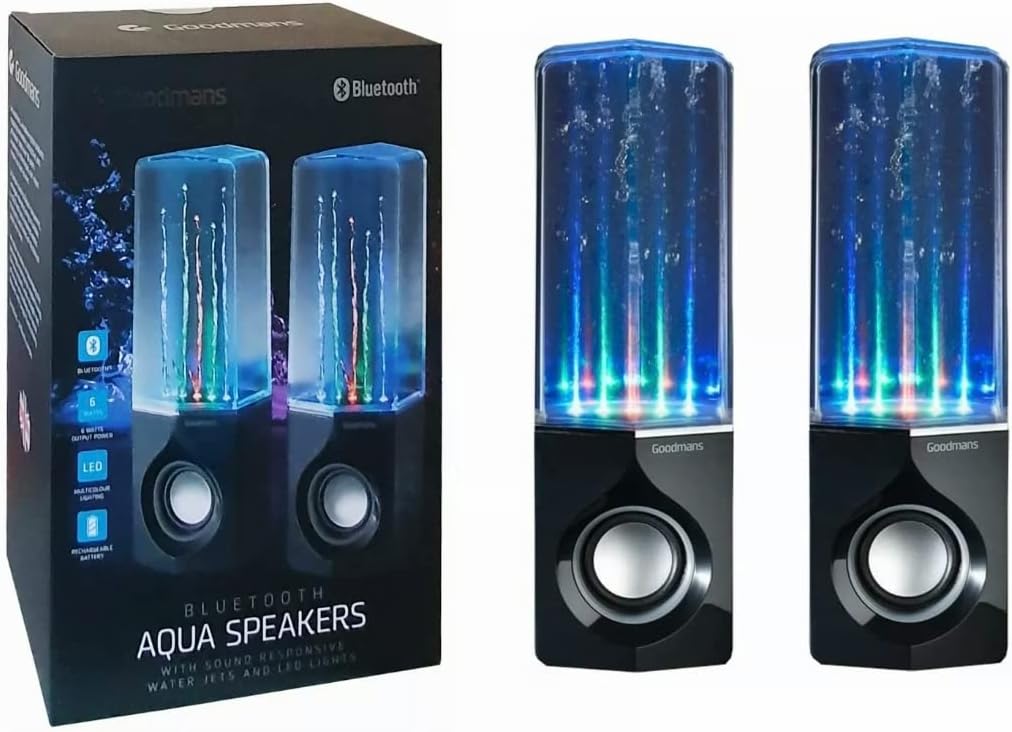
Image: Goodmans Bluetooth Aqua Speakers shown alongside their retail packaging, illustrating the product as it appears when unboxed.
Produit terminéview
The Goodmans Aqua Speakers feature a sleek design with integrated LED lights and sound-reactive water jets that pulse to your music. Each speaker unit includes a main speaker driver and control buttons.

Image : Avant view of two Goodmans Bluetooth Aqua Speakers, showcasing the active water jets and vibrant LED lights during operation.
Composants du haut-parleur
- Water Chamber: Transparent upper section containing water and LED lights.
- Grille de haut-parleur : Protects the audio driver.
- Panneau de contrôle: Located on the side or rear of the main speaker unit.
- Port micro-USB : Pour recharger la batterie interne.
- Entrée audio 3.5 mm : Pour la connexion filaire à des appareils audio.

Image : Côté view of one Goodmans Bluetooth Aqua Speaker, highlighting the location of control buttons and input/output ports.
Installation
1. Chargement de la batterie
- Connectez le câble de chargement Micro USB au port Micro USB de l'enceinte.
- Connectez l'autre extrémité du câble à un adaptateur secteur USB (non inclus) ou au port USB d'un ordinateur.
- Le voyant de charge s'allume. Une fois la charge complète, le voyant peut changer de couleur ou s'éteindre.
- A full charge typically takes 2-3 hours and provides several hours of playback.
2. Mise sous/hors tension
- Pour allumer l'appareil, maintenez enfoncé le bouton d'alimentation (généralement marqué d'un symbole d'alimentation) pendant quelques secondes jusqu'à ce que vous entendiez un signal sonore ou que vous voyiez les voyants LED s'activer.
- Pour éteindre l'appareil, maintenez le bouton Marche/Arrêt enfoncé jusqu'à ce que l'enceinte s'éteigne.
Opérationnel
1. Couplage Bluetooth
- Ensure the speaker is powered on and within close proximity (within 10 meters) of your Bluetooth-enabled device.
- The speaker will automatically enter Bluetooth pairing mode, indicated by a flashing LED light or an audible prompt.
- Sur votre appareil (smartphone, tablette, ordinateur), accédez aux paramètres Bluetooth et activez le Bluetooth.
- Rechercher available devices. The speaker should appear as "Goodmans Aqua Speakers" or a similar name.
- Select the speaker from the list to pair. Once paired, you will hear a confirmation sound, and the LED light may change to a solid color.
- You can now play audio from your device through the Aqua Speakers.
2. Entrée auxiliaire (AUX)
Pour les appareils sans Bluetooth, ou si vous préférez une connexion filaire :
- Connectez une extrémité du câble audio 3.5 mm au port AUX-in de l'enceinte.
- Connectez l'autre extrémité du câble à la prise casque ou à la sortie audio de votre appareil.
- The speaker should automatically switch to AUX mode, or you may need to press a mode button if available.
3. Lecture de musique et contrôle du volume
- Lecture/Pause : Press the Play/Pause button (often marked with a triangle or || symbol) to start or stop playback.
- Volume haut/bas : Use the volume buttons (+/-) on the speaker or your connected device to adjust the volume.
- Saut de piste : Some models may have dedicated buttons for skipping tracks forward or backward. Refer to the specific button layout on your speaker.
4. LED Lights and Water Jets
The LED lights and water jets are sound-reactive, meaning they will pulse and change color in sync with the audio being played. This feature is automatic and does not typically require manual control.
Entretien
- Nettoyage: Use a soft, dry cloth to wipe the exterior of the speaker. Do not use abrasive cleaners or solvents. For the transparent water chamber, a slightly damp On peut utiliser un chiffon, mais il faut veiller à ce qu'aucune eau ne pénètre dans les composants électroniques.
- Stockage: Rangez l'enceinte dans un endroit frais et sec, à l'abri de la lumière directe du soleil et des températures extrêmes lorsqu'elle n'est pas utilisée pendant une période prolongée.
- Entretien de la batterie: Pour prolonger la durée de vie de la batterie, évitez de la décharger complètement et fréquemment. Rechargez régulièrement l'enceinte, même si vous ne l'utilisez pas en permanence.
Dépannage
| Problème | Solution possible |
|---|---|
| Le haut-parleur ne s'allume pas. | Assurez-vous que la batterie est chargée. Branchez l'enceinte à une source d'alimentation à l'aide du câble micro USB. |
| Impossible de coupler via Bluetooth. | Make sure the speaker is in pairing mode. Disable and re-enable Bluetooth on your device. Ensure no other device is currently connected to the speaker. Move the speaker closer to your device. |
| Aucun son ou volume faible. | Check the volume levels on both the speaker and your connected device. Ensure the correct input mode (Bluetooth or AUX) is selected. If using AUX, check the cable connection. |
| Water jets or LED lights not working. | Ensure music is playing and the volume is sufficient for the sound-reactive features to activate. Check if the speaker is fully charged. |
| Audio déformé. | Reduce the volume on both the speaker and your device. Ensure the speaker is not too far from the Bluetooth source. |
Caractéristiques
| Fonctionnalité | Détail |
|---|---|
| Nom du modèle | Haut-parleurs aquatiques |
| Technologie de connectivité | Bluetooth |
| Type de haut-parleur | Stéréo |
| Mode de sortie audio | Stéréo |
| Puissance de sortie maximale du haut-parleur | 6 watts |
| Source d'énergie | Alimenté par batterie (Rechargeable) |
| Caractéristiques spéciales | Integrated Rechargeable Battery, Bluetooth Enabled, 3.5mm Line-in Cable Included, Micro USB Charging Cable Included, Sound-Reactive LED Lights and Water Jets |
| Méthode de contrôle | Bouton poussoir |
| Poids de l'article | 1.58 kilogrammes |
| Couleur | Noir |
| Matériel | Waterproof Material (for internal water chamber) |
| Dimensions du produit | 35 x 22.7 x 13.7 cm |
Garantie et assistance
Goodmans products are designed to meet high-quality standards. For warranty information, please refer to the warranty card included with your purchase or contact your retailer. Keep your proof of purchase for any warranty claims.
For further assistance or technical support, please contact the retailer where you purchased the product or visit the official Goodmans website pour les coordonnées.