
1. Introduction
Thank you for choosing the Ctronics RBX-F20 2.5K 4MP Solar WiFi PTZ Outdoor Security Camera. This advanced security camera offers high-resolution surveillance, flexible pan and tilt capabilities, and sustainable solar power. This manual will guide you through the installation, setup, and operation of your camera to ensure optimal performance and security for your property.

Image: The Ctronics RBX-F20 camera with its integrated solar panel, designed for outdoor use.
2. Principales caractéristiques
- 2.5K 4MP Resolution & Color Night Vision: Experience clear 2560x1440 resolution. Equipped with 10 built-in spotlights, the camera provides full-color night vision up to 30 meters, illuminating a wider area.
- 100 % sans fil et alimenté à l'énergie solaire : Features a 7800mAh rechargeable battery for extended operation. The integrated solar panel continuously recharges the battery, ensuring uninterrupted power and true wireless functionality.
- PIR Sensor & Human Detection: Utilizes a PIR sensor for accurate human shape detection with a rapid 0.2-second wake-up time. Adjustable alarm sensitivity (low, medium, high) sends precise real-time notifications to your smartphone upon human motion detection.
- Rotation panoramique à 355° et inclinaison à 95° : Control the camera's rotation remotely via your smartphone, covering a wide area with 355° horizontal pan and 95° vertical tilt.
- Audio bidirectionnel: Built-in microphone and speaker allow for real-time communication with family, visitors, or to deter intruders from anywhere.
- IP66 résistant aux intempéries : Designed with a robust IP66-certified weatherproof casing, ensuring reliable operation in various extreme weather conditions.

Image: Comparison of day and color night vision footage from the 2.5K 4MP camera, showing clarity and detail.
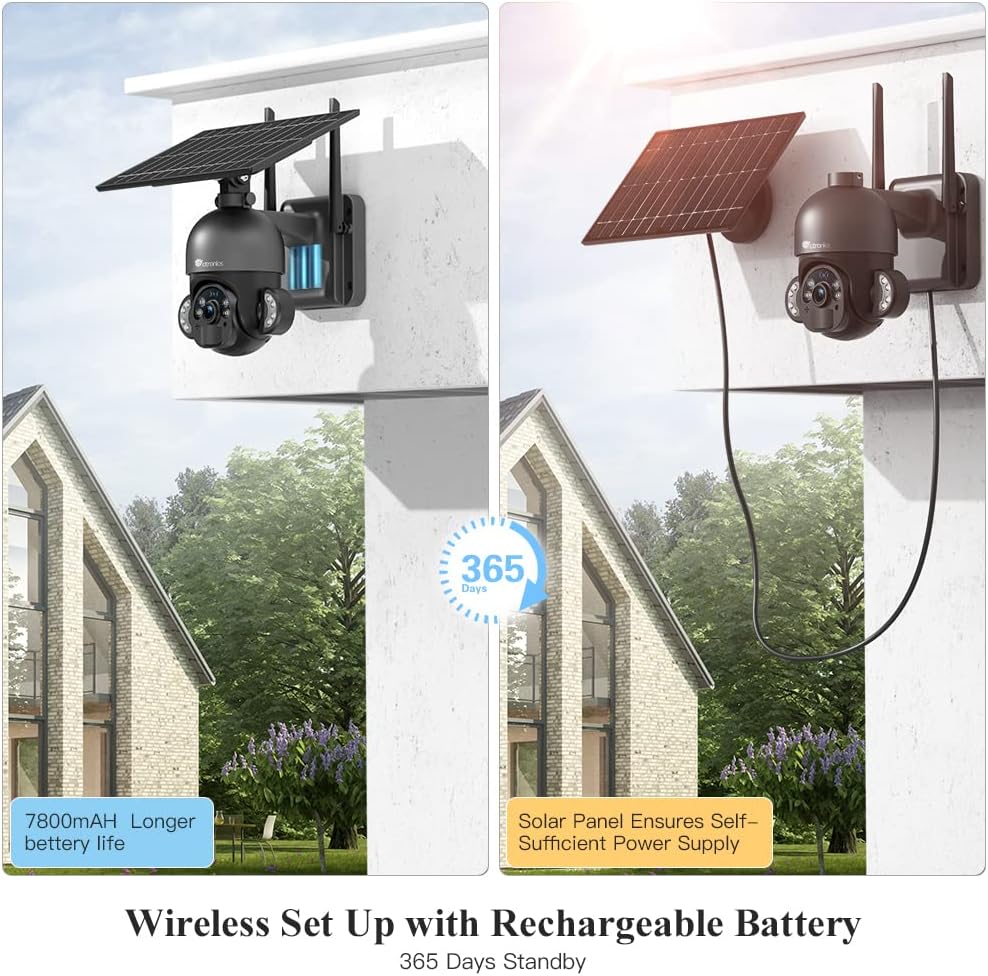
Image: The camera highlighting its 7800mAh battery and the solar panel providing continuous power, indicating 365 days of standby.

Image: A person and a dog in the camera's view, demonstrating the human detection feature distinguishing between human and non-human movement.

Image: The camera mounted on a wall, illustrating its 355-degree pan and 95-degree tilt capabilities for comprehensive coverage.

Image: A person interacting with a delivery driver via the camera's two-way audio feature, shown on a smartphone screen.

Image: The camera mounted outdoors, with rain and clouds indicating its IP66 weatherproof design.
3. Contenu du colis
Veuillez vérifier le contenu du colis à réception. Si des articles sont manquants ou endommagés, veuillez contacter le service client.
- Ctronics RBX-F20 PTZ Camera with Solar Panel
- Support de montage
- Vis de fixation et chevilles
- Câble de chargement USB
- Manuel d'utilisation
- Guide de démarrage rapide
4. Configuration et installation
4.1 Charge initiale
Before installation, fully charge the camera's built-in 7800mAh battery using the provided USB cable. Connect the cable to a 5V/2A power adapter (not included) and the camera's charging port. The charging indicator will show the status.
4.2 Installation de l'application et création du compte
- Download the "Ctronics" app from the App Store (iOS) or Google Play Store (Android).
- Ouvrez l'application et créez un nouveau compte, ou connectez-vous si vous en avez déjà un.
4.3 Appairage de la caméra avec l'application
- Assurez-vous que votre smartphone est connecté à un réseau Wi-Fi 2.4 GHz. (Le Wi-Fi 5 GHz n'est pas pris en charge).
- Allumez l'appareil photo.
- In the Ctronics app, tap the "+" icon to add a new device.
- Suivez les instructions à l'écran pour scanner le code QR avec l'appareil photo ou saisissez manuellement l'identifiant de l'appareil.
- Sélectionnez votre réseau Wi-Fi et entrez le mot de passe.
- The camera will attempt to connect. Once connected, you can name your camera and complete the setup.
4.4 Montage de la caméra
The camera offers two installation methods: all-in-one (camera and solar panel together) or separated (solar panel mounted separately for optimal sunlight exposure).
- Choisissez un emplacement : Select a location with good Wi-Fi signal and sufficient sunlight exposure for the solar panel. Ensure the camera has a clear view de la zone que vous souhaitez surveiller.
- Marquer les trous de perçage : Utilisez le support de fixation comme gabarit pour marquer les trous de perçage sur le mur.
- Trous de forage : Percez des trous aux emplacements marqués et insérez les chevilles.
- Fixez le support : Fixez le support de montage au mur à l'aide des vis fournies.
- Attach Camera/Solar Panel:
- All-in-one: Attach the camera unit (with the solar panel already connected) to the mounting bracket.
- Séparé: Mount the solar panel in a location with maximum sunlight, then connect it to the camera using the extension cable (if needed, not included). Attach the camera to its mounting bracket.
- Ajuster l'angle : Adjust the camera and solar panel angles for optimal coverage and charging efficiency.

Image: Illustrates two installation methods for the camera: integrated solar panel and separate solar panel for flexible placement.
5. Fonctionnement
5.1 En direct View et commande PTZ
Ouvrez l'application Ctronics et sélectionnez votre caméra pour accéder au flux en direct. view. Use the on-screen controls to pan (355° horizontally) and tilt (95° vertically) the camera lens to monitor different areas.
5.2 Audio bidirectionnel
En direct view interface, tap the microphone icon to speak through the camera's speaker. Tap the speaker icon to listen to audio from the camera's surroundings.
5.3 Détection de mouvement et alertes
The camera uses a PIR sensor for human detection. You can adjust the sensitivity (low, medium, high) in the app settings. When motion is detected, the camera will record and send a push notification to your smartphone.
5.4 Modes de vision nocturne
The camera supports color night vision up to 30 meters using its built-in spotlights. You can configure night vision settings (e.g., automatic, black & white, color) within the app.
5.5 Enregistrement et lecture
The camera supports local storage via a Micro TF card (not included). Recorded footage can be accessed and played back through the Ctronics app. The camera also supports saving to an FTP server.
6. Entretien
- Nettoyage: Nettoyez régulièrement l'objectif de l'appareil photo et le panneau solaire avec un chiffon doux et sec.amp Tissu pour garantir des images nettes et une recharge solaire efficace. Ne pas utiliser de produits chimiques agressifs.
- Entretien de la batterie: While the solar panel provides continuous charging, ensure the camera receives adequate sunlight. If the camera is installed in a shaded area or during prolonged cloudy periods, occasional manual charging via USB may be necessary.
- Mises à jour du micrologiciel : Check the Ctronics app periodically for firmware updates. Keeping your camera's firmware up-to-date ensures optimal performance and security.
- Protection de l'environnement : The IP66 rating protects against dust and water jets. Avoid submerging the camera in water or exposing it to extreme physical impact.
7. Dépannage
| Problème | Cause possible | Solution |
|---|---|---|
| La caméra ne parvient pas à se connecter au Wi-Fi. | Incorrect Wi-Fi password, 5GHz network, weak signal, or MAC address filtering on router. |
|
| False alarms or too many notifications. | High PIR sensitivity, environmental factors (e.g., moving branches, pets). |
|
| Batterie ne charge pas ou batterie faible. | Ensoleillement insuffisant, panneau solaire sale, connexion défectueuse. |
|
| Mauvaise qualité d'image. | Objectif sale, faible luminosité, problèmes de bande passante réseau. |
|
8. Spécifications
| Nom du modèle | RBX-F20 |
| Marque | Ctronics |
| Résolution | 2.5K 4MP (2560x1440) |
| Technologie de connectivité | Wireless (Wi-Fi 2.4GHz), Wired (Ethernet, ONVIF, RTSP) |
| Source d'énergie | Solar Powered / Rechargeable Battery (7800mAh) |
| Angle de panoramique / inclinaison | Pan 355 °, inclinaison 95 ° |
| Vision nocturne | Color Night Vision up to 30 meters (with 10 spotlights) |
| Détection humaine | PIR Sensor with adjustable sensitivity |
| Audio | Audio bidirectionnel (microphone et haut-parleur intégrés) |
| Résistance aux intempéries | Certifié IP66 |
| Stockage | Micro TF Card Slot (up to 128GB, not included), FTP Storage |
| Appareils compatibles | Smartphone (Android/iOS) |
| Utilisation recommandée | Sécurité extérieure |
9. Garantie et assistance
Les produits Ctronics sont couverts par une garantie standard. Pour obtenir des informations détaillées sur la garantie, veuillez consulter la carte de garantie incluse dans votre emballage ou visiter le site web officiel de Ctronics. website. If you encounter any issues or have questions regarding your camera, please contact Ctronics customer support. Our team is dedicated to providing prompt and helpful assistance.
Coordonnées: Please refer to the contact details provided on the Ctronics official website or in your product packaging for the most up-to-date support channels.