
Introduction
Thank you for choosing the Flutesan Pocket Calculator. This manual provides detailed instructions for the proper setup, operation, and maintenance of your new calculator. Designed for students, kids, and general office or home use, these mini calculators offer basic four-function arithmetic with an easy-to-read display and responsive keys.

Image: A set of Flutesan pocket calculators in red, green, and blue, highlighting their compact design and clear displays.
Contenu du colis
Votre colis doit contenir les éléments suivants :
- 10 x Green Pocket Calculators
- 10 x Red Pocket Calculators
- 10 x Blue Pocket Calculators
Note: AA batteries are required for operation and are not included in the package.
Installation
Installation de la batterie
The Flutesan Pocket Calculator is powered by one (1) AA battery. Follow these steps to install the battery:
- Repérez le couvercle du compartiment à piles à l'arrière de la calculatrice.
- Gently slide or pry open the battery compartment cover. A small screwdriver may be needed to assist in opening the cover.
- Insérez une (1) pile AA, en veillant à ce que les bornes positive (+) et négative (-) soient correctement alignées avec les marquages à l'intérieur du compartiment.
- Remettez le couvercle du compartiment à piles en vous assurant qu'il s'enclenche correctement.

Image: Illustration of how to open the battery compartment and insert an AA battery into the calculator.
Mode d'emploi
Fonctions de base
The Flutesan Pocket Calculator is designed for basic arithmetic operations and includes several useful features:
- ON/CE (On/Clear Entry): Press to turn the calculator on or to clear the last entered number.
- DÉSACTIVÉ: Press to turn the calculator off.
- MRC (rappel de mémoire/effacement): Press once to recall the value stored in memory. Press twice to clear the memory.
- M- (Mémoire Moins): Soustrait la valeur affichée de la mémoire.
- M+ (Mémoire Plus): Ajoute la valeur affichée à la mémoire.
- √ (Racine carrée): Calcule la racine carrée du nombre affiché.
- % (Pourcentage): Utilisé pour le pourcentagetage calculs.
- ÷ (Division): Performs division.
- × (Multiplication): Performs multiplication.
- - (Subtraction): Performs subtraction.
- + (Addition): Performs addition.
- = (Égal à): Displays the result of the calculation.
Affichage et touches
The calculator features a large 8-digit LCD display for clear visibility. The keys are designed for high sensitivity and quick response, ensuring efficient operation. The numbers and symbols on the keys are durable and resistant to wear for long-term use.
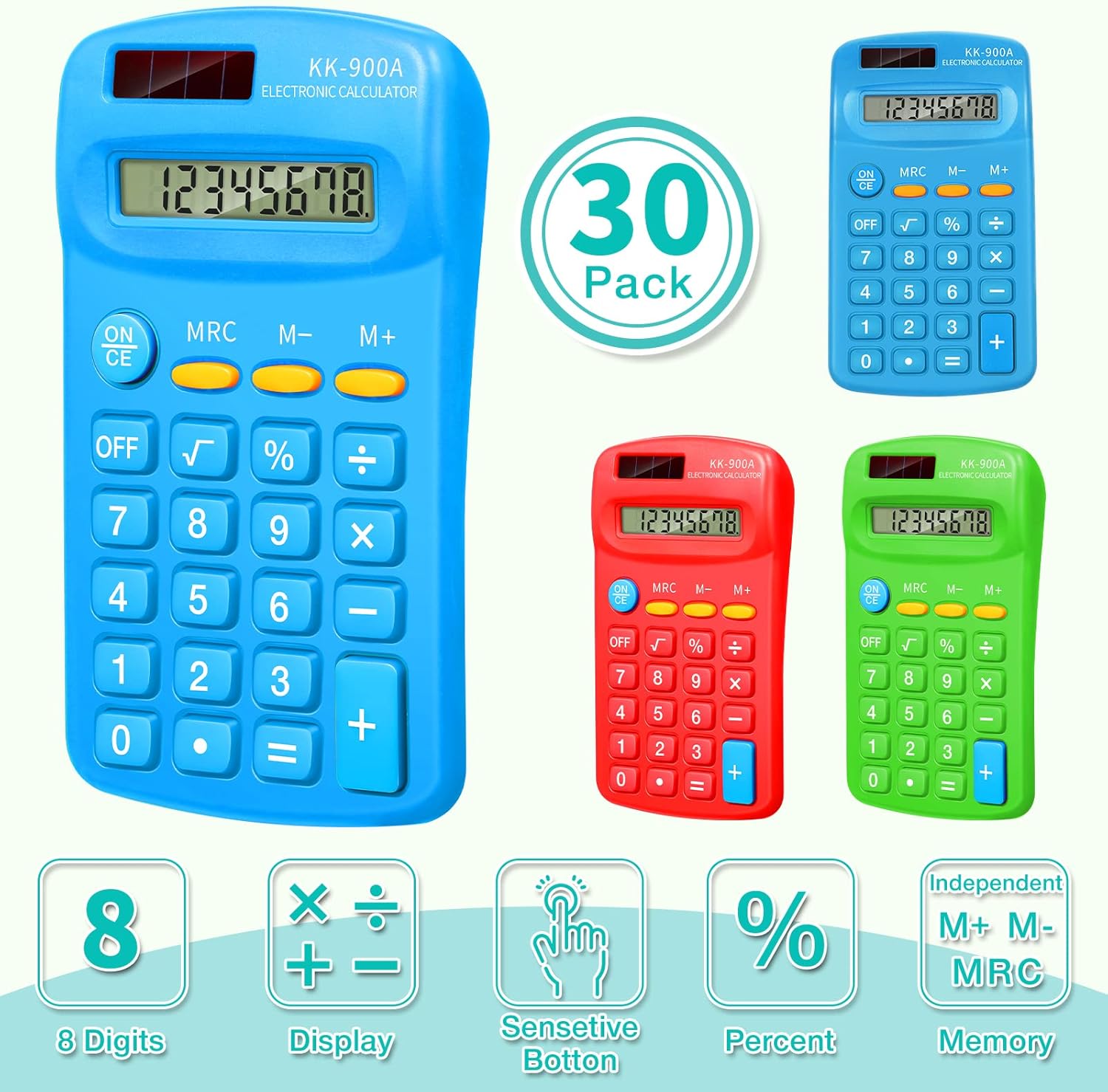
Image: Visual representation of the calculator's key features, such as its 8-digit display and responsive buttons.

Image: Demonstrates the calculator's portability and convenience for daily use in various settings.
Entretien
Nettoyage
To clean your calculator, gently wipe the surface with a soft, dry cloth. For stubborn dirt, a slightly damp cloth can be used, but ensure no moisture enters the calculator's internal components. Do not use abrasive cleaners or solvents.
Stockage
Store the calculator in a cool, dry place away from direct sunlight and extreme temperatures. Its compact size makes it easy to store in a drawer, school bag, or briefcase.
Dépannage
If you encounter issues with your Flutesan Pocket Calculator, please refer to the following common problems and solutions:
| Problème | Cause possible | Solution |
|---|---|---|
| La calculatrice ne s'allume pas ou l'écran est vide. | No battery, dead battery, or incorrectly installed battery. | Ensure an AA battery is installed. Check battery polarity (+/-). Replace with a new AA battery if necessary. |
| Keys are unresponsive or require excessive force. | Dust or debris under keys, or internal mechanism issue. | Gently clean around the keys. Ensure keys are not stuck. If the issue persists, the unit may be defective. |
| Incorrect numbers appear on display when pressing keys (e.g., pressing '3' shows '7'). | Defective keypad or internal circuit. | This indicates a manufacturing defect. The calculator may need to be replaced. |
| Battery cover opens easily or battery falls out. | Loose or damaged battery compartment cover. | Ensure the cover is properly aligned and snapped into place. If it remains loose, consider using tape to secure it, or the unit may be defective. |
| Some buttons are mislabeled (e.g., two '=' signs). | Erreur de fabrication. | This is a manufacturing defect. The calculator may need to be replaced. |
Caractéristiques
| Fonctionnalité | Détail |
|---|---|
| Numéro de modèle | Flutesan-Solar Battery-11 |
| Dimensions du produit | Environ 11.4 x 6.4 x 2 cm (4.49 x 2.52 x 0.79 pouces) |
| Poids de l'article | Approx. 2.45 pounds (for 30 pack) |
| Source d'énergie | Pile 1 AA (non incluse) |
| Afficher | 8-Digit LCD Display |
| Type de calculatrice | Basic Four-Function |
| Couleur | Vert, Rouge, Bleu |
| Fabricant | Flutesan |

Image: Detailed dimensions and ergonomic design of the Flutesan pocket calculator.
Garantie et assistance
Specific warranty information for this product is not provided in the available data. For details regarding warranty coverage, returns, or technical support, please refer to the seller's return policy or contact the manufacturer, Flutesan, directly through their official channels or the platform where the product was purchased.