
1. Introduction
This manual provides detailed instructions for the setup, operation, maintenance, and troubleshooting of your YiBiChin Universal Replacement Remote Control, Model RU-12. This remote is designed to work seamlessly with various Roku Built-in TV models.
2. Produit terminéview
The YiBiChin RU-12 is a dedicated infrared (IR) replacement remote control for Roku Built-in TVs. It offers direct access to popular streaming services through its 12 shortcut buttons.
2.1 Principales caractéristiques
- Aucune programmation ni appariement requis.
- Compatible with a wide range of Roku Built-in TVs.
- 12 dedicated shortcut buttons for popular streaming apps: NETFLIX, Prime Video, Roku Channel, Disney+, Sling, Hulu, VUDU, YouTube, ESPN+, Fan-NOW, Google Play, and Spotify.
- Infrared (IR) technology for reliable control.
2.2 Compatibilité
This remote is compatible with the following Roku Built-in TV brands:
- Téléviseur TCL Roku
- TV Hisense Roku
- ONN RokuTV
- INSIGNIA Roku TV
- SHARP Roku TV
- Télévision Hitachi Roku
- Téléviseur Philips Roku
- Télévision Westinghouse Roku
- Élément Roku TV
- And other Roku Built-in TV models.
2.3 Important Incompatibilities
This remote is NOT compatible with:
- Roku Stick devices.
- Roku Player devices without an IR receiver.
- Any Roku player/box that does not have an IR receiver.
- This is an infrared (IR) remote; it does not feature a pairing button, microphone for voice control, or a headphone jack. It is not an RF (Radio Frequency) model.

Image 1 : Face, côté et dos views of the YiBiChin RU-12 remote control. The remote is black with blue navigation buttons and various colored shortcut buttons.

Image 2: Visual guide indicating that the remote is compatible with Roku players/boxes that have an IR receiver (labeled 'YES') and incompatible with Roku Built-in TVs, Roku Sticks, and Roku Players without an IR receiver (labeled 'NO').
3. Installation
Setting up your YiBiChin RU-12 remote control is straightforward and requires no complex programming.
3.1 Installation de la batterie
- Localisez le compartiment à piles à l'arrière de la télécommande.
- Faites glisser le couvercle du compartiment à piles pour l'ouvrir.
- Insérez deux (2) piles AAA, en veillant à respecter la polarité (+ et -) comme indiqué à l'intérieur du compartiment.
- Fermez soigneusement le couvercle du compartiment à piles.
Note: Les piles ne sont pas incluses avec la télécommande.
3.2 Utilisation initiale
Once batteries are installed, the remote is ready for immediate use. No programming or pairing is necessary. Simply point the remote at your Roku Built-in TV and begin operating it.

Image 3: The remote control being used with a television, highlighting that no setup or programming is required after battery installation.
4. Mode d'emploi
Familiarize yourself with the buttons on your YiBiChin RU-12 remote control for optimal use.
4.1 Standard Controls
- Power (N/P buttons): Allume ou éteint votre téléviseur.
- Navigation Pad (Up, Down, Left, Right arrows): Permet de naviguer dans les menus et les sélections.
- Bouton OK : Confirme les sélections.
- Bouton Retour : Revient à l'écran ou au menu précédent.
- Bouton d'accueil: Retour à l'écran d'accueil Roku.
- Lecture/Pause, Avance rapide, Retour arrière : Contrôle la lecture multimédia.
- Asterisk (*) Button: Permet d'accéder aux options ou aux paramètres de certaines applications.
- Refresh/Replay Button: Replays the last few seconds of content.
4.2 Boutons de raccourci
The remote features 12 dedicated shortcut buttons for quick access to popular streaming applications:
- NETFLIX
- Prime Video
- Chaîne Roku
- Disney+
- Fronde
- Hulu
- VUDU
- YouTube
- ESPN+
- Fan-NOW
- Google Play
- Spotify
Simply press the desired shortcut button to launch the corresponding application directly.

Image 4: Visual confirmation that the remote does not include features such as voice search, an earphone jack, or a pairing button.
5. Entretien
Proper care and maintenance will ensure the longevity of your remote control.
5.1 Nettoyage
To clean the remote, gently wipe it with a soft, dry cloth. Avoid using liquid cleaners, solvents, or abrasive materials, as these can damage the remote's surface or internal components.
5.2 Remplacement de la batterie
Remplacez les piles lorsque la télécommande devient lente ou cesse de fonctionner. Remplacez toujours les deux piles AAA simultanément par des neuves. N'utilisez pas de piles neuves et usagées simultanément, ni de types de piles différents.
5.3 Stockage
When not in use for extended periods, it is recommended to remove the batteries to prevent leakage and potential damage to the remote.
6. Dépannage
If you encounter issues with your remote control, please refer to the following troubleshooting steps:
- La télécommande ne répond pas :
- Assurez-vous que les piles sont correctement installées et respectent la polarité.
- Remplacez les anciennes piles par des piles AAA neuves.
- Check for any obstructions between the remote and your TV's IR receiver. Ensure a clear line of sight.
- Confirm that your TV is a Roku Built-in TV and not a Roku Stick or a Roku Player without an IR receiver.
- No voice control/headphone jack: This remote is an IR remote and does not support voice control, a headphone jack, or a pairing function. These are not malfunctions but inherent design characteristics.
- Shortcut buttons not working: Ensure your TV is powered on and connected to the internet for streaming apps to function correctly.
Si les problèmes persistent après avoir suivi ces étapes, veuillez contacter le service client.
7. Spécifications
| Marque | YiBiChin |
| Numéro de modèle | RU-12 |
| Couleur | Noir |
| Technologie de connectivité | Infrarouge (IR) |
| Caractéristiques spéciales | No programming or setup required |
| Appareils compatibles | Téléviseurs Roku intégrés |
| Piles requises | 2 x AAA (non inclus) |
| Portée maximale | 10 mètres |
| Nombre de boutons | Standard controls + 12 shortcut buttons |
| Dimensions (environ) | Longueur: 13.9 cm (5.5 pouces) Largeur : 4.1 cm (1.6 pouces) Épaisseur : 2.1 cm (0.8 pouce) |
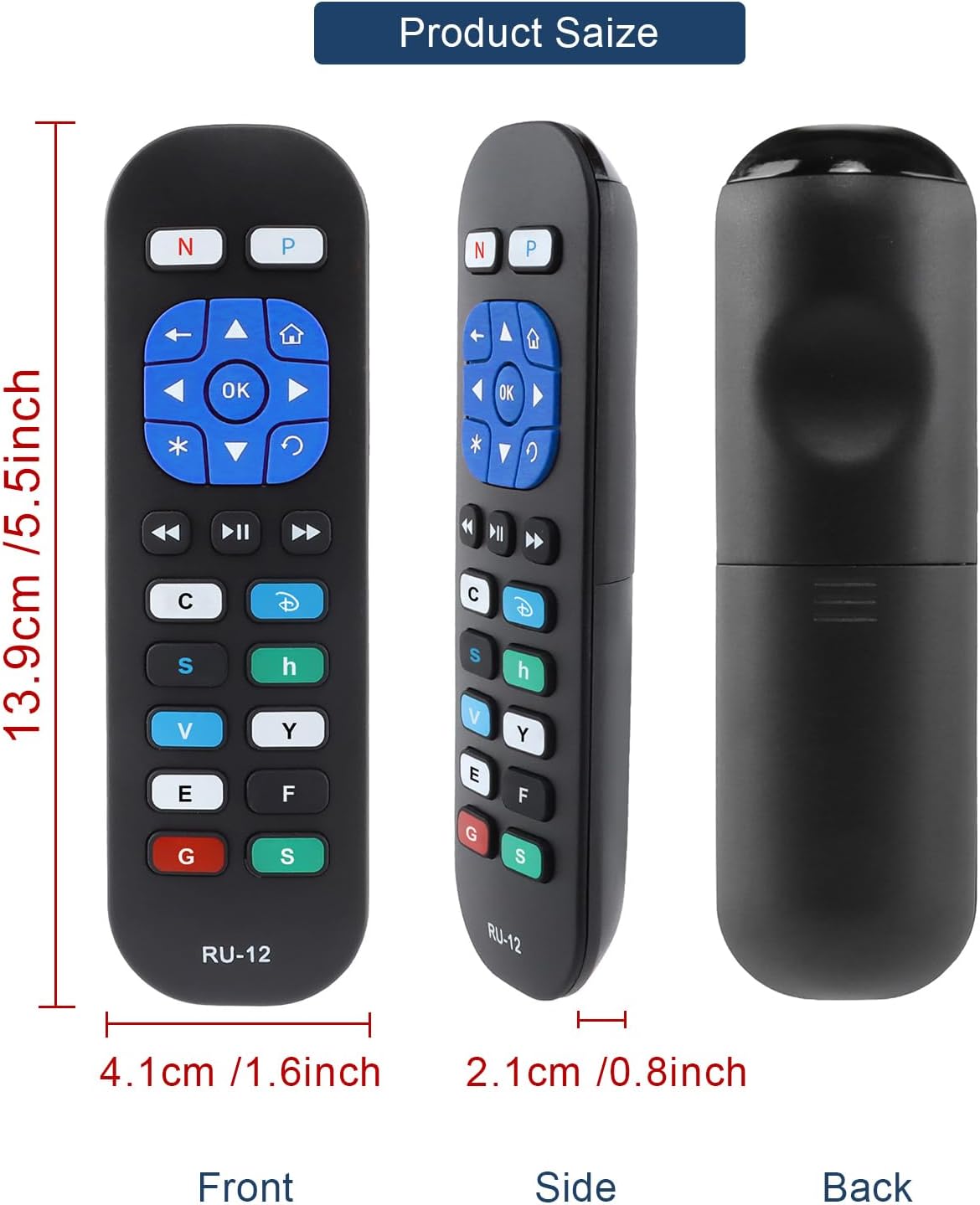
Image 5: Detailed dimensions of the remote control, indicating its length, width, and thickness.
8. Informations sur la garantie
Specific warranty details for the YiBiChin RU-12 Universal Replacement Remote Control are not provided in the product information. Please refer to your purchase documentation or contact the seller for any warranty-related inquiries.
9. Assistance
For any questions regarding your YiBiChin RU-12 remote control, whether before purchase or during use, please do not hesitate to contact our customer support team. We aim to respond to all inquiries within 24 hours.
Coordonnées: Please refer to the seller's contact details on your purchase platform or documentation.