
Shargeek STM2E-1
Manuel d'utilisation du chargeur portable fin Shargeek STORM2
Modèle : STM2E-1
Introduction
This manual provides comprehensive instructions for the safe and efficient use of your Shargeek STORM2 Slim Portable Charger. Please read this manual thoroughly before operating the device and retain it for future reference.
The Shargeek STORM2 Slim is a high-capacity portable power bank featuring a unique transparent design and an IPS display screen. It offers 130W max output with 100W USB-C and 30W USB-A ports, suitable for charging various devices including laptops, tablets, and smartphones.

Image: The Shargeek STORM2 Slim portable charger, showcasing its transparent design that reveals internal components and the included yellow USB-C to USB-C cables.
Caractéristiques du produit
- Conception transparente : The see-through casing reveals the internal battery and circuit layout, highlighting the device's engineering.
- IPS Display Screen: A clear screen provides real-time information on battery life, output distribution, temperature, operation hours, and active ports.
- Haute capacité : 20000mAh battery capacity, capable of multiple charges for various devices.
- Charge rapide : Features a 100W USB-C PD port and a 30W USB-A port, supporting 130W max output for rapid charging.
- Compatibilité universelle: Charges laptops, phones, tablets, and other devices with USB-C or USB ports.

Image : Une image détaillée view of the Shargeek STORM2 Slim's IPS LCD screen, showing various data points such as input/output wattage, voltage, current, battery level, and temperatures.
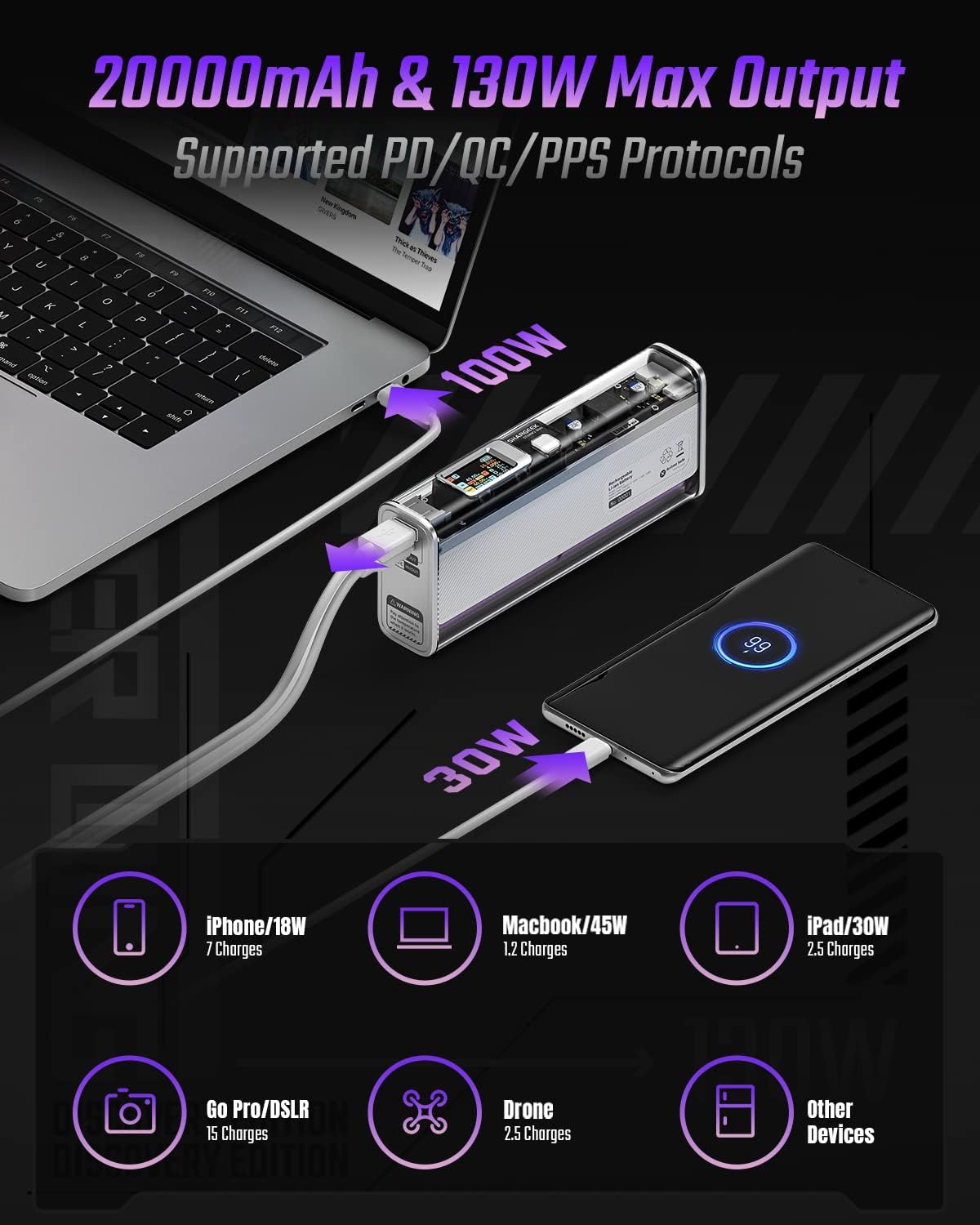
Image: The Shargeek STORM2 Slim connected via USB-C to a laptop for 100W charging and via USB-A to a smartphone for 30W charging, demonstrating its dual-port capability.
Installation et première utilisation
Contenu du colis :
- Shargeek STORM2 Slim Portable Charger
- Câble USB-C vers USB-C
- Manuel de l'utilisateur (ce document)
Charge initiale :
- Before first use, fully charge your STORM2 Slim.
- Connect the provided USB-C to USB-C cable to the USB-C port on the STORM2 Slim.
- Connect the other end of the cable to a compatible USB-C power adapter (not included) with a minimum of 100W output for fastest charging.
- The IPS screen will display charging status and battery percentage. The device is fully charged when the screen indicates 100%.
- A full recharge typically takes approximately 90 minutes with a 100W power adapter.
Mode d'emploi
Appareils de charge:
- Identify the appropriate charging cable for your device (USB-C to USB-C or USB-A to device-specific cable).
- Connect one end of the cable to your device and the other end to the corresponding port (USB-C or USB-A) on the STORM2 Slim.
- The IPS screen will automatically activate and display the charging output (watts, volts, amps) for the connected device(s).
- The STORM2 Slim can charge two devices simultaneously using both the USB-C and USB-A ports.
Understanding the IPS Screen:
The IPS screen provides detailed real-time information. Use the physical button on the side of the power bank to navigate through different display modes or access settings.
- Input/Output Dashboard: Shows power input (IN) when charging the power bank and power output (OUT) when charging devices, including wattage, voltage, et le courant pour chaque port.
- Niveau de batterie : Affiche le pourcentage de batterie restanttage and a visual icon.
- Voltage & Actuel : Detailed readings for the internal battery cells.
- Température: Shows the internal circuit board and battery temperatures.
- Durée : A resettable timer indicating the duration of current operation.
To access menus: Long-press the button. Pour naviguer : Short-press. Pour sélectionner: Long-press.
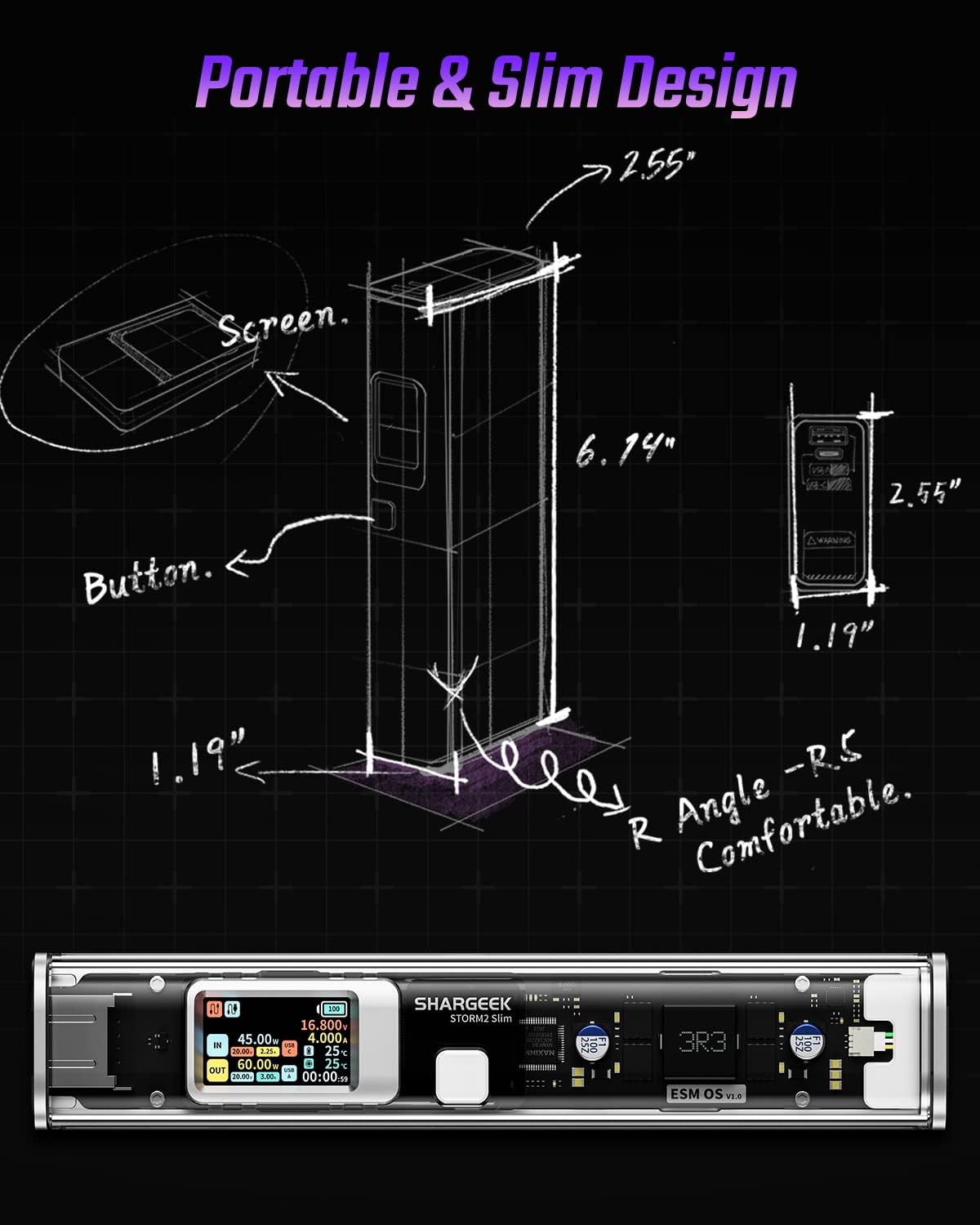
Image: A technical drawing illustrating the dimensions of the Shargeek STORM2 Slim and pointing out the screen and button locations.
Entretien
- Nettoyage: Utilisez un chiffon doux et sec pour nettoyer l'extérieur de la batterie externe. Évitez d'utiliser des produits chimiques agressifs ou des matériaux abrasifs.
- Stockage: Rangez l'appareil dans un endroit frais et sec, à l'abri de la lumière directe du soleil, des températures extrêmes et d'une forte humidité.
- Entretien de la batterie: Pour prolonger la durée de vie de la batterie, évitez de la décharger complètement et fréquemment. Rechargez-la lorsque son niveau est faible. En cas de stockage prolongé, rechargez-la à environ 50-70 % tous les 3 à 6 mois.
- Évitez les chutes : While designed with an aluminum alloy frame for durability, avoid dropping the device as it may damage internal components or the transparent casing.
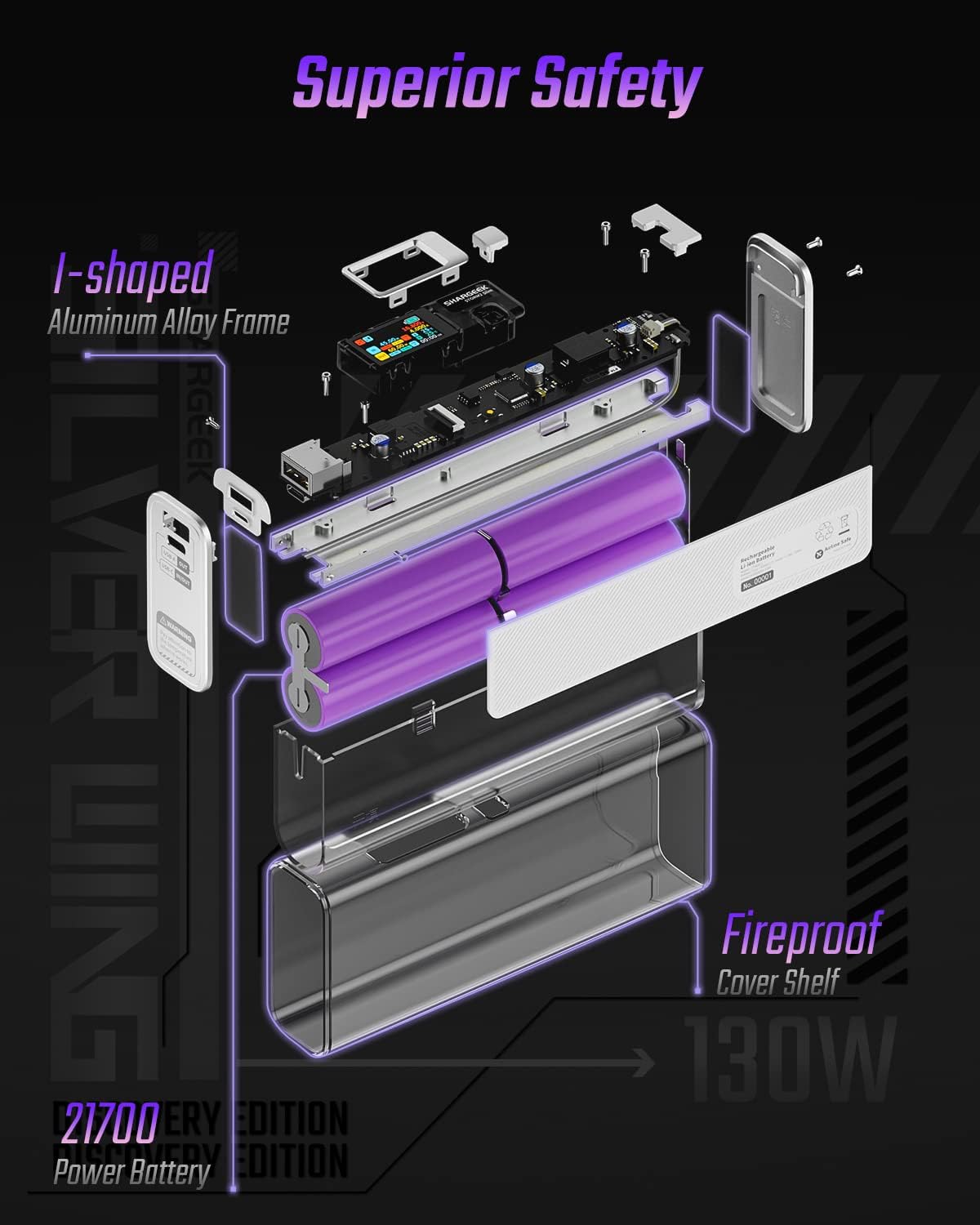
Image: An exploded diagram of the Shargeek STORM2 Slim, illustrating its internal structure including the I-shaped aluminum alloy frame, fireproof cover shelf, and 21700 power batteries, highlighting its robust construction.
Dépannage
| Problème | Cause possible | Solution |
|---|---|---|
| L'appareil ne se charge pas à partir de la batterie externe. | Low power bank battery; incompatible cable; device not properly connected; device requires more power than available. | Recharge the STORM2 Slim. Ensure cable is fully inserted and compatible. Check device power requirements against power bank output. Try a different cable or port. |
| La batterie externe ne charge pas. | Charging cable or adapter faulty; power bank port damaged. | Try a different USB-C cable and power adapter. Ensure the adapter meets the recommended power output (e.g., 100W). If problem persists, contact support. |
| IPS screen is blank or unresponsive. | La batterie externe est hors service ; problème logiciel temporaire. | Press the button to activate the screen. If unresponsive, try connecting a device to charge or connecting the power bank to a charger to see if it activates. If problem persists, contact support. |
| Chargement lent. | Câble non compatible avec la charge rapide ; appareil non compatible avec la charge rapide ; plusieurs appareils connectés. | Ensure you are using a high-quality USB-C PD cable. Verify your device supports fast charging. Charging multiple devices simultaneously may reduce individual charging speeds. |
Caractéristiques
- Numéro de modèle : STM2E-1
- Capacité de la batterie : 20000mAh
- Puissance de sortie maximale : 130 W
- Sortie USB-C : Puissance de service (PD) jusqu'à 100 W
- Sortie USB-A: Jusqu'à 30 W
- Saisir: USB-C (up to 100W PD)
- Afficher: Écran IPS
- Dimensions: 3 x 6.5 x 15.59 cm (environ 1.18 x 2.56 x 6.14 pouces)
- Poids: Environ 689 1.52 g (XNUMX lb)
- Type de batterie : Lithium-ion
Garantie et assistance
Informations sur la garantie :
Shargeek products are covered by a limited warranty against defects in materials and workmanship. Please refer to the warranty card included with your purchase or visit the official Shargeek webConsultez le site pour connaître les conditions générales de garantie détaillées.
Assistance clientèle :
For technical assistance, troubleshooting, or warranty claims, please contact Shargeek customer support through their official website ou les coordonnées fournies sur l'emballage de votre produit.
Official Shargeek Store Link: Shargeek Official Store
Consignes de sécurité
- N’exposez pas l’appareil à l’eau, à l’humidité ou à des températures extrêmes.
- Ne démontez pas, ne modifiez pas et n'essayez pas de réparer l'appareil vous-même. Cela annulera la garantie et pourrait causer des dommages ou des blessures.
- Tenir hors de portée des enfants.
- Utilisez uniquement des câbles et adaptateurs de charge certifiés et compatibles.
- Évitez de laisser tomber ou de soumettre l'appareil à des impacts violents.
- Mettez au rebut l'appareil de manière responsable, conformément à la réglementation locale relative aux déchets électroniques.
Ask a question about this manual
Ask about setup, troubleshooting, compatibility, parts, safety, or missing instructions. Manuals+ will review the question and use this page’s manual context to help answer it.