
1. Introduction
The Neoline G-Tech X63 is an advanced high-definition video recorder designed for vehicles. It features a dual-camera system integrated into a single housing, providing comprehensive coverage. The front camera offers a wide-angle 2K QHD resolution, while an interior Full HD camera monitors the cabin. Additionally, a separate Full HD rear camera captures events behind your vehicle. This device is equipped with a supercapacitor, which provides enhanced durability and more reliable operation across a wider range of temperatures compared to traditional batteries.
Key features include a wide viewing angle, front, interior, and rear cameras, high-contrast video recording, weather protection, a built-in GPS module, and 2K QHD resolution for the front camera.
2. Contenu du colis
Veuillez cocher la case correspondant aux éléments suivants :
- Neoline G-Tech X63 Dash Cam
- Caméra arrière
- Support adhésif 3M
- Power Adapter (Car Charger)
- Câble micro USB
- Manuel d'utilisation
- Certificat de garantie
3. Produit terminéview
Familiarize yourself with the components of your Neoline G-Tech X63 dash cam.
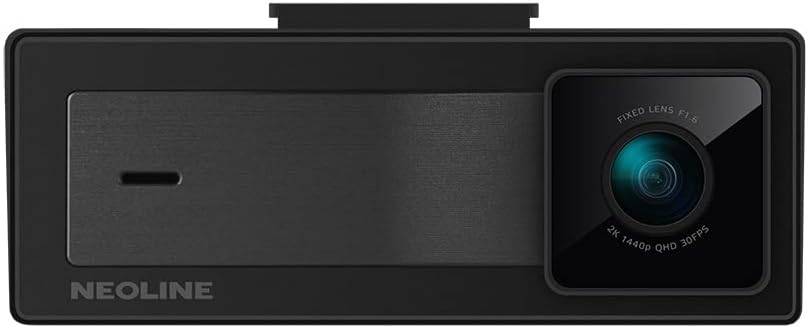
Figure 3.1 : Devant view of the Neoline G-Tech X63 dash cam, showing the main lens and Neoline branding.

Figure 3.2 : Arrière view of the dash cam, displaying the screen and control buttons.

Figure 3.3 : The compact rear camera module for external mounting.

Figure 3.4 : Haut view showing the mounting slot and various ports for connections.
4. Configuration et installation
4.1. Insertion de la carte mémoire
Before first use, insert a high-speed microSD card (Class 10 or higher, up to 128GB recommended) into the designated slot on the dash cam. Ensure the card is inserted correctly until it clicks into place. Format the card within the dash cam settings for optimal performance.
4.2. Montage de la Dash Cam
- Clean the windshield surface where you intend to mount the dash cam. Ensure it is dry and free of dust.
- Fixez le support adhésif 3M à la caméra embarquée.
- Peel off the protective film from the 3M adhesive and firmly press the mount onto the chosen spot on your windshield, ideally behind the rearview miroir pour une vue dégagée viewMaintenez la position pendant au moins 30 secondes.
- Adjust the camera lens to ensure it captures the road ahead clearly, with the horizon in the middle of the frame.

Figure 4.1 : Example of the dash cam mounted on the vehicle's windshield.
4.3. Connexion de la caméra arrière
Connect the rear camera cable to the main dash cam unit. Route the cable neatly along the vehicle's headliner and pillars to the rear of the vehicle. Mount the rear camera on the rear windshield or license plate area, ensuring a clear view. Connect the red wire of the rear camera to the reverse light power source if you wish to enable parking assistance features.
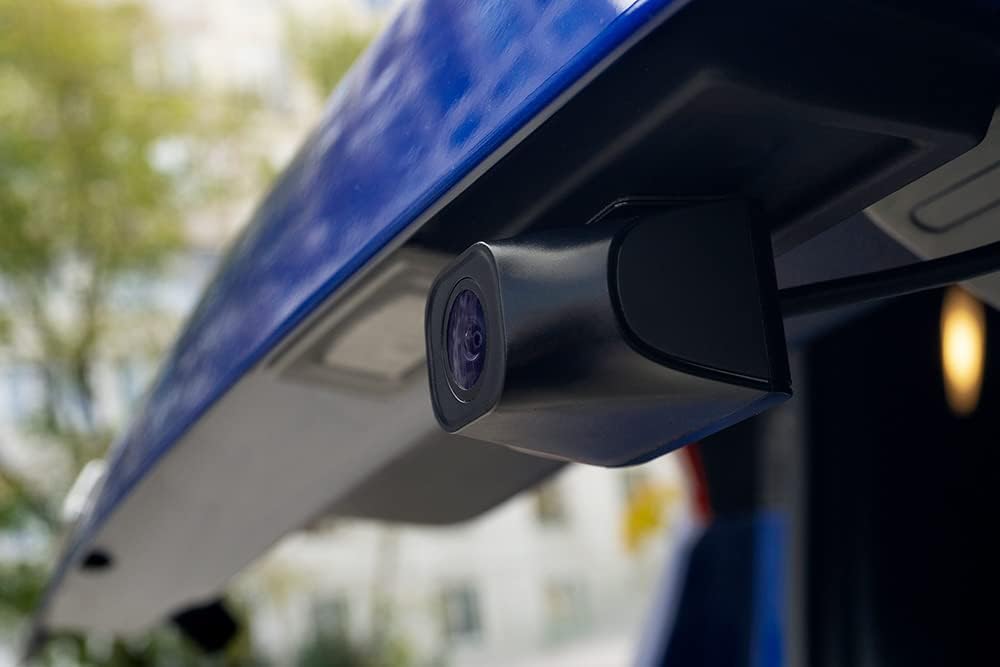
Figure 4.2 : The rear camera installed, providing a view de la zone située derrière le véhicule.
4.4. Connexion électrique
Plug the included power adapter into your vehicle's 12V power outlet (cigarette lighter socket). Connect the other end of the cable to the dash cam's power input. The dash cam will automatically power on and begin recording when the vehicle's ignition is turned on, and power off when the ignition is turned off.
5. Mode d'emploi
5.1. Enregistrement de base
Once powered on, the dash cam will automatically start continuous loop recording. Video files are saved in segments (e.g., 1, 3, or 5 minutes) to the microSD card. When the card is full, the oldest unprotected fileLes enregistrements précédents seront écrasés par de nouveaux enregistrements.
5.2. Capteur G (enregistrement d'urgence)
The built-in G-sensor detects sudden impacts or rapid acceleration/deceleration. When triggered, the current video segment is automatically locked and protected from being overwritten, ensuring critical footage is saved. The sensitivity of the G-sensor can be adjusted in the settings menu.
5.3. Mode de stationnement
The Neoline G-Tech X63 supports parking mode. When enabled and the vehicle is parked, the dash cam can detect motion or impacts and automatically start recording. This feature requires a continuous power supply (e.g., hardwiring kit, sold separately) to function when the vehicle is off.
5.4. Fonctionnalité GPS
Le module GPS intégré enregistre la vitesse et la position de votre véhicule, ce qui peut être viewed during video playback using dedicated software. This provides additional context for recorded events.
5.5. Navigation dans les menus
Use the buttons located on the device (refer to Figure 3.2 and 5.1 for button layout) to navigate through the menu options. The 'OK' button typically confirms selections, while arrow buttons navigate. The 'M' button often switches between recording, playback, and settings modes.
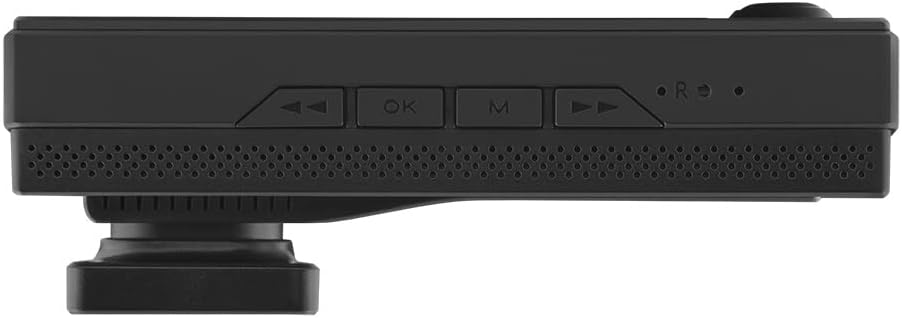
Figure 5.1 : Bas view showing the control buttons for menu navigation and operation.
6. Entretien
- Nettoyage: Utilisez un chiffon doux et sec pour nettoyer le boîtier et les objectifs de la caméra embarquée. N'utilisez pas de produits abrasifs ni de solvants.
- Carte mémoire : Regularly format your microSD card (at least once a month) within the dash cam to maintain optimal recording performance and prevent data corruption. Back up any important files avant le formatage.
- Mises à jour du micrologiciel : Check the official Neoline webConsultez régulièrement le site pour les mises à jour du micrologiciel. La mise à jour du micrologiciel peut améliorer les performances, ajouter de nouvelles fonctionnalités ou corriger des bogues. Suivez attentivement les instructions fournies avec la mise à jour.
- Température: Avoid exposing the dash cam to extreme temperatures for extended periods. While the supercapacitor offers better temperature tolerance, prolonged exposure to direct sunlight in a hot car can still affect its lifespan.
7. Dépannage
| Problème | Cause possible | Solution |
|---|---|---|
| La caméra embarquée ne s'allume pas. | Absence d'alimentation électrique ; adaptateur secteur défectueux ; connexion desserrée. | Check power connection to the vehicle's 12V outlet. Ensure the power adapter is working. Try a different power source if available. |
| L'enregistrement s'arrête ou se fige. | Memory card full; slow memory card; memory card error. | Format the microSD card. Use a high-speed (Class 10 or U3) microSD card. Replace the memory card if errors persist. |
| La qualité vidéo est médiocre. | Lentille sale ; film protecteur encore présent sur la lentille ; paramètres de résolution incorrects. | Clean the camera lens. Remove any protective film. Check video resolution settings in the menu and set to 2K QHD for front camera. |
| Le GPS ne fonctionne pas. | Poor satellite signal; GPS module obstruction. | Assurez-vous que la caméra embarquée dispose d'un écran clair. view du ciel. Évitez de l'installer à proximité d'objets métalliques susceptibles de perturber le signal. |
| Les boutons ne répondent pas. | Problème logiciel temporaire. | Perform a soft reset (if available, check manual for specific instructions) or disconnect and reconnect power. |
8. Spécifications
- Modèle: G-Tech X63
- Fabricant: Néoline
- Résolution de la caméra frontale : 2K QHD (1440p)
- Résolution de la caméra intérieure : Full HD (1080p)
- Résolution de la caméra arrière : Full HD (1080p)
- Taille de l'écran : 3 pouces
- Source d'alimentation : Supercondensateur
- Module GPS: Intégré
- Capteur G : Oui
- Enregistrement en boucle : Oui
- Mode stationnement : Yes (requires continuous power)
- Dimensions (L x l x H) : 10.5 x 3.5 x 3.5 cm (environ 4.13 x 1.38 x 1.38 pouces)
- Poids: 100 grammes (environ 0.22 lb)
- Type de montage : Windshield Mount (3M adhesive)
- Couleur: Noir
9. Garantie et assistance
The Neoline G-Tech X63 comes with a warranty certificate included in the package. Please refer to this document for specific warranty terms and conditions, including coverage period and claim procedures. For technical support, troubleshooting assistance beyond this manual, or service inquiries, please contact Neoline customer support through their official website ou les coordonnées fournies sur votre certificat de garantie.
Keep your purchase receipt and warranty certificate in a safe place as proof of purchase may be required for warranty claims.