
1. Introduction
The Zelotes F17 Vertical Wireless Mouse is designed for enhanced comfort and productivity, featuring an ergonomic vertical design that promotes a natural hand posture. This manual provides comprehensive instructions for setting up, operating, maintaining, and troubleshooting your new mouse.

Image: The Zelotes F17 Vertical Wireless Mouse, showcasinson design ergonomique et le récepteur USB inclus.
2. Contenu du colis
Veuillez vérifier que tous les articles sont présents dans votre colis :
- 1 x Zelotes Wireless Vertical Mouse
- 1 x Récepteur USB
- 1 x Manuel d'instructions
3. Guide de configuration
Follow these steps to set up your Zelotes F17 Vertical Wireless Mouse:
- Installer les piles : The mouse requires two AA batteries (not included). Locate the battery compartment on the underside of the mouse. Open the cover, insert the batteries according to the polarity indicators, and close the cover.
- Récupérer le récepteur USB : The USB receiver is conveniently stored next to the battery compartment. Gently pull it out.
- Connectez le récepteur USB : Plug the USB receiver into an available USB port on your computer (Laptop, PC, Mac).
- Mise sous tension : Locate the On/Off switch on the underside of the mouse and slide it to the 'On' position. The mouse is plug-and-play, requiring no driver installation.

Image: The underside of the Zelotes F17 mouse, illustrating the battery compartment and the integrated storage slot for the USB receiver.
Video: A demonstration of the Zelotes F17 Vertical Wireless Mouse in use, highlighting its ergonomic grip and functionality.
4. Mode d'emploi
The Zelotes F17 mouse features 6 buttons and adjustable DPI settings for optimal control.
4.1 Poignée ergonomique
The vertical design allows your hand to rest in a natural handshake position, reducing wrist and forearm strain during prolonged use.
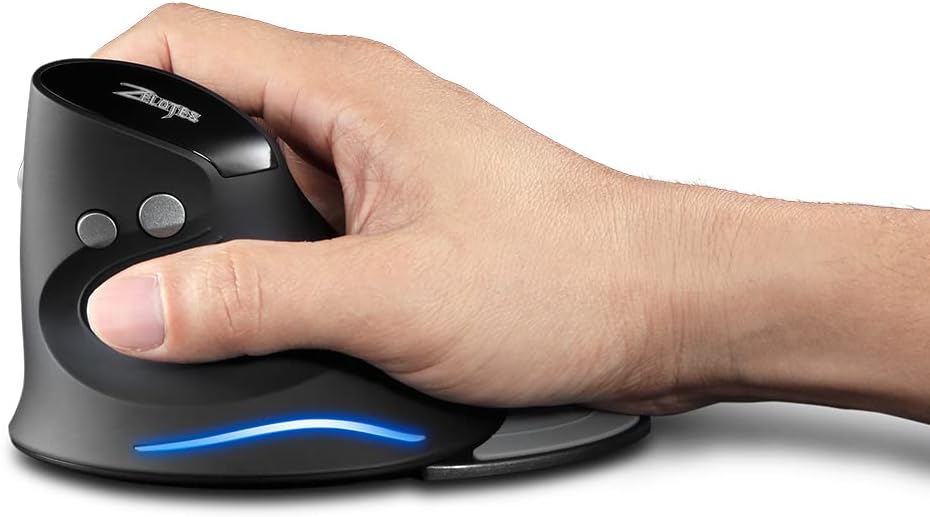
Image: A hand demonstrating the natural, ergonomic grip on the Zelotes F17 vertical mouse.
4.2 Fonctions des boutons
- Click gauche: Fonction de clic principal standard.
- Clic-droit: Fonction de clic secondaire standard.
- Molette: Défilez vers le haut ou vers le bas, puis cliquez pour utiliser la fonction du bouton central.
- Bouton PPP : Cycles through DPI settings (1200/1600/2400 DPI).
- Boutons Suivant/Précédent : Located on the thumb side, these buttons allow for quick navigation in web navigateurs ou file explorateurs.
4.3 PPP réglables
Press the DPI button (located near the scroll wheel) to switch between 1200, 1600, and 2400 DPI settings. This allows you to adjust the mouse sensitivity to suit your task, whether it's precise graphic design or fast-paced gaming.
4.4 Repose-paume amovible
The Zelotes F17 includes a detachable palm rest for additional wrist support. You can easily attach or remove it based on your preference and comfort needs.

Image: The Zelotes F17 mouse with its detachable palm rest separated, illustrating the modular design.
5. Entretien
To ensure the longevity and optimal performance of your Zelotes F17 mouse, follow these maintenance guidelines:
- Nettoyage: Utilisez un chiffon doux et sec pour essuyer la surface de la souris. Pour les saletés tenaces, frottez légèrement avec un chiffon doux et sec.ampNettoyez le chiffon avec de l'eau ou une solution nettoyante douce. Évitez les produits chimiques agressifs et les matériaux abrasifs.
- Remplacement de la batterie : When the mouse's performance degrades or the LED illumination dims, it's time to replace the AA batteries. Refer to Section 3.1 for battery installation instructions.
- Stockage: When not in use for extended periods, turn off the mouse to conserve battery life. Store the USB receiver in its dedicated slot on the underside of the mouse to prevent loss.
6. Dépannage
If you encounter issues with your Zelotes F17 mouse, try the following solutions:
| Problème | Cause possible | Solution |
|---|---|---|
| La souris ne répond pas | Batterie faible ; récepteur USB déconnecté ; souris éteinte. | Replace batteries; Re-insert USB receiver; Turn mouse On. |
| Mouvement erratique du curseur | Capteur optique sale ; Surface inadaptée ; Batterie faible. | Nettoyer le capteur optique ; utiliser sur une surface lisse et non réfléchissante ; remplacer les piles. |
| L'éclairage LED ne fonctionne pas | Low battery; Mouse is off. | Replace batteries; Turn mouse On. |
| Le paramètre DPI ne change pas | Dysfonctionnement du bouton DPI. | Vérifiez que la souris est allumée et connectée. Si le problème persiste, contactez le service client. |
7. Spécifications
Key technical specifications for the Zelotes F17 Vertical Wireless Mouse:
| Fonctionnalité | Détail |
|---|---|
| Dimensions du produit | 4.33 x 3.39 x 3.15 pouces |
| Poids de l'article | 3.53 onces |
| Numéro de modèle de l'article | F17 |
| Marque | zélotes |
| Couleur | Noir |
| Technologie de connectivité | USB (sans fil 2.4 GHz) |
| Dossier spécial | Ergonomic Design, Removable Wrist Rest, LED Illumination |
| Technologie de détection de mouvement | Optique |
| Paramètres PPP | 1200/1600/2400 ppp |
| Nombre de boutons | 6 |
| Source d'énergie | 2 piles AA (non incluses) |
| Compatibilité | Win11, Win10, Win8, Win7, Mac OS |

Image: A diagram illustrating the dimensions of the Zelotes F17 Vertical Wireless Mouse.
8. Garantie et assistance
For warranty information or technical support, please refer to the contact details provided on the product packaging or the official Zelotes webConsultez le site. Conservez votre reçu d'achat comme preuve d'achat.