
1. Installation
1.1 Déballage et contenu de l'emballage
Carefully remove the television and all components from the packaging. Verify that all items listed below are present:
- Téléviseur intelligent LG série UQ9000 4K de 70 pouces
- Télécommande magique
- Remote Control Batteries (AA x 2)
- Meuble TV
- Câble d'alimentation
- Guide de démarrage rapide
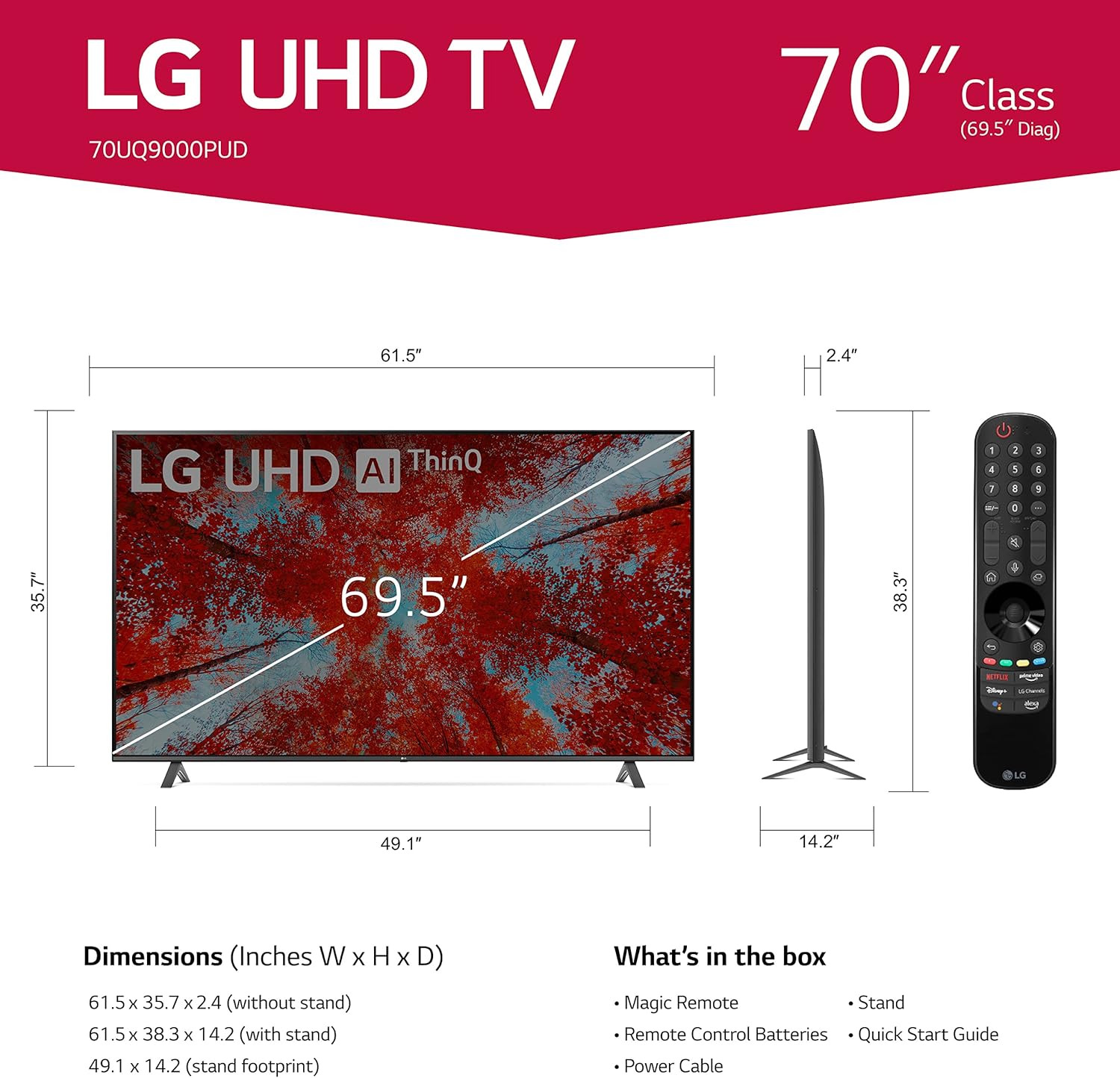
Image 1.1: LG 70UQ9000PUD TV with dimensions, Magic Remote, and a list of included accessories.
1.2 Installation physique
The television can be installed using the included stand or mounted on a wall.
Installation du support :
- Attach the stand components to the bottom of the TV using the provided screws.
- Ensure the stand is securely fastened before placing the TV on a stable, flat surface.
Installation murale :
For wall mounting, use a VESA compatible mount with a 400 x 400 mm standard. Consult a professional for wall mounting to ensure proper and safe installation.
1.3 Connexion de périphériques externes
Connect your external devices to the TV's ports. The LG 70UQ9000PUD features multiple connectivity options:
- Ports HDMI (x3) : For connecting devices such as gaming consoles, Blu-ray players, and set-top boxes.
- Ports USB (x2) : Pour connecter des périphériques de stockage USB ou d'autres périphériques compatibles.
- Port LAN : Pour une connexion internet filaire.
- Sortie audio numérique optique : Pour la connexion à des systèmes audio externes.
- Entrée antenne/câble : Pour connecter une antenne ou un signal de télévision par câble.
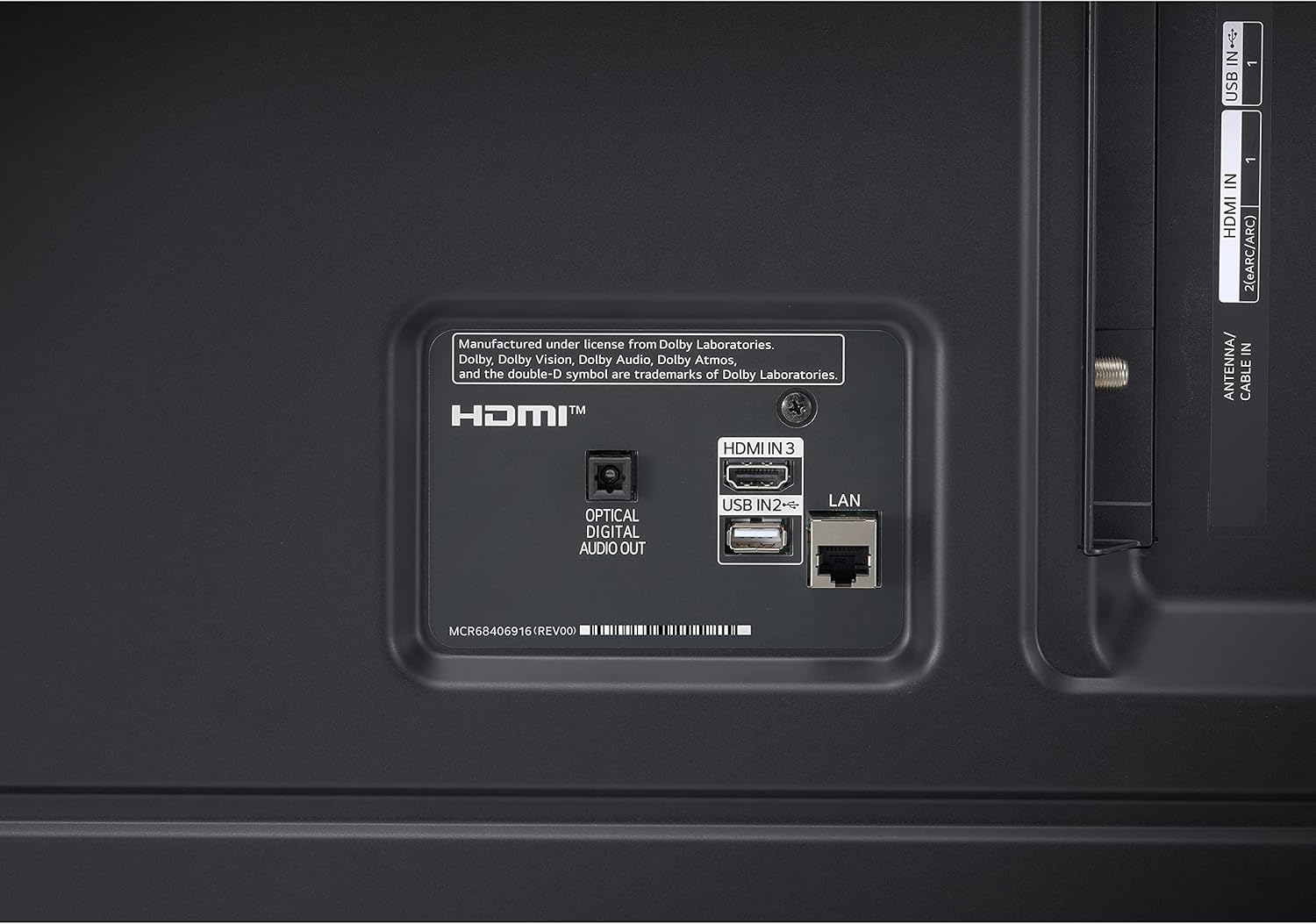
Image 1.2: Rear panel connections showing HDMI, USB, LAN, and Optical Digital Audio Out ports.
1.4 Mise sous tension initiale et paramètres de base
- Connectez le câble d'alimentation au téléviseur et à une prise de courant.
- Appuyez sur le bouton d’alimentation de la télécommande ou du téléviseur.
- Follow the on-screen instructions to complete the initial setup, including language selection, network connection (Wi-Fi or LAN), and channel scanning.
2. Mode d'emploi
2.1 Using the Magic Remote Control
The LG Magic Remote allows for intuitive control of your TV. It supports point, click, scroll, and voice commands.

Image 2.1: The LG Magic Remote, designed for easy navigation and voice control.
Caractéristiques principales :
- Montrer du doigt: Point the remote at the screen to move the on-screen cursor.
- En cliquant sur : Appuyez sur la molette de défilement (bouton OK) pour sélectionner des éléments.
- Défilement : Use the scroll wheel to move through menus and web pages.
- Contrôle vocal : Press and hold the microphone button to activate voice commands for searching content or controlling TV functions.

Image 2.2: Using the Magic Remote for intuitive control, including voice commands.
2.2 Fonctionnalités de la Smart TV (webSystème d'exploitation avec ThinQ AI)
The LG UQ9000 Series TV runs on webOS, providing a user-friendly interface for accessing various smart features and applications. ThinQ AI integrates artificial intelligence for enhanced control and personalized experiences.
Video 2.1: This video demonstrates the LG webinterface du système d'exploitation, afficherasinutilisateur g profiles and personalized recommendations for a customized viewexpérience de travail.
Key Smart Features:
- Recommandations personnalisées : webLe système d'exploitation apprend votre viewing habits to suggest content.
- Applications de streaming intégrées : Access popular services like Netflix, Prime Video, Apple TV app, Disney+, HBO Max, and over 300+ free LG Channels.
- Alexa intégrée : Use voice commands to control your TV and smart home devices.
Video 2.2: This video highlights various LG UHD TV features, including the α5 Gen5 AI Processor 4K, AI Brightness, and AI Sound, enhancing picture and audio quality.
2.3 Amélioration de l'image et du son
Le téléviseur intègre des technologies avancées pour optimiser votre expérience. viewexpérience d'interprétation et d'écoute.
- Processeur IA α5 Gen5 4K : Enhances picture and sound quality through artificial intelligence.
- Mise à l'échelle 4K : Transforme le contenu basse résolution en une qualité proche de la 4K pour des détails plus nets.
- Contrôle de la luminosité par IA : Automatically adjusts screen brightness based on ambient room lighting.
- HDR Format Support: Compatible with HDR10 and HLG for improved contrast and color.
- Mode cinéaste : Préserve les couleurs, les décors et la fréquence d'images d'origine du réalisateur pour une expérience cinématographique authentique.
- Son AI Pro : Automatically up-mixes 2-channel audio into virtual 5.1.2 channel sound for an immersive audio experience.

Image 2.3: AI Brightness Control automatically adjusts screen brightness to match room conditions.
2.4 Fonctionnalités de jeu
The TV offers features designed to enhance the gaming experience.
- Cloud Gaming : Access games directly from the cloud (GeForce Now compatible, subscription and compatible controller may be required).
- Optimiseur de jeu et tableau de bord : Centralized settings for quick adjustments to game-specific parameters.
- HGiG : Delivers realistic HDR gaming with optimized tone mapping.

Image 2.4: Game Optimizer and Dashboard for quick adjustment of gaming settings.
2.5 Alerte sportive
Receive real-time updates for your favorite teams and matches, ensuring you never miss important sports moments.

Image 2.5: Sports Alert feature providing real-time updates for ongoing matches.
3. Entretien
3.1 Nettoyage du téléviseur
- Écran: Essuyez délicatement l'écran avec un chiffon doux et sec en microfibre. Pour les taches tenaces, frottez légèrement.ampNettoyez le chiffon avec de l'eau ou un nettoyant pour écrans spécialisé. Évitez les produits chimiques agressifs.
- Cadre et support : Utilisez un chiffon doux et sec pour essuyer la poussière du cadre et du pied du téléviseur.
- Ventilation: Veillez à ce que les ouvertures de ventilation à l'arrière du téléviseur ne soient pas obstruées afin d'éviter toute surchauffe.
3.2 Mises à jour logicielles
The TV may receive regular software updates to improve performance, add new features, and enhance security. It is recommended to allow these updates to install when prompted to ensure optimal functionality.
3.3 Remplacement de la pile de la télécommande
The Magic Remote requires two AA batteries. Replace them when the remote's performance diminishes.
- Ouvrez le couvercle du compartiment des piles au dos de la télécommande.
- Retirez les anciennes piles.
- Insérez deux piles AA neuves en respectant la polarité (+/-).
- Fermez le couvercle du compartiment à piles.
4. Dépannage
If you encounter issues with your LG 70UQ9000PUD TV, refer to the following common troubleshooting steps:
- Pas d'alimentation : Ensure the power cable is securely connected to both the TV and the power outlet. Check if the outlet is functioning by plugging in another device.
- Pas d'image/de son : Vérifiez que la source d'entrée correcte est sélectionnée. Contrôlez le serrage et l'état de toutes les connexions des câbles (HDMI, antenne, etc.).
- La télécommande ne fonctionne pas : Remplacez les piles de la télécommande Magic Remote. Assurez-vous qu'aucun obstacle ne se trouve entre la télécommande et le téléviseur.
- Problèmes de connexion réseau : For Wi-Fi, restart your router and modem. For wired connections, ensure the LAN cable is properly connected. You can also try resetting network settings on the TV.
- Problèmes de qualité d'image : Réglez les paramètres d'image (luminosité, contraste, couleur) dans le menu du téléviseur. Assurez-vous que la source du contenu est de haute qualité.
For more detailed troubleshooting or persistent issues, consult the full electronic manual available through the TV's settings or contact LG customer support.
5. Spécifications
| Fonctionnalité | Spécification |
|---|---|
| Numéro de modèle | 70UQ9000PUD |
| Marque | LG |
| Taille de l'écran | 69.5 pouces (classe 70 pouces) |
| Technologie d'affichage | DIRIGÉ |
| Résolution | 4K (3840 x 2160) |
| Taux de rafraîchissement | 60 Hz |
| Processeur | Processeur IA α5 Gen5 4K |
| Système opérateur | webOS |
| Assistant vocal | Alexa intégré |
| Technologie de connectivité | Bluetooth 5.0, Wi-Fi |
| Ports HDMI | 3 |
| Ports USB | 2 |
| Dimensions du produit (P x L x H) | 14.2"P x 61.5"L x 38.3"H |
| Norme de montage VESA | 400 x 400 mm |
| Consommation d'énergie | 22 watts |
| Piles pour télécommande | 2 piles AA |
| Code UPC | 195174030073 |
6. Informations sur la garantie
This LG TV is covered by a Manufacturer’s Warranty. For specific details regarding warranty coverage, duration, and terms, please refer to the warranty card included with your product or visit the official LG webConsultez le site. Conservez votre preuve d'achat pour toute réclamation au titre de la garantie.
7. Assistance clientèle
For further assistance, technical support, or service inquiries, please contact LG Customer Support. You can find contact information on the official LG website or in the documentation provided with your television.
Ressources en ligne : Visit the LG support website for FAQs, software downloads, and detailed product manuals.
Assistance téléphonique : Refer to your product documentation for regional customer service numbers.