
Montre Samsung Galaxy Watch 4
Manuel d'utilisation de la Samsung Galaxy Watch4
Model: Galaxy Watch4 | Brand: Samsung
1. Produit terminéview
The Samsung Galaxy Watch4 is a versatile smartwatch designed to help you achieve your health and fitness goals while keeping you connected. It offers advanced features such as body composition analysis, comprehensive sleep tracking, ECG monitoring, and robust workout tracking capabilities. With its integrated GPS and cellular LTE connectivity, you can stay active and connected without needing your phone nearby. The watch also provides access to Google services and apps directly from your wrist, enhancing convenience for daily tasks.

Figure 1.1 : Face avant view of the Samsung Galaxy Watch4, displaying a digital watch face with time and activity indicators.
2. Guide de configuration
2.1 Déballage et charge initiale
Upon unboxing your Galaxy Watch4, ensure all components are present: the smartwatch, watch band, and charging cable. It is recommended to fully charge the device before first use. Connect the charging cable to a compatible power source and place the watch onto the magnetic charging pad. The watch display will indicate charging status.
2.2 Appairage avec votre smartphone
The Galaxy Watch4 is compatible with both Android and iOS devices. To pair, download the Samsung Wearable app from your smartphone's app store. Open the app and follow the on-screen instructions to connect your watch via Bluetooth. Ensure Bluetooth is enabled on your phone. The app will guide you through the initial setup, including granting necessary permissions and syncing data.
2.3 Cellular LTE Activation (LTE Models Only)
For LTE models, contact your cellular carrier to register the watch on your account. This will enable standalone calls, texts, and data usage directly from your watch without needing your phone nearby. Supported 4G LTE Bands include B2, B4, B5, B12, B13, B25, B26, B66, and B71. Verify compatibility with your specific carrier.
3. Mode d'emploi
3.1 Navigation dans l'interface
The Galaxy Watch4 features a Super AMOLED touchscreen display. Swipe left or right to access different widgets and tiles, swipe down for quick settings, and swipe up for the app drawer. The physical buttons on the side provide additional navigation and quick access to functions like the home screen or Google Assistant.

Figure 3.1: The Galaxy Watch4 displaying its customizable watch face with time and health data.
3.2 Suivi de la santé et de la forme physique
The watch is equipped with advanced sensors for comprehensive health monitoring:
- Analyse de la composition corporelle : Measure body fat, skeletal muscle, body water, basal metabolic rate, and Body Mass Index directly from your wrist.
- Suivi du sommeil : Monitor sleep patterns, including light, deep, and REM cycles, and SpO2 levels. Receive insights and coaching to improve sleep habits.
- Surveillance ECG : Take care of your heart with accurate ECG monitoring to detect possible atrial fibrillation. Share personalized readings with your doctor via the Samsung Health Monitor app.
- Oxygène sanguin (SpO2) : The watch uses red LEDs and infrared rays to calculate your blood oxygen levels, providing insights into your physical performance and overall health.

Figure 3.2: Blood oxygen measurement feature on the Galaxy Watch4.
3.3 Workout Tracking and Coaching
The Galaxy Watch4 automatically recognizes 6 popular activities, including running, rowing, and swimming, within 3 minutes of starting. It offers advanced running coaching technology and VO2 Max readings to assess oxygen levels, helping you manage and track heart and lung endurance. You can also connect to live coaching sessions via your smartphone or participate in dynamic Group Challenges with friends to stay motivated.

Figure 3.3: Group Challenge feature on the Galaxy Watch4.
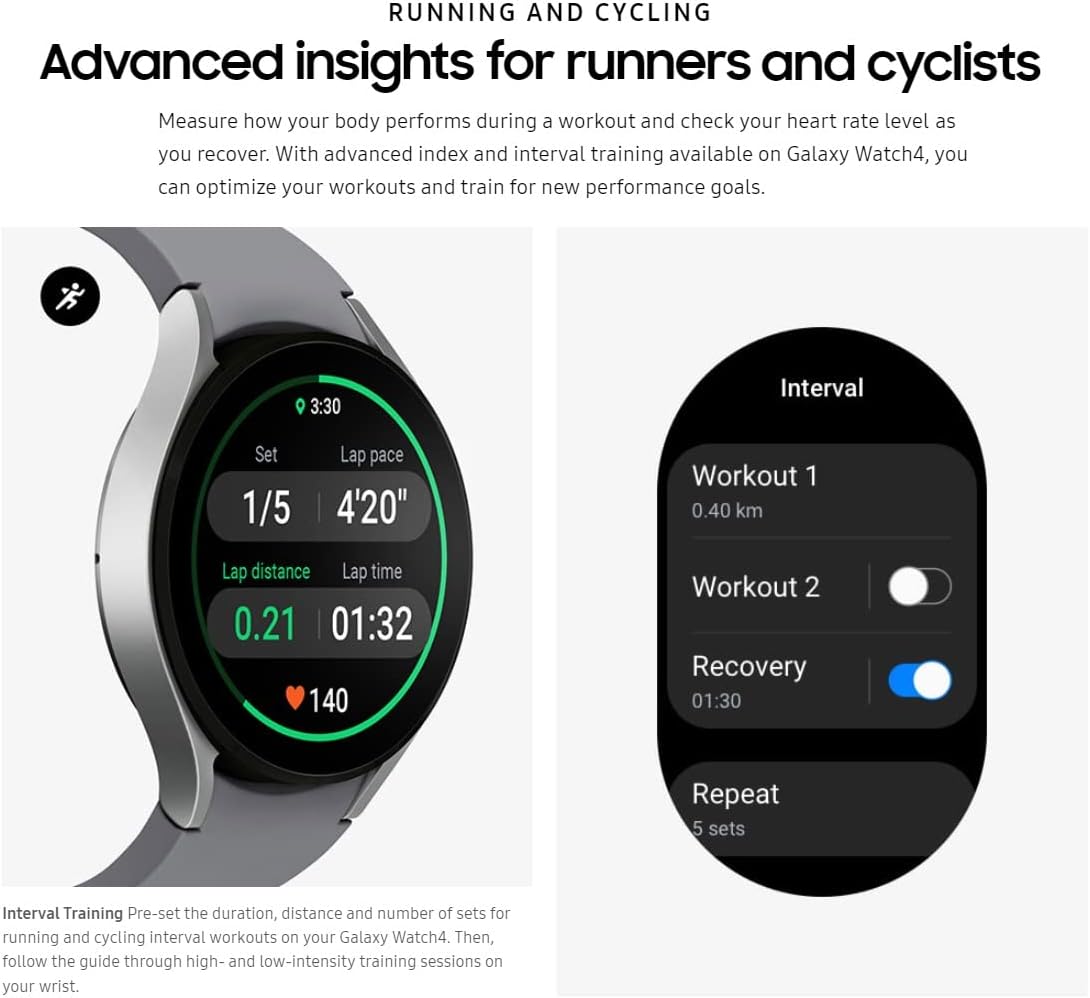
Figure 3.4: Advanced insights for runners and cyclists.
3.4 Communication and Google Services
Extend your phone's capabilities to your wrist. The watch allows you to receive calls, texts, and notifications. You can also stream music directly from the watch. With Wear OS, you can access select Google services and apps, including Google Pay for contactless payments, Google Maps for directions, and Bixby or Google Assistant for voice commands and information.
4. Entretien
4.1 Charger votre montre
The Galaxy Watch4 is powered by a 361mAh Lithium Ion battery. A full charge typically provides up to two days of battery life, depending on usage. To charge, place the watch on its wireless charging pad. Regular charging, such as overnight or during periods of inactivity, helps maintain optimal battery performance.
4.2 Nettoyage et entretien
To ensure longevity and proper functioning, regularly clean your watch. Wipe the screen and body with a soft, lint-free cloth. For the sensors on the back, gently clean with a dry cloth to remove any residue that might affect readings. The watch is 5 ATM / IP68 water-resistant, making it suitable for swimming, but it should be rinsed with fresh water after exposure to salt water or chlorinated water.
5. Dépannage
5.1 Problèmes de connectivité
If your watch is not connecting to your phone or cellular network, ensure Bluetooth is enabled on your phone and the watch is within range. For LTE connectivity, verify your carrier plan is active and the watch is properly registered. Restarting both your phone and watch can often resolve minor connectivity glitches.
5.2 Lectures inexactes
For health and fitness tracking, ensure the watch is worn snugly on your wrist, but not too tight. Keep the sensors on the back clean and free from debris. If issues persist, check for software updates for both the watch and the Samsung Health app on your phone.
5.3 Décharge de la batterie
Excessive battery drain can be caused by frequent use of GPS, continuous heart rate monitoring, or numerous notifications. Adjust settings to optimize battery life, such as reducing screen brightness, turning off always-on display, or limiting background app refresh. Ensure your watch software is up to date.
6. Spécifications
| Fonctionnalité | Détail |
|---|---|
| Dimensions du produit | 1.75 x 1.7 x 0.39 pouces |
| Poids de l'article | 0.96 onces |
| Afficher | 1.4" (34.5mm) Super AMOLED, 450 x 450 pixels (~321 ppi density), 16M Colors |
| Processeur | Processeur double cœur 1.15 GHz |
| Capacité de la batterie | 361 millièmeamp Heures (Lithium-ion) |
| Système opérateur | Wear OS, One UI Watch 3 |
| BÉLIER | 1.5 Go |
| Capacité de stockage de la mémoire | 16 Go |
| Connectivité | Bluetooth 5.0, Wi-Fi, Cellular LTE (B2, B4, B5, B12, B13, B25, B26, B66, B71) |
| Résistance à l'eau | 5 ATM / IP68, 50m water-resistant |
| Durabilité | Glass front (Gorilla Glass DX+), MIL-STD-810G compliant |
| Caractéristiques spéciales | Sleep Monitor, GPS, Text Messaging, Phone Call, Music Player, Daily Workout Memory, ECG, Fall Detection |
7. Garantie et assistance
This renewed Samsung Galaxy Watch4 is covered by the Amazon Renewed Guarantee, which provides a refund or replacement within 90 days of receipt if the product does not work as expected. For further technical support or warranty claims beyond this period, please refer to Samsung's official support channels or contact the seller directly. Keep your purchase receipt for any warranty-related inquiries.
Ask a question about this manual
Ask about setup, troubleshooting, compatibility, parts, safety, or missing instructions. Manuals+ will review the question and use this page’s manual context to help answer it.