
OMTech B09MQKFSLL
Manuel d'utilisation du graveur laser CO2 OMTech 50W
Marque : OMTech
Model: B09MQKFSLL
Produit terminéview
The OMTech 50W CO2 Laser Engraver is a versatile machine designed for engraving and cutting various non-metallic materials such as wood, glass, acrylic, and leather. It features a 300x500mm work area, a powerful 50W DC laser tube, and advanced digital control for precise and efficient operation. This manual provides essential information for setting up, operating, maintaining, and troubleshooting your laser engraver to ensure safe and optimal performance.

Figure 1 : Face avant view of the OMTech 50W CO2 Laser Engraver, highlighting its compact design and accessible work area.
Configuration et installation
Before operating your OMTech laser engraver, follow these steps carefully to ensure proper setup and safety.
1. Déballage et placement
- Retirez soigneusement la machine et tous ses accessoires de leur emballage.
- Place the engraver on a stable, level surface capable of supporting its weight (approximately 75 kg). Ensure adequate ventilation around the machine.
- Keep the machine away from flammable materials and direct sunlight.
2. Connexion des composants
- Connexion électrique : Connect the power cable to the machine and a grounded 220V outlet.
- Assistance aérienne : The built-in air assist helps clear debris during engraving. Ensure the air pump is connected and functioning.
- Eau froide: Connect the water pump and tubing for the laser tube cooling system. Ensure the water reservoir is filled with distilled water and the pump is submerged and circulating water before turning on the laser.
- Système d'échappement : Connect the exhaust hose to the machine and vent it to the outside to remove smoke and fumes.

Figure 2: Essential accessories included with your laser engraver, crucial for proper setup and operation.
3. Installation et connectivité du logiciel
- Install the provided laser control software (e.g., LightBurn, CorelDRAW, AutoCAD compatible) on your computer.
- Connect the engraver to your computer via USB or Ethernet cable. The machine also supports U-Flash disk for offline operation.
- Familiarize yourself with the control panel for basic machine functions.
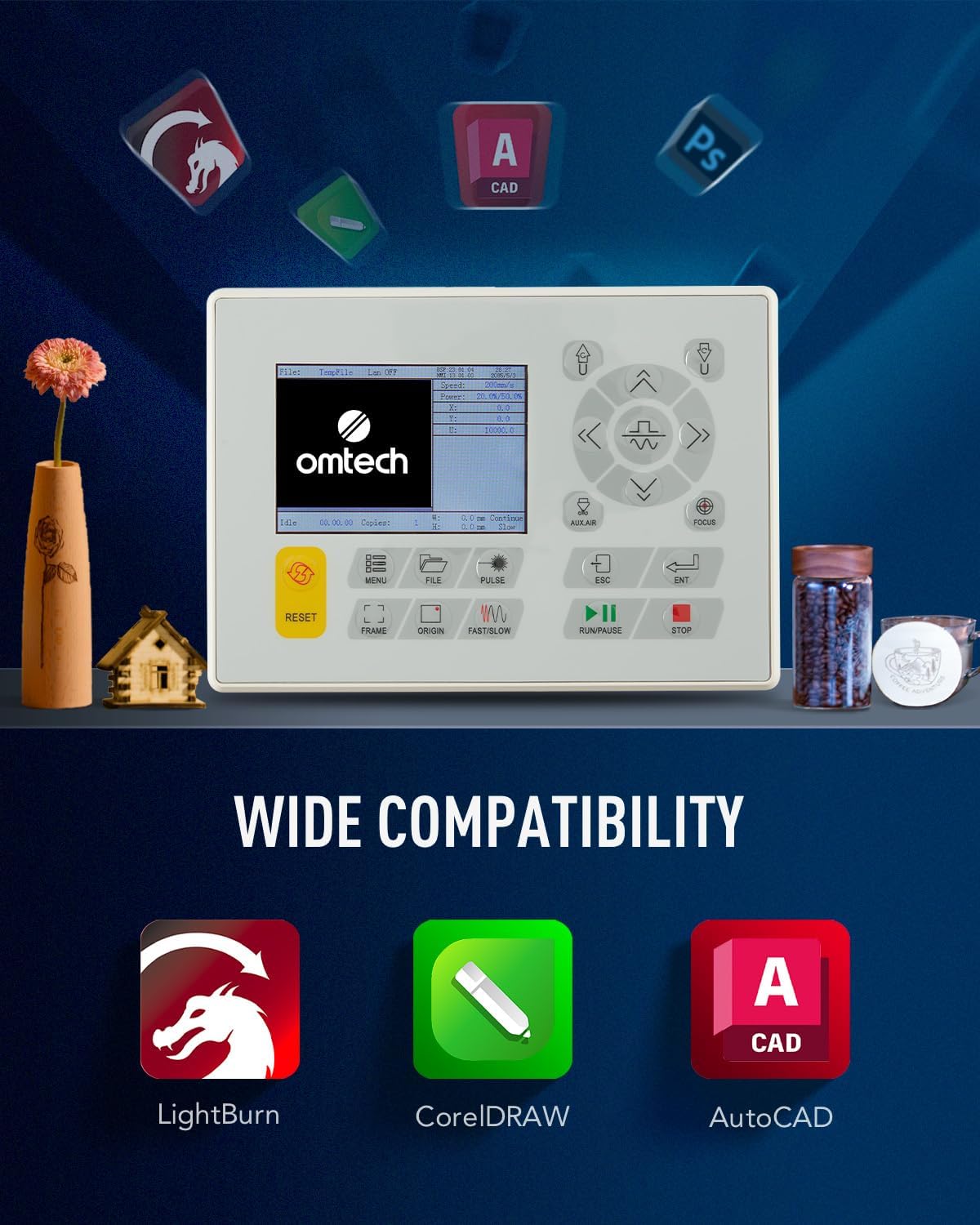
Figure 3: The machine's control panel and icons representing compatible software for design and operation.
Mode d'emploi
Suivez ces étapes pour un fonctionnement sûr et efficace de votre graveur laser.
1. Preparing Your Design and Material
- Create or import your design using the laser software.
- Select the appropriate material (e.g., wood, acrylic, leather) and place it securely on the honeycomb or aluminum blade workbed.
- Adjust the laser focus using the red dot pointer for optimal engraving/cutting results.

Figure 4: The laser head with its red dot pointer, used for precise material positioning and focus adjustment.
2. Executing Engraving/Cutting
- Set the desired power and speed settings in the software based on your material and desired outcome. The machine supports speeds up to 600 mm/s.
- Ensure the lid is closed. The machine has a safety interlock that cuts the laser beam if the lid is opened during operation.
- Initiate the engraving or cutting process from the software or control panel.
- Monitor the process through the flame-retardant viewing fenêtre.

Figure 5: The laser engraver actively processing a design on a wooden surface, demonstrating its precision.
3. Post-opératoire
- Once the process is complete, wait for the exhaust system to clear any remaining fumes.
- Retirez soigneusement le matériau gravé ou découpé.
- Turn off the machine and disconnect power if not in use for an extended period.
Entretien
Regular maintenance is crucial for extending the lifespan and ensuring the optimal performance of your laser engraver.
1. Cleaning Laser Lenses and Mirrors
- Periodically clean the laser lenses and reflective mirrors with a lint-free cloth and lens cleaning solution. This prevents residue buildup that can affect laser beam quality.
- The built-in air assist helps reduce debris on lenses during operation.

Figure 6: The CO2 laser tube, a critical component requiring proper cooling and care.
2. Système de refroidissement par eau
- Regularly check the water level in the cooling reservoir and refill with distilled water as needed.
- Change the water periodically to prevent algae growth and maintain cooling efficiency.
3. Nettoyage général
- Keep the work area and the interior of the machine clean from dust and debris.
- Clean the honeycomb and aluminum blade workbeds regularly to ensure proper material placement and airflow.
Dépannage
Cette section aborde les problèmes courants que vous pourriez rencontrer et leurs solutions potentielles.
| Problème | Cause possible | Solution |
|---|---|---|
| Le laser ne se déclenche pas | Lid open, water cooling issue, laser tube failure, power supply issue. | Ensure lid is closed. Check water flow and temperature. Inspect laser tube for damage. Verify power supply connections. |
| Qualité de gravure/découpe médiocre | Incorrect focus, dirty lenses/mirrors, incorrect power/speed settings, material issues. | Adjust focus. Clean optical components. Calibrate power and speed settings for the material. Ensure material is flat. |
| La machine ne répond pas. | Software communication error, emergency stop engaged, power issue. | Restart software and machine. Check USB/Ethernet connection. Disengage emergency stop button. Verify power supply. |
If you encounter issues not listed here or require further assistance, please contact OMTech customer support.
Caractéristiques
Key technical specifications for the OMTech 50W CO2 Laser Engraver.
| Fonctionnalité | Détail |
|---|---|
| Fabricant | OMTech |
| Dimensions du produit | 102 x 65 x 63 cm |
| Poids | 75 kg |
| Puissance du laser | 50 watts |
| Voltage | 220 volts |
| Max. Vitesse de gravure | 600 mm/s |
| Zone de traitement | 300 x 500 mm |
| Tables de travail | Lame en nid d'abeille et aluminium |
| Connectivité | USB Cable, Ethernet Cable, U-Flash Drive, Offline |

Figure 7: Visual representation of the machine's dimensions and a summary of its technical specifications.
Garantie et assistance
OMTech provides support for its products. For any issues or inquiries, please refer to the following information:
- Politique de retour: Le produit est éligible à un remboursement ou à un remplacement dans les 30 jours suivant l'achat.
- Assistance clientèle : For technical assistance, troubleshooting, or warranty claims, please contact OMTech Direct NL, the seller, or visit the official OMTech store on Amazon.
- OMTech Store: Visit the OMTech Store
Ask a question about this manual
Ask about setup, troubleshooting, compatibility, parts, safety, or missing instructions. Manuals+ will review the question and use this page’s manual context to help answer it.