
WORKPRO WPLG36V
WORKPRO Cordless 3.6V Grass Shears and Hedge Trimmer
Model: WPLG36V
Manufacturer: WORKPRO
Introduction
Merci pour votre achatasing the WORKPRO Cordless 3.6V Grass Shears and Hedge Trimmer. This versatile 2-in-1 tool is designed to simplify your garden maintenance tasks, offering both grass shearing and hedge trimming capabilities in a compact, lightweight, and cordless design. Please read this manual carefully before operation to ensure safe and efficient use of the product.
For optimal performance and longevity, adhere to all instructions regarding setup, operation, maintenance, and safety.
Consignes de sécurité
AVERTISSEMENT: Always wear appropriate personal protective equipment (PPE) including safety glasses, gloves, and sturdy footwear when operating this tool. Keep hands and feet away from blades. Do not operate in wet conditions or near flammable liquids or gases.
- Tenez les enfants et les passants éloignés pendant l'utilisation de l'outil.
- Ensure the safety lock key is properly inserted before operation.
- Do not force the tool. Use the correct blade for the task.
- Disconnect the tool from the power source before cleaning, maintenance, or changing accessories.
- Rangez l'outil dans un endroit sec et sûr, hors de portée des enfants.
Produit terminéview et composants
Familiarize yourself with the components of your WORKPRO Grass Shears and Hedge Trimmer:
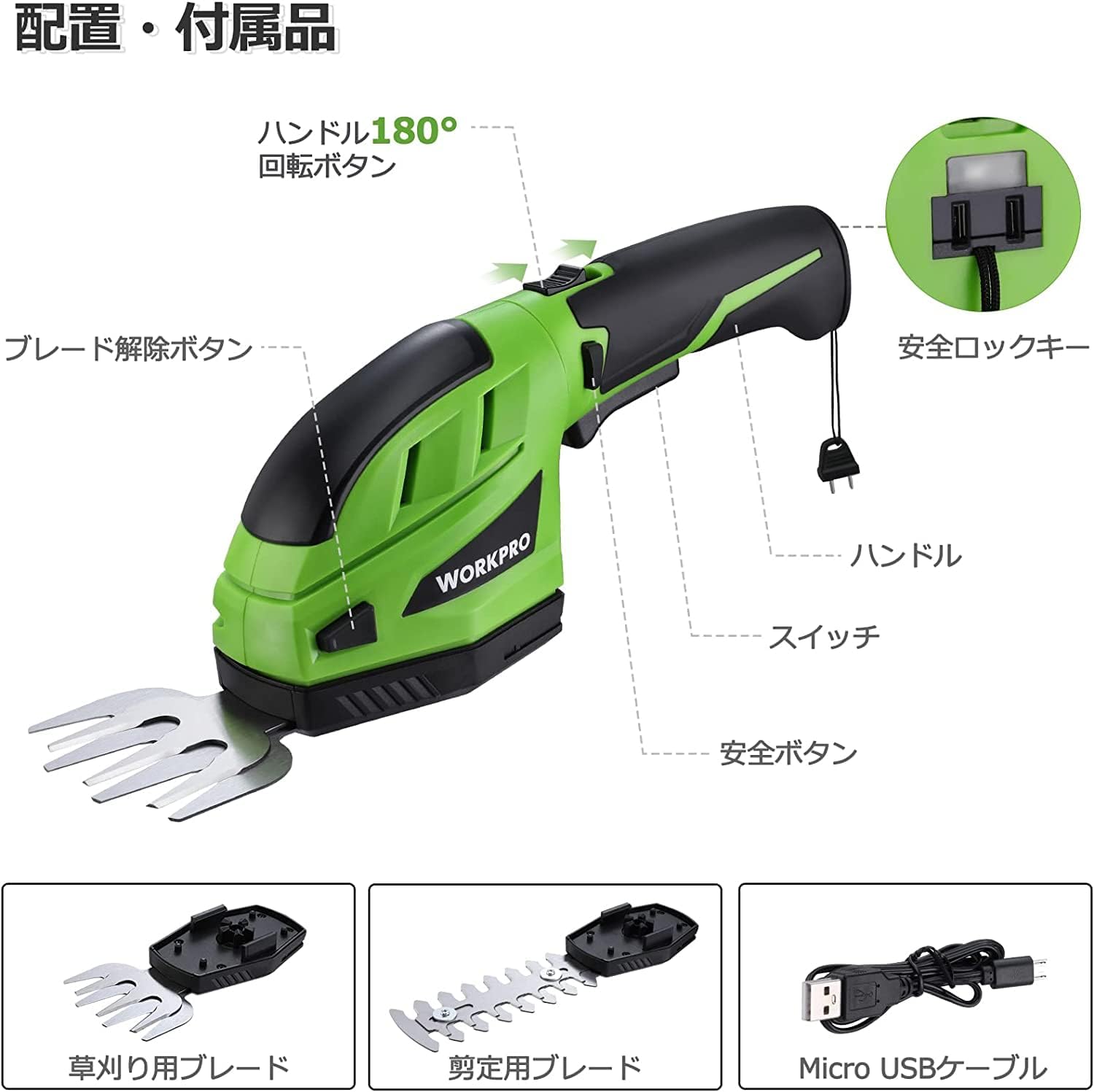
Figure 1 : Composants du produit
- Poignée: Conçu de manière ergonomique pour une prise en main confortable.
- Bouton de sécurité : Must be pressed simultaneously with the switch to operate.
- Changer: Activates the blades.
- Bouton de libération de la lame : Used to detach blades for changing.
- Bouton de rotation à 180° : Allows the handle to rotate for different cutting angles.
- Clé de verrouillage de sécurité : Must be inserted into the handle end for operation.
- Lame de cisaillement à gazon : 80mm cutting width, ideal for lawn edges and small grass areas.
- Lame de taille-haie : 120mm cutting width, suitable for hedges and shrubs.
- Câble micro-USB : For charging the tool's battery.
Setup and Blade Installation
Before first use, ensure the battery is fully charged (refer to the Charging section). Follow these steps to install the desired blade:
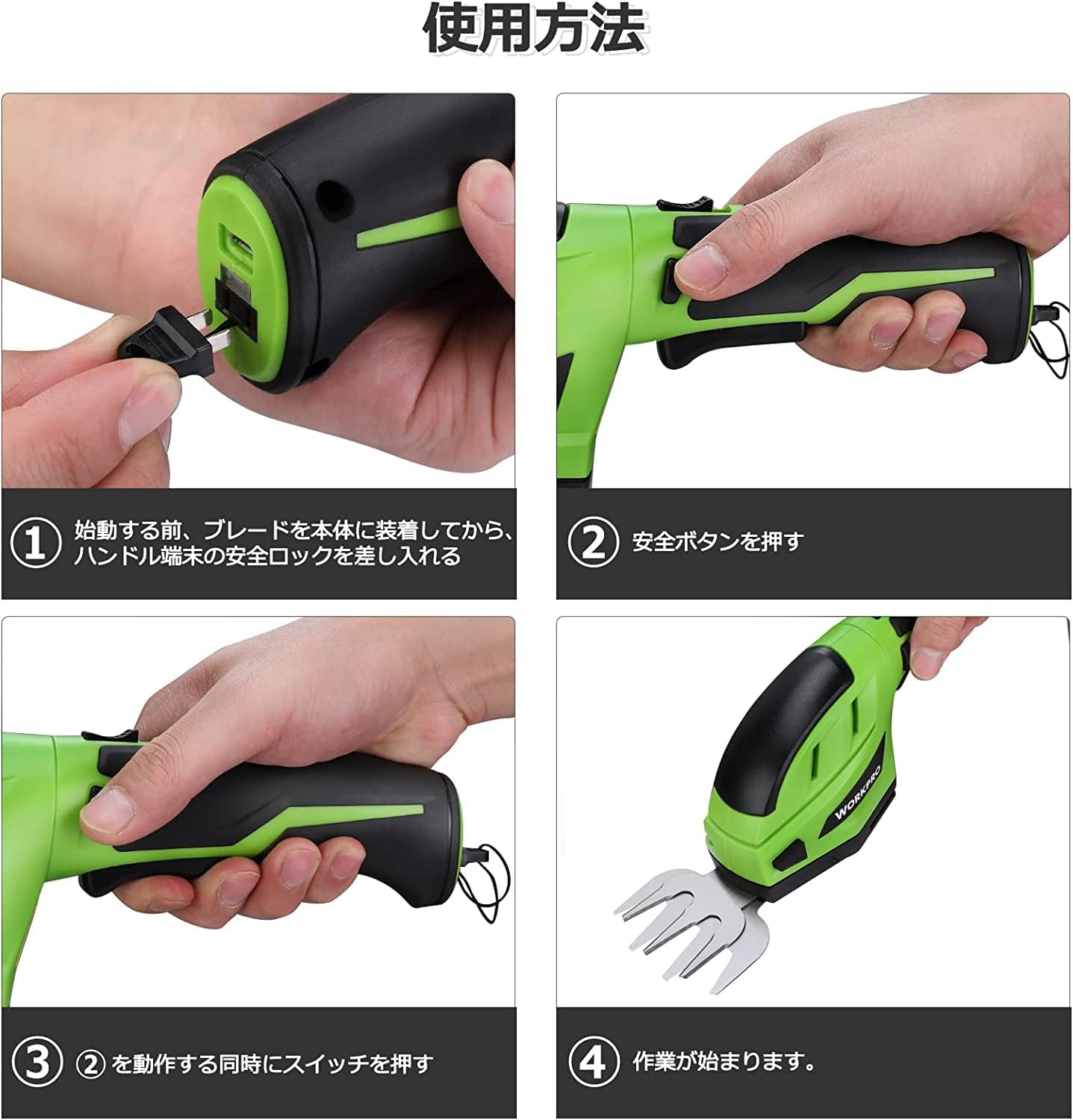
Figure 2 : Étapes de configuration
- Fixez la lame : Align the chosen blade (grass shear or hedge trimmer) with the main unit and press firmly until it clicks into place. Ensure it is securely fastened.
- Insert Safety Lock Key: Insert the safety lock key into the designated slot at the end of the handle. The tool will not operate without this key.
Mode d'emploi
To operate your WORKPRO tool, follow these steps:
- Activate Safety Button: With the safety lock key inserted, press and hold the safety button located on the side of the handle.
- Engager le commutateur : While holding the safety button, press the main power switch (trigger) to start the blades.
- Fonctionnement continu : Once the blades are running, you can release the safety button, and the tool will continue to operate as long as the main switch is pressed.
- Adjust Handle Angle (Hedge Trimmer): For hedge trimming, you can rotate the handle 180 degrees by pressing the 180° rotation button and adjusting the handle to your desired angle. This allows for comfortable cutting in various positions.

Figure 3: Grass Shearing in Use

Figure 4: Hedge Trimming and Handle Rotation
Video: WORKPRO Grass Shears and Hedge Trimmer in Action
This video demonstrates the operation of the WORKPRO Grass Shears and Hedge Trimmer, including blade changes, safety features, and practical use for both grass and hedge trimming.
Charger la batterie
The WORKPRO tool is powered by a 3.6V rechargeable Lithium-ion battery. It features a battery level indicator lamp to show the remaining charge.

Figure 5: Charging and Power Indicator
- Indicateur de charge : Un voyant rouge indique que la batterie est en charge. Un voyant vert indique que la batterie est complètement chargée.
- Connecting for Charge: Use the provided Micro USB cable. Connect it to the tool's charging port and plug the other end into a commercially available USB adapter (DC5V 0.5~1.0A output is recommended).
- Temps de charge : Environ 1.5 à 3.5 heures pour une charge complète.
- Remarque importante : Ensure your USB adapter provides at least 5V/1A output. Insufficient output may prevent proper charging or trigger overvoltage protection, stopping the charging process.
Entretien
Un entretien régulier garantit la longévité et les performances optimales de votre outil.
- Nettoyage de la lame : After each use, remove the blades and clean off any grass, leaves, or debris. Use a brush or cloth.
- Lubrification de la lame : Appliquez périodiquement une fine couche d'huile pour machines sur les lames afin de prévenir la rouille et d'assurer un bon fonctionnement.
- Stockage: Store the tool and blades in a dry, clean place. Ensure blades are clean and dry before storage.
- Entretien de la batterie: Do not store the tool with a completely depleted battery. Charge it periodically if not used for extended periods to maintain battery health.
Dépannage
| Problème | Cause possible | Solution |
|---|---|---|
| L'outil ne démarre pas. | Batterie faible ou déchargée. Safety lock key not inserted. Safety button and switch not pressed simultaneously. | Chargez la batterie. Insert the safety lock key fully. Ensure both the safety button and switch are pressed at the same time. |
| Les lames ne coupent pas efficacement. | Les lames sont émoussées ou sales. Incorrect blade for the material. | Clean blades. If dull, consider replacement blades. Ensure you are using the appropriate blade (grass shear for grass, hedge trimmer for hedges). |
| L'outil s'arrête pendant le fonctionnement. | La batterie est épuisée. Protection contre les surcharges activée. | Rechargez la batterie. Reduce the load on the blades. Avoid cutting overly thick branches or dense grass. |
| La batterie ne charge pas. | USB adapter output is insufficient. Le câble est défectueux. | Use a 5V/1A USB adapter. Essayez un autre câble USB. |
Caractéristiques
| Fonctionnalité | Spécification |
|---|---|
| Marque | TRAVAIL PRO |
| Modèle | WPLG36V |
| Source d'énergie | Alimenté par batterie |
| Type de batterie | Lithium-ion / DC 3.6V / 2.0A |
| Vol de chargetage | 5V |
| Temps de charge | 1.5 à 3.5 heures |
| No-load Operating Time | Environ 40 minutes |
| Largeur de coupe des cisailles à gazon | 80 mm |
| Trimmer Cutting Width | 120 mm |
| Max Trimmer Cutting Diameter | 7.5 mm |
| Poids du produit | 394 g (unité principale) |
| Dimensions | 28 x 12.5 x 8.9 cm (Dimensions de l'emballage) |

Figure 6 : Dimensions et spécifications du produit
Garantie et assistance
WORKPRO products are manufactured to high-quality standards. For warranty information, technical support, or to purchase replacement parts, please refer to the contact information provided with your product packaging or visit the official WORKPRO website.
Veuillez conserver votre preuve d'achat pour les réclamations au titre de la garantie.
Ask a question about this manual
Ask about setup, troubleshooting, compatibility, parts, safety, or missing instructions. Manuals+ will review the question and use this page’s manual context to help answer it.