
1. Produit terminéview
The ARPHA D01 Smart Lock offers advanced security and convenient access to your home. It integrates multiple unlocking methods and smart features for enhanced control and peace of mind.
Caractéristiques principales :
- Plusieurs méthodes de déverrouillage : Fingerprint, Pin Password, App Control (Bluetooth), and Mechanical Key.
- Quick Fingerprint Identification: Identifies fingerprints in 0.3 seconds with 360° recognition, storing up to 50 fingerprints.
- Verrouillage automatique: Automatically locks the door based on door position when closed, preventing accidental lockouts.
- Operation Record: View unlocking history via the mobile application.
- Advanced Secure Password: Features anti-peep password entry and stores up to 50 pin codes.
- Alimentation de secours: USB port for temporary power in case of battery depletion.
- Alerte de batterie faible : Provides alerts when batteries are low.
- Alarme anti-effraction : Activates an alarm if incorrect passwords are entered multiple times.
- Résistance aux intempéries : Designed to withstand temperatures from -13°F to 131°F with IP65 rating.

Figure 1: Multiple ways to unlock the ARPHA D01 Smart Lock.

Figure 2: The ARPHA D01 Smart Lock, designed to be smart, secure, and reliable.
2. Ce qui est inclus
Vérifiez que tous les composants sont présents avant de commencer l'installation :
- ARPHA D01 Smart Lock (Front and Rear Assemblies)
- Loquet à pêne dormant
- Plaque de montage
- Gâche et Boîte
- Clés mécaniques (2)
- Vis et quincaillerie de montage
- Manuel d'utilisation
- Modèle d'installation
3. Guide d'installation
Follow these steps carefully to install your ARPHA D01 Smart Lock. For a visual guide, please refer to the installation video below.
Video 1: ARPHA D01 Smart Lock Installation Guide. This video provides a step-by-step visual walkthrough of the installation process.
Étape 1 : Préparez la porte
- Retirez votre pêne dormant existant.
- Use the provided template to mark and drill any necessary holes.
Étape 2 : Installez le pêne dormant
- Adjust the deadbolt length if necessary (60mm or 70mm backset).
- Insert the deadbolt into the door hole with the word "TOP" facing up.
- Secure the deadbolt with the provided screws.
Step 3: Install the Lock Assemblies
- Install the connection columns onto the rear assembly.
- Adjust the paddle on the rear assembly to the horizontal direction.
- Guide the connection wire from the front assembly through the deadbolt opening.
- Align the front assembly with the door and the deadbolt.
- Install the iron plate (mounting plate) by aligning it with the connection columns and fixing the screws.
Step 4: Connect Wires and Install Batteries
- Connect the wire from the front assembly to the rear assembly.
- Insert 4 AA batteries into the battery compartment of the rear assembly.
Step 5: Lock Calibration
- Long press the RESET button until you hear a "Di" voice.
- Switch the knob from vertical to horizontal direction.
- A "successful" voice prompt indicates calibration is complete.
Step 6: Set Administrator Password
- Appuyez sur le bouton RESET.
- Set your desired administrator password, followed by the '#' key.
- Re-enter the password to confirm.
4. Mode d'emploi
Méthodes de déverrouillage:
4.1 Déverrouillage par empreinte digitale
- Placez votre doigt enregistré sur le capteur d'empreintes digitales.
- La serrure se déverrouillera si l'empreinte digitale est reconnue.

Figure 3: Quick fingerprint identification for unlocking.
4.2 Déverrouillage par mot de passe
- Enter your registered 6-8 digit passcode on the touchscreen keypad.
- Appuyez sur « # » pour confirmer. La serrure se déverrouillera.
- The anti-peep function allows you to enter random digits before or after your actual passcode to prevent others from guessing it.
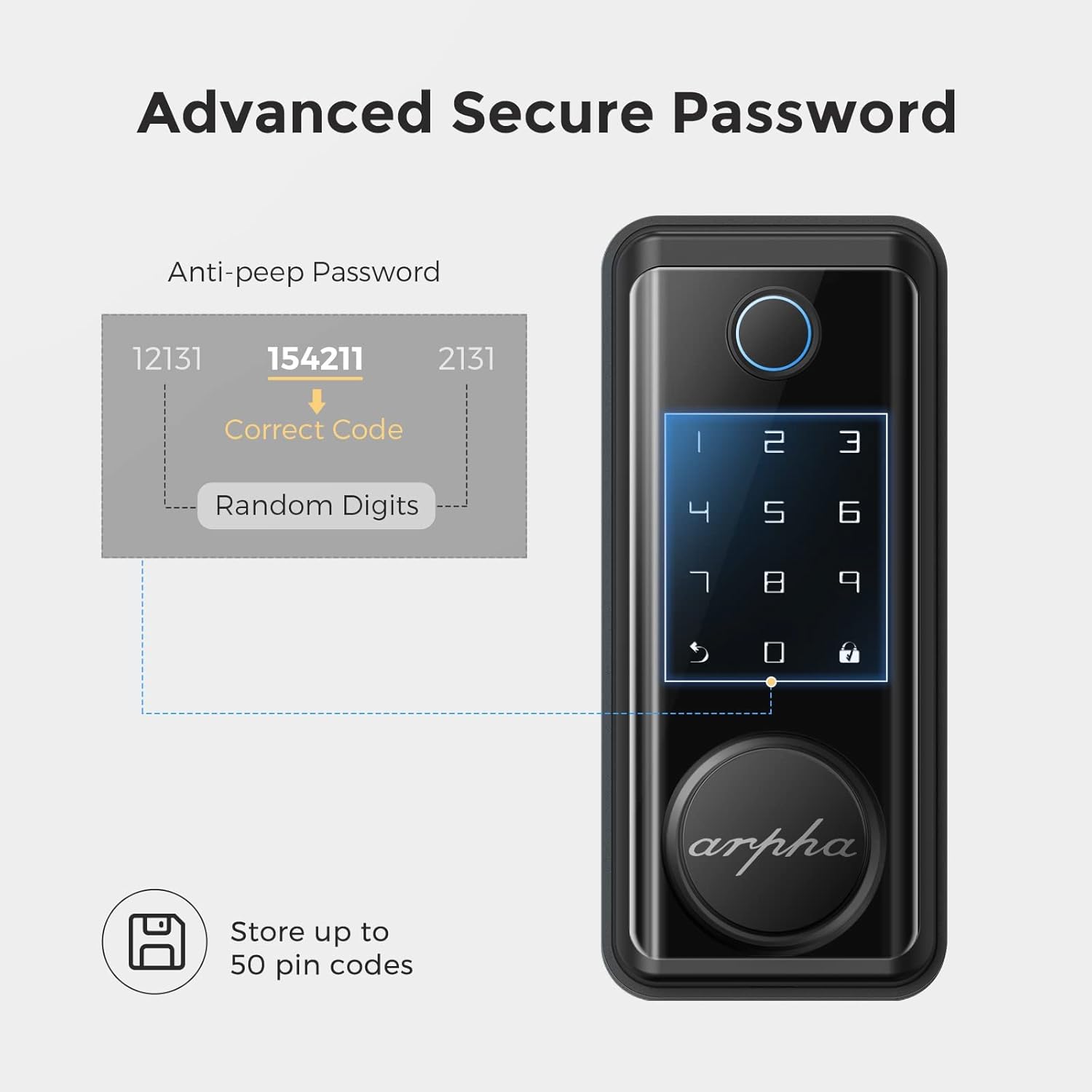
Figure 4: Advanced secure password entry with anti-peep function.
4.3 Déverrouillage par clé mécanique
- Remove the magnetic cover at the bottom of the front assembly to reveal the keyhole.
- Insérez la clé mécanique et tournez-la pour déverrouiller la porte.
4.4 Déverrouillage de l'application (Bluetooth)
- Assurez-vous que le Bluetooth est activé sur votre smartphone et que vous vous trouvez à portée de la serrure.
- Open the Tuya Smart app and select your ARPHA D01 Smart Lock.
- Tap and hold the unlock icon in the app to unlock the door.
4.5 Fonction de verrouillage automatique
- The lock is equipped with a sensor that detects when the door is closed.
- It will automatically engage the deadbolt after a set period (configurable in the app) once the door is closed.

Figure 5: The auto-lock feature based on door position.
4.6 Alimentation de secours
- In case the batteries are completely drained, connect a power bank to the micro-USB port located at the bottom of the front assembly.
- This will temporarily power the lock, allowing you to use the keypad or fingerprint sensor to gain entry.

Figure 6: USB port for emergency power supply.
5. Fonctionnalités de l'application
The Tuya Smart app provides comprehensive control and monitoring capabilities for your ARPHA D01 Smart Lock:
- Surveillance du niveau de batterie : View le pourcentage actuel de la batterietage of your lock.
- Déverrouillage des enregistrements : Access a detailed log of all unlocking events, including method and time.
- Gestion des membres : Add or remove family members and assign specific access methods (fingerprint, passcode).
- Mots de passe temporaires : Générez des mots de passe à usage unique ou périodiques pour les invités ou les prestataires de services.
- Liaison intelligente : Integrate your smart lock with other smart home devices for automated scenarios.
- Paramètres: Customize various lock parameters, including language, navigation volume, and auto-lock duration.

Figure 7 : View unlocking records and manage access via the app.

Figure 8: Easily share temporary passwords with guests.
6. Entretien
- Remplacement de la batterie : Replace all 4 AA batteries when the low battery alert is triggered. Use high-quality alkaline batteries for optimal performance.
- Nettoyage: Wipe the touchscreen and fingerprint sensor with a soft, dry cloth. Avoid abrasive cleaners or solvents.
- Vérification des vis : Periodically check all mounting screws to ensure they are tight.

Figure 9: Low battery alert on the smart lock.
7. Dépannage
- La serrure ne répond pas : Check battery levels. Use emergency USB power if batteries are dead.
- Empreinte digitale non reconnue : Assurez-vous que votre doigt est propre et sec. Réenregistrez votre empreinte digitale si le problème persiste.
- Code d'accès non fonctionnel : Verify the correct passcode is entered. Ensure the anti-peep function is not causing issues.
- Problèmes de connectivité de l'application : Ensure Bluetooth is enabled and you are within range. Restart the app and try again.
- Le verrouillage automatique ne s'enclenche pas : Check door sensor alignment. Verify auto-lock settings in the app.
8. Spécifications
| Fonctionnalité | Détail |
|---|---|
| Marque | ARPHA |
| Numéro de modèle | D01 |
| Type de serrure | Biométrique, clavier |
| Matériel | Zinc |
| Style | Moderne |
| Caractéristiques spéciales | Fingerprint, Touchscreen, Smart Lock, Wifi (via gateway, not direct) |
| Protocole de connectivité | Bluetooth |
| Méthode de contrôle | Application, tactile |
| Poids de l'article | 3.65 livres |
| Dimensions du colis | 9.02 x 7.13 x 3.7 pouces |
| Température de fonctionnement | -13°F à 131°F |
| Indice d'étanchéité | IP65 |

Figure 10: ARPHA D01 Smart Lock dimensions.

Figure 11: Weather resistance features of the smart lock.
9. Garantie et assistance
ARPHA products come with a standard manufacturer's warranty. For detailed warranty information, technical support, or service inquiries, please refer to the contact information provided in your product packaging or visit the official ARPHA website.