
Anova Culinary AN900-10
Manuel d'utilisation du four intelligent de précision Anova
Modèle : AN900-10
Introduction
The Anova Precision Smart Oven is a versatile countertop appliance designed to bring professional-grade cooking capabilities to your home kitchen. It combines convection, steam, bake, broil, roast, and dehydrate functions, offering precise temperature control for a wide range of culinary tasks. This manual provides essential information for the safe and effective operation and maintenance of your Anova Precision Smart Oven.
For optimal performance and longevity, please read this manual thoroughly before first use and retain it for future reference.
Consignes de sécurité
Respectez toujours les consignes de sécurité de base lors de l'utilisation d'appareils électriques afin de réduire les risques d'incendie, d'électrocution et de blessures.
- Ne touchez pas les surfaces chaudes. Utilisez les poignées ou les boutons.
- Pour éviter tout risque d'électrocution, ne plongez pas le cordon, les prises ou l'appareil dans l'eau ou tout autre liquide.
- Une surveillance étroite est nécessaire lorsqu’un appareil est utilisé par ou à proximité d’enfants.
- Débranchez l'appareil de la prise lorsqu'il n'est pas utilisé et avant de le nettoyer. Laissez-le refroidir avant d'ajouter ou de retirer des pièces.
- N’utilisez pas d’appareil dont le cordon ou la fiche est endommagé, ou après un dysfonctionnement de l’appareil ou après qu’il a été endommagé de quelque manière que ce soit.
- L’utilisation d’accessoires non recommandés par le fabricant de l’appareil peut provoquer des blessures.
- Ne pas utiliser à l'extérieur.
- Ne laissez pas le cordon pendre du bord de la table ou du comptoir, ni toucher des surfaces chaudes.
- Ne pas placer sur ou à proximité d'un brûleur à gaz ou électrique chaud, ni dans un four chaud.
- Une extrême prudence doit être exercée lors du déplacement d’un appareil contenant de l’huile chaude ou d’autres liquides chauds.
- N'utilisez pas l'appareil à d'autres fins que celles prévues.
Composants terminésview
Familiarize yourself with the main components of your Anova Precision Smart Oven:
- Cavité du four : La chambre de cuisson principale.
- Réservoir d'eau : Removable tank for steam generation. Located on the side.
- Panneau de contrôle: Digital display and knobs for setting temperature, time, and cooking modes.
- Sonde alimentaire : Detachable probe for precise internal temperature monitoring.
- Removable Racks: Multiple racks for various cooking needs.
- Moule à pâtisserie : Included pan for general baking and roasting.

Figure 1 : Face avant view of the Anova Precision Smart Oven, showing the main oven cavity, control panel, and side-mounted water tank.

Figure 2 : Intérieur view of the Anova Precision Smart Oven, illustrating the two removable racks and the included baking pan.

Figure 3: A user demonstrating the removal of the clear water tank from the side of the Anova Precision Smart Oven for refilling or cleaning.
Installation
Déballage et placement
- Retirez soigneusement le four et tous ses accessoires de leur emballage.
- Retirez tout film protecteur ou matériau d'emballage du four.
- Place the oven on a stable, level, heat-resistant surface with adequate clearance from walls and other appliances for ventilation. Ensure at least 4 inches of space on all sides and above the oven.
- Assurez-vous que la prise de courant est facilement accessible.
Nettoyage initial
- Avant la première utilisation, essuyez l'intérieur et l'extérieur du four avec un produit nettoyant.amp tissu.
- Wash the removable racks, baking pan, and water tank with warm, soapy water. Rinse thoroughly and dry completely.
Préparation du réservoir d'eau
- Remove the water tank from its housing on the side of the oven.
- Fill the water tank with distilled water. Do not use tap water as it can lead to mineral buildup.
- Securely reinsert the water tank into its housing until it clicks into place.
Connexion électrique
Plug the oven into a grounded electrical outlet. The display will illuminate, indicating the oven is ready for use.
Mode d'emploi
Panneau de configuration terminéview
The Anova Precision Smart Oven features an intuitive control panel with a digital display and rotary knobs for setting cooking parameters. The display shows temperature, time, and current cooking mode.
Connecting to the Anova App
For enhanced control and access to a recipe library, download the Anova Oven app on your smartphone. Follow the in-app instructions to connect your oven via Wi-Fi.
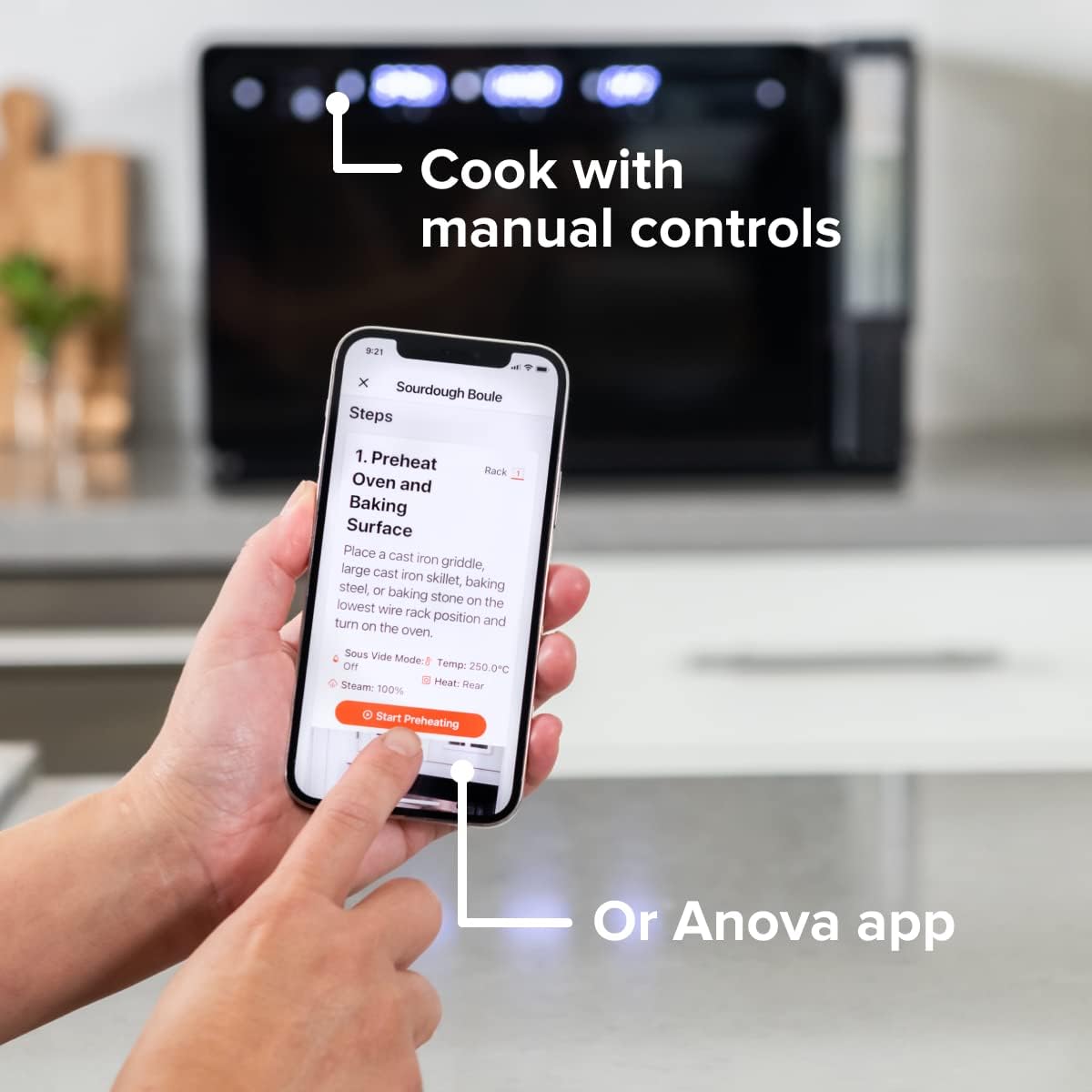
Figure 4: A user interacting with the Anova app on a smartphone, demonstrating remote control capabilities for the oven.
Basic Cooking Modes
The oven offers several cooking modes:
- Convection: Uses a fan to circulate hot air for even cooking and browning.
- Vapeur: Injects steam into the oven cavity, ideal for baking bread, steaming vegetables, or sous vide style cooking.
- Combi (Convection + Steam): Combines hot air and steam for moist interiors and crispy exteriors.
- Cuire/Rôtir : Standard oven functions for baking and roasting.
- Griller: Chaleur intense provenant de l'élément supérieur pour saisir et dorer.
- Déshydrater: Low heat and fan circulation for drying foods.
Setting a Program (Manual Control)
- Turn the mode knob to select your desired cooking mode.
- Adjust the temperature using the temperature knob.
- Réglez le temps de cuisson à l'aide du bouton de temps.
- Appuyez sur le bouton Départ/Pause pour commencer la cuisson.
- To use the food probe, insert it into the thickest part of your food before starting. The oven will cook until the target internal temperature is reached.
Mode sous vide
The Anova Precision Oven can achieve sous vide style results without a water bath. Use the steam function and the food probe to cook food to a precise internal temperature, ensuring tenderness and juiciness.
Steam Injection for Baking
For perfect breads with crispy crusts and soft interiors, utilize the steam injection feature. Ensure the water tank is filled before starting a steam-assisted baking program.

Figure 5: Two loaves of freshly baked bread, showcasing the results of steam injection for a perfect crust and crumb. The Anova Precision Smart Oven is visible in the background.
Entretien et nettoyage
Regular cleaning and maintenance will ensure the longevity and optimal performance of your Anova Precision Smart Oven.
Nettoyage quotidien
- Après chaque utilisation, laissez le four refroidir complètement.
- Essuyez les surfaces intérieures et extérieures avec de la publicitéamp Utilisez un chiffon et un détergent doux. Évitez les nettoyants abrasifs et les tampons à récurer.
- Remove and clean the racks and baking pan with warm, soapy water.
- Empty and rinse the water tank after each use, especially if using steam functions. Allow it to air dry before reinserting.
Descaling (Steam Function Users)
If you frequently use the steam function, mineral buildup may occur. The oven may indicate when descaling is needed. Refer to the Anova app or online resources for detailed descaling instructions using a descaling solution.
Stockage
Lorsqu'il n'est pas utilisé pendant une période prolongée, assurez-vous que le four est propre et sec. Rangez-le dans un endroit frais et sec.
Dépannage
This section addresses common issues you might encounter with your Anova Precision Smart Oven.
| Problème | Cause possible | Solution |
|---|---|---|
| Oven not turning on. | Non branché ; alimentation coupéetage; disjoncteur déclenché. | Assurez-vous que le four est bien branché sur une prise fonctionnelle. Vérifiez le disjoncteur de votre installation électrique. |
| Aucune vapeur n'a été produite. | Water tank empty or not properly seated; mineral buildup. | Fill water tank with distilled water and ensure it is correctly inserted. Perform descaling if necessary. |
| Les aliments ne cuisent pas uniformément. | Improper rack placement; overcrowding; fan obstruction. | Refer to recipe for recommended rack position. Avoid overcrowding the oven. Ensure nothing obstructs the convection fan. |
| Problèmes de connexion Wi-Fi. | Mot de passe Wi-Fi incorrect ; routeur trop éloigné ; interférences réseau. | Double-check Wi-Fi password. Move oven closer to router or use a Wi-Fi extender. Restart oven and router. |
If the problem persists after attempting these solutions, please contact Anova Customer Support.
Caractéristiques
- Marque: Anova Culinaire
- Nom du modèle : Four de précision
- Numéro de modèle de l'article : AN900-10
- Dimensions du produit : 18"P x 22"L x 14"H
- Poids de l'article : 59 livres
- Couleur: Noir
- Type de contrôle : Bouton
- Source d'alimentation : Électrique
- Composants inclus : Water tank, pan, temp probe
- Dossier spécial : Programmable
Garantie et assistance
The Anova Precision Smart Oven comes with a manufacturer's warranty. Please refer to the warranty card included with your product or visit the official Anova Culinary webConsultez le site pour connaître les conditions générales de garantie détaillées.
For technical support, troubleshooting assistance, or to inquire about replacement parts, please contact Anova Customer Support:
- Support en ligne: Visitez le Boutique culinaire Anova sur Amazon ou leur représentant website.
- Guide de l'utilisateur (PDF) : A comprehensive user guide is available for download at ce lien.

Figure 6: The Anova Precision Smart Oven integrated with a smart home assistant (Alexa), demonstrating its connectivity features.
Ask a question about this manual
Ask about setup, troubleshooting, compatibility, parts, safety, or missing instructions. Manuals+ will review the question and use this page’s manual context to help answer it.