
1. Introduction et plusview
The Hbada W203 Gaming Chair is designed to provide ergonomic support and comfort for extended periods of sitting, whether for gaming or office work. It features a robust construction, adjustable components, and a design focused on user well-being.
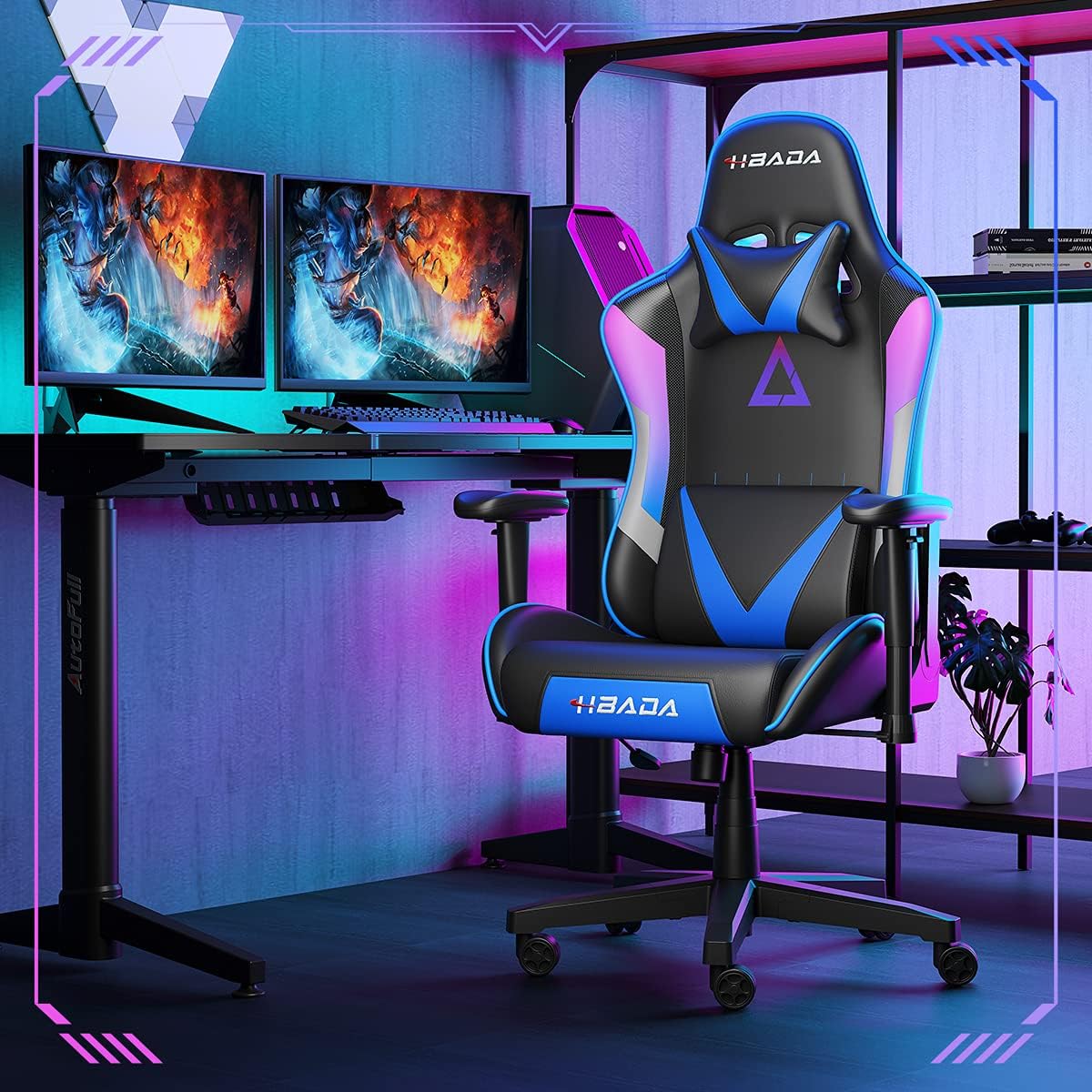
Image 1.1: The Hbada W203 Gaming Chair in a typical gaming environment, showcasinet son design et sa présence.
2. Consignes de sécurité
- Ne pas dépasser la capacité de poids maximale de 150 kg (330.7 lbs).
- Avant utilisation, assurez-vous que tous les boulons et vis sont bien serrés et vérifiez régulièrement leur desserrage.
- Évitez de monter sur la chaise ou de l'utiliser comme marchepied.
- Gardez vos mains et vos doigts éloignés des pièces mobiles pendant le réglage.
- Utilisez la chaise sur une surface plane et stable pour éviter qu'elle ne bascule.
3. Contenu du colis
Avant de commencer l'assemblage, vérifiez que tous les composants sont présents. Si des pièces sont manquantes ou endommagées, contactez le service client.
- Dossier
- Coussin de siège
- Accoudoirs (2)
- Base étoile
- Roulettes (5)
- Vérin à gaz
- Couvercle d'ascenseur à gaz
- Plaque de mécanisme
- Oreiller d'appui-tête
- Oreiller de soutien lombaire
- Kit de visserie (vis, rondelles, clé Allen)
- Manuel d'instructions
4. Instructions de montage
Assembly typically requires two people due to the weight of some components. Follow these steps carefully.
- Fixez les roulettes à la base : Insert each of the five casters into the holes at the end of each leg of the star base until they click into place.
- Insérer le vérin à gaz : Insérez le vérin à gaz dans l'orifice central de la base en étoile. Recouvrez-le avec le couvercle du vérin à gaz.
- Fixez la plaque du mécanisme au siège : Align the mechanism plate with the screw holes on the underside of the seat cushion. Secure it with the provided screws and Allen wrench. Ensure the front of the mechanism faces the front of the seat.
- Fixez les accoudoirs au siège : Secure the armrests to the sides of the seat cushion using the designated screws. Do not overtighten initially to allow for minor adjustments.
- Fixer le dossier au siège : Align the backrest with the mounting brackets on the seat cushion. Secure it with screws.
- Raccordez l'ensemble du siège à la base : Carefully place the assembled seat onto the gas lift cylinder, ensuring it is centered. Apply downward pressure to secure it.
- Attach Headrest and Lumbar Support: Position the headrest pillow and lumbar support pillow as desired. They are typically secured with straps.
- Serrage final : Once fully assembled, go back and tighten all screws firmly.

Image 4.1 : Terminéview of chair features, including lift function, height-adjustable armrests, 155-degree recline, silent casters, 360-degree rotation, and durable base.
5. Mode d'emploi
5.1. Réglage de la hauteur du siège
To adjust the chair height, locate the lever on the right side, beneath the seat. While seated, pull the lever up to lower the chair. To raise the chair, stand up slightly and pull the lever up. Release the lever at the desired height.
5.2. Fonction d'inclinaison
The chair offers a recline angle of up to 155 degrees with a 17-degree locking feature. To recline, pull the recline lever (typically on the left side) upwards and lean back. Release the lever to lock the backrest in position. To return to an upright position, pull the lever and lean forward.

Image 5.1: The chair's backrest can recline up to 155 degrees, allowing for various comfortable positions.
5.3. Réglage des accoudoirs
The armrests can be lifted to adjust their height. Locate the button or lever on the side of each armrest. Press or lift it and move the armrest up or down to your preferred height. Release the button/lever to lock it.
5.4. Soutien lombaire et appui-tête
The chair includes removable and adjustable headrest and lumbar support pillows. Adjust their position by sliding them along the backrest straps to provide optimal support for your head, neck, and lower back.
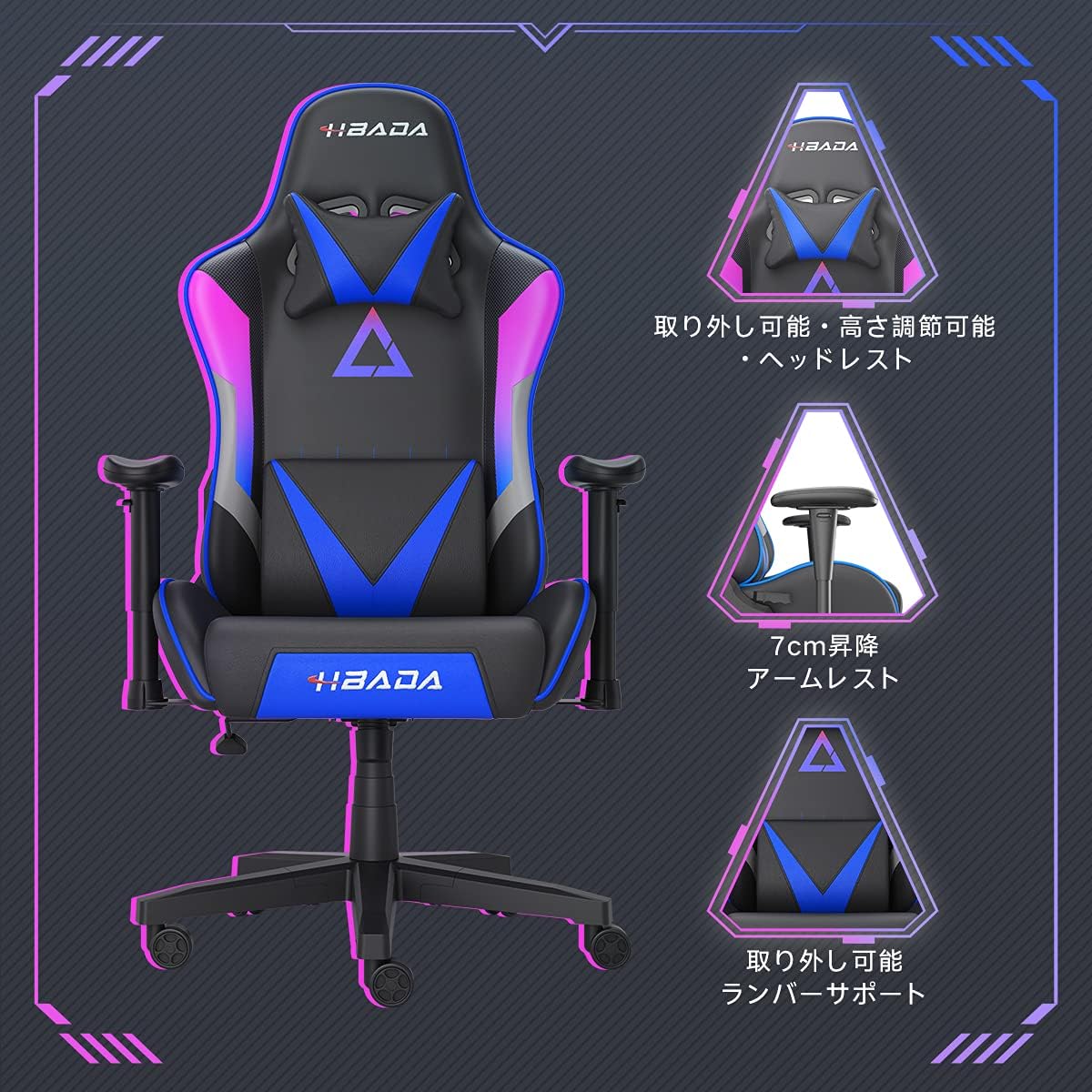
Image 5.2 : Détail view of the adjustable headrest, lifting armrests, and removable lumbar support.
5.5. Fonction pivotante
La chaise est dotée d'une fonction pivotante à 360 degrés, permettant une rotation facile sans déplacer la base.
6. Entretien
- Nettoyage: The chair's synthetic leather (PU) material can be wiped clean with a damp chiffon. Évitez les produits chimiques agressifs ou les nettoyants abrasifs.
- Fixations : Periodically check all screws and bolts to ensure they remain tight. Retighten as necessary to maintain stability and prevent squeaking.
- Casters: Veillez à ce que les roulettes soient exemptes de cheveux et de débris pour assurer un mouvement fluide.
7. Dépannage
- Grincements de chaises : Check and tighten all assembly screws. Applying a small amount of lubricant to moving metal parts (like the mechanism plate) may help.
- Réglage de la hauteur non fonctionnel : Ensure the gas lift lever is fully engaged. If the issue persists, the gas lift cylinder may need replacement. Contact customer service.
- La chaise semble instable : Verify that the star base is correctly assembled and all casters are fully inserted. Ensure all screws are tightened.
- Roulettes ne roulant pas correctement : Nettoyez les roulettes de tout débris (cheveux, poussière).
For issues not listed here or persistent problems, please contact Hbada customer service.
8. Spécifications

Image 8.1: Key dimensions of the Hbada W203 Gaming Chair.
| Fonctionnalité | Détail |
|---|---|
| Nom du modèle | Hbada W203 |
| Dimensions du produit (P x L x H) | 70 x 70 x 128 cm (27.6 x 27.6 x 50.4 pouces) |
| Hauteur du siège réglable | 40 - 48 cm (15.7 - 18.9 pouces) |
| Poids de l'article | 22.5 kg (49.6 lb) |
| Capacité de charge maximale | 150 kg (330.7 lb) |
| Matériel | Synthetic leather (PU upholstery), Metal (frame), Reinforced Nylon Resin (base), High-density Urethane Foam (cushion), Silent PU Nylon Casters |
| Angle d'inclinaison | Up to 155 degrees with 17-degree locking |
| Réglage des accoudoirs | Lifting (approx. 7 cm range) |
| Caractéristiques spéciales | Adjustable Lumbar Support, Ergonomic Design |

Image 8.2: Internal construction details, showing high-density foam and a robust metal frame.
9. Garantie et assistance
The Hbada W203 Gaming Chair comes with a Service de garantie d'un an. This warranty covers initial defects and manufacturing faults.
If you encounter any initial defects, malfunctions, or have any concerns regarding your product, please contact our customer service center. Our support team aims to respond within 24 hours and will assist with free exchanges or repairs as applicable.
For customer service inquiries, please refer to the contact information provided on your purchase receipt or the official Hbada website.