
Introduction
Thank you for choosing the Hbada Ergonomic Gaming Chair. This manual provides essential information for the safe and efficient assembly, operation, and maintenance of your new chair. Please read these instructions carefully before use and retain them for future reference.

Image: The Hbada Ergonomic Gaming Chair in a modern gaming environment, showcasinet son design et sa présence.
Consignes de sécurité
- Avant l'assemblage, assurez-vous que tous les composants sont présents et en bon état. Ne pas utiliser si des pièces sont manquantes ou cassées.
- Suivez scrupuleusement les instructions de montage. Un montage incorrect peut entraîner une instabilité et des blessures.
- Ne vous tenez pas debout sur la chaise. Utilisez-la uniquement pour vous asseoir.
- Ne pas dépasser la capacité de poids maximale (voir les spécifications).
- Tenez les enfants et les animaux domestiques éloignés de la chaise pendant le montage.
- Évitez d'exposer la chaise à la lumière directe du soleil ou à des températures extrêmes afin de prévenir toute dégradation du matériau.
Dimensions du produit
Understanding the dimensions of your chair is important for proper placement and comfortable use. Below are the key measurements:
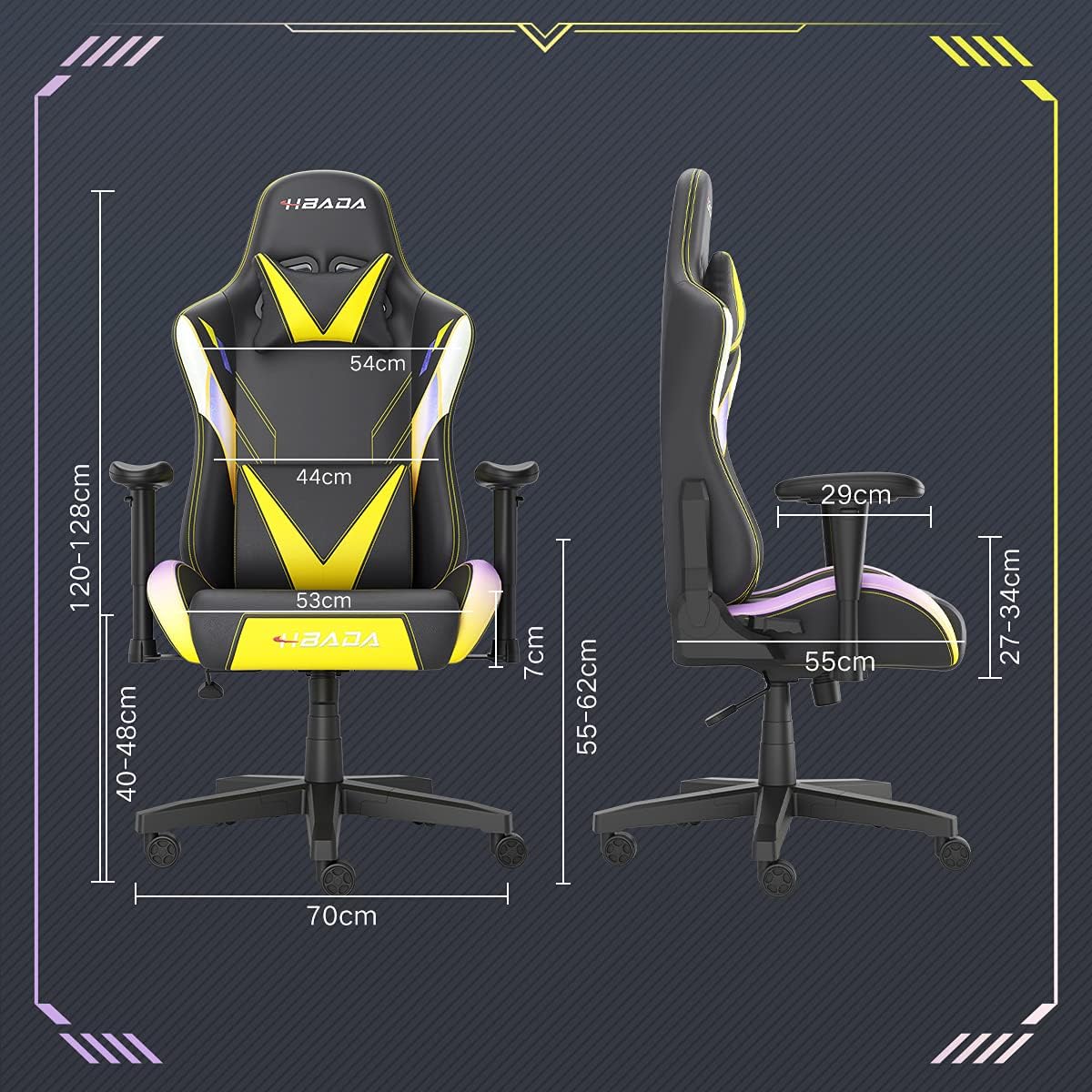
Image: A detailed diagram illustrating the various dimensions of the Hbada Gaming Chair, including height, width, and depth measurements.
- Hauteur totale : 120-128 cm (réglable)
- Hauteur du siège : 40-48 cm (réglable)
- Largeur du siège: 53 cm
- Profondeur du siège: 55 cm
- Largeur du dossier : 54 cm (shoulder area), 44 cm (lumbar area)
- Hauteur de l'accoudoir (à partir du siège) : 7 cm (réglable)
- Diamètre de la base : 70 cm
Configuration et assemblage
Please follow these steps carefully to assemble your Hbada Gaming Chair. It is recommended to have a clear, spacious area for assembly.
Étapes d'assemblage :
- Step 1: Assemble the Base and Wheels
Insert the five casters into the holes on the star base. Then, place the gas lift cylinder into the center hole of the base.

Image: Illustration of attaching the five casters to the chair's star-shaped base and inserting the gas lift cylinder.
- Step 2: Attach the Seat and Backrest
Connect the backrest to the seat using the provided screws and mounting plates. Ensure all screws are tightened securely.

Image: Diagram showing the process of securing the backrest to the seat cushion using screws and brackets.
- Étape 3 : Installer les accoudoirs
Attach the armrests to the sides of the seat using the designated screws. Make sure they are firmly attached.

Image: Visual guide for attaching the armrests to the chair's seat base.
- Step 4: Connect Seat to Base
Carefully place the assembled seat onto the gas lift cylinder, ensuring it is properly seated and stable.

Image: Depiction of lowering the assembled seat onto the gas lift cylinder, connecting the upper and lower parts of the chair.
- Step 5: Attach Headrest and Lumbar Pillow
Secure the detachable headrest and lumbar support pillow to the chair as desired for optimal comfort.

Image: Instructions for attaching the headrest and lumbar support pillows to the gaming chair.
Mode d'emploi
Your Hbada Gaming Chair is designed with several adjustable features to provide personalized comfort and support.
Key Adjustable Functions:
- Adjustable Sitting Height: Use the lever located under the seat on the right side to raise or lower the chair. Pull the lever up to adjust the height, then release it at your desired position. The seat has an 8 cm elevation range.
- Dossier inclinable (de 90° à 155°) : The backrest can be reclined from 90 degrees (upright) to 155 degrees (nearly flat). Use the recline lever on the side of the chair to adjust the angle. Lean back to your preferred position and lock the lever.
- Accoudoirs réglables : The armrests can be adjusted in height by 7 cm. Locate the button or lever on the side of each armrest to unlock, adjust, and then lock them into your desired height.
- 360° Free Swivel: The chair features a full 360-degree swivel function, allowing for easy movement and access to your surroundings without needing to move the entire chair.
- Detachable Headrest and Lumbar Support: The chair includes a removable headrest pillow and lumbar support cushion for enhanced ergonomic comfort. Adjust their positions or remove them based on your preference.

Image : Un surview of the chair's ergonomic systems, highlighting adjustable sitting height, armrests, 155° reclining, 360° swivel, cool racing casters, and durable base.

Image: The Hbada Gaming Chair demonstrated in its 155-degree reclined position, illustrating the recline controller.
Entretien
Regular maintenance will help prolong the life and appearance of your Hbada Gaming Chair.
- Nettoyage du cuir PU : Essuyez les surfaces en cuir PU avec un chiffon doux et sec.amp Pour les taches tenaces, utilisez une solution de savon doux puis essuyez avec un chiffon propre.amp Utilisez un chiffon. Évitez les produits chimiques agressifs ou les nettoyants abrasifs, car ils peuvent endommager le matériau.
- Entretien des roulettes : Periodically check the casters for accumulated dust or hair. Clean them with a brush or vacuum cleaner to ensure smooth movement and prevent damage to your flooring.
- Cadre et composants : Vérifiez régulièrement le serrage de toutes les vis et boulons. Resserrer si nécessaire pour maintenir la stabilité.
- Évitez la lumière directe du soleil : Prolonged exposure to direct sunlight can cause the PU leather to fade and crack. Position your chair away from direct sunlight when possible.
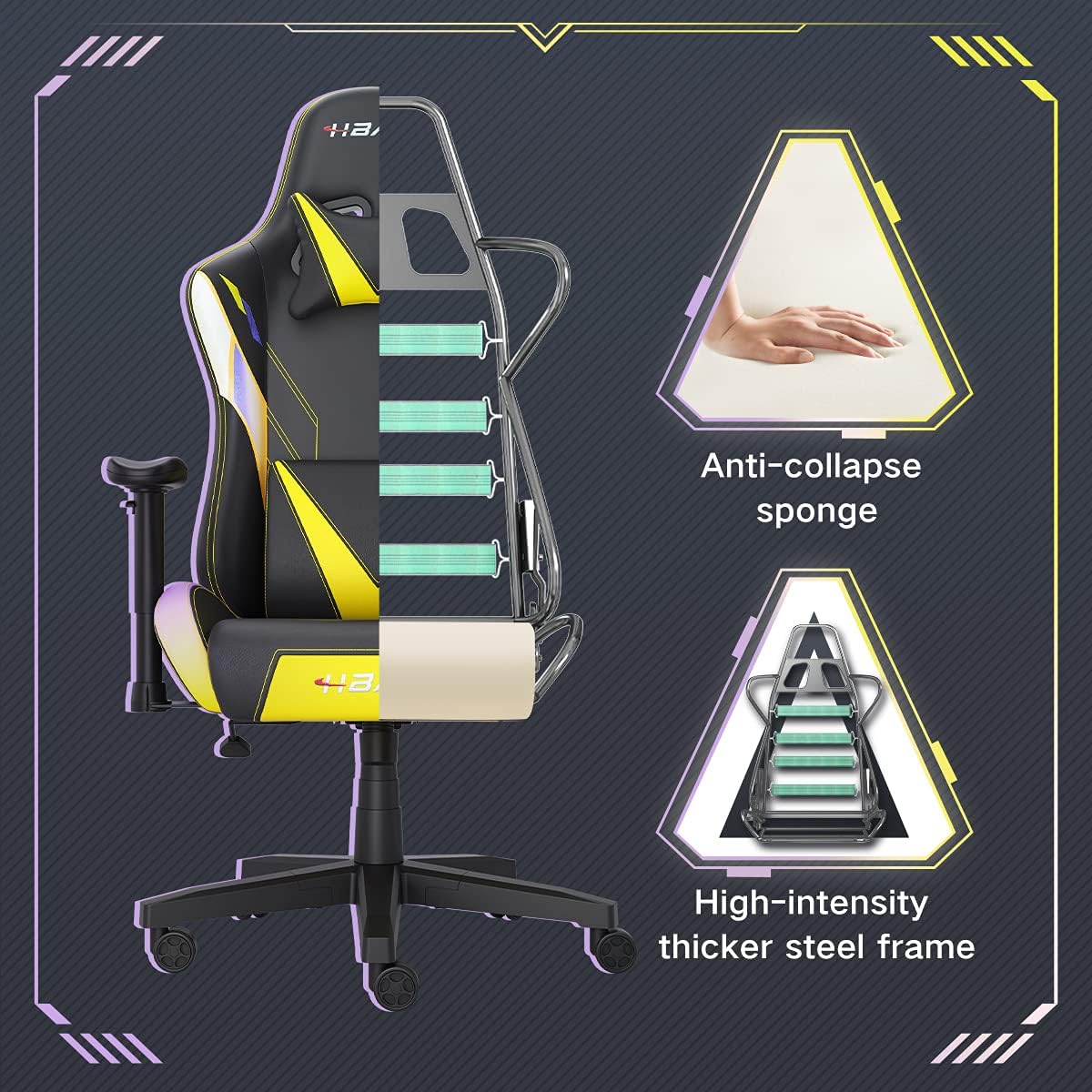
Image : Une coupe transversale view of the chair's internal structure, highlighting the anti-collapse sponge padding and the high-intensity thicker steel frame, indicating durable construction.
Dépannage
If you encounter any issues with your Hbada Gaming Chair, refer to the following common problems and solutions:
| Problème | Cause possible | Solution |
|---|---|---|
| La hauteur de la chaise n'est pas réglable. | Dysfonctionnement du vérin à gaz ou levier non enclenché. | Assurez-vous que le levier de réglage en hauteur est bien enclenché. Si le problème persiste, le vérin à gaz devra peut-être être remplacé. Contactez le service client. |
| La chaise est bancale ou instable. | Vis desserrées ou assemblage incorrect. | Check all assembly screws and bolts, and tighten them securely. Refer to the assembly instructions. |
| Les roulettes ne roulent pas en douceur. | Débris (cheveux, poussière) coincés dans les roulettes. | Retournez la chaise et retirez tous les débris des roulettes. |
| Le dossier ne s'incline pas et ne se verrouille pas. | Mécanisme d'inclinaison bloqué ou levier non enclenché. | Ensure the recline lever is fully engaged. Check for any obstructions around the mechanism. |
Caractéristiques
| Fonctionnalité | Détail |
|---|---|
| Marque | Hbada |
| Numéro de modèle | W203YMA/EU |
| ASIN | B095PSFLKX |
| Couleur | Jaune |
| Matériel | Cuir PU, cadre en métal |
| Dimensions du produit | 70 x 70 x 128 cm (Longueur x Largeur x Hauteur) |
| Poids du produit | 22 kilogrammes |
| Caractéristiques spéciales | Ergonomic, Swivel, Casters, Headrest Support, Adjustable Recline (90°-155°), Adjustable Seat Height (8cm range), Adjustable Armrests (7cm range) |
| Nombre d'unités | 1.0 Nombre |
Garantie et assistance
Your Hbada Gaming Chair comes with a Garantie d'un an À compter de la date d'achat, cette garantie couvre les défauts de fabrication et les vices de matériaux dans des conditions normales d'utilisation.
If you experience any issues during use, including problems with installation, damage, or missing parts, please do not hesitate to contact Hbada customer service. We are committed to providing reliable service and can offer free exchanges for covered issues.
For support, please visit the official Hbada webou contactez votre revendeur.