
1. Introduction
The Dual Electronics DCPA701 is a 7-inch single-DIN digital media receiver designed for in-dash installation in vehicles. This unit provides a comprehensive car audio and infotainment experience, integrating modern connectivity and media playback options. It features a full-color capacitive touchscreen and supports both Apple CarPlay and Android Auto for seamless smartphone integration.
Caractéristiques principales :
- 7-inch Full-Color Capacitive Touchscreen display.
- Built-in Bluetooth for hands-free calling, music streaming, and phonebook access (HFP, A2DP, AVRCP, PBAP).
- AM/FM tuner with 30 station presets (18 FM / 12 AM).
- Rear USB input with 1.5 Amp capacité de charge rapide.
- Compatibility with Apple CarPlay and Android Auto for smartphone mirroring and app control.
- Support for various audio file formats including FLAC, MP3, WMA, AAC, and HE-AAC via USB.
- Rear RCA A/V input and backup camera input.
- Three pairs of 4-volt RCA preamp outputs (Front/Rear/Subwoofer).
- 10-band equalizer with 7 preset EQ curves for audio customization.
- Digital media unit design, meaning no CD/DVD mechanism.
2. Consignes de sécurité
Please read all instructions carefully before installation and operation. Failure to follow these guidelines may result in injury or damage to the unit or vehicle. Keep this manual for future reference.
- Installation professionnelle recommandée : Due to the complexity of car audio systems, professional installation is highly recommended. Incorrect wiring can cause severe damage to the vehicle's electrical system or the unit.
- Source d'alimentation : Raccordez l'appareil uniquement à une alimentation 12 V CC avec une masse négative.
- Câblage : Vérifiez que tous les câbles sont correctement connectés conformément au schéma de câblage. Isolez tous les fils dénudés afin d'éviter les courts-circuits.
- Sureté de conduite: Do not operate the unit's complex functions or watch videos while driving. Distracted driving can lead to accidents.
- Contrôle du volume : Keep the volume at a level where you can still hear outside traffic sounds. Prolonged exposure to high volume levels can cause hearing damage.
- Température: Évitez d'exposer l'appareil à des températures extrêmes ou à la lumière directe du soleil pendant des périodes prolongées.
- Nettoyage: Utilisez un chiffon doux et sec pour nettoyer l'écran et l'appareil. N'utilisez pas de nettoyants abrasifs ni de solvants.
3. Configuration et installation
This section provides general guidance for installing your DCPA701 receiver. For detailed vehicle-specific instructions, consult your vehicle's service manual or a qualified installer.
3.1 Déballage et inspection
Carefully remove the unit from its packaging. Inspect for any signs of damage. Ensure all components listed in the packing list are present. The package typically includes the DCPA701 receiver, wiring harness, and mounting hardware.
3.2 Montage de l'unité
The DCPA701 is a single-DIN unit. It can be mounted using the provided mounting sleeve or custom brackets depending on your vehicle's dashboard configuration. Ensure the unit is securely fastened to prevent movement during driving.

Image : inclinée view of the DCPA701 receiver, illustrating its physical dimensions and the attached wiring harness, ready for installation.

Image : Côté view of the DCPA701 chassis, showing the standard single-DIN mounting points for secure installation.
3.3 Connexions de câblage
Refer to the wiring diagram provided with your unit for specific connections. Below are general guidelines:
- Pouvoir: Connect the yellow wire to a constant 12V power source, the red wire to an accessory (switched 12V) power source, and the black wire to a chassis ground.
- Intervenants : Raccordez les câbles des haut-parleurs aux haut-parleurs de votre véhicule en respectant la polarité.
- Antenne: Connect the vehicle's AM/FM antenna to the unit's antenna input.
- USB: Connect the rear USB extension cable to the unit and route it to an accessible location for media playback and smartphone connection.
- Sorties RCA : Use the three pairs of 4-volt RCA preamp outputs (Front, Rear, Subwoofer) to connect to external amplifiants si désiré.
- Entrée caméra arrière : Connectez un connecteur arrière compatible.view camera (sold separately) to the RCA video input labeled "CAMERA IN". Ensure the reverse trigger wire is connected to the vehicle's reverse light circuit.
- Commandes au volant (en option) : If your vehicle has steering wheel controls, an adapter (e.g., PAC ControlPRO or Axxess ASWC-1) is required and sold separately. Connect it according to the adapter's instructions.
- Microphone: Connect the external microphone to the dedicated microphone input for hands-free calling.

Image: Rear panel of the DCPA701, detailing the connectivity options for power, speakers, USB, RCA, and antenna.
3.4 Mise sous tension initiale
After all connections are made, turn on your vehicle's ignition. The unit should power on. Follow any on-screen prompts for initial setup, such as language selection or time setting.
4. Mode d'emploi
This section covers the basic operation of your DCPA701 digital media receiver.
4.1 Basic Controls and Main Menu
The unit is primarily controlled via its 7-inch capacitive touchscreen. The main menu provides access to various sources and settings.

Image: The main 'SOURCES' menu on the DCPA701 touchscreen, allowing selection of different audio and input modes.
- Marche/Arrêt : Press the power button (usually on the bottom left of the unit) to turn the unit on or off.
- Contrôle du volume : Use the volume up/down buttons or the on-screen controls to adjust the audio level.
- Sélection de la source : From the main menu, tap the desired source icon (e.g., BT Audio, CarPlay, AV In, Radio) to switch modes.
- Paramètres: Tap the 'Settings' icon to access system, audio, display, and other configuration options.
4.2 Fonctionnement radio (AM/FM)
- Sélectionner la source radio : From the main menu, tap the 'Radio' or 'FM/AM' icon.
- Tuning: Use the on-screen arrows to manually tune or seek for stations.
- Présélections: Save your favorite stations by pressing and holding a preset number on the screen. The unit supports 18 FM and 12 AM presets.
4.3 Fonctionnement Bluetooth
The DCPA701 features built-in Bluetooth for wireless audio streaming and hands-free calling.
- Couplage d'un appareil :
- Assurez-vous que Bluetooth est activé sur votre appareil mobile.
- On the DCPA701, go to the Bluetooth settings menu.
- Rechercher available devices on your mobile phone. The unit will appear as "DCPA701" or similar.
- Select the unit on your phone and confirm the pairing code if prompted.
- Appels mains libres : Once paired, you can make and receive calls directly through the unit. Use the external microphone for clear communication.
- Diffusion audio (A2DP) : Stream music from your paired device to the DCPA701. Control playback (play/pause, skip tracks) from the unit's touchscreen or your phone.
4.4 Lecture multimédia USB
Connect a USB flash drive to the rear USB input (via the extension cable) to play compatible audio files.
- Formats pris en charge : FLAC, MP3, WMA, AAC, HE-AAC.
- Navigation: Use the on-screen interface to browse folders and select tracks.
4.5 Apple CarPlay et Android Auto
Connect your compatible iPhone or Android smartphone via USB to access Apple CarPlay or Android Auto. This allows you to use select phone apps (navigation, music, messaging) directly on the unit's screen.
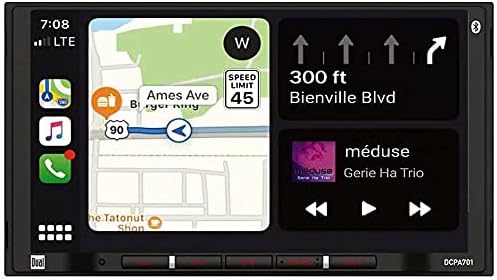
Image: The DCPA701 display showing the integrated Apple CarPlay or Android Auto interface, featuring navigation and media controls.
- Connexion: Connect your smartphone to the unit's USB port using a high-quality USB cable.
- Activation : The unit should automatically detect and launch CarPlay or Android Auto. Follow any on-screen prompts on both the unit and your phone.
- Contrôle vocal : Use Siri (CarPlay) or Google Assistant (Android Auto) for voice commands by pressing the voice button on the unit or steering wheel controls (if connected).
4.6 Paramètres audio
Access the audio settings menu to customize your sound experience.
- Equalizer: Adjust the 10-band graphic equalizer to fine-tune frequency response.
- Préréglages d'égaliseur : Select from 7 pre-defined EQ curves (e.g., Pop, Rock, Jazz) for quick sound adjustments.
- Fader / Balance: Adjust the audio distribution between front/rear and left/right speakers.
- Contrôle du caisson de basses : If a subwoofer is connected via the preamp outputs, you can adjust its level and crossover frequency.
Télécommande 4.7
The DCPA701 may come with a remote control for convenient operation of basic functions.

Image: The remote control for the DCPA701, providing access to common functions without touching the screen.
- Pouvoir: Allumez ou éteignez l'appareil.
- Volume: Réglez le niveau du volume principal.
- Source: Basculer entre différentes sources audio/vidéo.
- Track/Tune: Skip tracks or tune radio stations.
- Muet: Couper temporairement le son.
5. Entretien
Proper maintenance ensures the longevity and optimal performance of your DCPA701 receiver.
- Nettoyage de l'écran : Utilisez un chiffon doux non pelucheux pour essuyer délicatement l'écran tactile. Pour les traces tenaces, frottez légèrement.ampet le chiffon avec de l'eau. Do not use harsh chemicals, abrasive cleaners, or alcohol-based solutions as they can damage the screen coating.
- Nettoyage général : Wipe the unit's exterior with a soft, dry cloth to remove dust.
- Évitez les liquides : Prevent liquids from entering the unit, as this can cause electrical shorts and damage.
- Température: Do not expose the unit to extreme temperatures. High heat can affect electronic components and the display.
6. Dépannage
If you encounter issues with your DCPA701, refer to the following common problems and solutions before contacting support.
| Problème | Cause possible | Solution |
|---|---|---|
| Pas de courant | Fusible grillé ; câblage incorrect ; contact coupé. | Check the unit's fuse and vehicle's fuse box. Verify power and ground connections. Ensure vehicle ignition is on. |
| Pas de son | Volume trop faible ; mode muet activé ; câblage des haut-parleurs incorrect ; amplifier issues (if external). | Augmentez le volume. Vérifiez si la fonction muet est activée. Vérifiez les connexions des haut-parleurs. Vérifiez les connexions externes. ampstatut de lifier. |
| Bluetooth ne se connecte pas | Bluetooth not enabled on phone; unit not in pairing mode; interference. | Ensure phone's Bluetooth is on and discoverable. Put unit in pairing mode. Delete previous pairings and try again. Move closer to the unit. |
| Apple CarPlay / Android Auto ne se lance pas | Faulty USB cable; phone not compatible; phone software outdated; app permissions. | Use a high-quality, certified USB cable. Ensure your phone's OS is up to date. Check app permissions on your phone. Restart both phone and unit. |
| Mauvaise réception radio | Antenna not connected; damaged antenna; weak signal area. | Check antenna connection. Inspect antenna for damage. Try a different location. |
| L'écran tactile ne répond pas | Temporary software glitch; screen calibration issue. | Effectuez une réinitialisation logicielle (reportez-vous au manuel pour localiser le bouton de réinitialisation, généralement un petit trou). Si le problème persiste, contactez l'assistance. |
7. Spécifications
Technical specifications for the Dual Electronics DCPA701 digital media receiver.
- Afficher: 7-inch Full-Color Capacitive Touchscreen, Digital LED Backlit TFT Display
- Résolution de l'écran : 800 x 480 pixels
- Puissance de sortie : Peak: 60 Watts x 4 channels (240 Watts total)
- Tuner: AM/FM with 18 FM / 12 AM presets
- Bluetooth : Built-in (HFP, A2DP, AVRCP, PBAP profile(s pris en charge)
- Entrée USB: Rear USB with 1.5 Amp charging, supports FLAC/MP3/WMA/AAC/HE-AAC playback
- Intégration Smartphone : Apple CarPlay, Android Auto
- Traitement audio: 10-band EQ, 7 EQ Presets
- Préamp Résultats : Three pairs of 4-volt RCA (Front, Rear, Subwoofer)
- Entrées : Rear RCA A/V input, Rear Camera input (RCA)
- Commande au volant : Ready (adapter sold separately)
- Dimensions (paquet) : Environ 9 x 8 x 7 pouces
- Poids (article) : Environ 10 livres
- Numéro de modèle : DCPA701
- Fabricant: DUAL ELECTRONICS AUDIO
8. Informations sur la garantie
Dual Electronics products are designed and manufactured to high quality standards. This product is covered by a limited warranty provided by the manufacturer. Please refer to the warranty card included with your product or visit the official Dual Electronics website for detailed terms and conditions, including warranty period, coverage, and claim procedures. Keep your purchase receipt as proof of purchase.
9. Assistance clientèle
If you require further assistance or have questions not covered in this manual, please contact Dual Electronics customer support.
- Support en ligne: Visit the official Dual Electronics webSite regroupant les FAQ, l'enregistrement des produits et les ressources d'assistance.
- Coordonnées: Refer to the contact section on the Dual Electronics website pour obtenir des numéros de téléphone ou une assistance par courriel.
- Before Contacting: Please have your product model number (DCPA701) and purchase information ready.