
1. Introduction
Merci pour votre achatasing the REMAX RP-W16 Wireless Fast Charger. This device is designed to provide convenient and efficient wireless charging for compatible mobile phones. Please read this manual carefully before use to ensure proper operation and to maximize the lifespan of your product.
2. Informations importantes sur la sécurité
- N’exposez pas le chargeur à l’eau, à l’humidité ou à des températures extrêmes.
- Évitez de faire tomber le chargeur ou de le soumettre à des chocs violents.
- Ne démontez pas, ne modifiez pas et n'essayez pas de réparer l'appareil vous-même. Cela annulera la garantie et pourrait causer des dommages ou des blessures.
- Keep the charger away from medical implants (e.g., pacemakers) to prevent potential interference.
- Use only certified power adapters (not included) that meet the input voltage requirements (e.g., 9V) to ensure safe and efficient charging.
- Do not place metal objects, credit cards, or other foreign materials between the charging pad and your device, as this may interfere with charging or cause overheating.
- Ensure the charging pad is placed on a stable, flat surface.
3. Contenu du colis
Veuillez vérifier que le colis contient les éléments suivants :
- REMAX RP-W16 Wireless Fast Charger
- USB Charging Cable (Type-C or Micro-USB, depending on model variant)
- Manuel de l'utilisateur (ce document)
Note: A power adapter is not included and must be purchased separately. For fast charging, a Quick Charge (QC) 2.0/3.0 or Power Delivery (PD) compatible adapter is recommended.
4. Produit terminéview
The REMAX RP-W16 is a compact and stylish wireless charging pad designed for convenience and fast charging. Its features include:
- Puissance de sortie élevée de 10 W : Provides efficient and fast wireless charging.
- Upgraded Pure Copper Coil: Enhances charging speed by up to 50% for quicker power delivery.
- Optimal Charging Distance: Supports wireless charging through cases with a sensing distance of 3-8mm.
- Design durable et élégant : Features an aluminum base with a fabric surface, offering a simple yet elegant aesthetic.
- Compact et portable : Palm-sized design makes it easy to carry.
- Anti-Skid Foot Pads: Four non-slip pads on the base prevent the charger from sliding, even during phone vibrations.
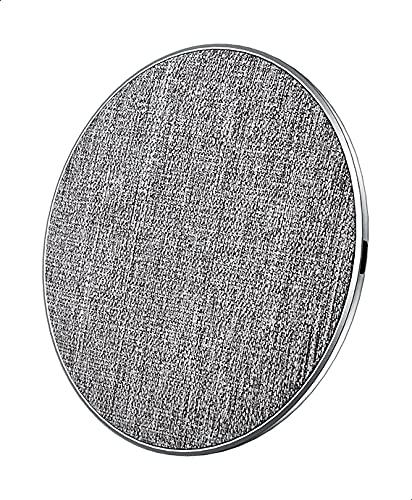
Figure 1 : REMAX RP-W16 Wireless Fast Charger in use. The image displays the circular charging pad with a fabric top, an aluminum base, and a smartphone placed on it, indicating active charging. The charger's compact size and anti-skid pads are visible.
5. Instructions de configuration
- Connectez le câble d'alimentation : Insert one end of the provided USB charging cable into the charging port on the REMAX RP-W16 wireless charger.
- Connectez-vous à l'adaptateur secteur : Insert the other end of the USB cable into a compatible USB power adapter (e.g., a Quick Charge 2.0/3.0 or Power Delivery adapter for fast charging).
- Branchez sur une prise de courant : Plug the power adapter into a wall outlet. The charger's indicator light (if present) may illuminate briefly to confirm it is powered on.
- Placement: Place the wireless charger on a flat, stable surface, ensuring there are no metal objects or foreign materials nearby.
6. Mode d'emploi
- Vérifier la compatibilité : Ensure your mobile phone supports Qi wireless charging.
- Placer l'appareil sur le chargeur : Carefully place your Qi-compatible mobile phone directly onto the center of the REMAX RP-W16 wireless charging pad.
- Confirmer la charge : Your phone should display a charging indicator (e.g., a battery icon with a lightning bolt or a charging animation). The charger's indicator light (if present) may also change color or blink to indicate active charging.
- Emplacement optimal : If charging does not begin immediately, slightly adjust the position of your phone on the pad until the charging indicator appears.
- Charging with Case: The charger supports charging through most non-metallic phone cases up to 8mm thick. Remove cases containing metal or magnetic attachments, as these can interfere with wireless charging.
- Chargement terminé : Once your device is fully charged, it will stop drawing power from the wireless charger. You can remove your phone at any time.
7. Maintenance et entretien
- Nettoyage: Disconnect the charger from the power source before cleaning. Use a soft, dry cloth to wipe the surface. Do not use harsh chemicals, cleaning solvents, or strong detergents.
- Stockage: Lorsqu'il n'est pas utilisé, rangez le chargeur dans un endroit frais et sec, à l'abri de la lumière directe du soleil et des températures extrêmes.
- Manutention: Handle the charger with care. Avoid dropping it or placing heavy objects on it.
8. Dépannage
| Problème | Cause possible | Solution |
|---|---|---|
| L'appareil ne se recharge pas sans fil. |
|
|
| Chargement lent. |
|
|
| Charger indicator light blinking or off. |
|
|
9. Spécifications
| Modèle | RP-W16 |
| Marque | REMAX |
| Vol d'entréetage | 9V (Requires compatible power adapter) |
| Puissance de sortie | 10 W |
| Ports de charge | 1 (Sans fil) |
| Distance de transmission | 3-8 mm |
| Appareils compatibles | Téléphones cellulaires (compatibles Qi) |
| Caractéristiques spéciales | Chargement rapide |
| Conformité aux normes | CE |
| Type de montage | Desktop / Surface Placement |
| Matériel | Aluminum base, Fabric surface |
| Origine | Fabriqué en Chine |
10. Garantie et support client
REMAX products are designed and manufactured to the highest quality standards. For information regarding warranty coverage, please refer to the warranty card included with your purchase or visit the official REMAX website.
If you encounter any issues or have questions about your REMAX RP-W16 Wireless Fast Charger, please contact REMAX customer support through their official channels. Please have your product model number (RP-W16) and proof of purchase ready when contacting support.


