
1. Introduction
This manual provides detailed instructions for the installation, operation, and maintenance of your CAMWAY Battery Monitor with Shunt. This device is designed to accurately measure and display the voltage, current, power, real capacity, and remaining time of various battery types, including Lithium, Lithium Iron Phosphate, Lead Acid, and Nickel Hydrogen batteries, within an 8V-120V range and up to 500A.
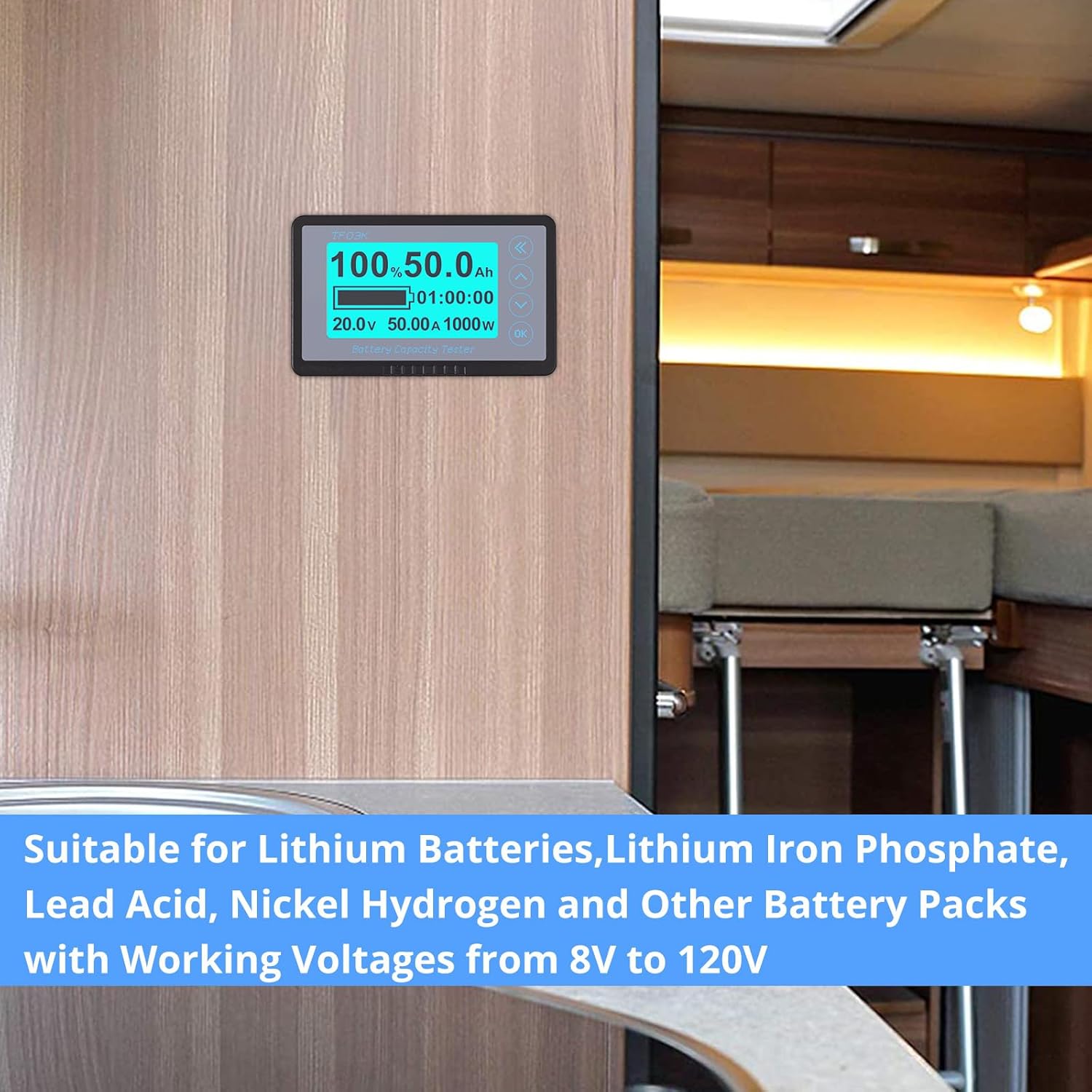
The monitor is suitable for a wide range of applications such as RVs, golf carts, motorhomes, electric vehicles, and other equipment requiring precise battery status monitoring.
2. Contenu de la boîte
Veuillez vérifier que tous les composants sont présents dans l'emballage :
- Unité d'affichage du moniteur de batterie
- 500A shunt/sampler
- Dérivation/Sampler Holder (Plastic insulation fixing bracket)
- 5-meter (16.4 ft) Shielded Wire
- Manuel d'utilisation

3. caractéristiques du produit
- Vol largetage et plage de courant : Supports batteries from 8V to 120V, with current measurement up to 500A. Compatible with Lithium, Lithium Iron Phosphate, Lead Acid, and Nickel Hydrogen battery types.
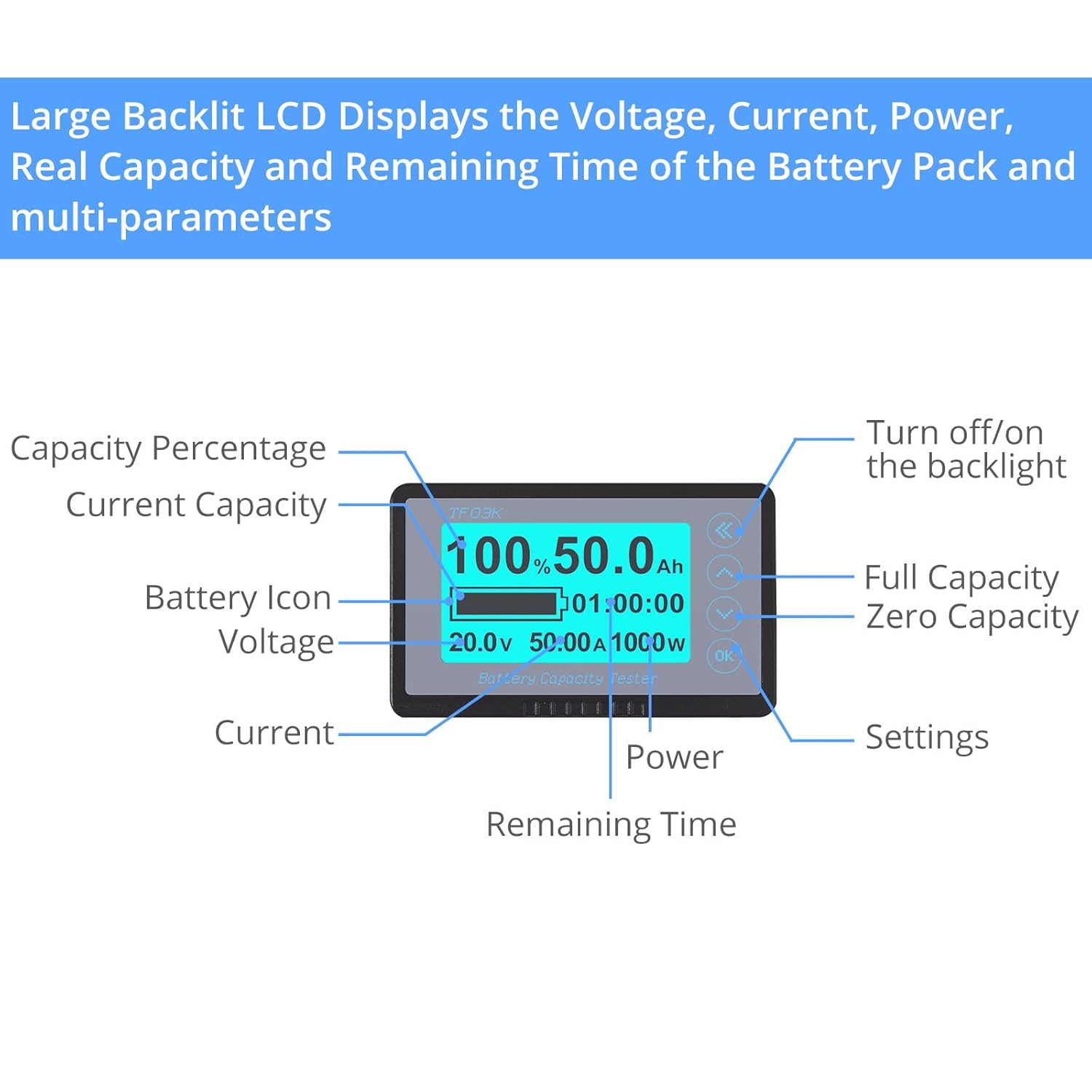
- Surveillance complète : Accurately detects Voltage, Current, Power, Real Capacity (Full capacity voltage, Zero capacity voltage), and Remaining Time of the battery.
- Extended Shielded Wire: Includes a 5-meter (16.4 ft) shielded cable for convenient remote installation and improved signal stability, reducing interference.
- Conception imperméable à l'eau: Allows for installation in various environments, both indoors and outdoors.
- Alarme de faible capacité : Features a visual (flashing percentage and battery symbol) and audible (buzzer) alarm when battery capacity falls below a set threshold.
- Stockage des données : Automatically stores the last tested data when the system is powered off, ensuring continuity of information.
- Backlit Large LCD: Displays multiple electronic parameters clearly. The backlight can be activated with a soft touch and can be turned on/off as needed.
4. Configuration et installation
Une installation correcte est essentielle pour des mesures précises et un fonctionnement sûr. Suivez attentivement ces étapes :
4.1 Schéma de câblage
4.2 étapes d'installation
- Mount the Shunt: Securely mount the 500A shunt using the provided holder in a dry, accessible location close to the battery. Ensure good ventilation.
- Connect Battery Negative to Shunt: Connect the negative terminal of your battery (B-) to the 'B-' terminal on the shunt.
- Connect Load/Charger Negative to Shunt: Connect the negative terminal of your load (P-) and charger (C-) to the 'P-' terminal on the shunt. All current flowing into or out of the battery must pass through the shunt for accurate measurement.
- Connect Battery Positive: Connect the positive terminal of your battery (B+) to the positive side of your load and charger.
- Connect Monitor to Shunt: Use the provided 5-meter shielded wire to connect the display unit to the shunt. Ensure the connectors are firmly seated.
- Mettez le moniteur sous tension : The monitor typically draws power from the battery via the shielded cable connection to the shunt. Verify the display powers on after all connections are made.
Important: Ensure all connections are tight and secure to prevent resistance and inaccurate readings. Incorrect wiring can damage the device or your battery system.
5. Mode d'emploi
The CAMWAY Battery Monitor provides real-time data on your battery's status. Familiarize yourself with the display and controls.
5.1 Affichage terminéview
5.2 Fonctionnement de base
- Mise sous tension : The monitor will power on automatically once correctly wired to the battery.
- Contrôle du rétroéclairage : Briefly press the 'Left Arrow' button to cycle through backlight brightness levels or turn it off.
- View Paramètres: The main screen displays key parameters. Use the 'Up' and 'Down' arrow buttons to switch between different display modes or parameters if available.
- Paramètres d'accès : Press the 'OK' button to enter the settings menu. Use the arrow buttons to navigate and 'OK' to select or confirm.
5.3 Setting Battery Parameters
To ensure accurate readings, you must configure the monitor with your battery's specifications, particularly its total capacity (Ah).
- Entrez les paramètres : Appuyez sur le bouton « OK ».
- Navigate to Capacity Setting: Use the 'Up'/'Down' arrows to find the 'Capacity' or 'Ah' setting.
- Adjust Capacity: Use the 'Up'/'Down' arrows to set the total Amp-hour (Ah) capacity of your battery. Confirm with 'OK'.
- Définir le volumetage Alarms (Optional): You can also set high and low voltage alarm thresholds within the settings menu.
5.4 Low Capacity Alarm
When the battery capacity drops below the preset low capacity alarm threshold, the display's percentage and battery symbol will flash, and an audible buzzer will sound (10 times per second) to alert you.
6. Entretien
To ensure the longevity and accurate performance of your CAMWAY Battery Monitor, follow these maintenance guidelines:
- Garder propre: Regularly wipe the display screen and unit with a soft, dry cloth. Avoid abrasive cleaners or solvents.
- Vérifier les connexions : Periodically inspect all wiring connections, especially at the shunt, to ensure they remain tight and free from corrosion.
- Protection de l'environnement : Although waterproof, avoid prolonged submersion or exposure to extreme temperatures beyond the specified operating range.
- Mises à jour logicielles : Vérifiez le fabricant website for any available firmware updates, though this device typically does not require user-performed updates.
7. Dépannage
If you encounter issues with your battery monitor, refer to the following common problems and solutions:
| Problème | Cause possible | Solution |
|---|---|---|
| Le moniteur ne s'allume pas. | Incorrect wiring; loose connection; no power from battery. | Verify all wiring according to the diagram (Section 4.1). Check for loose connections at the shunt and monitor. Ensure the battery has sufficient charge. |
| Lectures inexactes (Voltage, Current, Capacity). | Incorrect battery capacity setting; shunt not properly installed; high resistance in wiring. | Ensure the correct Ah capacity is set in the monitor's settings (Section 5.3). Confirm all current flows through the shunt. Check for tight, clean connections. |
| Low capacity alarm triggers prematurely or not at all. | Incorrect alarm threshold setting. | Adjust the low capacity alarm threshold in the settings menu to match your desired level. |
| L'écran est faiblement lumineux ou clignote. | Backlight setting; low battery voltage. | Adjust backlight brightness (Section 5.2). Check battery voltage; if low, charge the battery. |
If the problem persists after attempting these solutions, please contact CAMWAY customer support.
8. Spécifications
| Fonctionnalité | Spécification |
|---|---|
| Marque | CAMWAY |
| Modèle | B092HLVT35 |
| Source d'énergie | Alimenté par batterie, électrique |
| Couleur | Noir |
| Poids de l'article | 75 grammes (2.65 onces) |
| Min. Volume de fonctionnementtage | 8 volts |
| Max. Volume de fonctionnementtage | 120 volts |
| Max. Current Capacity | 500 Amps (with 500A shunt) |
| Type de mesure | Ampèremètre, voltmètre |
| Longueur du fil blindé | 5 mètres (pieds 16.4) |
| Indice de température supérieur | 35 degrés Celsius |
| Spécification satisfaite | CEI 61010-1, EN 61010-1 |
| Dimensions du colis | 6.02 x 5.91 x 2.13 pouces |

9. Produit terminéview Vidéo
Regardez cette vidéo officielle pour un aperçu visuel.view of the CAMWAY Battery Monitor and its features.
10. Garantie et assistance
For warranty information, technical support, or any inquiries regarding your CAMWAY Battery Monitor, please contact CAMWAY customer service directly. Refer to the contact information provided with your purchase or visit the official CAMWAY website.
Veuillez conserver votre preuve d'achat pour les réclamations au titre de la garantie.