
1. Introduction
The DANOPLUS KIB-006 is a 4-channel K-type thermocouple thermometer data logger designed for precise temperature measurement and recording. This device allows for simultaneous monitoring of up to four temperature points, storing data directly onto an SD card for easy retrieval and analysis without requiring specialized software. It features a large LCD with backlight for clear readings, programmable high/low limit alarms, and various measurement functions suitable for a wide range of industrial, laboratory, and environmental applications.

Image: The DANOPLUS KIB-006 thermometer with four K-type thermocouple probes connected, showing its digital display and an 8GB SD card.
2. Contenu du colis
Veuillez vérifier le contenu du colis dès réception afin de vous assurer que tous les articles sont présents et non endommagés :
- 1 x DANOPLUS KIB-006 4-Channel K-Type Thermometer SD Logger
- 2 x K-Type Thermocouple Probes
- Carte SD 1 x 8GB
- 4 piles AA
- 1 x English Operation Manual (this document)
- Emballage standard d'usine

Image: The DANOPLUS KIB-006 thermometer, two K-type thermocouples, an 8GB SD card, and batteries, representing the included items.
3. Principales caractéristiques
- 4-Channel Measurement: Simultaneously displays temperature readings from up to four K-type thermocouple probes.
- SD Card Data Logging: Records unlimited temperature data directly to an included 8GB SD card in TXT format, eliminating the need for software.
- Programmable High/Low Limit Alarm: Features an audible buzzer and LED indicator that activate when temperature thresholds are exceeded.
- Large plage de mesure : Capable of measuring temperatures from -200 to 1370°C (-328 to 2498°F) for the main unit.
- Grand écran LCD rétroéclairé : Provides clear temperature readings and operational status, with an adjustable backlight for low-light conditions.
- MAX/MIN/HOLD Function: Permet aux utilisateurs de view maximum, minimum, and hold current measured values on the screen.
- Unités commutables : Passez facilement du Celsius (°C) au Fahrenheit (°F).
- Differential Temperature (T1-T2): Calculates and displays the temperature difference between two selected channels.
- Arrêt automatique : Permet d'économiser la batterie en s'éteignant automatiquement après 20 minutes d'inactivité.

Image: Visual representation of the thermometer's features, including its 4-channel capability, SD card data logging, wide measurement range, alarm, unit switching, and data hold.
4. Guide de configuration
4.1. Installation de la batterie
- Repérez le couvercle du compartiment à piles à l'arrière de l'appareil.
- Faites glisser le couvercle pour l'ouvrir.
- Insérez 4 piles AA en respectant la polarité (+/-).
- Fermez soigneusement le couvercle du compartiment à piles.
4.2. Insertion de la carte SD
- Repérez l'emplacement pour carte SD sur le côté de l'appareil.
- Gently insert the provided 8GB SD card into the slot until it clicks into place. Ensure the card is oriented correctly.
- To remove, press the SD card inward until it springs out.

Image: Demonstrates the insertion of an SD card into the data logger for data storage.
4.3. Connexion du thermocouple
- Identify the four K-type thermocouple input ports on the top of the device, labeled CH1, CH2, CH3, and CH4.
- Connect the K-type thermocouple probes to the desired channels. Ensure the positive (+) and negative (-) terminals of the probe match the corresponding markings on the device's input ports.
- Gently push the probe connectors firmly into the ports until they are secure.
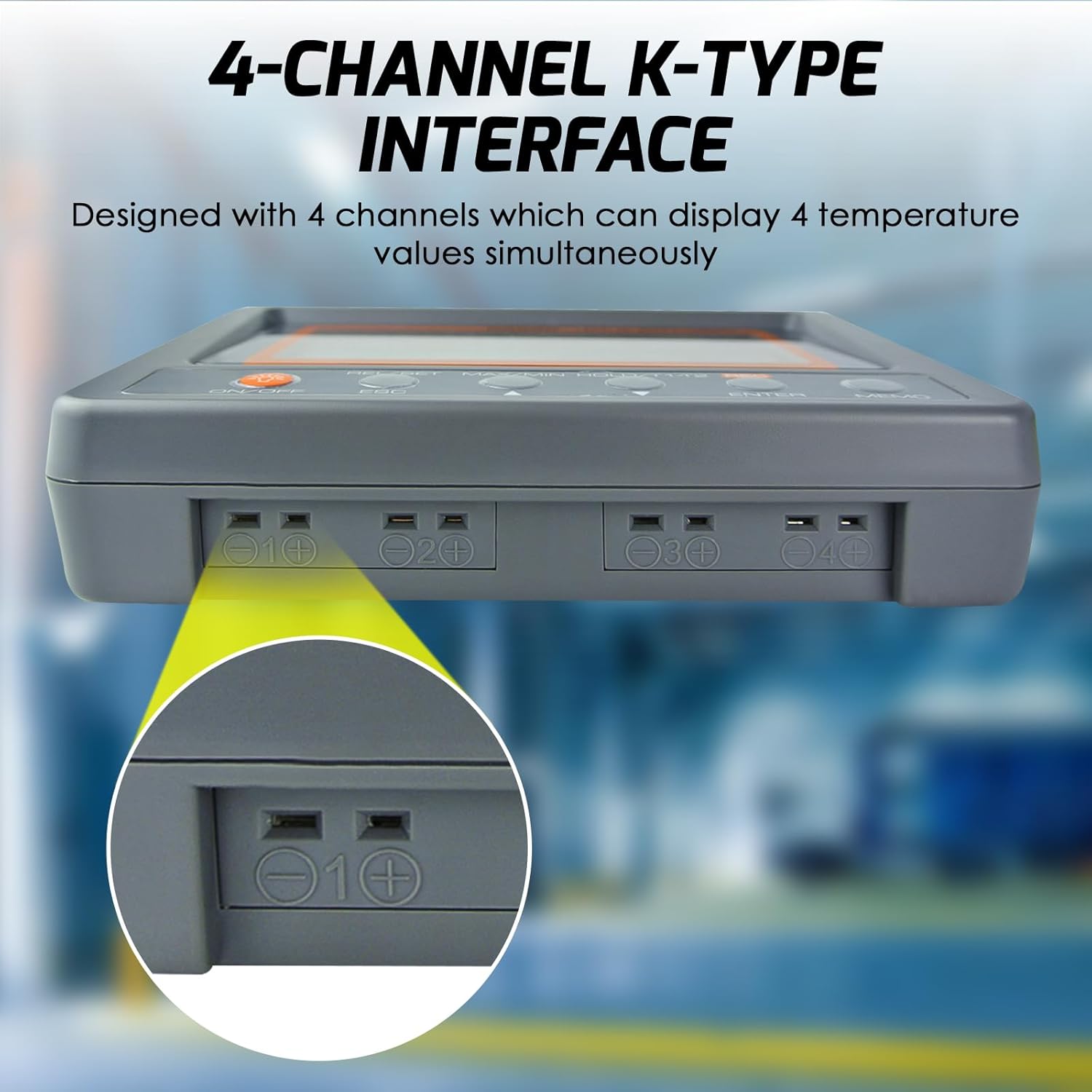
Image: Illustrates the connection of a K-type thermocouple probe into one of the four input channels on the device.
5. Fonctionnement
5.1. Marche/Arrêt
- Appuyez sur le MARCHE/ARRÊT bouton pour allumer l'appareil.
- Pour mettre hors tension, maintenez la touche MARCHE/ARRÊT pendant environ 3 secondes.
5.2. Contrôle du rétroéclairage
- Appuyez sur le MARCHE/ARRÊT button briefly to toggle the LCD backlight on or off.
5.3. Température de mesure
- Once powered on and thermocouples are connected, the device will immediately begin displaying real-time temperature readings for each active channel.
5.4. MAX/MIN/HOLD Function
Cette fonction vous permet de view the maximum, minimum, and current held values during a measurement session.
- Appuyez sur le MAX/MIN/MAINTIEN button once to display the maximum (MAX) temperature recorded.
- Appuyez sur le MAX/MIN/MAINTIEN button again to display the minimum (MIN) temperature recorded.
- Appuyez sur le MAX/MIN/MAINTIEN button a third time to hold the current readings (HOLD).
- Appuyez sur le MAX/MIN/MAINTIEN button a fourth time to return to real-time measurement mode.

Video: Demonstration of the MAX/MIN/HOLD function on the DANOPLUS KIB-006 thermometer.
5.5. Data Logging to SD Card
The device records temperature data to the SD card in a simple TXT file format, which can be opened with any text editor or spreadsheet software.
- Pour démarrer l'enregistrement, appuyez sur la touche REC button. The 'REC' indicator will appear on the screen.
- Pour arrêter l'enregistrement, appuyez sur le REC button again. The 'REC' indicator will disappear.
- Le sampling rate for data logging can be programmed (refer to advanced settings in the full manual for details).
5.6. Alarm Function (High/Low Limit)
The thermometer features programmable high and low temperature alarms.
- When a measured temperature exceeds the set high limit or falls below the set low limit, the device will activate an audible buzzer and an LED indicator.
- Refer to the full manual for instructions on how to set specific high and low alarm thresholds.

Image: The thermometer indicating an active alarm with visual and auditory cues.
5.7. Changement d'unité (°C/°F)
- Appuyez sur le ° C / ° F button (often combined with another function button, refer to button labels) to toggle between Celsius and Fahrenheit temperature units.
5.8. Differential Temperature (T1-T2)
- Appuyez sur le T1-T2 button to display the temperature difference between channel 1 and channel 2.
6. Applications
The DANOPLUS KIB-006 is suitable for a variety of temperature monitoring tasks, including but not limited to:
- Systèmes CVC : Monitoring air conditioning and heating system performance.
- Procédés industriels : Temperature control in manufacturing, machinery, and equipment.
- Utilisation en laboratoire : Research, experiments, and quality control requiring precise temperature data.
- Food Service: Monitoring temperatures in ovens, refrigerators, and freezers.
- Aquariums: Maintaining stable water temperatures for aquatic life.
- Refrigeration Equipment: Performance testing and maintenance of cooling units.

Image : Examples of diverse environments where the thermometer can be effectively utilized.
7. Spécifications
| Paramètre | Valeur |
|---|---|
| Thermometer Main Unit Temp. Range | -200 à 1370°C (-328 à 2498°F) |
| Résolution | 0.1°C, 0.1°F |
| Accuracy (under 18-28°C ambient temp.) | ±(0.3 % de lecture + 1 °C) |
| K Bead Type Thermocouple Temp. Range | -50 à 200°C (-58 à 392°F) |
| SampTaux de ling | Programmable from 1 second up |
| Taille LCD (HxL) | 47 x 104 mm (1.85 x 4.1 pouces) |
| Température de fonctionnement | 0 à 50°C |
| % d'humidité relative de fonctionnement | Humidité <80% |
| Température de stockage | -20 à 50°C |
| % HR de stockage | Humidité <90% |
| Dimensions (L x l x T) | 152 x 100 x 39 mm |
| Poids | 300g (0.66 livres) |
| Alimentation électrique | 4 x AA Batteries (included) or 9V adaptor (not included) |
| Technologie de connectivité | Carte SD |
| Type d'affichage | Écran LCD |
| Matériau extérieur | Plastique |
| Numéro de modèle | KIB-006 |
| Code UPC | 619317589858 |

Image: Detailed specifications and physical dimensions of the thermometer.
8. Entretien
- Nettoyage: Essuyez l'appareil avec un chiffon doux et sec. N'utilisez pas de nettoyants abrasifs ni de solvants.
- Remplacement de la batterie : Replace all 4 AA batteries when the low battery indicator appears on the display to ensure accurate readings and proper operation.
- Stockage: En cas de non-utilisation prolongée, retirez les piles et rangez l'appareil dans un endroit frais et sec, à l'abri de la lumière directe du soleil et des températures extrêmes.
- Thermocouple Care: Handle thermocouple probes carefully. Avoid bending or kinking the wires excessively, as this can affect accuracy. Replace damaged probes.
9. Dépannage
| Problème | Cause possible | Solution |
|---|---|---|
| L'appareil ne s'allume pas | Piles mortes ou mal installées | Vérifiez la polarité des piles ; remplacez-les par des piles AA neuves. |
| No temperature reading / "----" on display | Thermocouple not connected or faulty | Ensure thermocouple is securely connected to the correct channel. Test with another probe if available. |
| Lectures inexactes | Damaged thermocouple; incorrect probe type; environmental interference | Inspect probes for damage. Ensure K-type probes are used. Avoid strong electromagnetic fields. |
| Data not saving to SD card | SD card full or faulty; card not inserted correctly; recording not initiated | Check SD card capacity. Reinsert SD card. Ensure 'REC' indicator is active. Try a different SD card. |
| L'alarme ne fonctionne pas | Alarm limits not set; alarm function disabled | Verify alarm settings and ensure they are enabled. |
10. Garantie et assistance
The DANOPLUS KIB-006 comes with a standard manufacturer's warranty. For specific warranty details, please refer to the documentation included with your purchase or contact DANOPLUS customer support.
For technical assistance, troubleshooting beyond this manual, or to inquire about replacement parts, please contact your retailer or the manufacturer directly. Contact information can typically be found on the product packaging or the official DANOPLUS website.