
1. Introduction
The Hantek HDG6202B is a high-performance 2-channel arbitrary waveform generator designed for generating various electrical waveforms. It features a 200MHz frequency range, 1.25 GSa/s sampling rate, and 16-bit vertical resolution, making it suitable for a wide range of testing and measurement applications in electronics, research, and education. This manual provides essential information for the safe and effective operation of your device.
2. Consignes de sécurité
To ensure safe operation and prevent damage to the device or injury to personnel, observe the following safety precautions:
- Always operate the device in a dry, well-ventilated environment. Avoid exposure to moisture or extreme temperatures.
- Ensure the device is properly grounded using the provided power cable. Do not defeat the grounding feature.
- N'ouvrez pas l'appareil casing. L'appareil ne contient aucune pièce réparable par l'utilisateur. Toute réparation doit être effectuée par un technicien qualifié.
- Use only the power adapter and accessories supplied or approved by Hantek.
- Disconnect the power cord before cleaning the device. Use a soft, dry cloth for cleaning.
- Avoid applying excessive force to buttons, connectors, or the display.
3. Contenu du colis
Verify that all items listed below are present in the package upon unboxing:
- Hantek HDG6202B Arbitrary Waveform Generator Unit
- BNC to BNC Cable (x2)
- US Power Cable (x1)
- Câble USB (x1)
- User Manual (this document or similar printed guide)

Figure 3.1: Hantek HDG6202B with standard accessories.
4. Installation
Follow these steps to set up your Hantek HDG6202B:
- Placement: Place the generator on a stable, flat surface with adequate ventilation around the unit. Ensure there is enough space for cable connections.
- Connexion électrique : Connect the supplied US power cable to the power input port on the rear panel of the HDG6202B. Plug the other end into a grounded AC power outlet.
- Connexions de sortie: Connect BNC cables from the CH1 and/or CH2 output ports on the front panel to your test circuit or measurement device (e.g., oscilloscope).
- Connexion USB (en option) : If you plan to control the device via a computer or transfer arbitrary waveforms, connect the supplied USB cable from the USB port on the generator to your computer.
- Mise sous tension : Press the power button, typically located on the front or rear panel, to turn on the device. The LCD screen should illuminate.
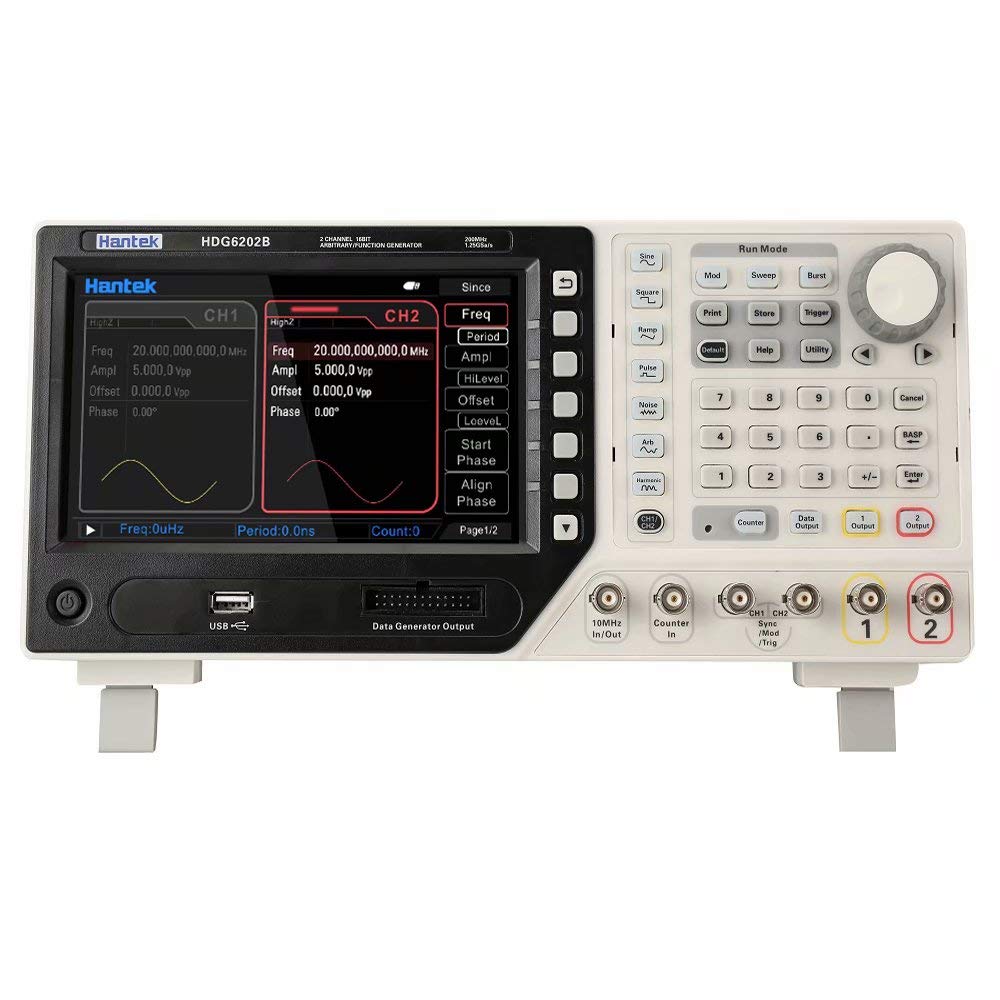
Figure 4.1: Front panel of the HDG6202B, illustrating display and controls.
5. Mode d'emploi
This section outlines basic operation of the Hantek HDG6202B. Refer to the full user manual for advanced functions.
5.1 Génération de formes d'onde de base
- Sélectionnez la chaîne : Utilisez les boutons CH1 ou CH2 du panneau avant pour sélectionner le canal de sortie souhaité.
- Choose Waveform Type: Appuyez sur le Forme d'onde button and use the navigation keys or rotary knob to select a standard waveform (e.g., Sine, Square, Triangle, Pulse, Noise, Arbitrary).
- Définir la fréquence : Appuyez sur le Fréquence button. Use the numeric keypad or rotary knob to enter the desired frequency value. Press the unit button (e.g., MHz, kHz) to confirm.
- Ajuster Amplitude : Appuyez sur le Amplatitude button. Enter the desired peak-to-peak amplitude value and select the unit (e.g., Vpp, mVpp).
- Définir le décalage : Appuyez sur le Compenser button. Enter the desired DC offset voltage.
- Activer la sortie : Appuyez sur le Sortie ON / OFF button for the selected channel to enable the waveform output. The button will typically illuminate when active.
5.2 fonctions avancées
- Modulation: The device supports various modulation types (AM, FM, PM, FSK, ASK, PSK). Access these functions via the Modulation menu to configure parameters such as modulation type, source, depth, and frequency.
- Balayage: Generate frequency sweeps by configuring start frequency, stop frequency, sweep time, and sweep type (linear/logarithmic) in the Balayer menu.
- Éclatement: Create burst waveforms with a specified number of cycles, burst period, and trigger source using the Éclatement fonction.
- Formes d'onde arbitraires : Load custom waveforms from USB or create them using the device's interface. The HDG6202B supports up to 64 Mpts waveform length.
- Compteur de fréquence : Utilize the built-in frequency counter to measure external signals.
6. Entretien
Proper maintenance ensures the longevity and accuracy of your Hantek HDG6202B.
- Nettoyage: Regularly clean the exterior of the device with a soft, dry, lint-free cloth. For stubborn dirt, dampen the cloth slightly with water. Do not use abrasive cleaners, solvents, or harsh chemicals. Ensure no liquid enters the device.
- Stockage: When not in use for extended periods, store the generator in a clean, dry environment, away from direct sunlight, dust, and extreme temperatures.
- Mises à jour du micrologiciel : Check the official Hantek website periodically for firmware updates. Firmware updates can improve performance, add features, or resolve known issues. Follow the instructions provided by Hantek carefully when performing updates.
- Étalonnage: Pour les applications critiques, un étalonnage périodique par un centre de service qualifié est recommandé afin de maintenir la précision des mesures.
7. Dépannage
This section addresses common issues you might encounter. For problems not listed here, contact Hantek support.
| Problème | Cause possible | Solution |
|---|---|---|
| L'appareil ne s'allume pas. | Câble d'alimentation non connecté ou prise défectueuse. | Vérifiez que le câble d'alimentation est bien branché. Testez la prise avec un autre appareil. |
| Aucun signal audio n'est affiché. | Output not enabled, incorrect settings, or faulty cable. | Appuyez sur le Sortie ON / OFF button. Verify frequency, amplitude, and offset settings. Check BNC cables for proper connection and integrity. |
| Waveform appears distorted or incorrect. | Incorrect waveform parameters, impedance mismatch, or external interference. | Double-check all waveform settings. Ensure the output impedance setting matches the load. Minimize external noise sources. |
| Settings (e.g., output impedance, power levels) are not saved after power cycling. | Potential firmware issue. | Check the Hantek website for the latest firmware updates for the HDG6202B model. Updating the firmware may resolve this issue. |
| Connexion USB non reconnue par l'ordinateur. | Missing drivers or faulty USB cable/port. | Install the necessary drivers from the Hantek website. Try a different USB cable or port on your computer. |
8. Spécifications
Key technical specifications for the Hantek HDG6202B Arbitrary Waveform Generator:
| Fonctionnalité | Spécification |
|---|---|
| Chaînes | 2 |
| Résolution verticale | 16 bits |
| SampTaux de ling | 1.25 GSa/s |
| Sine Wave Frequency | 1 uHz ~ 200 MHz |
| Square Wave Frequency | 1 uHz ~ 60 MHz |
| Harmonic Wave Frequency | 1 uHz ~ 100 MHz |
| Triangle Wave Frequency | 1 uHz ~ 5 MHz |
| Arbitrary Waveform Frequency | 1 uHz ~ 50 MHz |
| Longueur de la forme d'onde | Jusqu'à 64 Mpts |
| Afficher | 7.0 inch LCD (800*640 resolution) |
| Fonctions | Modulation, Sweep, Burst, Built-in Frequency Counter |
| Poids de l'article | 6.4 livre (environ 2.9 kg) |
| Dimensions du colis | 15.2 x 9.65 x 7.64 pouces (environ 38.6 x 24.5 x 19.4 cm) |
9. Garantie et assistance
For warranty information, technical support, or service inquiries, please contact Hantek directly through their official webConsultez le site web ou le détaillant auprès duquel vous avez acheté le produit. Conservez votre reçu d'achat comme preuve d'achat pour toute réclamation au titre de la garantie.