
Introduction
Welcome to the user manual for your AWOW Funtab 701 Kids Tablet. This guide provides essential information on setting up, operating, maintaining, and troubleshooting your device to ensure a safe and enjoyable experience for your child. Please read this manual thoroughly before using the tablet.
Contenu du colis
Veuillez vérifier que tous les éléments énumérés ci-dessous sont inclus dans votre colis :
- AWOW Funtab 701 Kids Tablet (7 inch)
- Exclusive Kid-Proof Case
- Stylet actif
- Manuel de l'utilisateur (ce document)
- Adaptateur secteur
Produit terminéview
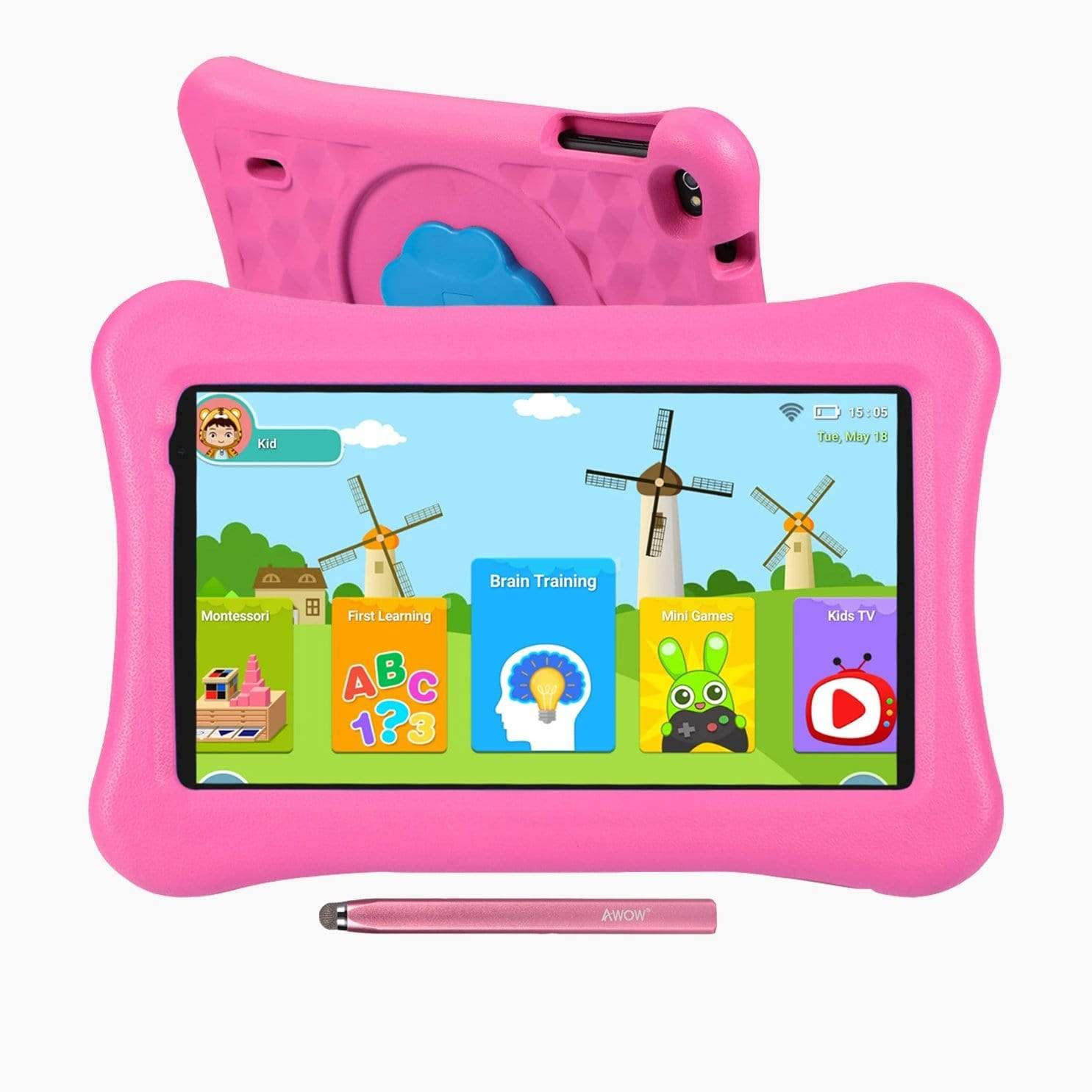
Image: The AWOW Funtab 701 Kids Tablet, shown with its protective pink kid-proof case and the accompanying active pen. The tablet features a 7-inch display.
The AWOW Funtab 701 is a 7-inch kids tablet designed for educational and entertainment purposes. It runs on Android 10 Go, powered by a 1.5GHz Quad-core processor, with 2GB RAM and 16GB ROM. It features a 1024x600 IPS HD display and supports 2.4G Wi-Fi connectivity. The tablet comes with a durable kid-proof case and an active pen for interactive learning and creativity.
Installation
1. Charger la tablette
Before first use, fully charge the tablet. Connect the provided power adapter to the tablet's charging port and plug it into a wall outlet. The charging indicator will typically light up. A full charge may take several hours.
2. Mise sous/hors tension
- Pour allumer : Press and hold the Power button (usually located on the side or top edge) until the screen lights up.
- Pour éteindre : Maintenez le bouton Marche/Arrêt enfoncé jusqu'à ce qu'un menu d'arrêt apparaisse à l'écran. Sélectionnez « Éteindre » et confirmez.
3. Configuration initiale
Lors de la première mise sous tension, la tablette vous guidera tout au long du processus de configuration initiale :
- Sélection de la langue : Choisissez votre langue préférée.
- Connexion Wi-Fi : Select your 2.4G Wi-Fi network from the list and enter the password.
- Compte google: Connectez-vous avec un compte Google existant ou créez-en un. Ceci est nécessaire pour accéder au Google Play Store et aux autres services Google.
- Date et heure : Réglez la date et l'heure correctes, ou laissez le réseau les régler automatiquement.
4. iWawa App and Parental Controls
The AWOW Funtab 701 comes with the iWawa app pre-installed, offering a safe environment for children and robust parental controls.
- Créer Profiles: Open the iWawa app to create individual profiles pour chaque enfant.
- Gestion de contenu : Within the parental control mode, you can hand-pick specific apps, games, videos, and websites that your child can access.
- Contrôle du temps d'écran : Set daily time limits for tablet usage and specific play periods.
- Navigation sécurisée : Ensure children browse only safe and approved websites.
- Réglage des paramètres : Parental control settings can be adjusted as your child grows to tailor content to their age and development.
Utilisation de la tablette
1. Navigation de base
La tablette utilise une interface tactile. Les gestes courants incluent :
- Robinet: Pour sélectionner un élément ou ouvrir une application.
- Glisser: Pour faire défiler les pages ou les menus.
- Pincer: Pour zoomer ou dézoomer sur les images et web pages.
- Appui long: Pour accéder aux menus contextuels ou déplacer les icônes des applications.
2. Using the Active Pen
The included active pen allows for more precise interaction, drawing, and writing. Simply touch the pen to the screen as you would with your finger. No pairing is typically required for basic functionality.
3. Gestion des applications
- Téléchargement d'applications : Access the Google Play Store to download new applications. Ensure parental controls are set to manage app downloads for children.
- Désinstallation des applications : Long-press an app icon on the home screen or in the app drawer, then drag it to the 'Uninstall' option that appears. Alternatively, go to Settings > Apps & notifications > See all apps, select the app, and tap 'Uninstall'.
4. Connexion au Wi-Fi
To connect or reconnect to a Wi-Fi network:
- Aller à Paramètres > Réseau et internet > Wifi.
- Assurez-vous que le Wi-Fi est activé. On.
- Select your desired 2.4G network from the list of available networks.
- Saisissez le mot de passe du réseau si vous y êtes invité, puis appuyez sur Connecter.
Entretien
1. Nettoyage
Pour nettoyer l'écran de la tablette, utilisez un chiffon doux non pelucheux. Pour les traces tenaces, frottez légèrement avec un chiffon doux.ampen the cloth with water or a screen-specific cleaning solution. Avoid harsh chemicals or abrasive materials. The kid-proof case can be cleaned with mild soap and water.
2. Entretien de la batterie
Pour prolonger la durée de vie de la batterie :
- Évitez d’exposer la tablette à des températures extrêmes (chaudes ou froides).
- Ne laissez pas la batterie se décharger complètement fréquemment.
- Utilisez uniquement l'adaptateur secteur fourni pour la charge.
- Reduce screen brightness and close unused apps to conserve power.
3. Stockage
When not in use for extended periods, store the tablet in a cool, dry place away from direct sunlight. Ensure the battery has at least a 50% charge before storing.
Dépannage
If you encounter issues with your AWOW Funtab 701, refer to the solutions below:
- La tablette ne s'allume pas : Ensure the tablet is fully charged. Connect it to the power adapter and wait a few minutes before attempting to power it on again. If it still doesn't turn on, try holding the power button for 10-15 seconds.
- Problèmes de connexion Wi-Fi : Check if your Wi-Fi router is working correctly. Restart both the tablet and the router. Ensure you are connecting to a 2.4G network and have entered the correct password.
- Les applications sont lentes ou plantent : Close unused applications. Clear the cache of problematic apps (Settings > Apps & notifications > App info > Storage & cache > Clear cache). If the issue persists, consider uninstalling and reinstalling the app.
- La batterie se décharge rapidement : The average battery life is approximately 4 hours. To optimize, reduce screen brightness, disable Wi-Fi when not needed, and close background apps. Avoid running multiple demanding applications simultaneously.
- L'écran ne répond pas : Essayez de redémarrer la tablette. Si le problème persiste, assurez-vous que l'écran est propre et exempt de poussière.
Caractéristiques
| Fonctionnalité | Détail |
|---|---|
| Marque | Waouh |
| Nom du modèle | Funtab 701 |
| Système opérateur | Android 10 Go |
| Taille de l'écran | 7 pouces |
| Résolution d'affichage | 1024 x 600 pixels |
| Processeur | 1.5 GHz Quad-core (Qualcomm) |
| BÉLIER | 2 Go |
| Stockage interne | 16 Go |
| Stockage extensible | Micro SD slot (up to 512GB) |
| Caméra arrière | 2.0 MP |
| Caméra frontale | 2.0 MP |
| Connectivité sans fil | 2.4G Wi-Fi (802.11b) |
| Durée de vie moyenne de la batterie | 4 heures |
| Dimensions du produit | 18.5 x 10.5 x 1 cm |
| Poids de l'article | 453.59 g |
Garantie et assistance
For warranty information, please refer to the documentation provided at the time of purchase. This typically includes details on coverage duration and terms. For technical assistance or further inquiries, please contact AWOW customer service through their official support channels.