
Cecotec 05948
Manuel d'utilisation du ventilateur de plafond Cecotec EnergySilence Aero 570
Modèle: 05948
Introduction
Thank you for choosing the Cecotec EnergySilence Aero 570 Ceiling Fan. This manual provides essential information for the safe and efficient operation of your new ceiling fan. Please read it thoroughly before installation and use, and keep it for future reference.
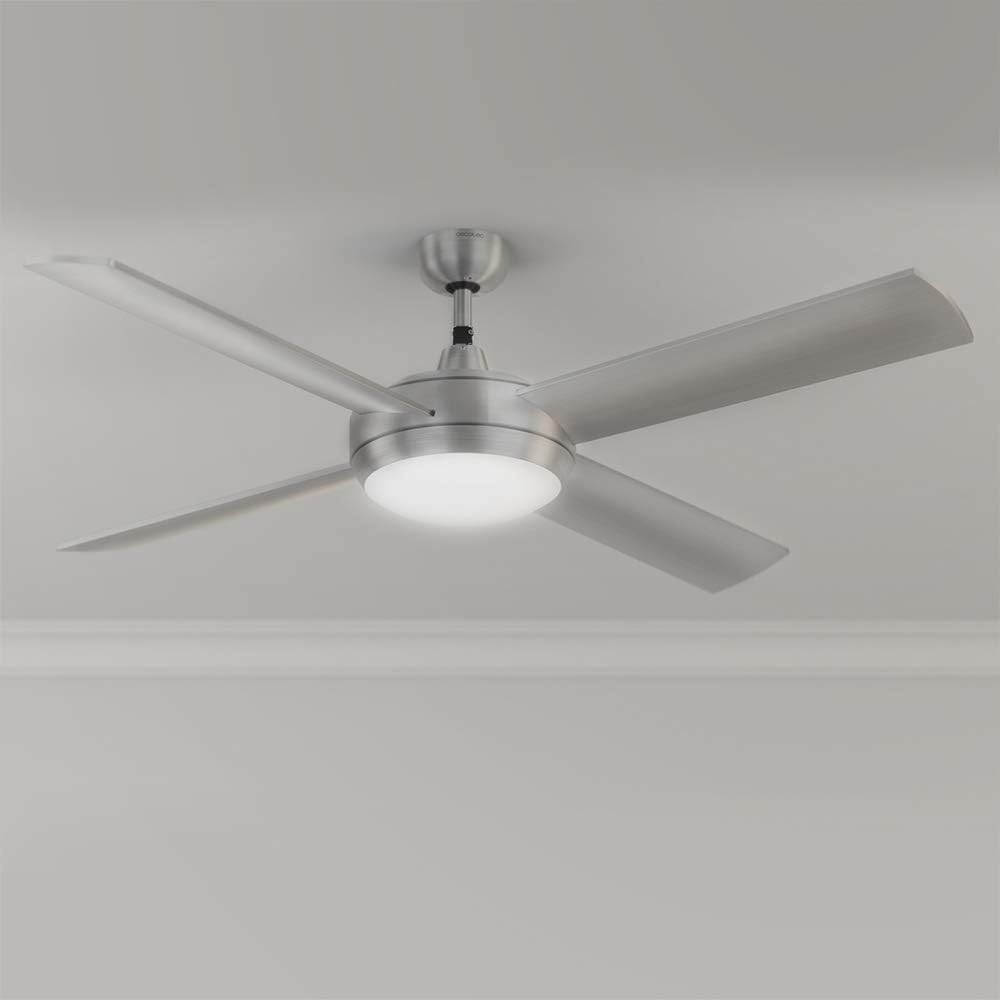
The EnergySilence Aero 570 is a powerful 60W ceiling fan with a high-performance copper motor, designed to increase airflow and freshness. Its large 132 cm (52 inch) diameter ensures wide air coverage. It also features an integrated LED lamp, remote control, and a convenient timer function. The fan includes a reversible motor system for both summer and winter use.
Consignes de sécurité
Respectez toujours les consignes de sécurité de base lors de l'utilisation d'appareils électriques afin de réduire les risques d'incendie, d'électrocution et de blessures.
- Assurez-vous que l'alimentation électrique est débranchée avant toute installation, maintenance ou nettoyage.
- L'installation doit être effectuée par un électricien qualifié et conformément aux normes électriques locales.
- La structure de montage doit être capable de supporter le poids du ventilateur (environ 7.45 kg).
- N’insérez aucun objet entre les pales du ventilateur lorsque celui-ci est en marche.
- Tenez les enfants et les animaux domestiques éloignés du ventilateur pendant son fonctionnement.
- N'utilisez pas le ventilateur dans damp ou des endroits humides.
- Use only the original components and accessories provided by Cecotec.
Composants inclus
The package for your Cecotec EnergySilence Aero 570 includes the following:
- EnergySilence Aero 570 Ceiling Fan Unit
- Télécommande
- Kit de montage
- Manuel d'utilisation
Configuration et installation
Installation of the Cecotec EnergySilence Aero 570 requires careful attention. It is recommended to have the fan installed by a professional electrician.
- Préparation: Ensure the power is turned off at the main circuit breaker. Clear the installation area.
- Installation du support de montage : Securely attach the mounting bracket to a ceiling joist or a suitable electrical junction box rated for fan support. Use appropriate screws and anchors for your ceiling type (e.g., concrete beam, hollow brick).
- Câblage : Connect the fan's electrical wires to your household wiring according to the wiring diagram in the detailed manual. Ensure all connections are secure and insulated.
- Assemblage du ventilateur : Carefully lift the fan assembly and hang it on the mounting bracket. Connect the fan's wiring to the receiver unit (if applicable) and tuck all wires neatly into the canopy.
- Fixation de la lame : Securely attach the four aerodynamic blades to the motor housing. Ensure all screws are tightened.
- Installation du kit d'éclairage : Installez la LED intégrée lamp et sa couverture.
- Vérifications finales : Double-check all connections and ensure the fan is securely mounted. Restore power.

Mode d'emploi
Your Cecotec EnergySilence Aero 570 ceiling fan is controlled via the included remote control.
Fonctionnement du ventilateur
- Marche/Arrêt : Appuyez sur le MARCHE/ARRÊT button on the remote control to turn the fan on or off.
- Paramètres de vitesse : Select from 3 operating speeds (low, medium, high) using the corresponding buttons on the remote control to adjust the airflow intensity to your needs.
- Fonction minuterie : Use the timer buttons (1H, 4H, 8H) on the remote to set the fan to automatically turn off after 1, 4, or 8 hours.
DEL Lamp Opération
- Lumière allumée/éteinte : Appuyez sur le LUMIÈRE button on the remote control to turn the integrated LED lamp allumé ou éteint.
- Sélection de la température de couleur : Le lamp offers 3 different color temperatures. Cycle through them by pressing the light button repeatedly to find your preferred ambiance.
Fonction été/hiver
The fan is equipped with a reversible motor system to optimize air circulation throughout the year. A switch on the motor housing allows you to select the direction of blade rotation.
- Mode été : Set the switch for counter-clockwise rotation (downward airflow) to create a pleasant cooling breeze.
- Mode hiver : Set the switch for clockwise rotation (upward airflow) to circulate warm air concentrated near the ceiling down into the room, complementing your heating system.

Entretien
Un entretien régulier garantit la longévité et les performances optimales de votre ventilateur de plafond.
- Nettoyage: Before cleaning, ensure the fan is turned off and the power supply is disconnected. Wipe the fan blades and motor housing with a soft, damp chiffon. N'utilisez pas de nettoyants abrasifs ou de solvants.
- Équilibre de la lame : If the fan wobbles, check that all blade screws are tight and that the blades are not bent or damaged.
- Source de lumière : The integrated LED light source is designed for long life. If replacement is ever needed, contact authorized service personnel.
- Inspection générale: Vérifiez régulièrement toutes les connexions et les éléments de fixation pour vous assurer qu'ils restent bien en place.
Dépannage
If you encounter issues with your Cecotec EnergySilence Aero 570, refer to the following common problems and solutions:
| Problème | Cause possible | Solution |
|---|---|---|
| Le ventilateur ne s'allume pas. | No power supply; Remote control battery low/dead; Incorrect wiring. | Vérifier le disjoncteur ; remplacer les piles de la télécommande ; vérifier les connexions électriques (consulter un électricien). |
| Le ventilateur vacille. | Vis de lames desserrées ; lames déséquilibrées ; fixation desserrée. | Serrez toutes les vis des lames ; vérifiez que les lames ne sont pas tordues ; assurez-vous que le support de montage est bien fixé. |
| La lumière ne fonctionne pas. | Light switch off; Wiring issue; LED module failure. | Ensure light is switched on via remote; Check wiring; Contact customer support for LED module replacement. |
| La télécommande ne fonctionne pas. | Batteries dead/incorrectly inserted; Remote out of range; Receiver issue. | Replace batteries, ensure correct polarity; Move closer to fan; Contact customer support. |
Si le problème persiste après avoir essayé ces solutions, veuillez contacter le service client de Cecotec.
Caractéristiques
| Fonctionnalité | Détail |
|---|---|
| Marque | Cecotec |
| Numéro de modèle | 05948 |
| Dimensions du produit | 30.2 x 28.7 x 60.5 cm (emballé) ; 52 x 52 x 11.8 cm (assemblé) |
| Poids du produit | 7.45 kilogrammes |
| Pouvoir | 60 watts |
| Type de finition | Acier brossé |
| Conception de ventilateur | Ventilateur de plafond |
| Source d'énergie | Électrique avec fil |
| Dossier spécial | Timer, Remote Control, Integrated LED Light, Summer/Winter Function |
| Type de chambre | Salon (Recommandé) |
| Assemblage requis | No (refers to main unit, but installation is required) |
| Nombre de pièces | 1 (unité principale) |
| Piles requises | No (for fan, but remote requires batteries) |
| Certifications | CE |
Garantie et assistance
Your Cecotec EnergySilence Aero 570 Ceiling Fan comes with a two-year warranty.
For warranty claims, technical support, or inquiries regarding spare parts (e.g., LED light module), please contact Cecotec customer service directly. Refer to the contact information provided in your product packaging or visit the official Cecotec website.
Informations sur le vendeur :
- Seller Name: Cecotec
- Pour plus d'assistance, vous pouvez visiter le Boutique Cecotec sur Amazon.
Ask a question about this manual
Ask about setup, troubleshooting, compatibility, parts, safety, or missing instructions. Manuals+ will review the question and use this page’s manual context to help answer it.