
1. Introduction
This manual provides instructions for the installation, setup, and operation of the Layfuz Tuya WiFi M515EGWT Intelligent Pull Bead Curtain Motor. This device is designed to automate bead-chain roller blinds, allowing control via a mobile application or voice commands through compatible smart home assistants.
2. Produit terminéview
The Layfuz M515EGWT motor offers convenient automation for your curtains. It integrates with the Tuya Smart App for remote control and supports voice commands via Amazon Alexa and Google Home. Key features include:
- Contrôle via application mobile : Manage your curtains from anywhere using the Tuya Smart App.
- Contrôle vocal : Compatible avec Amazon Alexa et Google Home pour une utilisation mains libres.
- Fonction de synchronisation : Schedule curtain opening and closing times to suit your daily routine.
- Adjustable Travel Limits: Set custom upper, lower, and intermediate stop positions.
- Direct Current Power Supply: Garantit un fonctionnement sûr et fiable.

Figure 2.1 : Layfuz M515EGWT motor with compatible bead chain types. The motor is designed to work with various bead chain sizes and materials, including 2mm, 4mm, 6mm, 4.5*6mm, 4.5*12mm, metal chain, beaded, and 3.2mm chains.
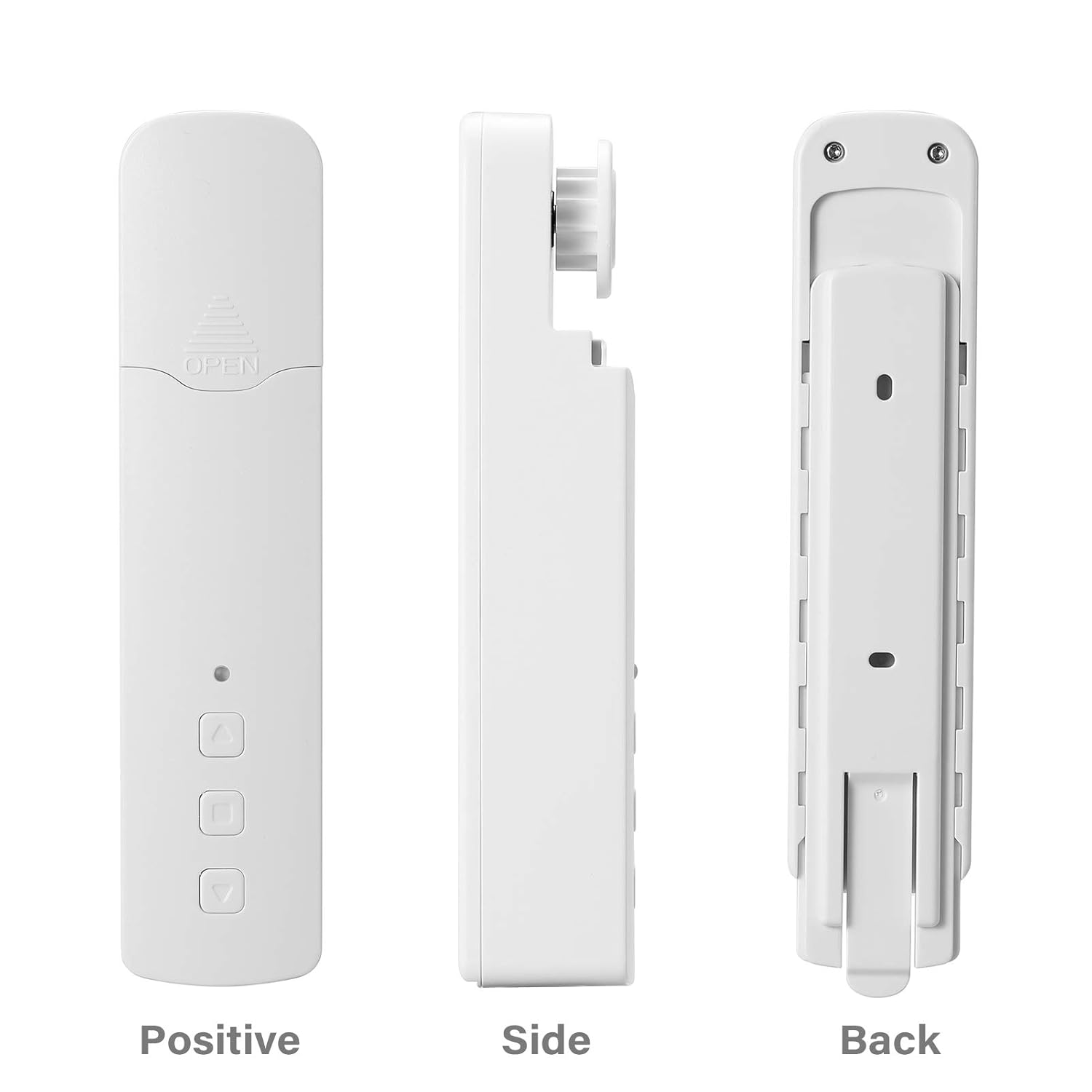
Figure 2.2 : Différent views of the Layfuz M515EGWT motor, showing its positive (front), side, and back profiles. The front includes an indicator light and control buttons, while the back features mounting points.

Figure 2.3 : The motor is suitable for various curtain types, including Venetian blinds, vertical blinds, honeycomb shades, triple shades, roller shades, and zebra shades, provided they use a compatible bead chain mechanism.

Figure 2.4 : This image highlights the motor's control buttons: Up, Stop, and Down. It also shows the Set button and the charging port. Compatibility logos for Amazon Alexa, Google Home, and Tuya Smart are visible, indicating smart home integration.
3. Contenu du colis
Veuillez vérifier que tous les articles sont présents dans le colis :
- 1 x Curtain Motor (M515EGWT)
- 1 x Power Adapter (EU, UK, USA, or AU type, optional based on region)
- 1 x Manuel d'utilisation
4. Spécifications
| Fonctionnalité | Spécification |
|---|---|
| Marque | Layfuz |
| Numéro de modèle | M515EGWT |
| Matériel | ABS |
| Couleur | Blanc |
| Vol évaluétage | 5 V CC |
| Puissance nominale | 6.0 W |
| Couple nominal | 0.45 Nm |
| Vitesse de rotation | 30 tr/min |
| Température de fonctionnement | -20℃ ~ +65℃ |
| Fréquence de réception intégrée | 915 MHz, 2.4 GHz |
| Dimensions du produit | 22 x 18.5 x 4 cm |
| Poids de l'article | 640 g |
| Pays d'origine | Chine |
5. Installation
Follow these steps to install the curtain motor. Refer to Figure 5.1 for visual guidance.

Figure 5.1 : Comprehensive guide for the Layfuz M515EGWT motor, detailing its appearance, step-by-step installation, Tuya Smart App connection process, and instructions for setting and deleting travel limits.
5.1 Product Installation Steps (Refer to '2 Product install' in Figure 5.1)
- Fix the Wall Panel: Secure the mounting panel to the wall at the desired location for the motor.
- Installez le moteur : Slide the motor onto the fixed wall panel until it clicks into place.
- Insert the Bead Chain: Carefully place the curtain's bead chain into the motor's drive wheel. Ensure it is seated correctly.
- Close Wheel Cover: Close the wheel cover and tighten the curtain bead chain to prevent slippage.

Figure 5.2 : The motor features fast switching capability for different drive gears, making it applicable to multiple models of bead chains. Ensure the correct gear is installed for your curtain's bead chain type.
6. Installation
After physical installation, proceed with the smart app setup and limit settings. Refer to '3 Instructions for use' and '3.2 Limit Setting' in Figure 5.1.
6.1 Add Tuya Smart App (Refer to '3.1 Add Tuya Smart App' in Figure 5.1)
- Téléchargez l'application: Download the Tuya Smart App from your mobile phone's app store (Google Play or Apple App Store).
- S'inscrire/Se connecter : Ouvrez l'application et créez un nouveau compte ou connectez-vous avec un compte existant.
- Ajouter un appareil : Click '+' or 'Add Device' in the app. The indicator light on the motor should be flashing red. If not, press and hold the 'Set' key for 3-5 seconds until it flashes rapidly.
- Sélectionnez le type d'appareil : Choose 'Manual Add' or 'Auto Scan'. For manual, select 'Curtain Motor'.
- Se connecter au Wi-Fi : Enter your 2.4GHz Wi-Fi network name and password. Ensure your phone is connected to the same 2.4GHz Wi-Fi network.
- Jumelage : L'application recherchera l'appareil et s'y connectera. Une fois la connexion établie, vous pourrez renommer l'appareil.
6.2 Limit Setting (Refer to '3.2 Limit Setting' in Figure 5.1)
Setting the upper and lower travel limits is crucial for proper operation. You must set these limits before setting any middle limits.
- Définir la limite supérieure : Press the 'Set' key once. The indicator light will flash red. Use the 'Up' key to move the curtain to the desired upper limit. Press the 'Set' key again to confirm. The indicator light will flash red three times, indicating the upper limit is set.
- Définir la limite inférieure : Press the 'Set' key once. The indicator light will flash red. Use the 'Down' key to move the curtain to the desired lower limit. Press the 'Set' key again to confirm. The indicator light will flash red three times, indicating the lower limit is set.
6.3 Middle Limit Setting (Refer to '3.3 Middle Limit Setting' in Figure 5.1)
You can set an intermediate stop point for your curtain.
- Initiate Middle Limit Setting: Press the 'Set' key once. The indicator light will flash red.
- Move to Desired Position: Use the 'Up' or 'Down' keys to move the curtain to the desired middle stop position.
- Confirm Middle Limit: Press the 'Set' key again. The indicator light will flash red three times, confirming the middle limit is set.
6.4 Delete Middle Limit (Refer to '3.4 Delete Middle Limit' in Figure 5.1)
To remove a previously set middle limit:
- Initiate Deletion: Press the 'Set' key once. The indicator light will flash red.
- Confirm Deletion: Press and hold the 'Set' key for 5 seconds. The indicator light will flash red, release, and then flash red three times, indicating the middle limit has been deleted.
7. Fonctionnement
The Layfuz M515EGWT motor can be operated via its physical buttons, the Tuya Smart App, or voice commands.
7.1 Commande manuelle (boutons de l'appareil)
- Bouton haut : Remonte le rideau.
- Bouton bas : Abaisse le rideau.
- Bouton d'arrêt: Arrête le rideau à sa position actuelle.
- Bouton de réglage: Used for pairing and setting travel limits (as described in Section 6).
7.2 Contrôle de l'application Tuya Smart
Once the motor is successfully paired with the Tuya Smart App (Section 6.1), you can:
- Open/Close Curtains: Use the virtual buttons in the app to fully open or close the curtains.
- Ajuster la position : Precisely control the curtain's position by sliding a bar or setting a percentage.
- Définir des horaires : Utilize the timing function to create automated schedules for opening and closing curtains at specific times.
- Télécommande: Operate your curtains from any location with internet access.
7.3 Commande vocale
The motor is compatible with Amazon Alexa and Google Home. After linking your Tuya Smart account to your voice assistant, you can use commands such as:
- "Alexa, ouvre le rideau."
- "Hey Google, ferme le rideau."
- "Alexa, règle le rideau à 50%."
8. Entretien
To ensure the longevity and optimal performance of your Layfuz M515EGWT motor, follow these maintenance guidelines:
- Nettoyage: Essuyez l'extérieur du moteur avec un chiffon doux et sec. N'utilisez pas de produits abrasifs et n'immergez pas l'appareil dans l'eau.
- Connexion électrique : Ensure the power adapter and cable are securely connected and free from damage. Disconnect power before cleaning or performing any maintenance.
- Inspection de la chaîne à billes : Periodically check the curtain's bead chain for wear, damage, or obstructions that could hinder motor operation. Ensure the chain is properly seated in the motor's drive wheel.
- Conditions environnementales : Operate the motor within the specified temperature range (-20℃ to +65℃) and avoid excessive humidity.
9. Dépannage
If you encounter issues with your Layfuz M515EGWT motor, refer to the following common problems and solutions:
- Moteur ne répondant pas :
- Check if the power adapter is securely connected and the motor is receiving power.
- Assurez-vous que la prise de courant est fonctionnelle.
- Verify that the bead chain is correctly installed and not jammed.
- Difficulty Connecting to Tuya App:
- Ensure your mobile phone is connected to a 2.4GHz Wi-Fi network. The motor does not support 5GHz Wi-Fi.
- Confirm that the motor's indicator light is flashing rapidly during pairing mode. If not, press and hold the 'Set' button for 3-5 seconds.
- Vérifiez l'exactitude de votre mot de passe Wi-Fi.
- Move the motor closer to your Wi-Fi router to improve signal strength.
- Redémarrez votre routeur Wi-Fi et réessayez la procédure d'appairage.
- Curtain Not Moving to Correct Limits:
- Re-calibrate the upper and lower travel limits as described in Section 6.2.
- Ensure the bead chain is not slipping or obstructed.
- La commande vocale ne fonctionne pas :
- Verify that your Tuya Smart account is correctly linked to your Amazon Alexa or Google Home app.
- Vérifiez votre connexion Internet.
- Ensure the device name in the Tuya app is recognized by your voice assistant.
10. Consignes de sécurité
Veuillez lire et respecter les consignes de sécurité suivantes :
- Cet appareil est destiné à un usage intérieur uniquement.
- Do not expose the motor to water, moisture, or extreme temperatures.
- Ensure the power adapter and cable are not damaged. Do not use if damaged.
- Gardez l’appareil hors de portée des enfants et des animaux domestiques.
- N’essayez pas de démonter ou de réparer le moteur vous-même. Contactez un technicien qualifié pour toute intervention.
- Ensure the curtain's bead chain is installed correctly and securely to prevent accidents.
11. Garantie et assistance
Pour toute information relative à la garantie et à l'assistance technique, veuillez consulter la documentation fournie lors de votre achat ou contacter votre revendeur. Conservez votre reçu d'achat comme preuve d'achat.