
Ctronics CTIPC-285C-Z4B
Manuel d'utilisation de la caméra de sécurité extérieure WiFi Ctronics avec zoom optique 5x
Model: CTIPC-285C-Z4B
1. Introduction
Thank you for choosing the Ctronics 5X Optical Zoom WiFi Outdoor Security Camera. This manual provides detailed instructions for the installation, operation, and maintenance of your camera. Please read this manual thoroughly before use to ensure proper functionality and safety. This camera is designed for outdoor surveillance, offering advanced features such as 5X optical zoom, human detection, auto-tracking, color night vision, and two-way audio.

Figure 1.1 : Ctronics 5X Optical Zoom WiFi Outdoor Security Camera. This image shows the main unit of the camera with its dual antennas and lens array.
2. Consignes de sécurité
Veuillez respecter les consignes de sécurité suivantes afin d'éviter d'endommager le produit ou de vous blesser, vous ou autrui :
- Ensure the power supply is stable and matches the camera's voltagexigences (12 volts).
- N’exposez pas l’appareil photo à des températures ou à une humidité extrêmes au-delà de sa plage de fonctionnement.
- Avoid direct exposure of the lens to strong light sources, which may damage the sensor.
- Ne tentez pas de démonter ou de modifier l'appareil photo. Confiez toute réparation à un personnel qualifié.
- Gardez l'appareil photo et ses accessoires hors de portée des enfants.
- Ensure proper mounting to prevent the camera from falling.
3. Contenu du colis
Please check the package contents upon opening. If any items are missing or damaged, contact your retailer or Ctronics support.
- Ctronics 5X Optical Zoom WiFi Outdoor Security Camera
- Adaptateur secteur
- Vis de fixation et chevilles
- Kit étanche pour câble réseau (le cas échéant)
- Guide de démarrage rapide
4. Installation
4.1 Installation physique
- Choisissez un emplacement : Select a suitable outdoor location with a clear view of the area you wish to monitor. Ensure the location has access to a power outlet.
- Montage: Use the provided mounting template (if included) to mark drill holes on the wall or ceiling. Drill the holes, insert wall plugs, and secure the camera bracket using the screws.
- Connexion électrique : Connect the power adapter to the camera's power input and plug it into a power outlet.
Connexion réseau 4.2
The camera supports 2.4GHz Wi-Fi networks.
- Téléchargez l'application : Download the "Ctronics" app from your smartphone's app store (iOS/Android). For PC users, download the HiP2P software for MAC/Windows.
- La configuration initiale: Suivez les instructions de l'application pour ajouter votre caméra. Cela implique généralement de scanner un code QR sur la caméra ou de saisir manuellement son identifiant.
- Configuration Wi-Fi : Connectez la caméra à votre réseau Wi-Fi 2.4 GHz via l'application.

Figure 4.1 : Broad Compatibility. This image illustrates the camera's compatibility with various devices and operating systems, including iOS, Android, Windows, and Mac OS, through the Ctronics Pro app and HiP2P Client software.
4.3 Installation de la carte Micro SD (facultatif)
The camera supports a micro SD card up to 64GB for local storage of recordings.
- Locate the SD card slot on the camera (refer to the camera diagram in the quick start guide).
- Carefully insert the micro SD card into the slot until it clicks into place.
- Format the SD card via the camera's settings in the Ctronics app for optimal performance.
5. Utilisation de l'appareil photo
5.1 Panoramique, inclinaison et zoom (PTZ)
The camera features motorized pan (355° horizontally) and tilt (90° vertically) functions, along with 5X optical zoom.
- Contrôle: Use the Ctronics app to remotely control the camera's pan and tilt movements by swiping on the live view écran.
- Zoom optique : Pincez pour zoomer sur le direct view to activate the 5X optical zoom. The camera will auto-focus for clear detailed images.
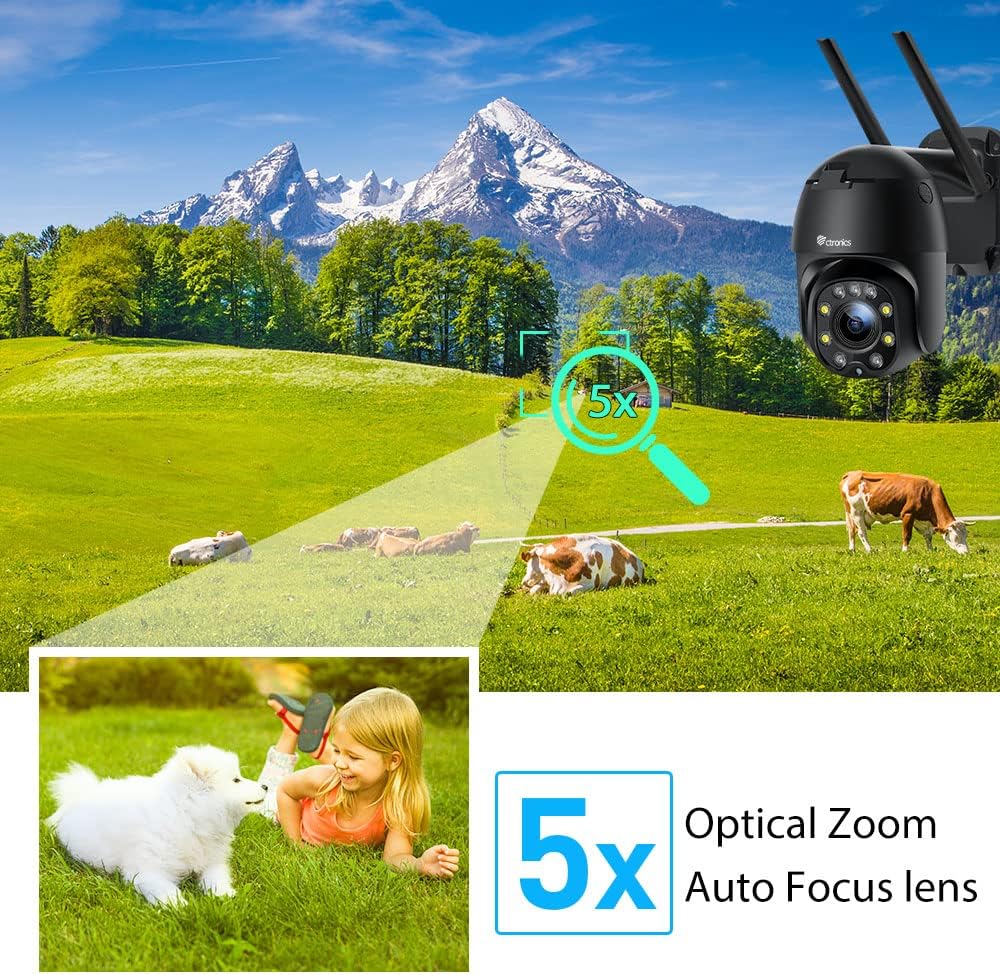
Figure 5.1 : 5X Optical Zoom. This image demonstrates the camera's 5X optical zoom capability, allowing for detailed viewing of distant objects with auto-focus functionality.
5.2 Human Detection and Auto-Tracking
The camera utilizes AI algorithms to distinguish human movement from other triggers, reducing false alarms by up to 95%.
- Détection: When a human is detected, the camera will automatically track their movement within its field of view.
- Alertes : You will receive instant notifications via the app, FTP, or email.
- Enregistrement: Detected events are recorded to the installed SD card.

Figure 5.2 : Human Detection. This image illustrates how the camera's human detection feature accurately identifies people while ignoring non-human movements like pets, significantly reducing false alarms.

Figure 5.3 : Auto Tracking. This image demonstrates the camera's auto-tracking capability, showing how it follows a detected subject's movement within its 355° horizontal and 90° vertical range.
5.3 HD 1080P & Night Vision
The camera provides 1920x1080P resolution for clear images and offers two night vision modes.
- Vision nocturne couleur: With 4 spotlights and 5 infrared lights, the camera can display vivid color images in total darkness up to 25 meters.
- Vision nocturne infrarouge: Standard black and white infrared vision is also available.

Figure 5.4 : Color Night Vision. This image illustrates the camera's ability to provide full-color video surveillance even in low-light or nighttime conditions.
5.4 Audio bidirectionnel
Communiquez avec les visiteurs ou dissuadez les intrus grâce au microphone et au haut-parleur intégrés.
- Real-time Conversation: Use the Ctronics app to engage in real-time conversations.
- Réduction du bruit : The camera features ambient noise reduction technology for clearer sound quality.

Figure 5.5 : Two-Way Audio. This image depicts the camera's two-way audio functionality, allowing users to communicate with individuals near the camera via their smartphone.
5.5 Accès à distance
View vivre footage and recordings from anywhere at any time using the Ctronics app or HiP2P software.
- Ensure your camera is connected to the internet.
- Log in to your Ctronics app or HiP2P software account to access your camera feed.
6. Entretien
Un entretien régulier garantit la longévité et les performances optimales de votre appareil photo.
- Nettoyage: Essuyez délicatement l'objectif et le boîtier de l'appareil photo avec un chiffon doux et sec.amp tissu. N'utilisez pas de produits chimiques agressifs ou de nettoyants abrasifs.
- Mises à jour du micrologiciel : Check the Ctronics app periodically for available firmware updates. Keeping the firmware updated ensures you have the latest features and security enhancements.
- Cycle d'alimentation : If the camera experiences minor issues, try power cycling it by unplugging and replugging the power adapter.
7. Dépannage
Cette section aborde les problèmes courants que vous pourriez rencontrer.
| Problème | Cause possible | Solution |
|---|---|---|
| Caméra hors ligne | Pas d'alimentation ; Wi-Fi déconnecté ; problème de routeur | Check power connection; Reconnect Wi-Fi in app; Restart router |
| Mauvaise qualité d'image | Dirty lens; Network bandwidth; Low light | Clean lens; Check internet speed; Ensure sufficient lighting or use night vision |
| Fausses alarmes | Sensitivity too high; Non-human movement | Adjust detection sensitivity in app; Ensure human detection is enabled |
| La carte SD n'enregistre pas | SD card full/corrupted; Not formatted; Incorrect settings | Format SD card in app; Check recording settings; Replace SD card if faulty |
8. Spécifications
Detailed technical specifications for the Ctronics CTIPC-285C-Z4B camera:
| Fonctionnalité | Spécification |
|---|---|
| Numéro de modèle | CTIPC-285C-Z4B |
| Dimensions (L x l x H) | 11 x 17 x 30 cm |
| Poids | 940 grammes |
| Matériel | Acrylonitrile butadiène styrène (ABS) |
| Type d'alimentation | Câble électrique |
| Voltage | 12 volts |
| Consommation d'énergie | 6 watts |
| Résolution | 1920x1080P |
| Zoom optique | 5X |
| Gamme Pan | 355° |
| Plage d'inclinaison | 90° |
| Distance de vision nocturne | Environ. 25 mètres |
| Indice d'étanchéité | IP66 |
| Type de carte mémoire | Micro SD |
| Capacité de mémoire maximale | 64 Go |
| Appareils compatibles | Smartphone (iOS/Android), PC (MAC/Windows) |
9. Garantie et assistance
Ctronics products come with a standard warranty. For specific warranty terms and conditions, please refer to the warranty card included with your product or visit the official Ctronics website. If you encounter any issues not covered in this manual or require further assistance, please contact Ctronics customer support:
- Website: www.ctronics.com
- E-mail: Veuillez vous référer à l'emballage de votre produit ou website pour l'assistance par e-mail.
- Téléphone: Veuillez vous référer à l'emballage de votre produit ou website pour le numéro de téléphone d'assistance.
Please have your model number (CTIPC-285C-Z4B) and purchase information ready when contacting support.
Ask a question about this manual
Ask about setup, troubleshooting, compatibility, parts, safety, or missing instructions. Manuals+ will review the question and use this page’s manual context to help answer it.