
EASYTONE 729920950270
EASYTONE 2.4G Wireless Voice Air Mouse Remote Control User Manual
Modèle: 729920950270
Introduction
Thank you for choosing the EASYTONE 2.4G Wireless Voice Air Mouse Remote Control. This device combines a 2.4G wireless air mouse, voice control, and infrared learning functions into one compact unit. It is designed to enhance your experience with Smart TVs, Android TV Boxes, PCs, Laptops, and Projectors, offering intuitive control with its 6-axis gyroscope.
Caractéristiques principales
- Fonctionnalité 4 en 1 : Air Mouse, Voice Control, Infrared (IR) Learning Remote, and Somatosensory Game Support.
- Contrôle intuitif : Integrated 6-axis gyroscope for precise air mouse cursor movement and somatosensory gaming.
- Connectivité sans fil 2.4 GHz : Stable and high-sensitivity wireless control up to 10 meters via a USB receiver.
- Recherche vocale : Built-in microphone for voice input, allowing easy search and navigation in compatible applications.
- Apprentissage infrarouge : Ability to learn and store infrared codes from other remote controls, such as your TV's power button.
- Large compatibilité : Supports Android TV, Projectors, Laptops, Android TV Boxes, PCs, Windows, Linux, and Mac OS.
- Conception ergonomique : 17 keys for essential functions, designed for comfortable use.

Image : Terminéview of the remote control's main features, including 2.4G wireless, voice search, and IR learning capabilities.
Contenu du colis
- 1 x 2.4G Voice Air Remote Control (batteries not included)
- 1 x Récepteur USB
- 1 x Manuel d'utilisation
Instructions d'installation
- Insérez les piles : Open the battery compartment on the back of the remote control. Insert 2 AAA batteries (not included), ensuring correct polarity.
- Connectez le récepteur USB : Plug the USB receiver into an available USB port on your device (Smart TV, Android TV Box, PC, etc.).
- Installation automatique du pilote : Wait for 20 to 60 seconds for your device to automatically install the necessary driver for the USB receiver. No software installation is required.
- Confirmation de l'appairage : Once the driver is installed, move the remote control. A cursor should appear and move on your screen, indicating successful pairing and readiness for use.

Image: Illustration of inserting the USB receiver and the remote's dimensions.
Mode d'emploi
Fonction de la souris aérienne
The remote control features a 6-axis gyroscope. Simply wave the remote in the air to control the cursor on your screen. This allows for intuitive navigation and interaction with your device.

Image: Demonstrating the 2.4G wireless air mouse functionality with a 10-meter range.
Fonction de commande vocale
The built-in microphone enables voice search. Press and hold the dedicated voice button (often marked with a microphone icon) on the remote to activate voice input. Speak your commands or search queries. This function works with integrated search fields or applications that support voice input.
Infrared (IR) Learning Function
The remote can learn infrared codes from other remotes, allowing you to consolidate control. For example, you can program the power button to control your TV.
- Enter IR Learning Mode: Appuyez et maintenez enfoncé le Pouvoir button on the EASYTONE Air Mouse. The LED indicator will begin to flash slowly, indicating it has entered IR learning mode.
- Align Remotes: Point the infrared emitter of your original remote control directly at the infrared receiver of the EASYTONE Air Mouse (usually at the top).
- Code de transmission : Press the button on your original remote (e.g., the Power button) that you wish to teach to the Air Mouse. The Air Mouse LED will light up steadily, then flash slowly, confirming successful code reception.
- Quitter le mode d'apprentissage : The learned data is automatically saved, and the product will exit learning mode.
- Clear Learned Code: To clear a learned IR code, press and hold the OK bouton et le DEL bouton simultanément.
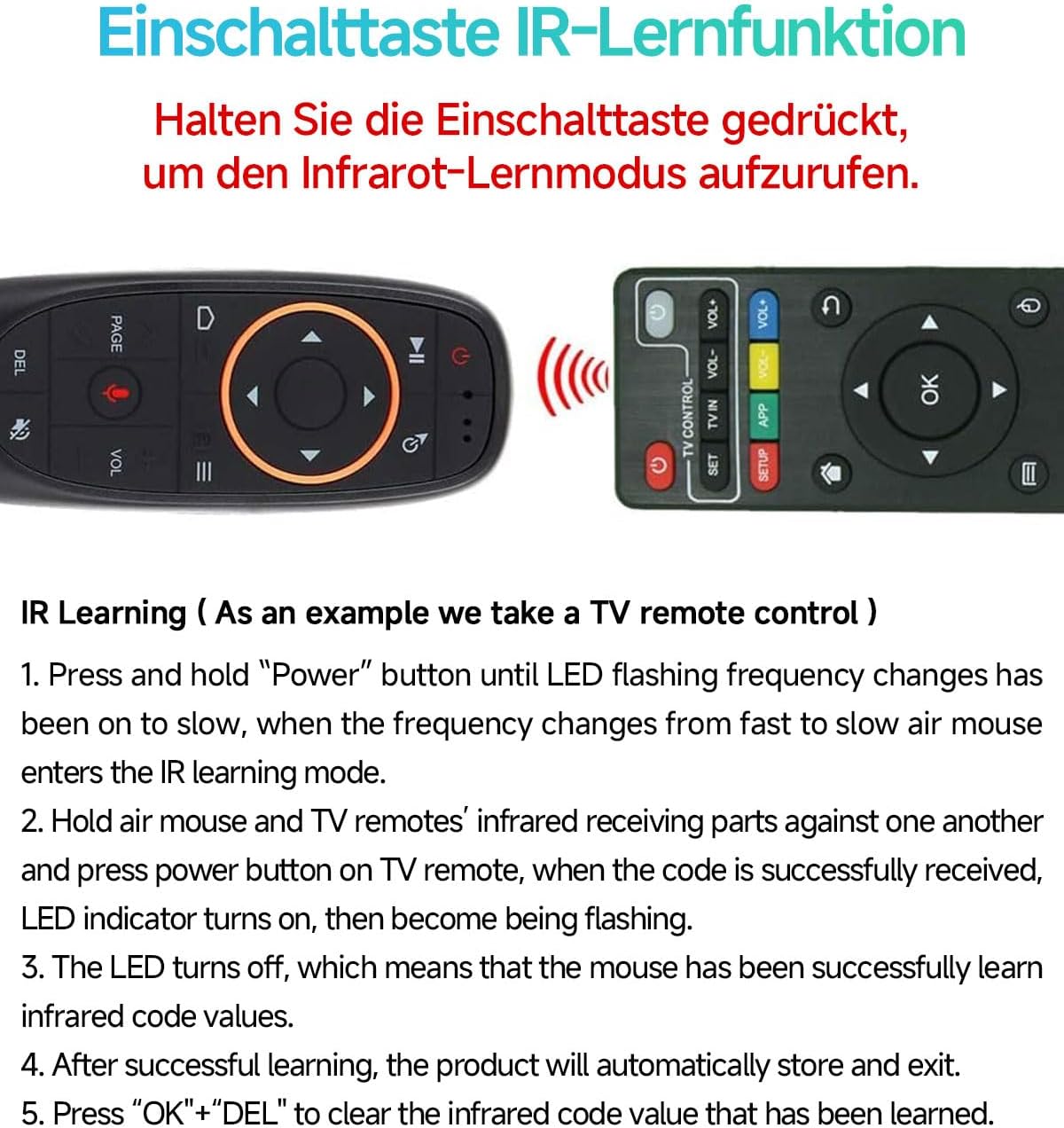
Image: Step-by-step guide for the IR learning function, using a TV remote as an example.
Disposition des boutons
The remote features 17 keys for various functions. Refer to the diagram below for a detailed overview of each button's purpose.

Image: Functional diagram of the remote control buttons, indicating their respective actions.
Entretien
- Remplacement de la batterie : When the low battery indicator flashes slowly, replace the 2 AAA batteries. Ensure correct polarity.
- Economie d'énergie: The remote automatically enters sleep mode when idle to conserve battery life. It boasts a working current under 15mA and microamp standby consumption.
- Nettoyage: Use a soft, dry cloth to clean the remote control. Avoid using liquids or abrasive cleaners.
- Stockage: Rangez la télécommande dans un endroit frais et sec, à l'abri de la lumière directe du soleil et des températures extrêmes.

Image: Information on intelligent power saving and low battery indication.
Dépannage
- La télécommande ne répond pas :
- Vérifiez que les piles sont correctement insérées et non déchargées. Remplacez-les si nécessaire.
- Check if the USB receiver is securely plugged into your device.
- Essayez de brancher le récepteur USB sur un autre port USB.
- Re-pair the remote by unplugging and re-plugging the USB receiver.
- Le mouvement du curseur est erratique ou imprécis :
- Assurez-vous qu'aucun obstacle ne se trouve entre la télécommande et le récepteur USB.
- Calibrez le gyroscope en plaçant la télécommande sur une surface plane pendant quelques secondes.
- La commande vocale ne fonctionne pas :
- Ensure you are pressing and holding the voice button while speaking.
- Vérifiez que l'application ou le système que vous utilisez prend en charge la saisie vocale.
- Check your device's settings for microphone permissions.
- L'apprentissage de la recherche d'information a échoué :
- Vérifiez que la pile de la télécommande d'origine n'est pas faible.
- Make sure the IR emitters of both remotes are closely aligned and pointing at each other.
- Répétez attentivement les étapes d'apprentissage de la réponse aux questions.
Caractéristiques
| Méthode de transmission | Radiofréquence sans fil 2.4 GHz |
| Capteurs | Gyroscope à axe 6 |
| Nombre de clés | 17 |
| Plage de fonctionnement | Jusqu'à 10 mètres |
| Type de batterie | 2 piles AAA (non incluses) |
| Matériel | Plastique ABS et silicone |
| Dimensions | 143 x 45 x 29 mm |
| Poids | 50 g |
Compatibilité
The EASYTONE 2.4G Wireless Voice Air Mouse Remote Control is compatible with a wide range of devices and operating systems:
- Appareils : Smart TV, Android TV Box, Mini PC, HTPC, Projector, Personal Computer (PC), Laptop.
- Systèmes d'exploitation : Linux, Android, Windows, Mac OS.

Image: Visual representation of the remote's compatibility with multiple systems and devices.
Garantie et assistance
For any questions or issues regarding your EASYTONE 2.4G Wireless Voice Air Mouse Remote Control, please refer to the contact information provided with your purchase or visit the official EASYTONE support website. Please note that specific warranty details may vary by region and retailer.
Ask a question about this manual
Ask about setup, troubleshooting, compatibility, parts, safety, or missing instructions. Manuals+ will review the question and use this page’s manual context to help answer it.