
Goshyda KX-T6001CID
Goshyda KX-T6001CID Big Button Corded Telephone User Manual
Model: KX-T6001CID | Brand: Goshyda
Introduction
Thank you for choosing the Goshyda KX-T6001CID Big Button Corded Telephone. This manual provides detailed instructions to help you set up, operate, and maintain your new telephone. Please read this manual thoroughly before use to ensure proper functionality and to take full advantage de ses caractéristiques.
Consignes de sécurité
- N’exposez pas le téléphone à l’eau ou à l’humidité.
- Avoid placing the telephone in direct sunlight or near heat sources.
- Utilisez uniquement le cordon téléphonique fourni.
- N’essayez pas d’ouvrir ou de réparer le téléphone vous-même. Confiez toute réparation à un technicien qualifié.
- Tenir hors de portée des enfants.
Contenu du colis
Vérifiez que tous les éléments sont présents dans le colis :
- 1 x combiné
- 1 x Telephone Base Unit
- 1 x cordon du combiné
- 1 cordon téléphonique
- 1 x Manuel d'utilisation

Image: The Goshyda KX-T6001CID telephone, showing the base unit, handset, and coiled cord.
Produit terminéview
Familiarize yourself with the main components and controls of your telephone.

Image : Avant view of the telephone, highlighting the LCD display, large numeric keypad, and function buttons.
Keypad and Display:
- Clavier numérique (0-9, *, #) : Pour composer des numéros de téléphone.
- Écran LCD : Affiche l'identifiant de l'appelant, l'heure, la date et les options du menu.
- Boutons M1/M2 : One-touch memory dialing keys.
- SET/STORE Button: Used for entering settings menu and saving entries.
- Boutons HAUT/BAS : Navigate through menu options or adjust volume.
- RING Button: Adjust ringer volume.
- Bouton VOL : Adjust earpiece/speaker volume.
- FL/BRT (Flash/Brightness) Button: Flash function for call waiting, also adjusts LCD brightness.
- REDIAL Button: Redials the last dialed number.
- H.F (Hands-Free) Button: Active le mode haut-parleur.

Image : Un gros plan view of the large, easy-to-read buttons on the telephone's keypad.
Installation
1. Connecting the Telephone:
- Connect one end of the coiled handset cord to the handset and the other end to the handset jack on the left side of the telephone base unit.
- Connect one end of the telephone line cord to the LINE jack on the back of the telephone base unit.
- Branchez l'autre extrémité du cordon téléphonique à votre prise téléphonique murale.
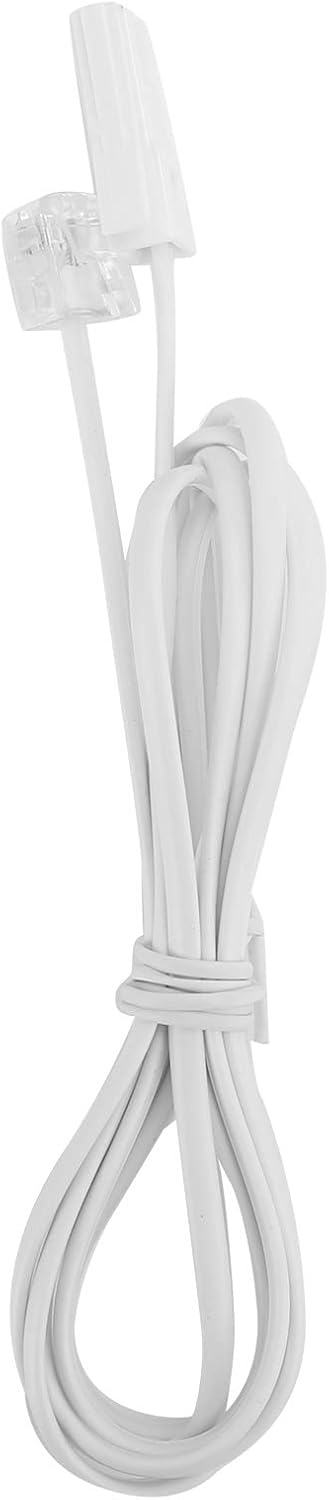
Image: The telephone line cord, used to connect the phone to the wall jack.
2. Paramètres initiaux :
Upon initial connection, the LCD display may prompt you to set the date and time. Follow the on-screen instructions using the UP et VERS LE BAS des boutons pour ajuster les valeurs et le RÉGLER/MÉMORISER bouton pour confirmer.
Mode d'emploi
Passer un appel :
- Décrochez le combiné ou appuyez sur la HF bouton pour haut-parleur.
- Composez le numéro de téléphone souhaité à l'aide du clavier numérique.
- Attendez que l'appel se connecte.
- Pour mettre fin à l'appel, raccrochez ou appuyez sur la touche HF Appuyez à nouveau sur le bouton.
Répondre à un appel:
Lorsque le téléphone sonne, décrochez ou appuyez sur la touche HF bouton pour répondre.
Recomposer :
Décrochez le combiné ou appuyez sur HF, puis appuyez sur la touche RECOMPOSER bouton pour appeler le dernier numéro composé.
Using Memory Keys (M1/M2):
Stockage d'un nombre :
- Décrochez le combiné ou appuyez sur HF.
- Presse RÉGLER/MÉMORISER.
- Composez le numéro de téléphone que vous souhaitez enregistrer.
- Presse RÉGLER/MÉMORISER encore.
- Appuyez sur l'un ou l'autre M1 or M2 to save the number to that memory key.
Numérotation de mémoire :
Décrochez le combiné ou appuyez sur HF, then press either M1 or M2 to dial the stored number.
Caractéristiques
- DTMF/FSK Dual System Caller ID: Supports both DTMF and FSK caller ID systems for displaying incoming call information.

Image: The telephone's display, showing its capability for DTMF/FSK dual system caller ID function.
- FLASH Time Adjustment: Adjustable FLASH time (90/95/100/120/180/300/600/1000ms) for compatibility with various PBX systems or call waiting services.
- 16 Ringtone Options: Choose from 16 different ringtones.

Image: The telephone with graphic elements suggesting a choice of 16 ringtones.
- Adjustable LCD Brightness: Five levels of LCD screen brightness adjustment for optimal viewing.
- 3 Alarm Clock Functions: Set up to 3 different alarm clocks, each with unique alarm sounds.
- 10 Groups of Dual Key Memory: Store up to 10 frequently called numbers using dual-key memory functions.
- 1-99 Hours Do Not Disturb Function: Set a "Do Not Disturb" period from 1 to 99 hours.
Entretien
- Clean the telephone with a soft, damp chiffon. N'utilisez pas de nettoyants abrasifs ou de solvants.
- Keep the telephone away from dust and extreme temperatures.
- Veillez à ce que les câbles ne soient ni emmêlés ni pincés afin d'éviter tout dommage.
Dépannage
| Problème | Cause possible | Solution |
|---|---|---|
| Pas de tonalité | Le cordon de la ligne téléphonique est débranché ou défectueux. | Check all cable connections. Try a different telephone line cord. Test the wall jack with another phone. |
| Impossible de passer ou de recevoir des appels. | Line issue, or phone is in "Do Not Disturb" mode. | Verify phone line service. Check if "Do Not Disturb" is active and disable it. |
| Numéro de l'appelant non affiché | Service d'identification de l'appelant non souscrit ou système incompatible. | Contactez votre opérateur téléphonique pour vérifier que le service d'identification de l'appelant est activé. |
| L’affichage est sombre ou vide | LCD brightness setting is too low. | Adjust the LCD brightness using the FL/BRT button or menu settings. |
Caractéristiques
| Fonctionnalité | Détail |
|---|---|
| Modèle | KX-T6001CID |
| Marque | Goshyda |
| Matériel | Acrylonitrile butadiène styrène (ABS) |
| Couleur | Blanc |
| Taper | Téléphone filaire |
| Type de composeur | Clavier unique |
| Identification de l'appelant | Yes (DTMF/FSK Dual System) |
| Temps de flash | 90/95/100/120/180/300/600/1000ms |
| Sonneries | 16 options |
| Luminosité de l'écran LCD | 5 niveaux réglables |
| Fonctions d'alarme | 3 groupes |
| Fonction mémoire | 10 groups of dual key memory |
| Ne pas déranger | 1-99 heures |
| Poids de l'article | 481 gramme |
| Dimensions (L x l x H) | 10 x 10 x 10 millimètres (environ) |
| Source d'énergie | Battery Powered (likely referring to LCD/memory backup, as corded phones are line-powered for basic functions) |
Garantie et assistance
This Goshyda product is covered by a standard manufacturer's warranty. For specific warranty details, please refer to the documentation included with your purchase or contact Goshyda customer support.
For technical assistance or further inquiries, please contact Goshyda customer service through their official weble site ou les coordonnées fournies avec votre produit.
Ask a question about this manual
Ask about setup, troubleshooting, compatibility, parts, safety, or missing instructions. Manuals+ will review the question and use this page’s manual context to help answer it.