
1. Introduction
This manual provides detailed instructions for the installation, operation, and maintenance of your Cestovet 10.1 Inch Android 13 Car Stereo Radio. Designed for Jeep Compass (2010-2016) and Jeep Patriot (2009-2016), this unit features Wireless CarPlay, Android Auto, Bluetooth, WiFi, Steering Wheel Control (SWC), Mirror Link, and GPS navigation. Please read this manual thoroughly before installation and use to ensure optimal performance and safety.
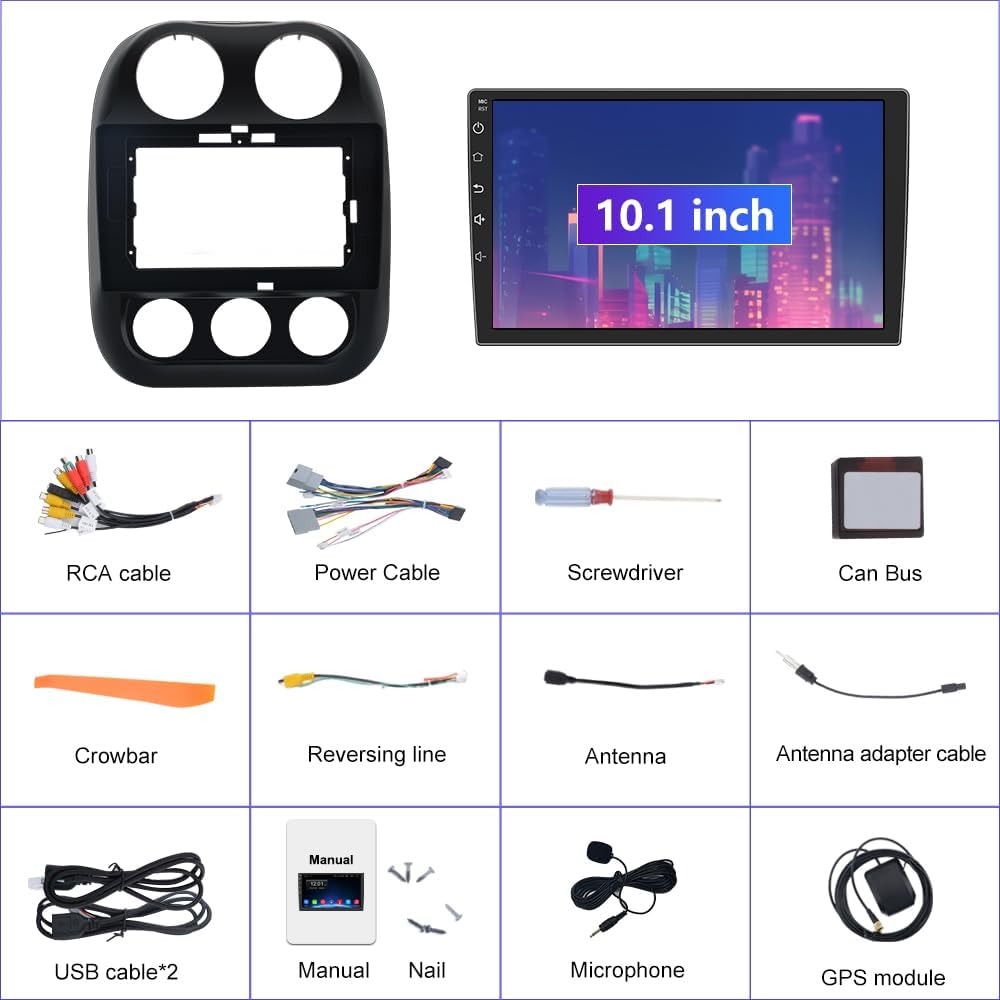
2. Contenu de la boîte
Carefully unpack all items and ensure everything listed below is present:
- 10.1-inch Android 13 Car Stereo Main Unit
- Kit de garniture de montage pour tableau de bord
- Power Cable with CANBUS Module
- Antenne radio
- Antenne GPS
- Câbles USB (x2)
- RCA Cable & Backup Microphone Interface
- Microphone de secours
- Caméra de recul HD
- Câble d'extension pour caméra de recul
- Installation Tool (Crowbar, Screwdriver)
- Manuel d'utilisation
3. Configuration et installation
3.1 Vérification avant l'installation
- Ensure your vehicle is a Jeep Compass (2010-2016) or Jeep Patriot (2009-2016) for compatibility.
- Turn off the vehicle's engine and disconnect the negative terminal of the car battery to prevent electrical shorts.
- Rassemblez tous les outils nécessaires, y compris l'outil d'installation fourni.
3.2 Câblage et connexions
Refer to the wiring diagram and videos for detailed connection instructions. Proper wiring is crucial for functionality.

Important: If you experience no sound after installation, ensure the white 4-pin or 8-pin connector (depending on your car's amplifier system) is correctly plugged into the main wiring harness. The CANBUS module is essential for power and integrating steering wheel controls.
Video 3.1: Detailed guide on how to install the car stereo unit and its wiring.
3.3 Étapes générales d'installation
- Using the provided crowbar, carefully pry open and remove the original radio and dash panel.
- Connect the main power harness, ensuring the CANBUS module is correctly integrated.
- Connect the Radio Antenna, GPS Antenna, and USB cables to their respective ports on the new unit.
- If installing a rear camera, connect the reversing video input wire and power the camera from the reverse lamp circuit.
- Mount the 10.1-inch Android 13 Car Stereo into the dash trim kit.
- Carefully re-install the new unit into the dashboard, ensuring all clips and screws are secure.
- Rebranchez la batterie de la voiture et testez toutes les fonctions avant de remonter complètement le tableau de bord.

4. Mode d'emploi
4.1 Power On/Off & Touchscreen Interface
Press the power button on the unit to turn it on or off. The 10.1-inch touchscreen provides intuitive control over all functions. Swipe and tap to navigate through apps and settings.
4.2 Connexion Wi-Fi
To access online features and download apps, connect the unit to a Wi-Fi network:
- Faites glisser votre doigt du haut vers le bas de l'écran pour accéder au panneau des paramètres rapides.
- Appuyez sur l'icône Wi-Fi pour l'activer.
- Accédez à Paramètres > Réseau et Internet > Wi-Fi.
- Sélectionnez le réseau souhaité et saisissez le mot de passe si vous y êtes invité.
Video 4.1: Demonstrates Wi-Fi and Hotspot connection steps (0:06-0:25).
4.3 Connectivité Bluetooth
Associez votre smartphone via Bluetooth pour passer des appels mains libres et écouter de la musique en streaming :
- On the car stereo, open the 'Phone' app or go to Settings > Connected devices > Bluetooth.
- Assurez-vous que le Bluetooth est activé à la fois sur la chaîne stéréo et sur votre smartphone.
- Rechercher available devices on your smartphone and select the stereo's device name (e.g., "BCB-Android845").
- Vérifiez le code d'appairage sur les deux appareils.
Video 4.2: Shows Bluetooth pairing for calls and music streaming (0:44-0:55).
4.4 CarPlay sans fil et Android Auto
Connect your iPhone or Android phone wirelessly for a seamless in-car experience:
- Assurez-vous que le Bluetooth et le Wi-Fi sont activés sur votre smartphone et sur l'autoradio.
- On the car stereo, open the 'ZLINK5' app (or similar CarPlay/Android Auto app).
- Follow the on-screen prompts to connect your device. For iPhones, ensure CarPlay is enabled in your phone's settings.
Video 4.3: Demonstrates Wireless CarPlay connection and usage (0:56-1:10).
4.5 Navigation GPS
The unit supports both online and offline GPS navigation. Pre-installed maps for North America are available. To use navigation:
- Open the 'Navigation' or 'Maps' app from the home screen.
- Enter your destination using the search function.
- Suivez les instructions vocales et les indications à l'écran.
Video 4.4: Shows GPS navigation features and map interaction (1:01-1:09).
4.6 Radio FM
Access the FM radio tuner for local broadcasts:
- Tap the 'Radio' app icon.
- Use the arrow buttons to manually tune frequencies or the search function to scan for stations.
- Enregistrez vos stations préférées comme préréglages pour y accéder rapidement.
Video 4.5: Demonstrates FM Radio tuning and features (1:45-2:00).
4.7 EQ Settings (Equalizer)
Customize your audio experience with the built-in equalizer:
- Open the 'EQ' app from the app drawer.
- Adjust the frequency bands to fine-tune the sound output.
- Select from various preset sound modes (e.g., Standard, Pop, Rock, Jazz) or create custom settings.
- Adjust the 'Sound Field' to optimize audio for different seating positions in the vehicle.
Video 4.6: Shows how to access and adjust the EQ settings and sound field (1:33-1:44).
4.8 Commandes au volant (SWC)
The unit supports your vehicle's original steering wheel controls for safe and convenient operation. Access the 'SW Learning' app to program or customize button functions.
4.9 Assistance à la marche arrière
When a rear camera is connected, the display automatically switches to the camera view when the vehicle is put into reverse, providing visual assistance for parking and maneuvering.

5. Entretien
- Nettoyage de l'écran : Utilisez un chiffon doux et non pelucheux légèrement dampNettoyez à l'eau ou avec un nettoyant pour écrans. Évitez les produits chimiques agressifs et les matériaux abrasifs.
- Mises à jour logicielles : Vérifiez régulièrement les mises à jour logicielles via les paramètres de l'appareil ou le site web du fabricant. website pour garantir des performances optimales et l'accès aux nouvelles fonctionnalités.
- Vérifications de connexion : Inspectez régulièrement tous les branchements électriques pour vous assurer qu'ils sont bien fixés et exempts de corrosion.
- Température: Évitez d'exposer l'appareil à des températures extrêmes pendant des périodes prolongées.
6. Dépannage
| Problème | Cause possible | Solution |
|---|---|---|
| L'unité ne s'allume pas | Incorrect power wiring; Blown fuse; Loose battery connection. | Check power cable connections (refer to Section 3.2); Inspect vehicle's fuse box; Ensure battery terminals are secure. |
| Pas de sortie audio | Incorrect speaker wiring; CANBUS module issue; Volume too low. | Verify speaker connections; Ensure white connector on harness is properly seated (refer to Figure 3.1); Increase volume. |
| La connexion Bluetooth/CarPlay/Android Auto ne fonctionne pas. | Bluetooth/Wi-Fi off; Device not paired; Interference. | Ensure Bluetooth/Wi-Fi is active on both devices; Re-pair the device; Move away from sources of interference. |
| Perte ou imprécision du signal GPS | Antenne GPS mal installée/connectée ; Obstruction. | Ensure GPS antenna is securely connected and placed in an unobstructed location (e.g., dashboard); Update map data. |
| Les commandes au volant ne fonctionnent pas | CANBUS module issue; SWC not programmed. | Verify CANBUS connection; Use the 'SW Learning' app to program the controls. |
7. Spécifications
- Nom du modèle : 2GRAM
- Taille de l'écran : 10 pouces
- Résolution: 1024 x 600
- Système opérateur: Android 13
- Mémoire: RAM 2GB, ROM 32GB
- Connectivité : Bluetooth, cellulaire, Wi-Fi
- Caractéristiques spéciales : Wireless CarPlay, Android Auto, Touchscreen, Voice Command (via Microphone), Steering Wheel Control, Mirror Link, Reversing Assistance, GPS Navigation (North America maps)
- Type de service de véhicule : Car (Jeep Patriot/Compass 2010-2016)
- Poids de l'article : 5.17 livres
- Dimensions du produit : 14.96 x 12.99 x 7.09 pouces
- Type de montage : Montage sur panneau
- Composants inclus : Microphone
8. Garantie
This Cestovet Car Stereo Radio comes with a 1-year warranty from the date of purchase. Please retain your proof of purchase for any warranty claims. The warranty covers manufacturing defects and malfunctions under normal use. It does not cover damage caused by improper installation, misuse, accidents, or unauthorized modifications.
9. Assistance
For technical assistance, troubleshooting beyond this manual, or warranty claims, please contact Cestovet customer support. Refer to the product packaging or the official Cestovet website for contact information. You may also find additional resources and FAQs on the Cestovet brand store page on Amazon.