
1. Introduction
The NEJE Master 2 Mini is a compact, high-speed laser engraver designed for precision engraving and light cutting tasks. It features wireless control via a dedicated application, a 110 x 120 mm engraving area, and a 2.5W laser output. This manual provides essential information for safe operation, setup, maintenance, and troubleshooting to ensure optimal performance and longevity of your device.

Image: The NEJE Master 2 Mini laser engraver held in hand, illustrating its compact size and key features such as automatic reset, smart & power module, built-in MEMS protection, APP wireless control, and high-strength material construction.
Caractéristiques principales :
- Compact design for space efficiency.
- Wireless offline control and application support for ease of use.
- 360-degree engraving capability.
- High-speed operation for efficient project completion.
- Cloud gallery and online G-code support for creative flexibility.
- 110 x 120 mm engraving area for precise work on small objects.
- User-friendly interface, ideal for beginners.
- Built-in MEMS protection for enhanced safety.
2. Consignes de sécurité
AVERTISSEMENT: This device uses a high-power laser. Improper use can cause serious injury, including eye damage and burns. Always follow these safety guidelines:
- Always wear appropriate laser safety goggles when operating the engraver.
- Ne jamais regarder directement le faisceau laser ni son reflet.
- Veillez à ce que la zone de travail soit bien ventilée afin de dissiper les émanations des matériaux gravés.
- Keep children and pets away from the operating engraver.
- Ne laissez pas la graveuse sans surveillance pendant son fonctionnement.
- Operate the device on a stable, non-flammable surface.
- Be aware of the materials that can be safely engraved. Avoid highly reflective, transparent, or unknown materials that may cause unexpected laser behavior or hazardous fumes.
- In case of emergency, immediately disconnect power to the device.
3. Contenu du colis
Veuillez vérifier que tous les articles listés ci-dessous sont présents dans votre colis. Si un article est manquant ou endommagé, veuillez contacter le service client.

Image: The NEJE Master 2 Mini laser engraver shown with its included accessories, such as power adapter, USB cable, safety goggles, and samples matériaux.
- NEJE Master 2 Mini Laser Engraver Unit
- Lunettes de protection laser
- Adaptateur secteur
- Câble USB
- Clé hexagonale
- Sample Engraving Materials (e.g., wood blocks, paper)
- Manuel de l'utilisateur (ce document)
4. Installation
4.1 Initial Assembly and Connection
The NEJE Master 2 Mini comes largely pre-assembled. No complex installation is required.
- Placez le graveur sur une surface stable, plane et ininflammable.
- Connect the power adapter to the engraver's power input port and then plug it into a suitable power outlet.
- (Optional) Connect the engraver to your computer using the provided USB cable for wired control.
4.2 Installation des logiciels et des applications
The NEJE Master 2 Mini can be controlled via NEJE Windows software, NEJE Android APP, or the "NEJE Wireless" APP for iOS and macOS.
- Pour PC (Windows/macOS) : Download the latest software from the official NEJE website. Suivez les instructions à l'écran pour l'installation.
- For Mobile (Android/iOS): Rechercher "NEJE" or "NEJE Wireless" in your device's app store and install the application.
Once installed, open the NEJE application and connect to your device via Bluetooth (for mobile) or USB (for PC) to begin.
4.3 Focalisation du laser
Proper laser focus is crucial for achieving optimal engraving and cutting results. The NEJE Master 2 Mini features an easy focus mechanism.


Images: A sequence demonstrating how to adjust the laser module for optimal focus. This typically involves rotating the lens or moving the module up/down until the laser spot is at its smallest and most intense point on the material surface.
- Placez votre matériau sur la plateforme de gravure.
- Adjust the laser module's height or lens rotation until the laser dot projected onto the material surface is as small and sharp as possible. This indicates the focal point.
- Ensure the focus is set correctly for each new material thickness to achieve the best results.
5. Mode d'emploi
5.1 Préparation de votre conception
- Create or import your design using the NEJE software or app. Supported graphic formats include G-CODE, BMP, JPG, PNG, NC, DXF.
- Adjust the size, position, and engraving parameters (power, speed, passes) according to your material and desired effect.
- The NEJE cloud service provides high-quality pictures, and you can share phone pictures directly to your computer for engraving.
5.2 Compatibilité des matériaux
The NEJE Master 2 Mini is suitable for engraving a wide range of materials. Cutting functionality is supported only in G-code mode and is limited to certain materials.
| Catégorie | Documents pris en charge | Matériaux non pris en charge |
|---|---|---|
| Wood & Paper | MDF, Balsa, Paper, Wood, Plywood, Foam paper, Bamboo | |
| Tissus et cuir | Fabric, Leather, Non-woven, Cotton, Linen, Velvet, Canvas | |
| Plastiques | Plastic, Acrylic, PPR, ABS board, PVC board | Transparent material |
| Metals & Others | Anodized aluminum, Paint metal, Dark alumina, Light alumina, EPE, KT board | Metal (pure), Glass, Stone, Ceramic, PCB, Stainless steel, Reflective metal, Gold |
Note: The Mini series modules are not compatible with modules of other specifications.
5.3 Début d'un travail de gravure
- Place the material securely on the engraving platform.
- Assurez-vous que le laser est correctement focalisé sur la surface du matériau.
- Portez vos lunettes de sécurité laser.
- In the NEJE software/app, send your prepared design to the engraver.
- Monitor the engraving process. The device supports 360-degree engraving for cylindrical objects or specific orientations.

Image: The NEJE Master 2 Mini laser engraver shown in operation, demonstrating its ability to perform 360-degree engraving on a vertical surface like a door, controlled wirelessly via a smartphone app.
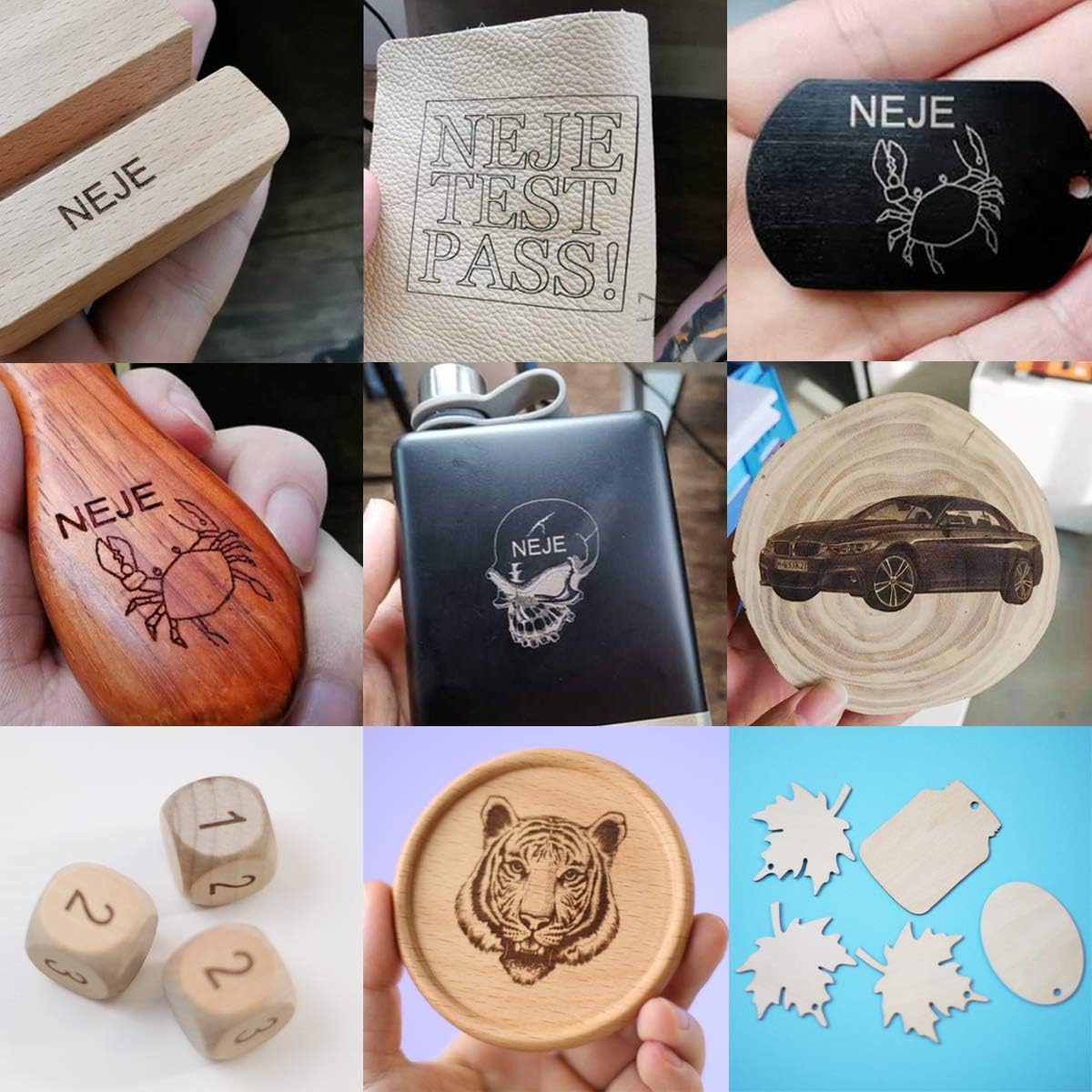
Image: A collage displaying various materials and objects successfully engraved by the NEJE Master 2 Mini, including wood, leather, and anodized metal, showcasing the engraver's versatility.
6. Entretien
Regular maintenance ensures the longevity and optimal performance of your NEJE Master 2 Mini.
- Nettoyage de la lentille : Periodically inspect the laser lens for dust or debris. Gently clean it with a soft, lint-free cloth and lens cleaning solution if necessary.
- Cleaning the Engraver: Use a soft brush or compressed air to remove dust and debris from the machine's frame and moving parts.
- Inspection de la courroie : Check the 6mm drive belt for any signs of wear or looseness. Ensure it is properly tensioned for accurate movement.
- Soins généraux: Keep the engraver in a clean, dry environment away from direct sunlight and extreme temperatures.
The laser module itself is designed for minimal maintenance.

Image : Une image détaillée view of the NEJE Smart Laser Module, highlighting its components such as the fan, 4-pin input, built-in temperature sensor, and easy focus mechanism. The smart driver dynamically adjusts fan speed based on temperature.
7. Dépannage
If you encounter issues with your NEJE Master 2 Mini, refer to the following common problems and solutions.
| Problème | Cause possible | Solution |
|---|---|---|
| Engraver not connecting to app/software | Bluetooth/USB not enabled, incorrect app version, device not powered on. | Ensure Bluetooth is on (for mobile), USB cable is connected securely (for PC), engraver is powered on, and you are using the correct NEJE app/software version. Restart both device and engraver. |
| Poor engraving quality / Laser not burning | Incorrect laser focus, wrong power/speed settings, incompatible material, dirty lens. | Re-focus the laser. Adjust power and speed settings in the software. Verify material compatibility. Clean the laser lens. |
| Engraver stops mid-job | Loose connection, software crash, overheating. | Check all cable connections. Restart the software and engraver. Ensure adequate ventilation. |
| La machine ne répond pas. | Problème d'alimentation, erreur logicielle. | Check power supply. Restart the engraver and computer/mobile device. |
If the problem persists, please contact NEJE customer support for further assistance.
8. Spécifications
Detailed technical specifications for the NEJE Master 2 Mini Laser Engraver.

Image: A comprehensive table detailing the specifications of the NEJE Master 2 Mini, including carving area, laser power, material compatibility, and software support.
| Fonctionnalité | Détail |
|---|---|
| Modèle | Master 2 Mini |
| Fabricant | NEJE |
| Zone de sculpture | 120 mm x 110 mm |
| Puissance de sortie du laser | Approximately 2.5W (Module Power: 10W) |
| Longueur d'onde du laser | 450 nm |
| Carte mère | 1 x MCU + Wireless control IC + MEMS |
| Protection de sécurité | MEMS (Motion-sensitive protection) |
| Driving Structure | Ceinture 6mm |
| Moteur | 42mm step motor |
| Interrupteur de fin de course | Oui |
| Matériel de la machine | Aluminum + Composite material |
| Précision | Haute précision |
| Vitesse | Grande vitesse |
| Niveau de bruit | Calme |
| Engraving Max Depth | Max 2mm (NEJE Mode Easy Control) |
| Fonction de coupe | Yes (G-code mode only, limited materials) |
| Assistance logicielle | NEJE Windows software, NEJE Android APP, NEJE Wireless APP (iOS/macOS) |
| Méthode de contrôle | PC (USB), Mobile (Bluetooth), Offline |
| Formats graphiques | G-CODE, BMP, JPG, PNG, NC, DXF |
| Dimensions du colis | 33.6 x 29.8 x 19.1 cm |
| Poids | 1.77 kg |
| Piles incluses | Non |
| Première date disponible | 13 décembre 2020 |
9. Garantie et assistance
9.1 Informations sur la garantie
The NEJE Master 2 Mini Laser Engraver comes with a Garantie de 2 ans À compter de la date d'achat, cette garantie couvre les défauts de fabrication et les dysfonctionnements dans des conditions normales d'utilisation. Veuillez conserver votre preuve d'achat pour toute réclamation au titre de la garantie.
The laser module also has a 2-year warranty service.
9.2 Assistance clientèle
NEJE offers lifetime customer service for the Master 2 Mini. If you have any questions, encounter issues not covered in this manual, or require technical assistance, please contact us.
- Méthode de contact : Please refer to the official NEJE website or your purchase platform for the most up-to-date contact information (e.g., email, support portal).
- Nous nous efforçons de répondre à toutes les demandes dans un délai de 24 heures.
For software updates and additional resources, visit the official NEJE Wiki or support pages.