
1. Introduction
This manual provides detailed instructions for the installation, operation, maintenance, and troubleshooting of your Palit GeForce RTX 3060 Ti Dual OC graphics card. Please read this manual thoroughly before installing and using the product to ensure proper functionality and to prevent damage.
The Palit GeForce RTX 3060 Ti Dual OC is a high-performance graphics card designed for gaming and demanding graphical applications. It features 8GB of GDDR6 memory, a dual-fan cooling system, and supports PCI Express 4.0.
2. Consignes de sécurité
Observe the following safety guidelines to prevent injury and damage to your equipment:
- Débranchez toujours l'alimentation électrique de votre ordinateur avant d'installer ou de retirer un composant.
- Wear an anti-static wrist strap or frequently touch a grounded metal object to discharge static electricity before handling the graphics card. Static discharge can damage electronic components.
- Handle the graphics card by its edges. Avoid touching the gold-plated PCI Express connector or other components on the board.
- Ensure your computer case has adequate ventilation to prevent overheating.
- N’exposez pas la carte graphique à l’humidité ou à des températures extrêmes.
- Keep the graphics card away from children.
3. Contenu du colis
Vérifiez que tous les éléments sont présents dans l'emballage de votre produit :
- Palit GeForce RTX 3060 Ti Dual OC Graphics Card
- Guide d'installation rapide (ce document)
- Driver CD (or instructions for online download)
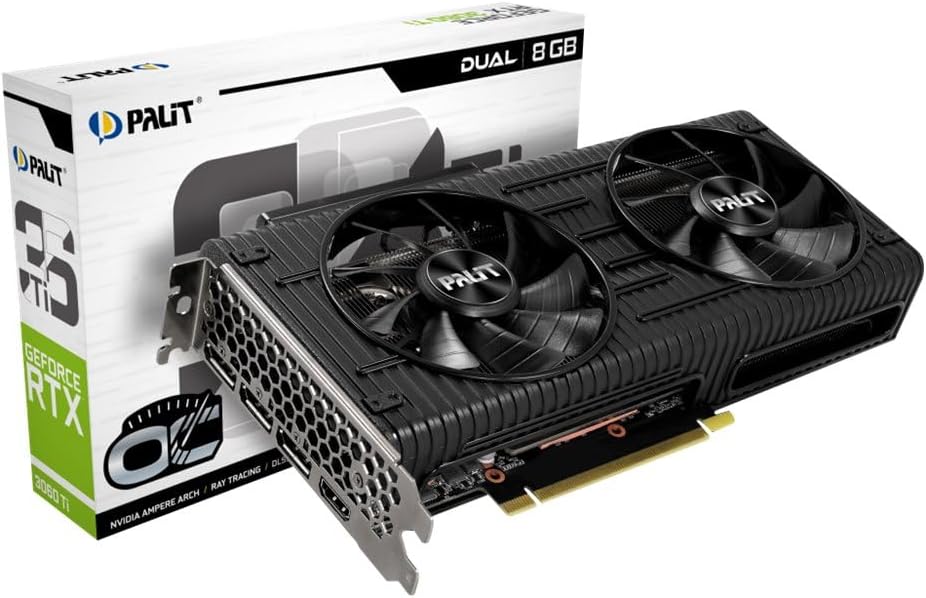
Image: The Palit GeForce RTX 3060 Ti Dual OC graphics card shown alongside its retail packaging.
4. Installation
4.1. Configuration requise
Avant l'installation, assurez-vous que votre système répond aux exigences minimales suivantes :
- Carte mère compatible PCI Express avec un emplacement graphique x16.
- Alimentation de 600 W minimum avec un connecteur d'alimentation PCIe à 8 broches.
- Système d'exploitation Microsoft Windows 10 64 bits ou Linux 64 bits.
- 8 Go de mémoire système (16 Go recommandés).
- Connexion Internet requise pour le téléchargement et la mise à jour des pilotes.
4.2. Installation physique
Follow these steps to install the graphics card into your computer:
- Éteignez votre ordinateur et débranchez le câble d'alimentation de la prise murale.
- Open your computer case. Refer to your computer case manual for specific instructions.
- Locate an available PCI Express x16 slot on your motherboard. Remove any expansion slot covers that block the slot.
- Carefully align the graphics card with the PCI Express x16 slot. Press down firmly until the card is securely seated in the slot.
- Secure the graphics card to the computer case with the screw from the expansion slot cover.
- Branchez le connecteur d'alimentation PCIe à 8 broches de votre bloc d'alimentation au port correspondant de la carte graphique. Assurez-vous que la connexion est bien fixée.
- Refermez le boîtier de votre ordinateur et rebranchez le câble d'alimentation.

Image : Vue de dessus view of the Palit GeForce RTX 3060 Ti graphics card, highlighting its dual cooling fans and the heatsink assembly.
4.3. Installation du pilote
After physical installation, you must install the graphics drivers:
- Allumez votre ordinateur.
- If an internet connection is available, Windows may automatically install a basic display driver. For optimal performance, download the latest drivers from the official NVIDIA website (www.nvidia.com/drivers) or the Palit website (www.palit.com/download).
- Exécutez le programme d'installation du pilote téléchargé et suivez les instructions à l'écran.
- Redémarrez votre ordinateur une fois l'installation du pilote terminée.
5. Fonctionnement
5.1. Connexion des écrans
The Palit GeForce RTX 3060 Ti Dual OC graphics card features multiple display outputs:
- 3x DisplayPort
- 1x HDMI
Connect your monitor(s) to the available ports on the graphics card. Ensure your display cables are securely connected to both the graphics card and your monitor.

Image : Un angle view of the graphics card, highlighting the DisplayPort and HDMI output connectors on the rear I/O bracket.
5.2. Configuration du logiciel
After driver installation, you can access the NVIDIA Control Panel or Palit ThunderMaster utility for advanced settings. These tools allow you to:
- Ajustez la résolution d'affichage et la fréquence de rafraîchissement.
- Configure multi-monitor setups.
- Optimize 3D settings for games and applications.
- Monitor GPU temperature and fan speed (ThunderMaster).
- Perform overclocking (ThunderMaster, use with caution).
6. Entretien
Un entretien adéquat garantit la longévité et les performances de votre carte graphique :
- Nettoyage: Periodically clean dust from the fans and heatsink using compressed air. Ensure the computer is powered off and unplugged before cleaning. Hold the fan blades gently to prevent them from spinning rapidly during cleaning, which can damage the bearings.
- Mises à jour du pilote: Regularly check for and install the latest graphics drivers from NVIDIA to ensure optimal performance, stability, and access to new features.
- Surveillance de la température : Use monitoring software (e.g., Palit ThunderMaster, MSI Afterburner) to keep an eye on GPU temperatures, especially during heavy loads. Ensure temperatures remain within safe operating limits.
7. Dépannage
En cas de problème, veuillez consulter la liste des problèmes courants et leurs solutions ci-dessous :
| Problème | Solution possible |
|---|---|
| No display output after installation. |
|
| System crashes or freezes during use. |
|
| Poor performance in games or applications. |
|
| Les ventilateurs ne tournent pas. | Many modern graphics cards feature a 0dB fan mode, where fans only spin up when the GPU reaches a certain temperature (e.g., 50°C). This is normal behavior for silent operation under light loads. If fans do not spin under heavy load and temperatures are high, check power connections and driver installation. |
8. Spécifications techniques
Key specifications for the Palit GeForce RTX 3060 Ti Dual OC graphics card:
| Fonctionnalité | Spécification |
|---|---|
| Coprocesseur graphique | Carte graphique NVIDIA GeForce RTX 3060 Ti |
| Graphics Ram Size | 8 Go GDDR6 |
| Horloge de suralimentation | 1695 MHz |
| Interface de sortie vidéo | 3 ports DisplayPort, 1 ports HDMI |
| Interface | PCI Express 4.0 |
| Dimensions du produit | 9.72 x 4.72 x 1.57 pouces (24.7 x 12.0 x 4.0 cm) |
| Poids de l'article | 7 onces (198 grammes) |
| Numéro de modèle | NE6306TS19P2-190AD |
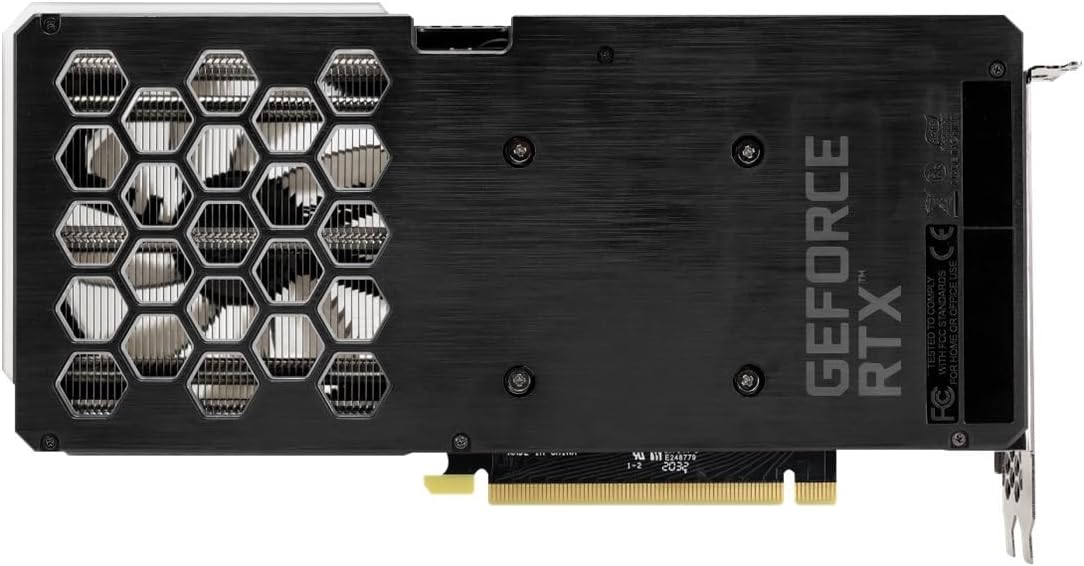
Image: The backplate of the Palit GeForce RTX 3060 Ti graphics card, showing its design and ventilation.
9. Garantie et assistance
9.1. Informations sur la garantie
This Palit GeForce RTX 3060 Ti Dual OC graphics card is backed by Palit's 2-year manufacturer's warranty. This warranty covers defects in materials and workmanship under normal use. For full warranty terms and conditions, please refer to the official Palit website or contact Palit customer support.
9.2. Assistance clientèle
If you require technical assistance or have questions regarding your product, please visit the official Palit website regroupant les ressources d'assistance, les FAQ et les informations de contact :
- Palit Official Website: www.palit.com
- Page d'assistance : Recherchez une section « Assistance » ou « Nous contacter » sur le site. website.
When contacting support, please have your product model number (NE6306TS19P2-190AD) and purchase information readily available.