
1. Introduction
Thank you for choosing the Leopold FC650MDS 65% Mechanical Keyboard. This manual provides essential information for setting up, operating, and maintaining your new keyboard. The FC650MDS is designed for durability and a superior typing experience, featuring Cherry MX Black mechanical switches, high-quality PBT double shot keycaps, and a sound-absorbing pad for enhanced acoustics.
2. Contenu du colis
- Leopold FC650MDS Mechanical Keyboard
- Câble USB-C vers USB-A
- Extracteur de capuchon
- Manuel de l'utilisateur (ce document)
3. Produit terminéview
The Leopold FC650MDS is a compact 65% layout mechanical keyboard, offering a balance between functionality and desk space. It features durable PBT double shot keycaps and Cherry MX Black switches for a linear, non-tactile typing feel. The keyboard also includes a sound-absorbing pad to reduce typing noise and Cherry System Stabilizers for consistent keypresses on larger keys.
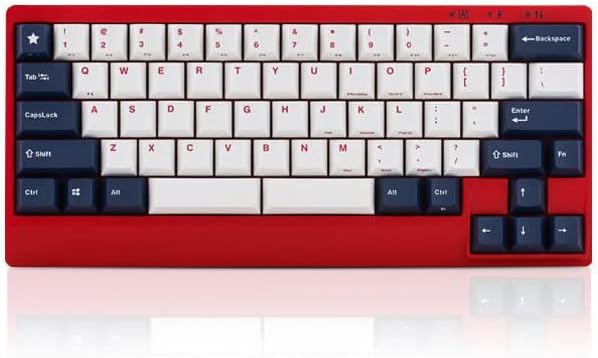
Figure 1 : Face avant view of the Leopold FC650MDS keyboard. The keyboard features a red case with a 'White Blue Star PD' keycap set, consisting of white alphanumeric keys and dark blue modifier keys. The compact 65% layout is visible, including arrow keys and a few navigation keys on the right side.
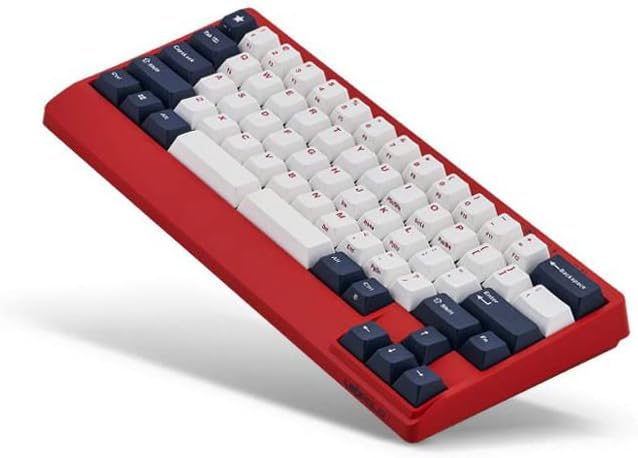
Figure 2 : Angulaire view of the Leopold FC650MDS keyboard, highlighting the ergonomic 'Step Sculpture 2' keycap profile. The red case and the white and dark blue PBT double shot keycaps are clearly visible, demonstrating the keyboard's build quality and design.
Caractéristiques principales :
- Mini 65-key layout with double space bar support.
- 1.5mm thick PBT Double Shot keycaps for durability and legend longevity.
- Integrated sound-absorbing pad to enhance typing acoustics.
- Step Sculpture 2 ergonomic keycap profile pour une frappe confortable.
- Cherry System Stabilizers on larger keys (Shift, Space bar, Enter, Backspace) for consistent keypresses.
- Cherry MX Black mechanical switches.
4. Installation
- Déballer le clavier : Retirez soigneusement le clavier et ses accessoires de leur emballage.
- Connectez le câble USB : Insert the USB-C end of the provided cable into the port on the back of the keyboard. Connect the USB-A end to an available USB port on your computer.
- Installation du pilote : The keyboard is plug-and-play and typically does not require special drivers. Your operating system should automatically detect and install the necessary drivers.
- Placement: Place the keyboard on a stable, flat surface. Adjust the keyboard feet on the underside for your preferred typing angle.
5. Mode d'emploi
Fonctions clés standard :
The FC650MDS operates as a standard QWERTY keyboard for alphanumeric input. The 65% layout includes dedicated arrow keys and a few navigation keys (e.g., Delete, Page Up, Page Down) for convenience.
Combinaisons de touches FN :
The 'FN' (Function) key, typically located near the right Ctrl key, allows access to secondary functions printed on the front or side of certain keycaps. Common FN key combinations on 65% keyboards include:
- FN + F-keys (F1-F12): Accessing F-key functionality (e.g., FN + 1 for F1, FN + 2 for F2, etc.).
- FN + Media Keys: Play/Pause, Stop, Previous Track, Next Track, Volume Up, Volume Down, Mute.
- FN + Brightness/Backlight Control: Adjusting keyboard backlight brightness or modes (if applicable, this model has single-color backlighting).
- FN + Home/End: Accessing Home and End functions.
Please refer to the legends on your specific keycaps for the exact FN key combinations available on your FC650MDS keyboard. Some functions may vary.
Interrupteur DIP:
Leopold keyboards often feature DIP switches on the underside to customize key functions (e.g., swapping Caps Lock and Left Ctrl, changing the position of the FN key). Consult the diagram on the underside of your keyboard or a separate quick start guide for specific DIP switch configurations and their effects.
6. Entretien
Nettoyage du clavier :
- Nettoyage général : Utilisez un chiffon doux et non pelucheux légèrement dampened with water or a mild cleaning solution to wipe down the keyboard case. Avoid harsh chemicals.
- Nettoyage des touches : For deeper cleaning, you can remove the keycaps using the provided keycap puller. Wash keycaps with mild soap and water, rinse thoroughly, and ensure they are completely dry before reattaching.
- Élimination de la poussière : Utilisez de l'air comprimé pour souffler la poussière et les débris entre les touches et les interrupteurs.
Soins généraux:
- Évitez de renverser des liquides sur le clavier.
- N’exposez pas le clavier à des températures extrêmes ou à la lumière directe du soleil pendant des périodes prolongées.
- Handle the USB cable carefully to prevent damage to the connector.
7. Dépannage
- Le clavier ne répond pas :
- Assurez-vous que le câble USB est correctement connecté au clavier et à l'ordinateur.
- Essayez de connecter le clavier à un autre port USB de votre ordinateur.
- Testez le clavier sur un autre ordinateur pour exclure un problème lié à cet ordinateur.
- Redémarrez votre ordinateur.
- Touches spécifiques ne fonctionnant pas :
- Retirez la touche et vérifiez qu'aucun débris ni obstruction ne se trouve autour de l'interrupteur. Utilisez de l'air comprimé pour le nettoyer.
- Si le problème persiste, contactez le support client.
- Sortie de clé incorrecte :
- Check the DIP switch settings on the underside of the keyboard, as they can alter key functions.
- Ensure your operating system's keyboard layout settings are correct.
8. Spécifications
| Marque | Leopold |
| Numéro de modèle | FC650MDSS/EWBPD(R) |
| Type de clavier | Mécanique |
| Type de commutateur | Cherry MX Black |
| Matériau du capuchon | 1.5mm PBT Double Shot |
| Mise en page | 65% (Mini 65 keys) |
| Connectivité | USB-C |
| Caractéristiques spéciales | Sound Absorbing Pad, Step Sculpture 2, Cherry System Stabilizer, Single Color Backlit |
| Dimensions (L x l x H) | 12.64 x 5.67 x 2.76 pouces |
| Poids de l'article | 2.18 livres |
| Couleur | Red case with White Blue Star PD keycaps |
9. Garantie et assistance
Pour toute information relative à la garantie et à l'assistance technique, veuillez consulter la documentation fournie avec votre achat ou contacter directement le revendeur ou le fabricant. Conservez votre preuve d'achat pour toute réclamation au titre de la garantie.