
1. Introduction
Merci pour votre achatasing the Absima Truck Racing 1:14 RC Electric Monster Truck 4WD RtR 2.4. This manual provides essential information for the safe operation, setup, maintenance, and troubleshooting of your new remote-controlled vehicle. Please read this manual thoroughly before operating the truck to ensure proper function and to maximize your enjoyment.
This 1:14 scale electric monster truck features 4-wheel drive (4WD) for enhanced performance and control. It is designed for Ready-to-Run (RtR) convenience, meaning most components are pre-assembled and ready for use after initial setup.

Image 1.1 : Face avant view of the Absima Truck Racing 1:14 RC Electric Monster Truck. The truck features a blue and black body with racing decals, large off-road tires, and a robust front bumper.
2. Précautions de sécurité
Always observe the following safety guidelines to prevent injury or damage to the product and surroundings:
- Surveillance par un adulte : Ce produit est recommandé aux utilisateurs âgés de 14 ans et plus. La surveillance d'un adulte est conseillée pour les utilisateurs plus jeunes.
- Environnement d'exploitation : Operate the RC truck in open areas, away from people, pets, vehicles, and water. Avoid public roads.
- Sécurité des batteries :
- Utilisez uniquement le chargeur et les batteries spécifiés.
- Ne pas surcharger ni court-circuiter les batteries.
- N'exposez pas les batteries à des températures extrêmes ou à la lumière directe du soleil.
- Remove batteries from the truck and transmitter when not in use.
- Jetez les piles conformément aux réglementations locales.
- Pièces mobiles: Keep fingers, hair, and loose clothing away from rotating wheels and other moving parts to prevent entanglement.
- Protection de l'eau : The electronics are splash-protected, but avoid submerging the vehicle in water.
- Modifications: Do not modify the truck or its components. Unauthorized modifications can void the warranty and compromise safety.
- Stockage: Store the truck and its components in a cool, dry place, out of reach of children.
3. Contenu du colis
Lors du déballage, veuillez vérifier que tous les éléments suivants sont inclus :
- Absima Truck Racing 1:14 RC Electric Monster Truck (pre-assembled)
- Émetteur de télécommande 2.4 GHz
- Rechargeable Lithium-ion Battery for the truck (2 included)
- Chargeur de batterie USB
- Manuel d'instructions (ce document)

Image 3.1: The included USB battery charger and two green lithium-ion batteries. The charger is black with two charging slots and connects via a USB cable.
4. Installation
4.1. Chargement de la batterie du véhicule
- Branchez le chargeur USB à une source d'alimentation USB compatible (par exemple, un port USB d'ordinateur, un adaptateur secteur USB).
- Insert the rechargeable Lithium-ion battery into the charger. Ensure correct polarity.
- The charger's indicator light will show the charging status (refer to charger's specific instructions if available).
- Once fully charged, disconnect the battery from the charger and the charger from the power source. Charging time may vary.
4.2. Installation de la batterie du véhicule
- Locate the battery compartment on the underside of the truck. It is typically secured by clips or screws.
- Ouvrez le couvercle du compartiment à piles.
- Carefully insert the charged Lithium-ion battery into the compartment.
- Connect the battery connector to the vehicle's power connector. Ensure a secure connection.
- Fermez soigneusement le couvercle du compartiment à piles.

Image 4.2.1 : Dessous view of the Absima RC truck chassis. The battery compartment is visible in the center, designed for easy access.
4.3. Installation des piles de l'émetteur
The remote control transmitter requires its own batteries (not specified in product data, typically AA batteries). Refer to the transmitter's manual for specific battery type and installation instructions.
- Ouvrez le couvercle de la batterie situé à l'arrière de l'émetteur.
- Insérez les piles requises en respectant la polarité (+/-).
- Fermez soigneusement le couvercle de la batterie.
4.4. Pairing the Transmitter and Vehicle
The 2.4 GHz system usually pairs automatically. Follow these steps:
- Ensure both the vehicle battery and transmitter batteries are installed and charged.
- Allumez d'abord l'émetteur.
- Mettez le contact du véhicule.
- The indicator lights on both the transmitter and vehicle should show a solid light, indicating a successful connection. If not, turn both off and repeat the process.
5. Mode d'emploi
5.1. Contrôles de base
- Gâchette d'accélérateur : Tirez la gâchette vers vous pour accélérer. Poussez-la vers l'extérieur pour freiner ou faire marche arrière.
- Volant: Turn the steering wheel left to steer the truck left, and right to steer the truck right.
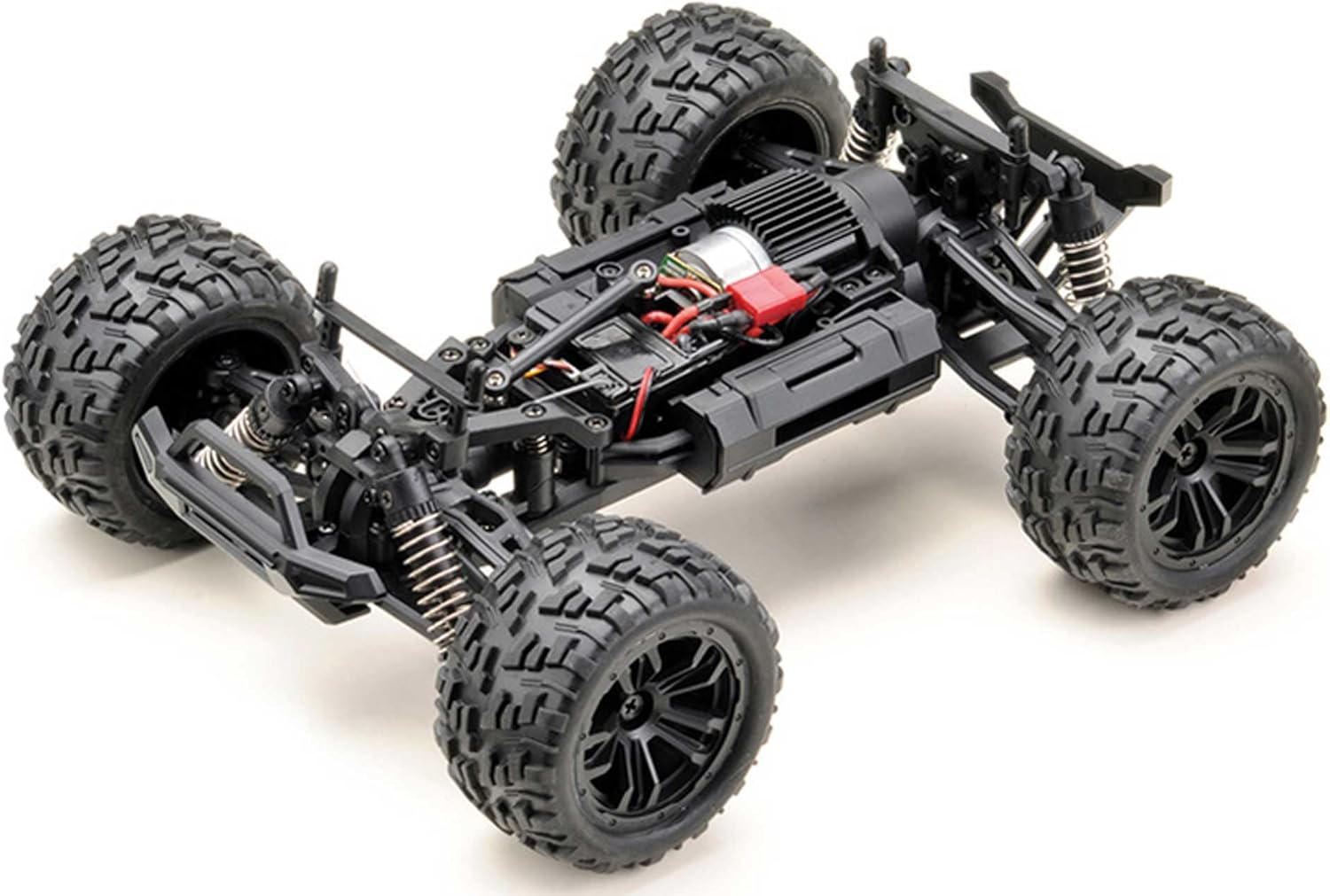
Image 5.1.1 : Vue de dessus view of the Absima RC truck chassis with the body removed, showing the motor, electronics, and suspension components. This view highlights the internal layout for maintenance and understanding controls.
5.2. Conseils de conduite
- Commencez lentement pour vous familiariser avec les commandes.
- Entraînez-vous à diriger et à contrôler l'accélérateur dans un espace dégagé.
- Évitez les arrêts brusques ou les virages à grande vitesse pour éviter les renversements.
- Be mindful of obstacles and uneven terrain. The 4WD system provides good traction, but extreme conditions can still cause issues.
- When the battery power is low, the truck's performance will decrease. Recharge the battery promptly.
5.3. Adjustments (Steering Trim)
If the truck does not drive straight when the steering wheel is centered, use the steering trim dial on the transmitter to adjust it. Turn the dial incrementally until the truck tracks straight.
6. Entretien
Regular maintenance ensures the longevity and optimal performance of your RC truck.
6.1. Nettoyage
- After each use, especially in dusty or dirty conditions, clean the truck.
- Utilisez une brosse douce ou de l'air comprimé pour enlever la saleté et les débris du châssis, de la suspension et de la zone du moteur.
- Essuyez le corps avec de la publicitéamp tissu. Évitez d'utiliser des produits chimiques agressifs.
6.2. Entretien de la batterie
- Toujours charger complètement les batteries avant utilisation.
- Ne laissez pas les batteries en charge sans surveillance.
- Store batteries in a cool, dry place, ideally at a storage charge level (around 50%).
- If a battery appears damaged or swollen, discontinue use immediately and dispose of it safely.
6.3. Inspections
- Vérifiez régulièrement le serrage de toutes les vis et fixations.
- Inspect the suspension components (shocks, arms) for damage or wear.
- Check the tires for wear and ensure they are securely mounted.
- Examine wiring for any cuts or loose connections.
6.4. Stockage
- Remove all batteries from the truck and transmitter before long-term storage.
- Store the truck in a clean, dry environment, away from direct sunlight and extreme temperatures.
7. Dépannage
Cette section aborde les problèmes courants que vous pourriez rencontrer. Si les problèmes persistent, contactez le service client.
| Problème | Cause possible | Solution |
|---|---|---|
| Le camion ne répond pas à l'émetteur. |
|
|
| Truck drives slowly or lacks power. |
|
|
| La direction est décentrée. |
|
|
| Portée de contrôle réduite. |
|
|
8. Spécifications
Key technical specifications for the Absima Truck Racing 1:14 RC Electric Monster Truck:
- Numéro de modèle : 14004
- Échelle: 1:14
- Système d'entraînement : 4 roues motrices (4WD)
- Source d'alimentation : Électrique
- Piles : 2 batterie lithium-ion (incluse)
- Dimensions (L x l x H) : 30 x 23 x 13 cm (environ 11.8 x 9.1 x 5.1 pouces)
- Poids: 845 grammes (environ 1.86 lb)
- Matériel: Rubber (tires), other components not specified but typically plastic/metal.
- Couleur: Noir/Bleu
- Dossier spécial : Splash-protected electronics
- Âge recommandé : 14+ années
9. Garantie et assistance
Absima products are manufactured to high-quality standards. For warranty information, please refer to the documentation provided with your purchase or visit the official Absima webConsultez le site. Conservez votre preuve d'achat pour toute réclamation au titre de la garantie.
For technical support, spare parts, or further assistance, please contact your retailer or the Absima customer service department. Contact details can typically be found on the product packaging or the manufacturer's website.