
1. Informations importantes sur la sécurité
Veuillez lire attentivement ce manuel avant le montage et l'utilisation. Conservez ce manuel pour toute consultation ultérieure.
- Capacité de poids : Do not exceed the maximum weight capacity of 80 kg (176 lbs). Overloading can cause instability and potential damage.
- Stabilité: Ensure the desk is stable and level on a flat surface before placing items on it and during height adjustments.
- Autorisation: Keep the area around the desk clear of obstructions during operation to prevent pinching or damage.
- Enfants et animaux domestiques : Tenez les enfants et les animaux domestiques éloignés du bureau pendant son utilisation afin d'éviter tout accident.
- Assemblée: Follow all assembly instructions precisely. Incorrect assembly can lead to instability and injury.
2. Produit terminéview
The FLEXISPOT H1W is a hand-crank adjustable standing desk frame designed to provide a flexible and ergonomic workspace. It allows for smooth transitions between sitting and standing positions.
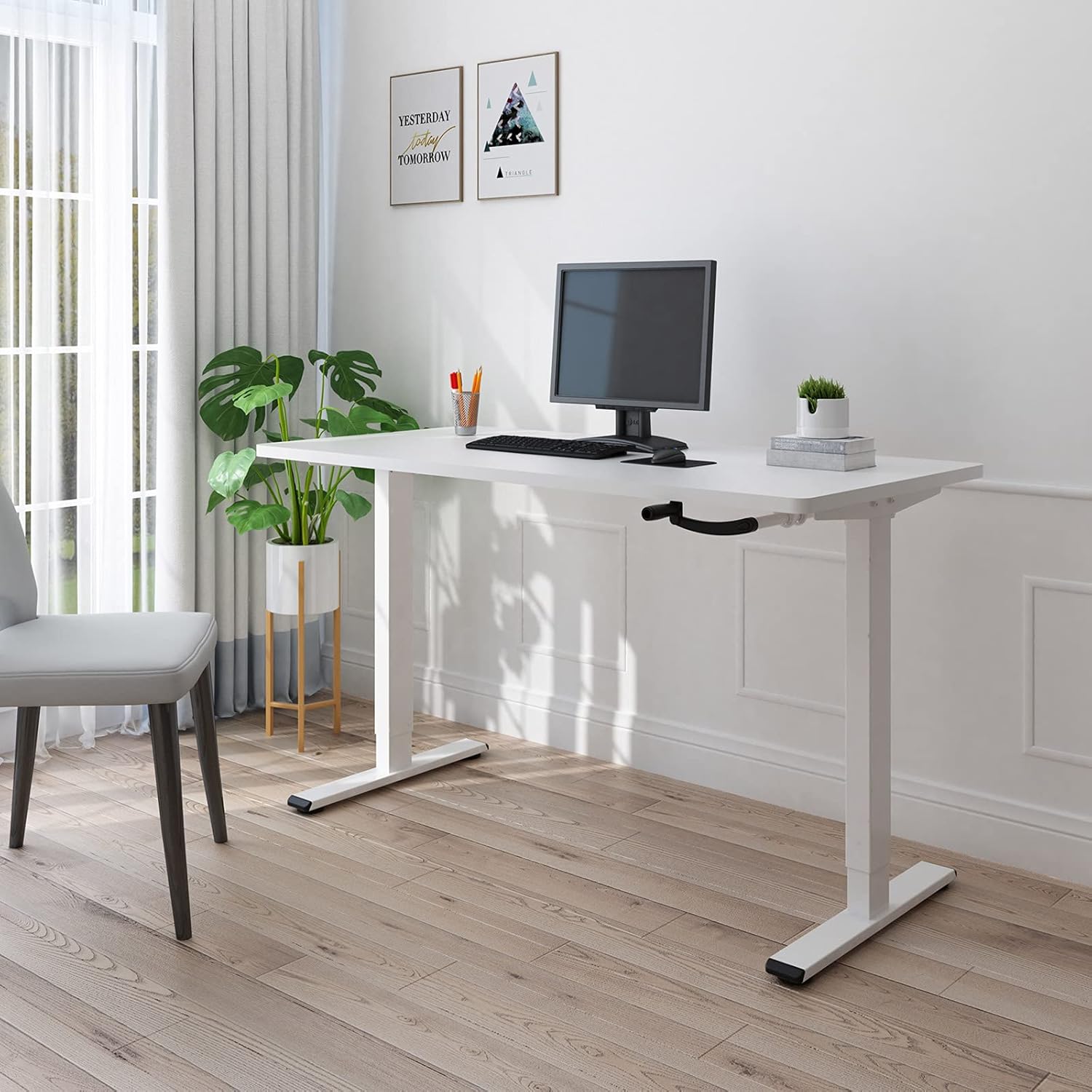
Figure 2.1: The FLEXISPOT H1W Hand-Crank Adjustable Standing Desk frame with a white tabletop, set up in an office environment.
Caractéristiques principales :
- Réglage en hauteur fluide : The innovative hand-crank system provides a smooth and quiet height adjustment experience.
- Plage de hauteur réglable : The desk frame can be adjusted from 71 cm (27.9 inches) to 121 cm (47.6 inches).
- Customizable Frame Width: The frame extends laterally from 85 cm (33.5 inches) to 129 cm (50.8 inches) to accommodate various tabletop sizes.
- Capacité de poids élevée : Designed for maximum structural integrity, supporting up to 80 kg (176 lbs).
- Construction durable : Features double-walled steel tubes for enhanced strength and stability.
- Flexible Crank Installation: The hand crank can be installed on either the left or right side, or completely removed when not in use.
3. Configuration et assemblage
Assembly of the FLEXISPOT H1W desk frame is designed to be straightforward. It is recommended that one person performs the assembly.
3.1 Déballage et inspection
- Déballez soigneusement tous les composants de la boîte.
- Veuillez vérifier que toutes les pièces mentionnées sur le bon de livraison sont présentes et en bon état. Contactez immédiatement le service client si des pièces sont manquantes ou endommagées.
- Tous les outils nécessaires au montage sont inclus dans le colis.
3.2 Étapes d'assemblage
Follow the detailed step-by-step instructions provided in the separate assembly guide included with your product. Key steps include:
- Assemble the leg columns and feet.
- Attach the crossbar and side brackets, adjusting the width to match your tabletop.
- Install the hand-crank mechanism. The hand crank can be positioned on the left or right side of the desk, or removed entirely when not needed.
- Securely attach your chosen tabletop to the assembled frame using appropriate screws (tabletop not included).

Figure 3.1: The desk frame's width can be adjusted from 850mm to 1290mm to fit various tabletops.

Figure 3.2: The hand crank offers flexible installation options, allowing it to be placed on either side or removed.
3.3 Recommended Tabletop Dimensions
- Longueur: 100 cm à 160 cm (39.4 pouces à 63 pouces)
- Largeur: 60 cm à 80 cm (23.6 pouces à 31.5 pouces)
- Épaisseur: 2 cm (0.8 pouces) ou plus

Figure 3.3: Recommended tabletop dimensions for optimal fit and stability.
4. Mode d'emploi
The FLEXISPOT H1W desk frame features a manual hand-crank system for height adjustment.
4.1 Réglage de la hauteur du bureau
- Ensure the area above and below the desk is clear of any obstacles.
- Locate the hand crank on the side of the desk.
- To raise the desk, turn the hand crank clockwise.
- To lower the desk, turn the hand crank counter-clockwise.
- Adjust the desk to your desired sitting or standing height within the range of 71 cm to 121 cm.

Figure 4.1: The desk frame offers a height adjustment range from 710mm to 1210mm.
4.2 Capacité de poids
The desk frame is designed to safely support a maximum load of 80 kg (176 lbs). Distribute weight evenly across the tabletop to maintain stability.

Figure 4.2: The desk frame supports a maximum weight of 80 kg (176 lbs).
5. Entretien
Regular maintenance helps ensure the longevity and smooth operation of your FLEXISPOT H1W desk frame.
- Nettoyage: Essuyez le cadre du bureau avec un chiffon doux et sec.amp Chiffon. Évitez les produits chimiques agressifs ou les nettoyants abrasifs qui pourraient endommager la finition.
- Fixations : Vérifiez régulièrement le serrage de toutes les vis et boulons. Resserrer si nécessaire pour assurer la stabilité de la structure.
- Pièces mobiles: The hand-crank mechanism is designed for smooth operation. If you notice any stiffness, ensure no debris is obstructing the mechanism. Do not lubricate unless specifically instructed by the manufacturer.
- La répartition du poids: Always distribute weight evenly on the tabletop. Avoid placing heavy items on one side only.
6. Dépannage
If you encounter any issues with your FLEXISPOT H1W desk frame, refer to the following common troubleshooting tips:
- Le bureau est bancal :
- Assurez-vous que toutes les vis et tous les boulons d'assemblage sont bien serrés.
- Check that the desk is placed on a level surface. Adjust the leveling feet if necessary.
- Verify that the tabletop is securely attached to the frame.
- Hand Crank is Stiff or Difficult to Turn:
- Check for any obstructions in the crank mechanism or along the lifting columns.
- Veillez à ne pas surcharger le bureau au-delà de sa capacité de 80 kg.
- Confirm that the crank handle is properly installed.
- Desk Does Not Adjust Height Smoothly:
- Ensure the weight on the desk is within the specified limit and evenly distributed.
- Inspect the lifting columns for any visible damage or foreign objects.
Si ces étapes ne résolvent pas le problème, veuillez contacter le service client de FLEXISPOT pour obtenir de l'aide supplémentaire.
7. Spécifications
| Numéro de modèle | H1W |
| Marque | FLEXIPOT |
| Taper | Hand-Crank Adjustable Standing Desk Frame |
| Matériel | Acier allié |
| Couleur | Cadre blanc |
| Plage de réglage de la hauteur | 71 cm - 121 cm (27.9 po - 47.6 po) |
| Réglage de la largeur du cadre | 85 cm - 129 cm (33.5 po - 50.8 po) |
| Longueur de plateau recommandée | 100 cm - 160 cm (39.4 po - 63 po) |
| Largeur de plateau recommandée | 60 cm - 80 cm (23.6 po - 31.5 po) |
| Recommended Tabletop Thickness | 2 cm (0.8 po) ou plus |
| Capacité de poids maximale | 80 kg (176 lb) |
| Poids de l'article (cadre uniquement) | 21 kg (46.3 lb) |
| Assemblage requis | Oui |
| Personnes recommandées pour l'assemblage | 1 |
| Code UPC/GTIN | 810054070498 |
8. Garantie et assistance
For warranty information and customer support, please refer to the documentation included with your purchase or visit the official FLEXISPOT website.
If you have any questions or require assistance with your FLEXISPOT H1W desk frame, please contact FLEXISPOT customer service directly.