
1. Produit terminéview
The DROK DC Buck Converter is a high-performance, digitally controlled step-down power module designed to convert a higher DC input voltage à un volume de sortie CC plus faible et réglabletage and current. It features an integrated LED display for real-time monitoring of voltage, current, capacity, and time. This module is equipped with advanced microprocessor control for precise adjustments and includes a cooling fan and heat sink for efficient thermal management.

Image 1 : Haut view of the DROK DC Buck Converter module.
2. Consignes de sécurité
Please read and understand these safety instructions before operating the device. Failure to follow these instructions may result in electric shock, fire, or damage to the product.
- Vol d'entréetage: Assurez-vous que le volume d'entréetage is within the specified range of DC 10V-65V. Exceeding this range can damage the module.
- Charge de sortie : Do not exceed the maximum output current of 12A or maximum output power of 720W.
- Polarité: Always observe correct input and output polarity. Incorrect connections can cause severe damage.
- Ventilation: Ensure adequate ventilation around the module, especially the cooling fan and heat sink, to prevent overheating.
- Environnement: Avoid operating the module in environments with high humidity, dust, or extreme temperatures.
- Installation: L'installation et le câblage doivent être effectués uniquement par du personnel qualifié.
- Isolement: Ensure the module is properly isolated from other components to prevent accidental short circuits.
3. Composants et schéma du produit
Familiarize yourself with the main components of the DROK DC Buck Converter:

Image 2: Labeled diagram of the DROK DC Buck Converter.
- Input + / Input -: Terminals for connecting the DC power source (10V-65V).
- Sortie + / Sortie - : Terminals for connecting the load.
- Interface d'affichage: LED screen showing real-time voltage, current, capacity, and time.
- Ventilateur de refroidissement : S'active automatiquement pour dissiper la chaleur pendant son fonctionnement.
- Operation Key Buttons: Used for setting output voltage, courant et autres paramètres.
- Working Status Indicators: LEDs for OUT (Output active), CV (Constant Voltage mode), and CC (Constant Current mode).
4. Spécifications
| Paramètre | Valeur |
|---|---|
| Vol d'entréetaget gamme | CC 10 V - 65 V |
| Volume de sortie réglabletaget gamme | CC 0 V - 60 V |
| Plage de courant de sortie réglable | 0A - 12A |
| Puissance de sortie maximale | 720 W |
| Volume de sortietage Réglage de la résolution | 10mV |
| Output Current Setting Resolution | 10 mA |
| Efficacité typique | 94% (Input 54V, Output 30V, Current 5A) |
| Voltage Display Error | ±1% + 20mV |
| Current Display Error | ±1% + 20mA |
| Temps de réponse | <50 ms |
| Dimensions (L x l x H) | 104mm x 83mm x 57mm (115mm length with cooling fan) |
| Poids | 10.8 onces (environ 306 g) |
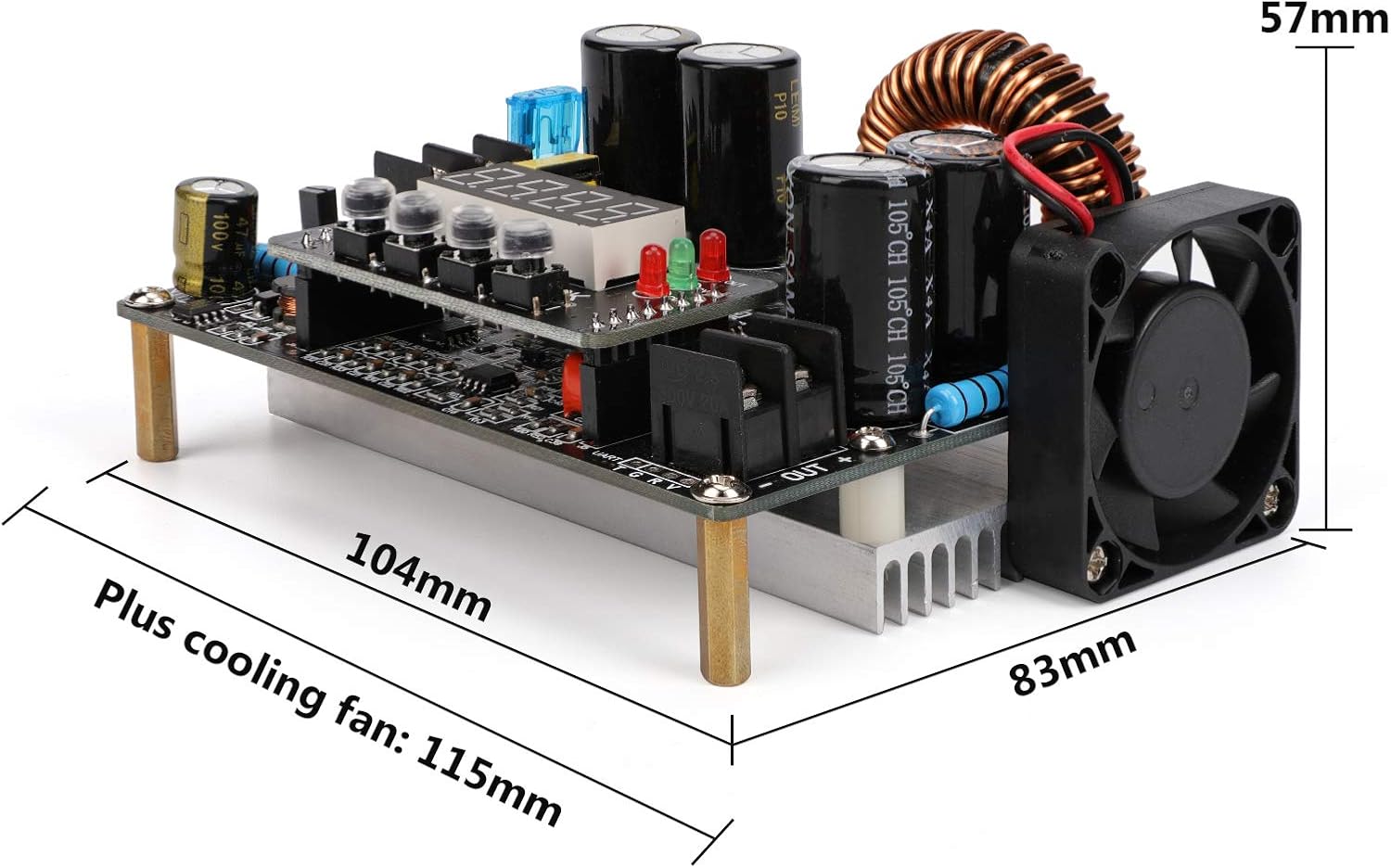
Image 3: Physical dimensions of the converter module.
5. Installation
5.1 Connexions de câblage
- Puissance d'entrée : Connect your DC power source (10V-65V) to the 'IN+' and 'IN-' terminals. Ensure correct polarity.
- Charge de sortie : Connect your load device to the 'OUT+' and 'OUT-' terminals. Again, verify correct polarity.
- Connexions sécurisées : Assurez-vous que tous les branchements électriques sont bien serrés et sécurisés afin d'éviter les faux contacts ou les courts-circuits.
5.2 Montage
Mount the module in a stable location that allows for proper airflow, especially around the cooling fan and heat sink. Avoid enclosed spaces that could lead to heat buildup.

Image 4: Cooling fan and cooling pad for thermal management.
6. Mode d'emploi
6.1 Mise sous tension
Once wired correctly, apply power to the input terminals. The LED display will illuminate, showing the current output voltage or other default parameters.
6.2 Réglage du volume de sortietage et courant
The module features operation key buttons for precise adjustment:
- Voltage Réglage : Press the 'SET' button to enter voltage adjustment mode. Use the adjustment buttons (usually up/down arrows or rotary encoder, if present) to increase or decrease the voltage value. Press 'OK' to confirm and save the setting.
- Paramètre actuel: Similarly, press 'SET' to cycle to current adjustment mode. Adjust the current value using the appropriate buttons and confirm with 'OK'.
- Affichage en temps réel : The LED display shows real-time output voltage and current. It can also display capacity and time, which can be cycled through using the buttons.
6.3 indicateurs d'état
The module includes LED indicators to show its operating status:
- DEHORS: S'allume lorsque la sortie est active.
- CV (vol constanttage) : Illuminates when the module is operating in constant voltagle mode.
- CC (Constant Current): Illuminates when the module is operating in constant current mode.
6.4 fonctionnalités avancées
- Sortie automatique : The module can be configured to automatically enable output upon power input. Refer to the specific button sequence for this setting.
- Mode de verrouillage des boutons : To prevent accidental changes to settings, the parameter adjustment buttons can be locked. Consult the device's specific button combination for this function.
7. Entretien
Regular maintenance ensures optimal performance and longevity of your DROK DC Buck Converter:
- Nettoyage: Keep the module clean and free from dust and debris. Use a soft, dry cloth for cleaning. Do not use liquid cleaners.
- Circuit de refroidissement: Periodically check that the cooling fan and heat sink fins are free from obstructions to ensure efficient heat dissipation.
- Relations: Regularly inspect all input and output wiring connections for tightness and signs of wear or corrosion.
- Stockage: When not in use for extended periods, store the module in a dry, cool, and dust-free environment.
8. Dépannage
If you encounter issues with your DROK DC Buck Converter, refer to the following common problems and solutions:
| Problème | Cause possible | Solution |
|---|---|---|
| No display / No power | No input power; Incorrect input polarity; Loose connections. | Check input power source; Verify input wiring polarity; Secure all connections. |
| Pas de volume de sortietage/actuel | Output disabled; Output short circuit; Overload protection activated; Incorrect output settings. | Ensure output is enabled; Check load for short circuits; Reduce load; Verify output voltage/paramètres actuels. |
| Volume de sortietage/courant instable | Input power fluctuation; Loose connections; Overheating. | Use a stable input power source; Check all wiring; Ensure proper ventilation and cooling. |
| Surchauffe des modules | Insufficient ventilation; Cooling fan obstructed or faulty; Exceeding power limits. | Ensure clear airflow; Clean fan/heat sink; Reduce load to stay within specifications. |
| Erreur d'affichage | Measurement error within specified tolerance; Internal fault. | Note the specified error margin; If persistent and significant, contact support. |
9. Garantie et assistance
DROK products are designed for reliability and performance. For technical assistance, warranty claims, or any questions regarding your DC Buck Converter, please contact DROK customer service through the retailer where you purchased the product or visit the official DROK website d'information et de support.