
Introduction
The AQQA Electric Power Sponge Filter is designed to provide efficient physical and biochemical filtration for both saltwater and freshwater aquariums. This submersible filter features a powerful, quiet motor and a dual-stage filtration system to maintain optimal water quality and increase oxygen content. This manual provides detailed instructions for setup, operation, and maintenance to ensure the best performance of your filter.
Caractéristiques du produit
- Upgrade Electric Power Filter: Features a powerful motor, eliminating the need for an external air pump. Operates efficiently with low energy consumption and a noise level below 30dB for a quiet environment.
- Système de double filtration : Combines physical filtration (biochemical cotton with ribbing design for increased surface area) and biochemical filtration (bio ceramic media balls for improved water purification and beneficial bacteria cultivation).
- Adjustable Water Outlet: The water outlet can be adjusted 360° and is retractable to adapt to various tank depths. It can be submerged or positioned above the water surface to purify water, increase circulation, and enhance oxygen content.
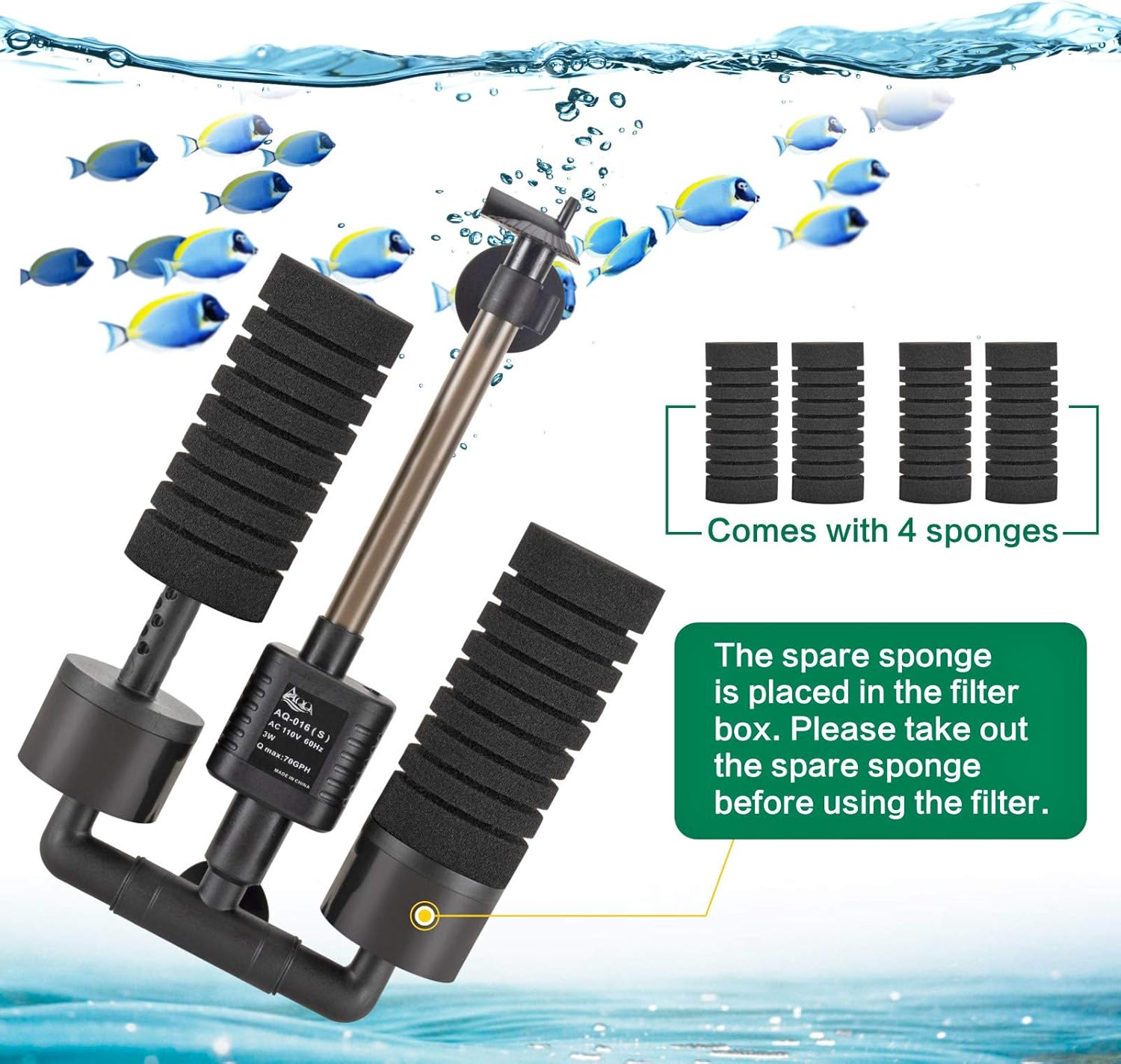
- Accessoires complets : Includes 4 sponges (2 spare), 1 bag of bio ceramic media balls, and 2 strong suction cups for secure installation. The filter box can accommodate additional or alternative filter media.
- Utilisation polyvalente : Suitable for both saltwater and freshwater aquarium environments.
Contenu du colis
Veuillez vous assurer que tous les éléments sont présents avant de procéder à l'installation :
- 1 x AQQA Electric Power Sponge Filter Unit (with motor)
- 4 x Biochemical Filter Sponges (2 pre-installed, 2 spare)
- 1 x Bag of Bio Ceramic Media Balls
- 2 x Suctions
- 1 x Retractable Water Outlet Pipe
Instructions d'installation
Follow these steps to correctly set up your AQQA Electric Power Sponge Filter:
- Déballer et inspecter : Retirez soigneusement tous les composants de leur emballage. Vérifiez qu'ils ne sont pas endommagés.
- Assemble Filter Components: Attach the biochemical sponges to the filter base. Ensure the motor unit is securely placed. The filter is designed for easy assembly and disassembly.
- Ajouter un média filtrant : Place the bio ceramic media balls into the designated filter box compartments. Ensure any spare sponges are removed from the filter box before use.
- Attach Water Outlet: Connect the retractable water outlet pipe to the motor unit. Adjust its height and direction as needed for your aquarium setup.
- Install in Aquarium: Use the provided suction cups to securely attach the filter to the inside wall of your aquarium. Ensure the filter is fully submerged in water.
- Amorcer le filtre : Before plugging in, ensure the filter is completely immersed in water. Gently squeeze the sponges repeatedly until they are full of water and sink to the bottom of the fish tank. This removes trapped air and ensures proper operation.
- Connexion à l'alimentation : Plug the filter into a suitable power outlet. The filter will begin operating, providing oxygenation and filtration.

Mode d'emploi
Once installed and powered on, the AQQA Electric Power Sponge Filter will begin its operation:
- Filtration continue : The powerful motor will draw water through the biochemical sponges for physical filtration, removing debris and residues.
- Biological Processing: Water then passes through the bio ceramic media balls, where beneficial bacteria cultivate to purify water quality and decompose harmful substances.
- Oxygénation: The filter's operation increases water circulation and oxygen content in the aquarium, crucial for fish health.
- Ajuster le débit d'eau : The 360° adjustable water outlet allows you to direct the flow as desired, minimizing surface disturbance or maximizing aeration.


Entretien
Regular maintenance ensures the longevity and efficiency of your AQQA Electric Power Sponge Filter:
- Nettoyage à l'éponge : Periodically remove the biochemical sponges and gently clean them with water from the fish tank. Avoid using tap water directly as it may contain chlorine that harms beneficial bacteria.
- Media Ball Cleaning: The bio ceramic media balls should also be rinsed gently with aquarium water during sponge cleaning. Note that new media balls may have a layer of protective powder, which is normal and should be rinsed off before first use.
- Inspection du moteur : Occasionally inspect the motor and impeller for any debris or blockages. Clean as necessary to maintain optimal flow.
- Remplacement: The filter comes with 2 spare sponges. Replace sponges when they show significant wear or clogging that cannot be cleaned.

Dépannage
If you encounter any issues with your AQQA Electric Power Sponge Filter, please refer to the following common solutions:
- Débit réduit : Check if the sponges are clogged and require cleaning. Inspect the motor and impeller for any blockages. Ensure the water outlet is not obstructed.
- Bruit excessif : Ensure the filter is fully submerged and securely attached to the tank wall. Check for any trapped air within the unit; re-prime if necessary. Inspect the impeller for damage or debris.
- Le filtre ne démarre pas : Verify that the power cord is securely plugged into a working outlet. Ensure the motor is properly assembled and free of obstructions.
- Eau trouble : This may indicate insufficient filtration or an imbalance in the aquarium's biological cycle. Perform regular water changes and ensure filter media is clean and functioning correctly.
Caractéristiques
| Fonctionnalité | Spécification |
|---|---|
| Marque | AQQA |
| Numéro de modèle | FUS-AQ016-S |
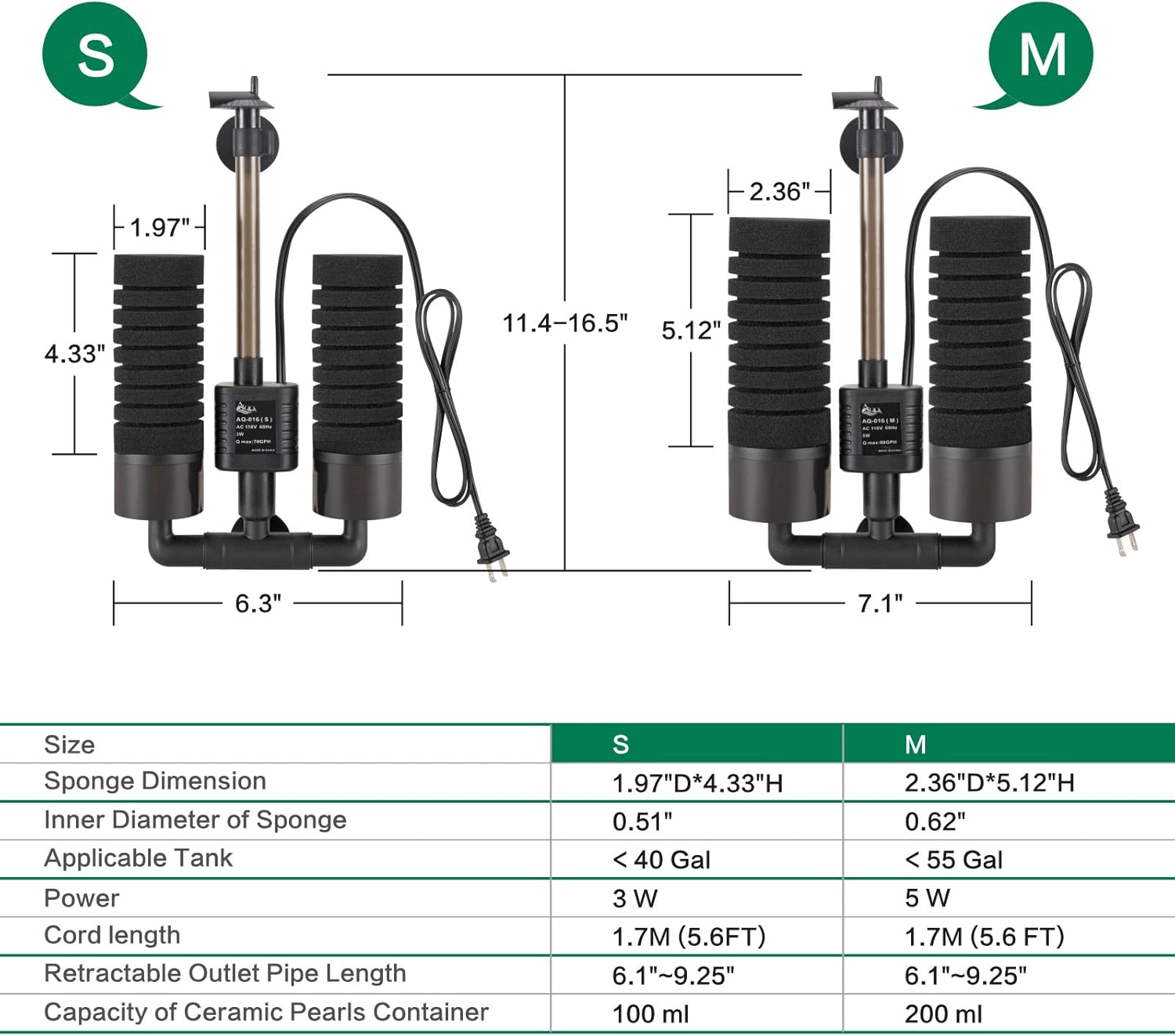
| Power (S model) | 3W |
| Power (M model) | 5W |
| Max Flow (S model) | 79 GPH (300 XNUMX L/H) |
| Max Flow (M model) | 132 GPH (500 XNUMX L/H) |
| Applicable Tank Size (S model) | 10-40 gallons |
| Applicable Tank Size (M model) | 20-55 gallons |
| Longueur du cordon | 5.6 pieds (1.7 m) |
| Niveau de bruit | < 30 dB |
| Type de filtration | Physical & Biochemical |
| Type d'eau | Eau salée et eau douce |
Garantie et assistance
AQQA is committed to providing quality products and customer satisfaction.
- Garantie: Ce produit bénéficie d'une garantie de 1 ans à compter de la date d'achat.
- Assistance clientèle : For any questions, concerns, or technical assistance, please feel free to contact AQQA customer service.
