
1. Introduction
The GRAVITY STANDS FM SEAT1 BR is a versatile height-adjustable stool designed for musicians and performers, offering enhanced comfort and support during long sessions. It features an ergonomically shaped seat, an adjustable backrest, and a footrest, all built on a solid steel frame for stability. This manual provides detailed instructions for assembly, operation, maintenance, and troubleshooting to ensure optimal use of your FM SEAT1 BR stool.
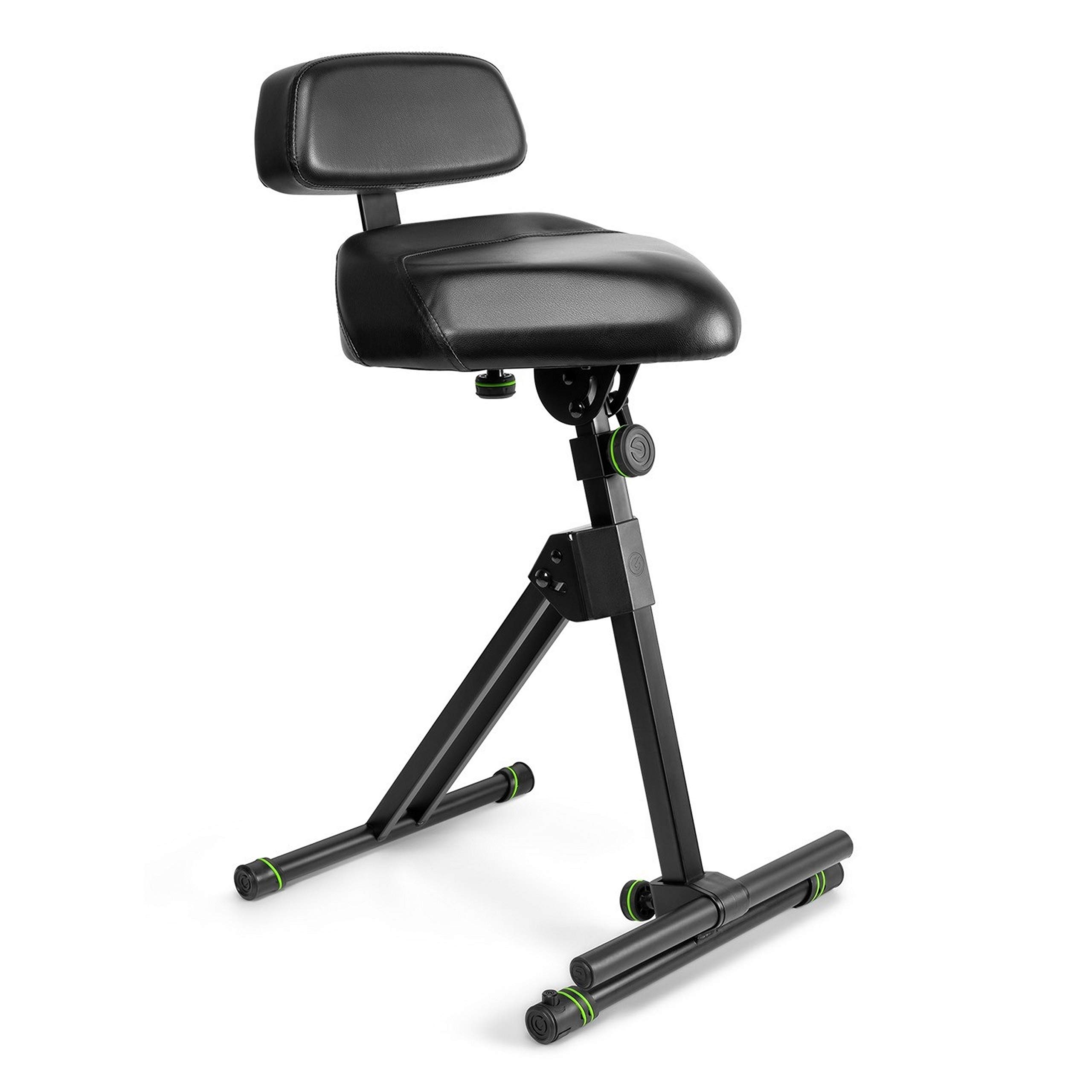
Figure 1: GRAVITY STANDS FM SEAT1 BR Height Adjustable Stool. This image shows the complete stool with its seat, backrest, and footrest components.
Caractéristiques principales :
- Ergonomically shaped seat with adjustable height and tilt angle.
- Backrest adjustable in height and depth.
- Footrest with continuously variable height adjustment.
- Solid steel construction for durability and stability.
- Convenient folding mechanism for transport and storage.
2. Informations importantes sur la sécurité
AVERTISSEMENT: Do not exceed the maximum weight capacity of 150 kg (approximately 330 lbs). Exceeding this limit may result in product damage or personal injury.
- Ensure all locking mechanisms and adjustments are securely fastened before use.
- Use the stool on a stable, level surface. The integrated leveling feet (KS Vari-Foot® 1) can be adjusted for uneven surfaces.
- Lors du réglage, veillez à garder vos mains et vos doigts éloignés des pièces mobiles afin d'éviter tout pincement.
- Regularly inspect the stool for any signs of wear, damage, or loose components. Do not use if damaged.
3. Configuration et assemblage
The FM SEAT1 BR stool features a folding mechanism for quick assembly and disassembly.
3.1 Déplier le tabouret
- Retirez délicatement le tabouret de son emballage.
- Place the folded stool on a flat surface.
- Unfold the main frame components until they lock into their open position. Ensure the locking pins or levers are fully engaged.
- Extend the base legs to their full width for maximum stability.

Figure 2: Stool in an unfolded position, ready for adjustments. This image illustrates the stool's frame fully extended.
3.2 Attaching the Backrest (if detached)
If the backrest is not pre-attached, follow these steps:
- Locate the backrest support bar and the corresponding slot on the main frame.
- Slide the backrest support bar into the slot.
- Secure the backrest using the provided screws or locking knob. Ensure it is firmly attached.

Figure 3: Stool with backrest attached. This image shows the backrest securely mounted to the main frame.
3.3 Adjusting for Uneven Surfaces
The tubular base construction is fitted with KS Vari-Foot® 1 leveling feet.
- To stabilize the stool on uneven surfaces, rotate the screw mechanism on each foot until the stool is level and stable.

Figure 4: Close-up of the KS Vari-Foot® 1 leveling feet. This image highlights the adjustable feet mechanism for stability on uneven ground.
4. Mode d'emploi
The FM SEAT1 BR offers multiple adjustment options to achieve a comfortable and ergonomic seating position.
4.1 Réglage de la hauteur du siège
- Locate the height adjustment mechanism on the main vertical support.
- Loosen the locking knob or lever.
- Adjust the seat to the desired height (range: 67 cm to 97 cm).
- Securely tighten the locking knob or lever to fix the seat in position.
4.2 Seat Tilt Adjustment
- The seat can be tilted forwards or backwards at continuously variable angles.
- Locate the tilt adjustment mechanism beneath the seat.
- Loosen the adjustment knob, set the desired tilt, and then firmly tighten the knob to secure the position.

Figure 5: Stool with the seat tilted forward. This image demonstrates the adjustable seat tilt feature.
4.3 Réglage du dossier
The backrest can be adjusted in both height and distance from the seat.
- Réglage de la hauteur : Loosen the knob on the backrest support bar, slide the backrest up or down to the desired height, and re-tighten.
- Réglage de la profondeur : Loosen the knob that controls the backrest's distance from the seat, adjust the depth, and re-tighten.
4.4 Réglage du repose-pieds
- The footrest is continuously height-adjustable.
- Locate the adjustment mechanism for the footrest.
- Loosen the locking mechanism, move the footrest to a comfortable height, and then firmly secure it. This allows for resting one or both legs and helps relieve back strain.

Figure 6: Close-up of the adjustable footrest. This image shows the footrest bar and its attachment point on the stool's frame.
5. Maintenance et entretien
Proper maintenance ensures the longevity and safe operation of your Gravity Stands FM SEAT1 BR stool.
- Nettoyage: Essuyez le cadre avec un chiffon doux et sec.amp cloth. For the leatherette seat and backrest, use a mild, non-abrasive cleaner specifically designed for synthetic leather, if necessary. Avoid harsh chemicals.
- Inspection: Vérifiez régulièrement toutes les vis, tous les boulons et tous les mécanismes de verrouillage pour vous assurer qu'ils sont bien serrés et sécurisés.
- Lubrification: If any moving parts become stiff, apply a small amount of silicone-based lubricant to the pivot points.
- Stockage: When not in use, fold the stool flat and store it in a dry, clean environment to protect it from dust and moisture.
6. Dépannage
If you encounter issues with your FM SEAT1 BR stool, refer to the following common problems and solutions.
| Problème | Cause possible | Solution |
|---|---|---|
| Les tabourets semblent instables ou bancals. | Uneven surface; loose connections; legs not fully extended. |
|
| Seat or backrest slips after adjustment. | Mécanisme de verrouillage insuffisamment serré. |
|
| Footrest feels loose or detaches. | Improper assembly; loose fastening. |
|
| Difficulty folding/unfolding the stool. | Mécanisme rigide ; obstruction. |
|
7. Spécifications
| Fonctionnalité | Détail |
|---|---|
| Numéro de modèle | FM SEAT1 BR |
| Marque | Pesanteur |
| Matériel | Steel frame, Leatherette seat/backrest |
| Couleur | Noir |
| Poids de l'article | 22 livres (environ 10 kg) |
| Dimensions du produit (plié) | 12 x 12 x 38 pouces (environ 30.5 x 30.5 x 96.5 cm) |
| Plage de réglage de la hauteur | 67 cm à 97 cm (environ 26.4 à 38.2 pouces) |
| Capacité de charge maximale | 150 kg (330 lb) |

Figure 7: Dimensions of the GRAVITY STANDS FM SEAT1 BR stool. This image provides key measurements for the product.
8. Garantie et assistance
Gravity products are known for their quality and often come with a manufacturer's warranty. For specific warranty details, including coverage period and terms, please refer to the documentation included with your purchase or visit the official Gravity Stands website.
For technical support, spare parts, or warranty claims, please contact Gravity customer service directly. Contact information can typically be found on the manufacturer's website ou dans l'emballage de votre produit.
Fabricant Website: www.gravitystands.com