
Introduction
Merci pour votre achatasing the Hori Fighting Stick Mini for Nintendo Switch. This compact arcade stick is designed to enhance your gaming experience for arcade classics and fighting games on the Nintendo Switch. Please read this manual thoroughly to ensure proper setup and operation.
Contenu du colis
- Hori Fighting Stick Mini (NSW-149A)
- Manuel d'instructions (ce document)
Please ensure all items are present before proceeding with setup. If any items are missing or damaged, please contact your retailer.
Caractéristiques du produit
- Compatible with Arcade and Fighting Games
- Conception compacte, légère et portable
- Classic button layout for authentic arcade feel
- Includes Home, Capture, and Plus/Minus buttons for full Nintendo Switch functionality
Instructions d'installation
Connexion à la Nintendo Switch
- Assurez-vous que votre console Nintendo Switch est allumée et mise à jour avec la dernière version du logiciel système.
- Locate an available USB port on your Nintendo Switch dock. If playing in handheld mode, you may need a USB-C to USB-A adapter (not included) to connect directly to the console's USB-C port.
- Plug the USB cable from the Hori Fighting Stick Mini into the USB port on the Nintendo Switch dock or console.
- The Fighting Stick Mini should be automatically recognized by your Nintendo Switch. You may need to navigate to the "Controllers" menu on your Switch to confirm it is connected.
- Once connected, you can begin playing compatible games.
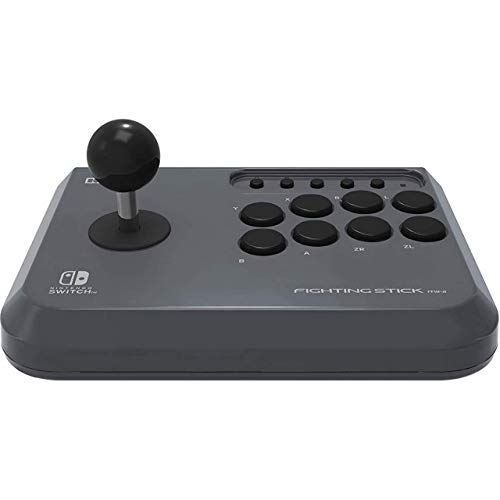
Image: The Hori Fighting Stick Mini NSW-149A shown in its retail packaging. The device features a joystick on the left and multiple action buttons on the right, designed for arcade-style gameplay on the Nintendo Switch.
Mode d'emploi
Commandes de base
- Manette: Use the joystick for directional input in games.
- Boutons d'action : The array of buttons on the right corresponds to various in-game actions (e.g., attack, jump, special moves). Refer to your game's control settings for specific assignments.
- Bouton d'accueil: Press to return to the Nintendo Switch HOME Menu.
- Bouton de capture : Press to take a screenshot of your current game screen. Hold to record video clips (if supported by the game).
- Boutons Plus (+) / Moins (-) : These function as the Start/Pause and Select buttons, respectively, in many games.
Compatibilité des jeux
The Hori Fighting Stick Mini is designed for games that benefit from arcade-style controls, particularly fighting games and classic arcade titles. Compatibility may vary by game. Ensure the game supports Pro Controller input for optimal performance with this device.
Entretien et soins
- Nettoyage: Use a soft, dry cloth to wipe the surface of the Fighting Stick Mini. Do not use liquid cleaners, solvents, or abrasive materials, as these can damage the finish or internal components.
- Stockage: Conservez l'appareil dans un endroit frais et sec, à l'abri de la lumière directe du soleil et des températures extrêmes.
- Manutention: Avoid dropping the device or subjecting it to strong impacts. Do not pull on the USB cable forcefully.
Dépannage
- Problem: The Fighting Stick Mini is not recognized by the Nintendo Switch.
- Solution:
- Ensure the USB cable is securely plugged into both the Fighting Stick Mini and the Nintendo Switch dock/console.
- Try plugging the Fighting Stick Mini into a different USB port on the dock.
- Redémarrez votre console Nintendo Switch.
- Assurez-vous que le logiciel de votre système Nintendo Switch est à jour.
- Problem: Buttons or joystick are unresponsive.
- Solution:
- Verify the device is properly connected as described in the Setup section.
- Test the Fighting Stick Mini with a different compatible game to rule out game-specific issues.
- Ensure no debris is obstructing the buttons or joystick.
- Problem: The device feels loose or makes unusual noises.
- Solution:
Discontinue use immediately and contact customer support. Do not attempt to open or repair the device yourself, as this may void any applicable warranty.
Caractéristiques
| Nom du modèle | Bâton de combat Mini |
| Numéro de modèle | NSW-149A |
| Marque | Hori |
| Appareils compatibles | Nintendo Switch |
| Technologie de connectivité | USB (filaire) |
| Type de contrôleur | Manette de jeu |
| Plateforme matérielle | Nintendo Switch |
| Dimensions de l'article (L x l x H) | 23 x 18 x 10 cm |
| Poids de l'article | 2.78 kilogrammes |
| Couleur | Noir |
Remarque: les spécifications peuvent être modifiées sans préavis.
Assistance clientèle
For further assistance, technical support, or inquiries regarding warranty information, please contact your retailer or visit the official Hori website for your region. Do not attempt to repair the device yourself.
Politique de retour : Please refer to the returns policy of your purchase retailer for details regarding product returns or exchanges.