
Introduction
This manual provides essential information for the safe and efficient operation of your APC Back-UPS Pro Gaming UPS, model BGM1500B. This Uninterruptible Power Supply (UPS) is designed to protect your gaming console, PC, and other electronic equipment from power outages, surtensions et voltage fluctuations, ensuring continuous power and data integrity.
Consignes de sécurité
Read these instructions carefully before installing or operating the unit. Save this manual for future reference.
- Sécurité électrique : Connect the UPS to a grounded outlet only. Do not remove the grounding prong.
- Sécurité des batteries : The battery is user-replaceable. Refer to the maintenance section for proper replacement procedures. Do not dispose of batteries in a fire; they may explode.
- Placement: Install the UPS indoors in a protected area, away from excessive moisture, heat, or conductive contaminants. Ensure adequate airflow around the unit.
- Surcharge: Do not overload the UPS. Ensure the total power draw of connected equipment does not exceed the UPS's capacity (900W).
Contenu du colis
Vérifiez que votre colis contient les éléments suivants :
- APC Back-UPS Pro Gaming UPS (Model BGM1500B)
- Câble de communication USB
- Câble coaxial
- Manuel d'utilisation et informations de sécurité
Caractéristiques du produit
The APC Back-UPS Pro Gaming UPS BGM1500B offers advanced features for power protection and convenience:
- 1500VA / 900W Sine Wave Output: Provides clean and stable power, ideal for sensitive electronics and Active PFC power supplies.
- Écran LCD interactif : Features a Reactor Circle that changes color to indicate power status, surges, dips, and remaining battery power.
- Customizable RGB Ambient LED Lighting: Personalize the look of your UPS to match your gaming setup.
- 10 Total Outlets: Includes 6 battery backup outlets and 4 surge-only outlets for comprehensive protection.
- 3 ports de chargement USB : Two Type-A and one Type-C port (5V/3A shared) for convenient device charging.
- Vol automatiquetage Règlement (AVR) : Corrects high and low voltage fluctuations without using battery power, preserving battery life.
- Surge-Protected Dataline Ports: 1 Gb dataline ports and gold-plated co-axial ports protect network and cable connections.
- Hot-Swappable, User-Replaceable Battery: Allows for easy battery replacement without powering down connected equipment.
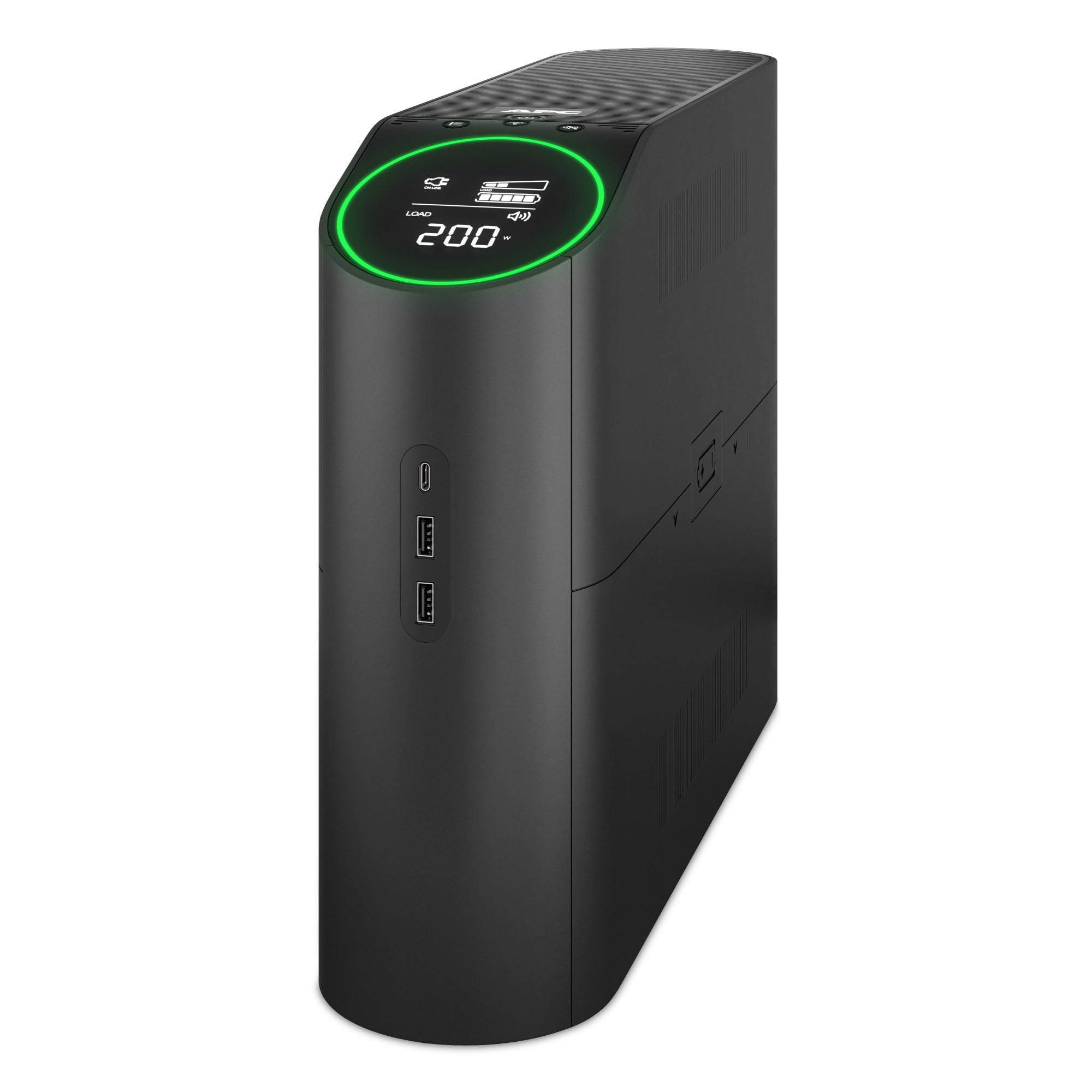
Figure 1 : Face avant view of the APC Back-UPS Pro Gaming UPS BGM1500B, showcasing the interactive LCD display and overall design.
Video 1: An official video from APC highlighting the key features and benefits of the APC Back-UPS Pro Gaming UPS.
Installation
1. Connexion de la batterie
The UPS is shipped with the battery disconnected for safety. Before use, you must connect the internal battery.
- Placez l’onduleur sur une surface stable.
- Locate the battery access panel, typically on the side or bottom of the unit.
- Retirez le panneau pour accéder au compartiment à piles.
- Connect the red battery cable to the red terminal. Ensure a secure connection.
- Replace the battery access panel.
2. Placement
Choose a suitable location for your UPS:
- Avoid direct sunlight, heat sources, and areas with high humidity.
- Ensure proper ventilation by keeping at least 1 inch (2.5 cm) of space around the unit.
- Placez l'onduleur sur une surface plane et stable.
3. Raccordement des équipements
Connect your devices to the appropriate outlets on the rear of the UPS.

Figure 2: Rear panel of the UPS, illustrating the battery backup and surge-only outlets, data ports, and circuit breaker.
- Battery Backup + Surge Protected Outlets: These 6 outlets provide power from the battery during outages and protect against surges. Connect your critical equipment such as your gaming PC, console, monitor, and external hard drives here.
- Prises de surtension uniquement : These 4 outlets provide surge protection but no battery backup. Connect less critical devices like printers, speakers, or lampc'est ici.
- Ports de chargement USB : Use the two USB-A and one USB-C ports on the side of the unit to charge mobile devices, controllers, or other USB-powered accessories.
- Dataline Protection: Connect your network cable (RJ45) and coaxial cable to the respective IN and OUT ports for surge protection on your data lines.
4. Charge initiale
After connecting the battery and plugging the UPS into a wall outlet, allow the unit to charge for at least 16 hours before connecting any equipment. This ensures the battery is fully charged and ready to provide maximum runtime.
5. PowerChute Personal Edition Software (Optional)
For advanced monitoring and management features, install the PowerChute Personal Edition software on your PC. Connect the UPS to your computer using the provided USB communication cable. The software allows you to:
- Monitor power events and energy consumption.
- Configure alarms and notifications.
- Perform automatic and safe shutdown of your computer during extended power outaget.
Fonctionnement de l'onduleur
1. Marche/Arrêt
- Pour allumer : Press the power button located on the top panel. The LCD display will illuminate.
- Pour éteindre : Maintenez le bouton d'alimentation enfoncé jusqu'à ce que l'appareil s'éteigne.
2. LCD Display and Reactor Circle
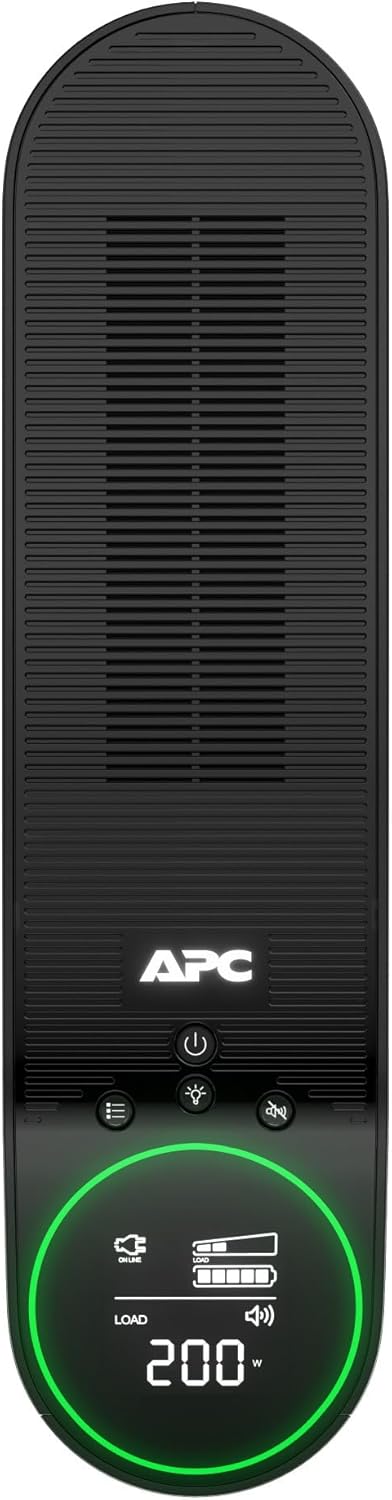
Figure 3 : Haut view of the UPS, highlighting the LCD display and control buttons for easy interaction.
The interactive LCD display provides real-time information about the UPS status. The Reactor Circle around the display changes color to indicate different operational states:
- Vert: Normal operation, providing power.
- Jaune/Orange : Warning, indicating a power event (e.g., voltage fluctuation) or low battery.
- Rouge: Critical alert, indicating a significant issue or very low battery.
Use the navigation buttons next to the LCD to cycle through various display screens, showing information such as input/output voltage, charge pour centtage, niveau de charge de la batterie et autonomie estimée.
3. Éclairage RVB personnalisable
The ambient LED lighting can be customized to match your preference. Refer to the specific controls on the unit or the PowerChute software for options to change colors and lighting effects.
4. Chargement USB

Figure 4 : Côté view of the UPS, showing the convenient USB-A and USB-C charging ports.
The USB ports provide 5V/3A shared power for charging devices. These ports are always active when the UPS is powered on, regardless of battery backup status.
Entretien
1. Remplacement de la batterie
The battery in your UPS has an average life of 4 years. When the battery needs replacement, the UPS will indicate this on the LCD display. The replacement battery part number is APCRBC163.
- Ensure the UPS is powered off and disconnected from the wall outlet.
- Remove the battery access panel.
- Disconnect the battery cables (black first, then red).
- Carefully slide out the old battery.
- Insert the new battery (APCRBC163).
- Connect the battery cables (red first, then black).
- Replace the battery access panel.
- Recycle the old battery responsibly.
2. Nettoyage
Nettoyez régulièrement l'extérieur de l'onduleur avec un chiffon doux et sec. N'utilisez pas de nettoyants liquides ni de solvants. Assurez-vous que les ouvertures de ventilation sont exemptes de poussière et de débris.
Dépannage
Si vous rencontrez des problèmes avec votre onduleur, consultez les problèmes et solutions courants suivants :
| Problème | Cause possible | Solution |
|---|---|---|
| L'onduleur ne s'allume pas. | Batterie non connectée ou faible charge | Ensure battery cables are securely connected. Charge the UPS for 16 hours. |
| L'onduleur émet fréquemment des bips | On battery power, low battery, or overload | Check utility power. Reduce connected load. Allow battery to recharge. |
| LCD shows 'Overload' | Too many devices connected to battery backup outlets | Débranchez les appareils non essentiels des prises alimentées par batterie de secours. |
| Building Wiring Fault indicator is lit | Wiring problem in the wall outlet | Faites inspecter le câblage du bâtiment par un électricien qualifié. |
Caractéristiques
Key technical specifications for the APC Back-UPS Pro Gaming UPS BGM1500B:
- Modèle: BGM1500B
- Capacité: 1500 900 VA / XNUMX W
- Vol d'entréetage: 120 volts
- Volume de sortietage: 120 volts
- Forme d'onde: Onde sinusoïdale
- Type de batterie : Batterie plomb-acide scellée
- Temps de charge de la batterie : 16 heures
- Durée de vie moyenne de la batterie: 4 ans
- Indice de protection contre les surtensions : 1080 joules
- Nombre de prises : 10 (6 batteries de secours + protection contre les surtensions, 4 protections uniquement contre les surtensions)
- Ports de chargement USB : 2x Type-A, 1x Type-C (5V/3A shared)
- Dimensions (P x L x H) : 16.06" x 4.13" x 11.45" (40.8 cm x 10.5 cm x 29.1 cm)
- Poids: 25.35 livres (11.5 kg)
- Température de fonctionnement : 32°F à 104°F (0°C à 40°C)
- Certifications: Energy Star
Garantie et assistance
This APC Back-UPS Pro Gaming UPS BGM1500B comes with a Garantie fabricant d'un an. For warranty claims, technical support, or further assistance, please contact APC customer service or visit the official APC website. Ensure you have your product model number and serial number available when contacting support.
Pour obtenir les informations et les ressources d'assistance les plus récentes, veuillez consulter : www.apc.com/support