
CANARE KP-H15F-I
CANARE KP-H15F-I AV Outlet Modern Plate User Manual
Model: KP-H15F-I
1. Introduction
This user manual provides comprehensive instructions for the installation, operation, and maintenance of the CANARE KP-H15F-I AV Outlet Modern Plate. This product is designed to provide a clean and organized connection point for audio-visual signals, specifically converting VGA to BNC connections within a wall-mounted plate system. Please read this manual thoroughly before installation and use to ensure proper functionality and safety.
2. caractéristiques du produit
- Designed for AV outlet modern plate systems.
- Equipped with a durable metal frame for secure installation.
- Features a VGA female connector for input.
- Includes BNC female connectors for output, facilitating VGA to BNC signal conversion.
- Ivory color finish to blend with standard wall plates.
3. Contenu du colis
Veuillez vérifier que tous les articles énumérés ci-dessous sont présents dans votre colis. Si un article est manquant ou endommagé, veuillez contacter votre revendeur.
- CANARE KP-H15F-I AV Outlet Modern Plate (1 unit)
- Integrated VGA female to BNC female cable assembly (1 unit)
- Metal mounting frame (1 unit)
Note: Product images may show usage examples or additional accessories not included with the standard package. Only items explicitly listed above are part of the product package.
4. Configuration et installation
The CANARE KP-H15F-I is designed for integration into standard wall-mounted AV outlet systems. Professional installation is recommended.
Étapes d'installation :
- La sécurité avant tout : Before beginning installation, ensure that power to the installation area is turned off at the circuit breaker to prevent electrical shock.
- Préparez le boîtier mural : Ensure you have a standard electrical wall box or low-voltage mounting bracket installed in the desired location.
- Connecter les câbles :
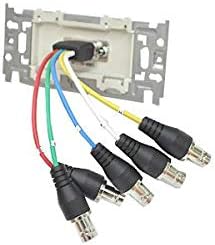
Figure 4.1 : Arrière view of the AV outlet plate with BNC cables connected. This image illustrates the five BNC female connectors on the rear of the plate, designed to receive BNC cables from your AV source.
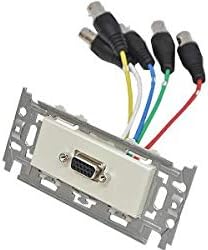
Figure 4.2 : Face avant view of the AV outlet plate with VGA and BNC cables connected. This image shows the VGA female port on the front for connecting a VGA cable, and the BNC cables extending from the rear.
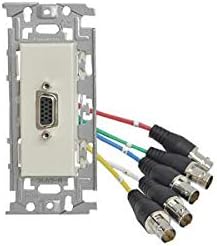
Figure 4.3 : Face avant inclinée view of the AV outlet plate, highlighting the VGA port and the connected BNC cables. This perspective provides a clearer view of the overall assembly.
Connect the BNC cables from your AV source (e.g., projector, monitor) to the corresponding BNC female connectors on the rear of the KP-H15F-I plate. Ensure a secure connection for each cable. The VGA female port on the front of the plate will connect to your VGA display device.
- Monter la plaque : Carefully push the plate assembly into the wall box, ensuring no cables are pinched. Secure the plate to the wall box using the provided screws through the metal mounting frame.
- Attach Faceplate (Optional): If using a decorative faceplate (not included), attach it over the installed KP-H15F-I plate.
- Restaurer l'alimentation : Once installation is complete, restore power to the circuit.
5. Fonctionnement
The CANARE KP-H15F-I AV Outlet Modern Plate is a passive adapter designed to facilitate signal conversion and routing. Once properly installed and connected, its operation is straightforward:
- Connect your VGA source (e.g., computer, laptop) to the VGA female port on the front of the wall plate using a standard VGA cable.
- Ensure that the BNC cables connected to the rear of the plate are properly routed to your BNC-compatible display device (e.g., projector, monitor).
- Power on your source and display devices. The signal should be transmitted through the plate.
No additional configuration or power is required for the plate itself.
6. Entretien
The CANARE KP-H15F-I AV Outlet Modern Plate requires minimal maintenance to ensure long-term performance.
- Nettoyage: To clean the surface of the plate, gently wipe with a soft, dry cloth. For stubborn marks, a slightly damp cloth with mild soap can be used, followed by a dry cloth. Do not use abrasive cleaners, solvents, or harsh chemicals, as these may damage the finish.
- Inspections : Periodically inspect the connections to ensure they remain secure. If the plate is in an area with high traffic or vibration, check for any loosening of the mounting screws.
- Conditions environnementales : Avoid exposing the plate to extreme temperatures, high humidity, or direct sunlight, which can degrade materials over time.
7. Dépannage
If you encounter issues with your CANARE KP-H15F-I AV Outlet Modern Plate, refer to the table below for common problems and their solutions.
| Problème | Cause possible | Solution |
|---|---|---|
| No video signal on display. |
|
|
| Poor video quality (e.g., blurry, distorted). |
|
|
| Plate feels loose in the wall. |
|
|
8. Spécifications
Key technical specifications for the CANARE KP-H15F-I AV Outlet Modern Plate:
| Attribut | Détail |
|---|---|
| Numéro de modèle | KP-H15F-I |
| Type de produit | AV Outlet Modern Plate with VGA to BNC Conversion |
| Connecteurs | 1x VGA Female (front), 5x BNC Female (rear) |
| Matériau du cadre | Métal |
| Couleur | Ivoire |
| ASIN | B08GLGX399 |
| Première date disponible | 27er août 2020 |
9. Consignes de sécurité
Veuillez respecter les consignes de sécurité suivantes afin d'éviter toute blessure ou tout dommage au produit :
- Always disconnect power before installing or servicing the plate to avoid electrical shock.
- Ne tentez pas de modifier ou de démonter le produit. Toute modification non autorisée peut annuler la garantie et présenter des risques pour la sécurité.
- Keep the product away from water, moisture, and excessive heat.
- Assurez une ventilation adéquate autour de la zone d'installation.
- Ce produit est destiné à un usage intérieur uniquement.
10. Garantie et assistance
Information regarding specific warranty terms and customer support contact details for the CANARE KP-H15F-I is not provided in the available product data. For warranty claims or technical assistance, please refer to the documentation included with your purchase or contact the retailer or manufacturer directly.
Ask a question about this manual
Ask about setup, troubleshooting, compatibility, parts, safety, or missing instructions. Manuals+ will review the question and use this page’s manual context to help answer it.