
Introduction
This manual provides comprehensive instructions for the Lexmark MS431dw Monochrome Laser Printer. It covers setup, operation, maintenance, and troubleshooting to ensure optimal performance and longevity of your device. The Lexmark MS431dw is designed for efficient monochrome printing, offering speeds up to 40 pages per minute and automatic duplex printing.

Image : Avant-droite view of the Lexmark MS431dw Monochrome Laser Printer.
Installation
1. Déballage de l'imprimante
Carefully remove the printer from its packaging. Ensure all packing materials, tapes, and protective films are removed from the exterior and interior of the printer. Retain the packaging for future transport if needed.
2. Installation de la cartouche de toner
- Ouvrez le capot avant de l'imprimante.
- Retirez la nouvelle cartouche de toner de son emballage et secouez-la doucement pour répartir le toner.
- Insérez la cartouche de toner dans l'emplacement prévu jusqu'à ce qu'elle s'enclenche.
- Fermez le capot avant.
3. Chargement du papier
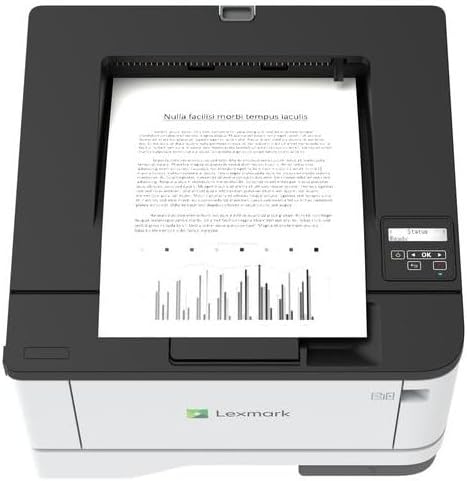
Image : Haut view of the Lexmark MS431dw with paper loaded in the input tray.
Open the paper tray and adjust the paper guides to fit the size of your paper. Load the paper stack into the tray, ensuring it is flat and below the maximum fill line. Close the paper tray. The printer supports various media types, including card stock.
4. Connexion de l'alimentation
Branchez le cordon d'alimentation à l'entrée d'alimentation de l'imprimante, puis à une prise électrique mise à la terre.
5. Connecting to a Network/Computer
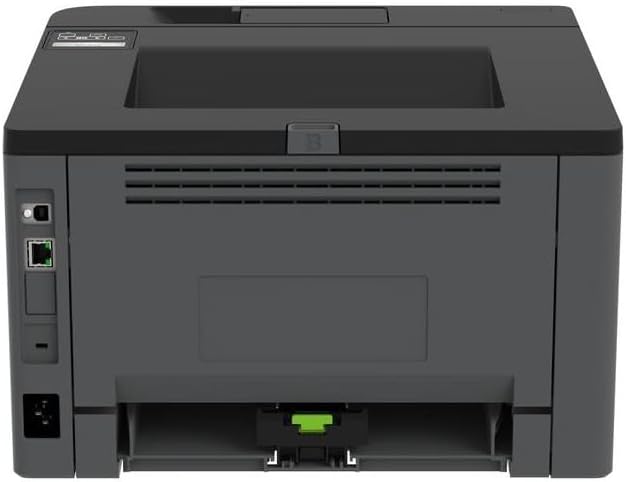
Image : Arrière view of the Lexmark MS431dw, highlighting the Ethernet and power connection ports.
The Lexmark MS431dw supports Ethernet connectivity. Connect an Ethernet cable from your network router or switch to the Ethernet port on the back of the printer. For direct connection to a computer, use a USB cable (not included) if available, or configure network printing.
6. Installation du pilote
Turn on the printer. Insert the driver CD (if provided) into your computer, or download the latest drivers from the official Lexmark support webSuivez les instructions à l'écran pour terminer l'installation du pilote.
Mode d'emploi
1. Panneau de configuration terminéview

Image : Haut view of the Lexmark MS431dw, showing the printer's control panel with display and buttons.
The control panel features a display screen and navigation buttons (Up, Down, OK, Back) to access printer settings, status, and functions. Refer to the on-screen menus for specific options.
2. Impression de base
- Assurez-vous que l'imprimante est allumée et connectée à votre ordinateur ou à votre réseau.
- Ouvrez le document que vous souhaitez imprimer sur votre ordinateur.
- Sélectionner Imprimer depuis le menu de l'application (par exemple, File > Imprimer).
- Choose the Lexmark MS431dw from the list of available printers.
- Adjust print settings as desired (e.g., number of copies, paper size).
- Cliquez Imprimer.
3. Impression recto verso automatique
The MS431dw supports automatic two-sided (duplex) printing. To enable this feature:
- In the print dialog box on your computer, navigate to the printer properties or preferences.
- Look for an option related to "Two-sided printing" or "Duplex printing."
- Sélectionnez l'option duplex souhaitée (par exemple, reliure bord long, reliure bord court).
- Confirmez votre sélection et procédez à l'impression.
Entretien
1. Remplacement de la cartouche de toner
When the toner level is low, the printer's display will indicate a warning. To replace the cartridge:
- Assurez-vous que l'imprimante est sous tension.
- Ouvrez le capot avant.
- Retirez la cartouche de toner usagée en la tirant vers l'extérieur.
- Unpack a new Lexmark-compatible toner cartridge and gently shake it.
- Insérez la nouvelle cartouche jusqu'à ce qu'elle se verrouille en place.
- Fermez le capot avant.
2. Nettoyage de l'imprimante
Un nettoyage régulier permet de maintenir la qualité d'impression et de prolonger la durée de vie de l'imprimante.
- Extérieur: Essuyez les surfaces extérieures avec un chiffon doux, dampUtilisez un chiffon non pelucheux. N’utilisez pas de nettoyants abrasifs ni de solvants.
- Intérieur: Periodically open the front cover and gently remove any dust or paper debris from accessible areas using a dry, lint-free cloth. Avoid touching the fuser unit.
Dépannage
This section addresses common issues you might encounter. For more detailed troubleshooting, refer to the Lexmark support website.
1. Bourrages papier
- If a paper jam occurs, the printer display will show an error message indicating the location of the jam.
- Carefully open the indicated covers or trays.
- Tirez délicatement le papier coincé dans le sens du papier. Veillez à ne pas le déchirer.
- Close all covers and trays. The printer should resume printing.
2. Mauvaise qualité d'impression
- Imprimés délavés : La cartouche de toner est peut-être presque vide. Remplacez-la si nécessaire.
- Streaks or Spots: Clean the printer's interior as described in the Maintenance section. Ensure the toner cartridge is properly seated.
- Pages blanches: Verify the toner cartridge is installed correctly and has toner. Check printer drivers and print settings.
3. Problèmes de connectivité
- Imprimante introuvable : Ensure the Ethernet cable is securely connected to both the printer and the network. Verify network settings on the printer and computer.
- Statut hors ligne : Check the printer's power and network connection. Restart both the printer and your computer.
Caractéristiques
| Fonctionnalité | Détail |
|---|---|
| Numéro de modèle | 29S0110 |
| Technologie d'impression | Laser |
| Sortie de l'imprimante | Monochrome |
| Vitesse d'impression maximale (monochrome) | Jusqu'à 40 ppm (pages par minute) |
| Technologie de connectivité | Ethernet |
| Dossier spécial | Auto-Duplex (Automatic Two-sided Printing) |
| Capacité maximale d'entrée de feuilles | 900 feuilles |
| Print Media Support | Card stock, Plain paper |
| Poids de l'article | 9300 grammes (environ 20.5 lb) |
| Quoitage | 570 watts |
| Code UPC | 734646695558 |
Remarque: les spécifications peuvent être modifiées sans préavis.
Garantie et assistance
Informations sur la garantie
Your Lexmark MS431dw printer is covered by a standard manufacturer's warranty. For specific terms, conditions, and duration of your warranty, please refer to the documentation included with your product or visit the official Lexmark webConsultez le site. Conservez votre preuve d'achat pour toute réclamation au titre de la garantie.
Assistance clientèle
For technical assistance, driver downloads, or further support, please visit the official Lexmark support portal.
Visit the Lexmark Store for Support