
Introduction
Merci pour votre achatasing the Byron Statics Portable CD Boombox. This device offers versatile audio playback options, including a top-loading CD player, AM/FM radio, and an Aux-in port for external devices. Designed for portability and ease of use, this manual provides detailed instructions to help you operate and maintain your boombox effectively.
Consignes de sécurité
- Source d'alimentation : Use only the specified AC power cord (AC 120V-60Hz) or 6 x 1.5V 'C' size batteries.
- Eau et humidité : Ne pas exposer l'appareil à la pluie, à l'humidité ou l'immerger dans l'eau.
- Sources de chaleur : Tenez l'appareil éloigné des sources de chaleur telles que les radiateurs, les bouches de chauffage, les poêles ou tout autre appareil produisant de la chaleur.
- Ventilation: Assurez une ventilation adéquate. Ne bloquez aucune ouverture de ventilation.
- Nettoyage: Débranchez l'appareil de la prise électrique avant de le nettoyer. Utilisez un chiffon doux et sec.
- Entretien: N'essayez pas de réparer vous-même ce produit. Confiez tous les travaux d'entretien à du personnel de service qualifié.
- Lecteur CD: Ne regardez jamais directement dans le rayon laser.
Produit terminéview
Familiarisez-vous avec les différentes parties et commandes de votre boombox.

Figure 1 : Avant et Haut View of the Boombox with Labeled Controls
- Porte CD : Access for loading/unloading CDs.
- Commutateur de fonction : Selects between CD/AUX IN, OFF, and RADIO modes.
- Contrôle du volume : Ajuste le niveau de sortie audio.
- Antenne FM : Antenne extensible pour la réception radio FM.
- Band Switch (AM/FM): Permet de choisir entre les bandes radio AM et FM.
- Contrôle de réglage : Ajuste avec précision les fréquences radio.
- Poignée de transport : Pour une portabilité facile.
- Boutons de commande du CD : Repeat, Skip On/Down, Program, Stop, Play/Pause.
- Affichage LED: Shows track number for CD or radio frequency.
- Indicateur d'alimentation : S'allume lorsque l'appareil est sous tension.
- Prise d'entrée auxiliaire : Pour connecter des périphériques audio externes.
- Entrée de courant alternatif: Pour brancher le cordon d'alimentation secteur.
- Compartiment à piles : Located on the bottom for 'C' size batteries.
Installation
Mise sous tension de l'unité
Votre boombox peut être alimentée soit par secteur, soit par piles.
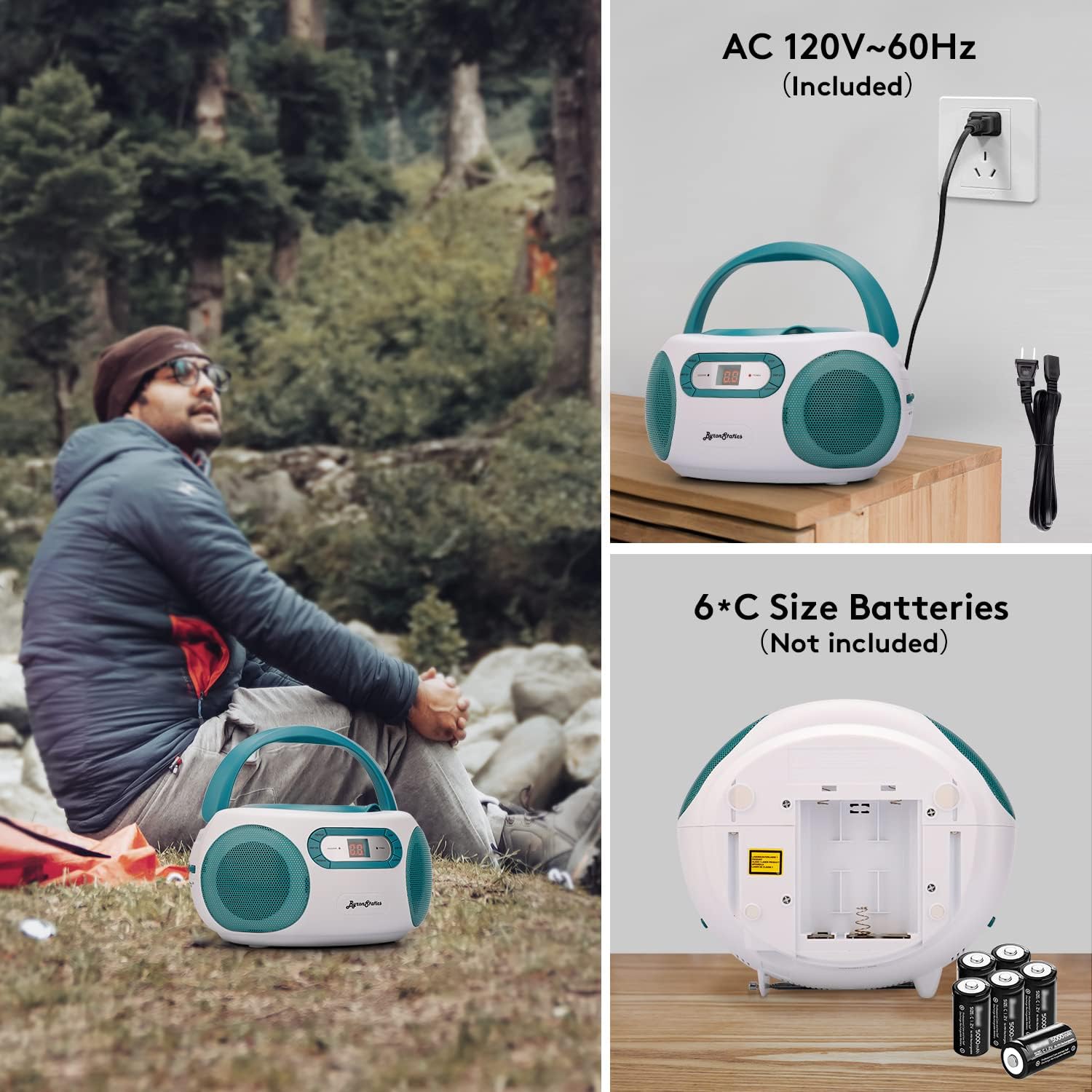
Figure 2 : AC Power Connection and Battery Installation
Fonctionnement de l'alimentation CA
- Ensure the Function Switch is in the "OFF" position.
- Connect the supplied AC power cord to the AC power input jack on the back of the unit.
- Plug the other end of the AC power cord into a standard AC 120V-60Hz wall outlet.
Fonctionnement sur batterie
- Ensure the Function Switch is in the "OFF" position.
- Ouvrez le couvercle du compartiment des piles situé au bas de l'appareil.
- Insert 6 x 1.5V 'C' size batteries (not included), observing the correct polarity (+/-) as indicated inside the compartment.
- Fermez soigneusement le couvercle du compartiment à piles.
- Note: Disconnect the AC power cord when operating on batteries.
Mode d'emploi
Fonctionnement du lecteur de CD

Figure 3 : Loading a CD into the Top-Loading Compartment
- Set the Function Switch to the "CD/AUX IN" position.
- Open the CD door by gently lifting it.
- Placez un CD (CD, CD-R ou CD-RW) sur l'axe central, l'étiquette vers le haut.
- Close the CD door firmly until it clicks.
- The CD player will begin reading the disc, and the total number of tracks will appear on the LED display.
- Appuyez sur le LECTURE/PAUSE button to start playback. The track number will be displayed.
- Pour mettre la lecture en pause, appuyez sur la touche LECTURE/PAUSE bouton. Appuyez à nouveau pour reprendre.
- Pour passer à la piste suivante, appuyez sur la SAUTER bouton.
- Pour revenir au début du morceau en cours ou au morceau précédent, appuyez sur la touche correspondante. PASSER EN BAS bouton.
- Pour arrêter la lecture, appuyez sur le ARRÊT bouton.
- Fonction de répétition : Appuyez sur le RÉPÉTER button once to repeat the current track. Press it again to repeat the entire disc. Press a third time to cancel repeat mode.
- Fonction du programme : To program tracks for playback, press the PROGRAMME button while the CD is stopped. The "PROGRAM" indicator will flash. Use the SAUTER HAUT/BAS appuyez sur les boutons pour sélectionner le morceau souhaité, puis appuyez sur PROGRAMME again to confirm. Repeat for up to 20 tracks. Press LECTURE/PAUSE pour démarrer la lecture programmée.
Fonctionnement de la radio AM/FM

Figure 4 : Using the AM/FM Radio with Extended Antenna
- Set the Function Switch to the "RADIO" position.
- Slide the Band Switch to select either "AM" or "FM".
- For FM reception, fully extend the telescopic FM antenna. For AM reception, the unit has a built-in antenna, so no external adjustment is needed.
- Faites pivoter le RÉGLAGE control knob to select your desired radio station. The frequency will be displayed on the LED screen.
- Ajustez le VOLUME Réglez le niveau d'écoute selon vos préférences.
Aux-in Operation
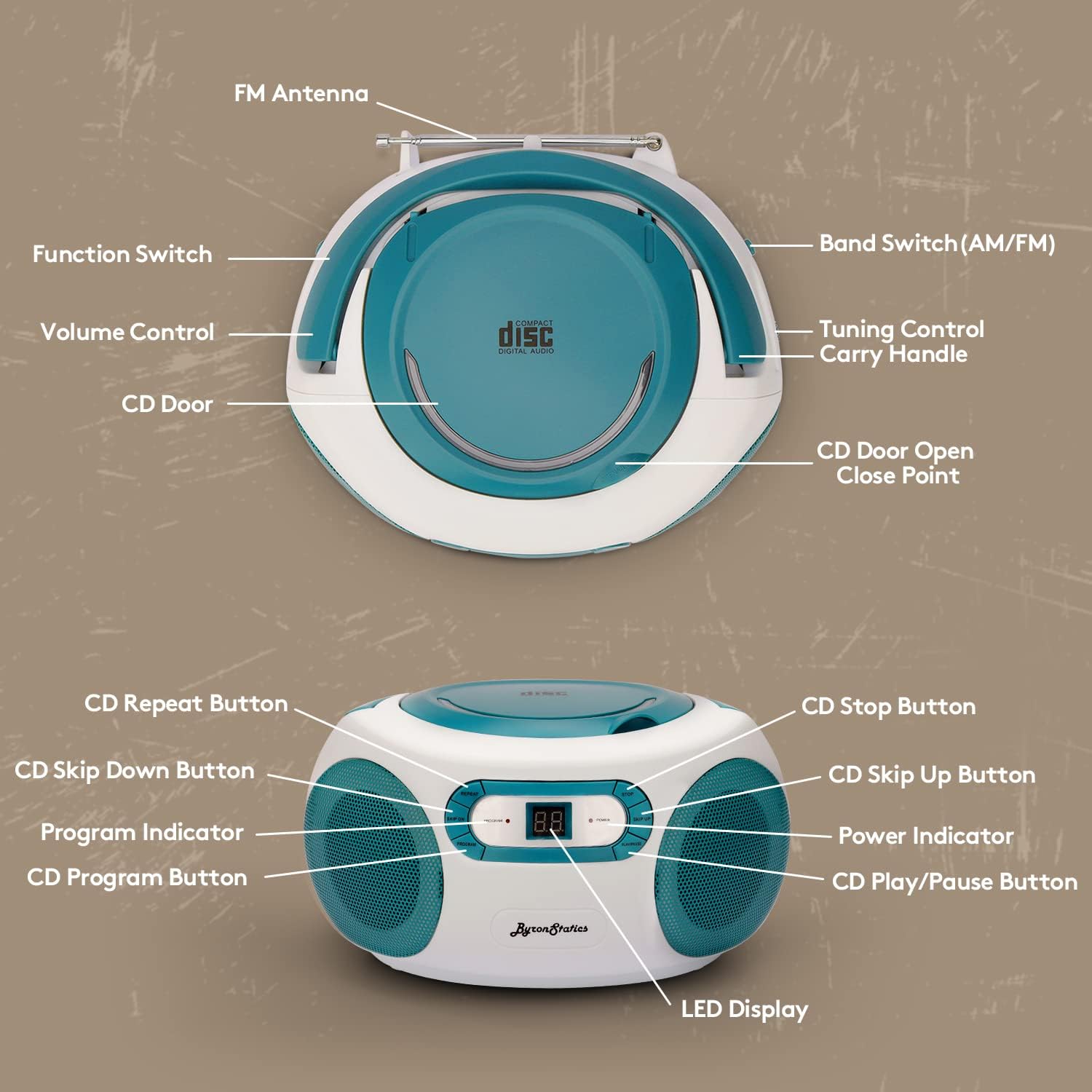
Figure 5 : Connecting an External Device via Aux-in
- Set the Function Switch to the "CD/AUX IN" position.
- Connectez une extrémité d'un câble audio de 3.5 mm (non inclus) à la prise Aux-in du boombox.
- Connect the other end of the audio cable to the headphone jack or audio output of your external audio device (e.g., smartphone, tablet, MP3 player).
- Démarrez la lecture sur votre appareil externe.
- Réglez le volume à l'aide de la VOLUME control on the boombox and/or your external device.
Entretien
- Nettoyage de l'unité : Essuyez l'extérieur de l'appareil avec un chiffon doux.amp chiffon. N'utilisez pas de nettoyants abrasifs ou de solvants.
- Entretien des lentilles CD : If the CD player experiences reading errors, clean the lens with a commercially available CD lens cleaner.
- Remplacement de la batterie : If using batteries, replace all six 'C' size batteries when the sound becomes distorted or the unit stops functioning. Do not mix old and new batteries.
- Stockage: En cas de non-utilisation prolongée, retirez les piles et rangez l'appareil dans un endroit frais et sec.
Dépannage
| Problème | Cause possible | Solution |
|---|---|---|
| Pas de courant | Cordon d'alimentation non branché ; piles déchargées ou mal insérées. | Vérifiez la connexion du cordon d'alimentation ; remplacez les piles ou assurez-vous de la polarité correcte. |
| Le CD ne fonctionne pas / saute | CD dirty or scratched; CD inserted incorrectly; CD door not closed; Function switch not in CD mode. | Clean or replace CD; Insert CD label-side up; Close CD door firmly; Set Function Switch to CD/AUX IN. |
| Mauvaise réception radio | FM antenna not extended; Weak signal; Interference. | Fully extend FM antenna; Reposition the unit; Try tuning to a stronger station. |
| Aucun son provenant de l'entrée auxiliaire. | Aux cable not connected; Volume too low; External device not playing. | Ensure Aux cable is fully inserted; Increase volume on boombox and external device; Start playback on external device. |
Caractéristiques
- Modèle: KBB-250
- Source d'alimentation : AC 120V-60Hz or 6 x 1.5V 'C' size batteries (not included)
- Lecteur CD: Top-loading, compatible with CD, CD-R, CD-RW
- Fréquences radio : AM 520-1710KHz; FM 76-108MHz
- Intervenants : 1W RMS x 2 Stereo Speakers
- Connectivité : Aux-in Jack (3.5mm)
- Afficher: Écran LCD
- Dimensions du produit : 8.3 x 7.68 x 4.73 pouces
- Poids de l'article : 3.47 livres
Garantie et assistance
For customer service, warranty information, or technical support, please refer to the contact details provided with your product packaging or visit the official BYRONSTATICS webSite. Notre équipe d'assistance est disponible pour répondre à toutes vos questions ou résoudre tout problème.