
1. Introduction
The Mikado MD-21BT Soundcube is a portable Bluetooth speaker designed for audio playback from various sources. It features a 3W speaker, a 300mAh rechargeable battery, Bluetooth connectivity, and a TF card slot for direct media playback. Additionally, it includes a luminous light function for enhanced ambiance.
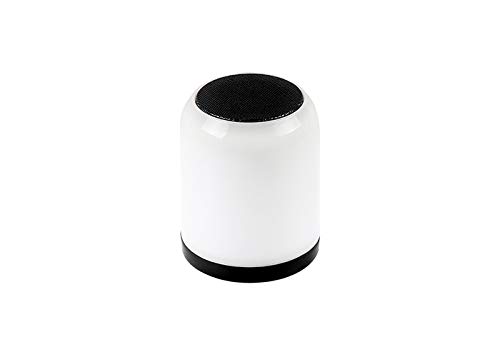
Figure 1.1 : Face avant view of the Mikado MD-21BT Soundcube Bluetooth Speaker.
2. Contenu du colis
Veuillez vérifier que le colis contient les éléments suivants :
- Mikado MD-21BT Soundcube Bluetooth Speaker
- USB Charging Cable (typically included, though not explicitly detailed)
- Manuel de l'utilisateur (ce document)
3. Installation
3.1 Chargement de l'enceinte
Before first use, fully charge the speaker. Connect the micro USB end of the charging cable to the speaker's charging port and the USB-A end to a standard USB power adapter (not included) or a computer's USB port. The charging indicator light will illuminate during charging and turn off or change color when fully charged.
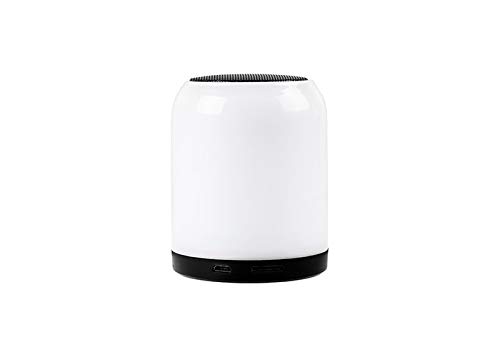
Figure 3.1 : Côté view of the speaker showing the Micro USB charging port.
3.2 Mise sous/hors tension
To power on the speaker, press and hold the power button located on the bottom of the device until you hear an audible prompt or see the indicator light illuminate. To power off, press and hold the power button again until the speaker powers down.
4. Mode d'emploi
4.1 Couplage Bluetooth
- Ensure the speaker is powered on and in Bluetooth pairing mode. An audible prompt or flashing indicator light typically indicates pairing mode.
- Sur votre appareil mobile (smartphone, tablette, ordinateur portable), activez le Bluetooth et recherchez les appareils disponibles.
- Select "MD-21BT" from the list of found devices.
- Once connected, the speaker will provide an audible confirmation, and the indicator light will typically become solid.
4.2 Lecture de carte TF
Pour lire de la musique directement depuis une carte TF (MicroSD) :
- Insérer une carte TF avec audio MP3 files dans la fente pour carte TF sur le haut-parleur.
- The speaker should automatically detect the card and begin playing the audio files. If not, press the Mode button (if available) to switch to TF card mode.
- Use the playback control buttons (Play/Pause, Next/Previous Track) on the speaker to manage your music.
4.3 Luminous Light Function
The MD-21BT Soundcube features a luminous light function. Press the dedicated light button (if available) or a multi-function button to cycle through different light modes or to turn the light on/off. Refer to the button layout for specific controls.
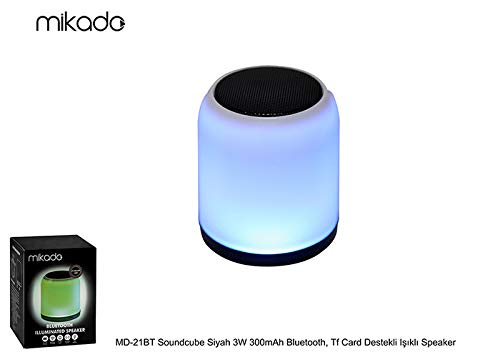
Figure 4.1: The speaker demonstrating its luminous light feature.
4.4 Contrôle du volume et lecture
Volume can typically be adjusted using the volume buttons on the speaker or directly from your connected Bluetooth device. Playback controls (Play/Pause, Next/Previous) are usually located on the speaker's control panel.

Figure 4.2 : Bas view du haut-parleur affichant les boutons de commande.
5. Entretien
5.1 Nettoyage
Wipe the speaker with a soft, dry cloth. Do not use abrasive cleaners, alcohol, or other chemical solvents, as these may damage the surface. Avoid exposing the speaker to excessive moisture.
5.2 Stockage
Rangez l'enceinte dans un endroit frais et sec, à l'abri de la lumière directe du soleil et des températures extrêmes. En cas de stockage prolongé, rechargez régulièrement la batterie pour préserver sa durée de vie.
6. Dépannage
| Problème | Cause possible | Solution |
|---|---|---|
| Le haut-parleur ne s'allume pas. | La batterie est épuisée. | Chargez complètement l'enceinte. |
| Impossible de se connecter via Bluetooth. | L'enceinte n'est pas en mode de couplage ou le Bluetooth de l'appareil est désactivé. | Ensure speaker is in pairing mode. Turn off and on Bluetooth on your device. Forget previous connections and try pairing again. |
| Aucun son pendant la lecture. | Le volume est trop faible ou l'appareil n'est pas connecté. | Increase volume on both the speaker and the connected device. Verify Bluetooth connection or TF card insertion. |
| Carte TF non reconnue. | Card inserted incorrectly or unsupported format. | Reinsert the TF card correctly. Ensure the card contains MP3 files and is formatted correctly (e.g., FAT32). |
7. Spécifications
| Fonctionnalité | Détail |
|---|---|
| Nom du modèle | MD-21BT |
| Type de haut-parleur | Stéréo |
| Technologie de connectivité | Bluetooth |
| Puissance de sortie maximale du haut-parleur | 3 watts |
| Source d'énergie | Alimenté par batterie (300 mAh) |
| Dossier spécial | Luminous Light, TF Card Support |
| Appareils compatibles | Ordinateur portable, smartphone |
| Dimensions du produit | 1 x 1 x 1 cm (environ) |
| Poids de l'article | 100 g |
8. Garantie et assistance
For warranty information and technical support, please refer to the documentation provided with your purchase or contact the Mikado customer service department. Keep your proof of purchase for warranty claims.