
1. Informations importantes sur la sécurité
Veuillez lire attentivement toutes les instructions avant le montage et l'utilisation. Le non-respect de ces instructions peut entraîner des blessures ou endommager le produit.
- Ce bureau est conçu pour un usage intérieur uniquement.
- Ensure all screws are tightened securely before use. Periodically check and re-tighten all fasteners.
- Ne surchargez pas le bureau. Le poids maximal recommandé est de 80 kg (176 livres).
- Tenez les enfants et les animaux domestiques éloignés du bureau pendant son utilisation.
- Avoid placing the desk in direct sunlight or in damp environnements.
- Ne démontez pas et ne modifiez pas les composants électriques du bureau. Contactez le service client pour toute assistance.
Warning: The product will arrive in two separate packages and may be shipped separately. Do not discard any packaging until assembly is complete and the desk is fully functional.
2. Contenu du colis
Your FLEXISPOT EN2 Electric Standing Desk is shipped in two packages. Please ensure you have received both packages before beginning assembly.
- Paquet 1: Desktop (48" Mahogany Top)
- Paquet 2: Desk Frame (Gray Frame), Motor, Control Panel, Power Strip, Cable Management Tray, Hardware, and User Manual.

Figure 2.1: The FlexiSpot EN2 desk components are shipped in two separate packages for safe delivery.
3. Configuration et assemblage
Assembly typically requires one person and approximately 30-60 minutes. An electric drill (not included) may be helpful for certain steps.
- Déballer les composants : Carefully remove all parts from both packages and lay them out on a soft, clean surface to prevent scratches. Verify all components are present against the packing list.
- Assembler le cadre du bureau : Attach the lifting columns to the feet. Ensure the crossbeam is correctly oriented.
- Attach Crossbeam: Secure the crossbeam to the lifting columns. Note that while some holes are pre-drilled for legs, the center holes for the crossbeam and cable tray may require self-tapping screws. Apply firm pressure with an electric drill for easy installation.
- Install Motors and Control Box: Follow the manual to connect the motor cables to the control box and secure the control box to the frame.
- Attacher un ordinateur de bureau : Carefully place the desktop onto the assembled frame. Align the pre-drilled holes on the desktop with the frame and secure with screws.
- Installer le panneau de commande et la multiprise : Mount the 6-button digital control panel and the clamp-on power strip to the desired location on the desktop. The power strip can be clipped to the back or side.
- Gestion des câbles: Utilize the included cable management device to organize and secure all power and data cables underneath the desk. This helps prevent cables from snagging during height adjustments.

Figure 3.1: Assembled FLEXISPOT EN2 Electric Standing Desk.

Figure 3.2: Effective cable management keeps your workspace tidy and safe.
4. Mode d'emploi
The desk features a 6-button digital controller for easy height adjustment and memory presets.
4.1 Réglage de la hauteur
- Relever le bureau : Press and hold the 'Up' arrow button (▲) to raise the desk. The LED display will show the current height.
- Bureau inférieur : Press and hold the 'Down' arrow button (▼) to lower the desk. The LED display will show the current height.
- The motorized system adjusts smoothly from 28.1 inches to 45.7 inches. The motor operates quietly at less than 50 dB.
4.2 Préréglages de mémoire
The controller features 4 programmable memory presets to quickly switch between your preferred sitting and standing heights.
- Réglez le bureau à la hauteur souhaitée à l'aide des boutons fléchés Haut/Bas.
- Appuyez sur la touche « M » (Mémoire). L’écran affichera « S- ».
- Press one of the number buttons (1, 2, 3, or 4) within 3 seconds. The display will show 'S-1', 'S-2', etc., indicating the height is saved to that preset.
- Pour rappeler une hauteur enregistrée, appuyez simplement sur la touche numérique correspondante (1, 2, 3 ou 4). Le bureau se déplacera automatiquement jusqu'à la position enregistrée.
4.3 Multiprise intégrée et ports USB
The desktop is equipped with a removable power strip for convenient device charging and power access.
- La multiprise comprend 3 prises secteur (125V/12A) et 2 ports de chargement USB (5V/2A).
- It can be clipped to the back or side of your desk to suit your setup.

Figure 4.1: Digital control panel for height adjustment and memory presets.

Figure 4.2 : Multiprise intégrée avec prises secteur et ports de chargement USB.
4.4 Timer Function (if available on your model)
Some models may include a timer function to remind you to switch between sitting and standing positions. Refer to your specific model's manual for details on setting and using this feature.
5. Caractéristiques
- Bureau en une seule pièce : The 1-inch eco-friendly desktop provides a seamless and spacious work surface, offering enhanced stability compared to multi-piece desktops.
- Construction durable : Constructed with an industrial-grade steel frame and solid tabletop, the desk can support up to 176 pounds (80 kg). Each frame undergoes rigorous testing for performance and durability.
- Coins arrondis : The desktop features rounded corners for safety and to prevent accidental bumps or damage.
- Fonctionnement silencieux : The motor operates at less than 50 dB, ensuring a quiet work environment during height adjustments.

Figure 5.1: The whole-piece desktop offers enhanced stability and a smooth surface.

Figure 5.2: The desk operates with a quiet motor, producing less than 50 dB of noise.

Figure 5.3: The desk's robust construction supports up to 176 lbs.
6. Entretien
- Nettoyage: Essuyez le bureau et le cadre avec un chiffon doux et sec.amp tissu. Évitez les nettoyants abrasifs ou les produits chimiques agressifs qui pourraient endommager la finition.
- Inspection: Vérifiez régulièrement le serrage de toutes les vis et boulons. Resserrer si nécessaire.
- Gestion des câbles: Veillez à ce que les câbles restent bien rangés et ne soient ni pincés ni tendus lors des réglages de hauteur.
7. Dépannage
- Le bureau ne bouge pas : Check all cable connections, especially the power cord and motor cables. Ensure the power outlet is functional.
- Mouvement irrégulier : Perform a reset procedure (refer to the full user manual for specific steps). Ensure the desk is not overloaded or obstructed.
- Codes d'erreur : If an error code appears on the LED display, consult the comprehensive user manual for specific troubleshooting steps related to that code.
8. Spécifications
| Fonctionnalité | Détail |
|---|---|
| Marque | FLEXIPOT |
| Numéro de modèle | EN2 |
| Taille du bureau | 48"D x 24"W (Dimensions may vary slightly by 0 to 1") |
| Matériel de bureau | Wood (Mahogany Top) |
| Matériau du cadre | Alloy Steel (Gray Frame) |
| Plage de réglage de la hauteur | 28.1" à 45.7" |
| Mécanisme de levage | Électrique |
| Niveau sonore du moteur | Moins de 50 dB |
| Capacité de charge maximale | 176 livres (80 kg) |
| Panneau de contrôle | Contrôleur numérique à 6 boutons avec 4 mémoires préréglées |
| Prise de courant | 3 prises secteur (125 V/12 A) |
| Ports de chargement USB | 2 ports USB (5V/2A) |
| Assemblage requis | Oui |
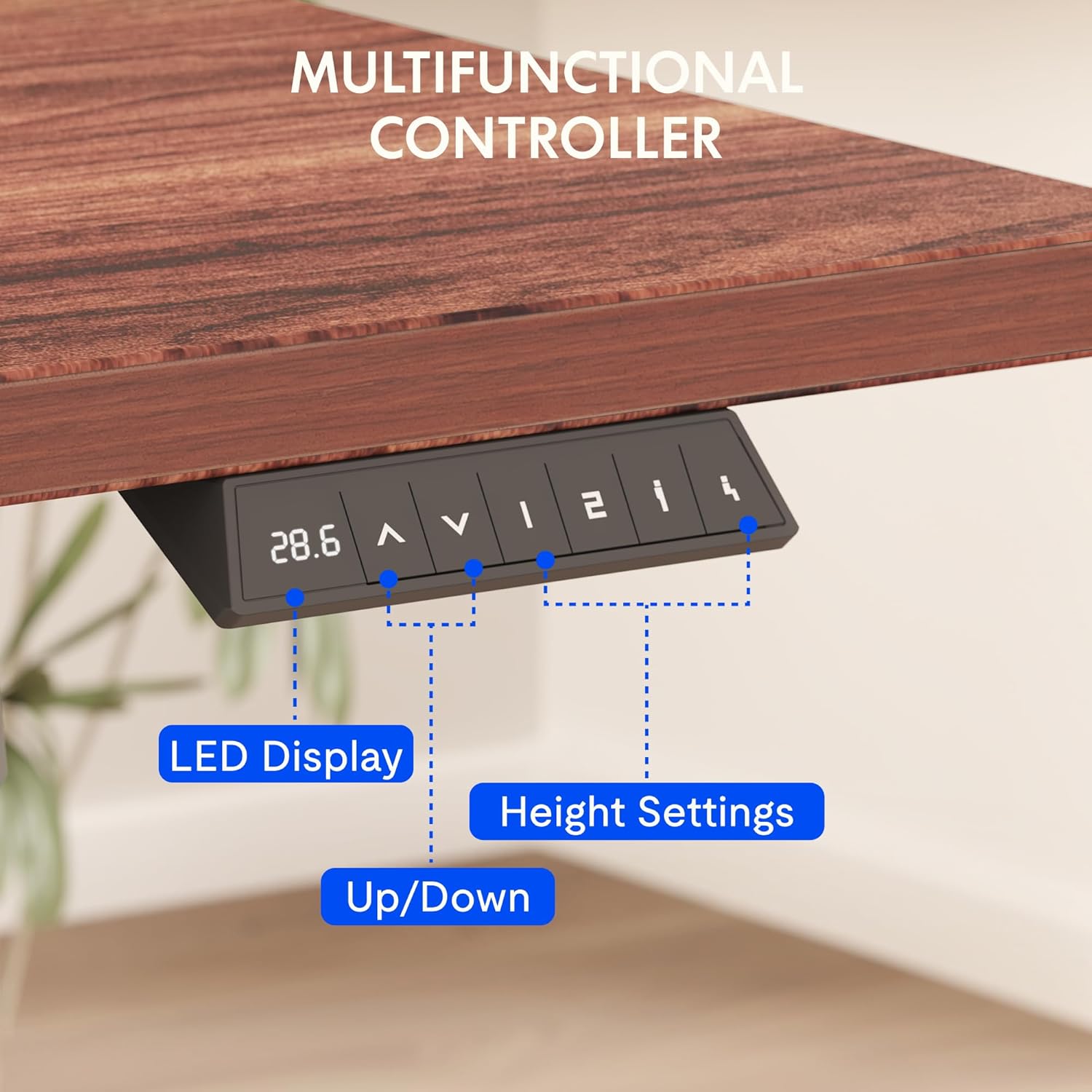
Figure 8.1 : Dimensions et caractéristiques principales du bureau FLEXISPOT EN2.
9. Garantie et assistance
FLEXISPOT provides comprehensive warranty coverage for your EN2 Electric Standing Desk:
- Garantie de 5 ans : S'applique aux châssis, moteurs et autres dispositifs mécaniques.
- Garantie de 2 ans : S'applique aux contrôleurs, aux interrupteurs et aux appareils électroniques.
For customer support, troubleshooting assistance, or warranty claims, please visit the official FLEXISPOT webconsultez leur site web ou contactez directement leur service clientèle.
10. Vidéos officielles du produit
10.1 Computer Workstation Table Test
Video 10.1: A demonstration of the FLEXISPOT EN2 desk's stability and functionality as a computer workstation.
10.2 Flexispot Classic Height Adjustable Standing Desk Series
Vidéo 10.2 : Un overview of the FlexiSpot Classic Height Adjustable Standing Desk Series, highlighting key features and design.
10.3 FLEXISPOT Brand Introduction
Video 10.3: A brief introduction to the FLEXISPOT brand and its commitment to ergonomic solutions.