
1. Produit terminéview
The Alecto WS-1560 is a wireless weather station designed to provide accurate indoor and outdoor environmental data. Featuring a clear color display and a remote outdoor sensor, it offers comprehensive weather information and additional useful functions for your home.
Caractéristiques principales :
- Mesure la température et l'humidité intérieures et extérieures.
- Long-range wireless outdoor sensor (up to 100 meters).
- 5.7-inch well-lit color display with animated weather forecast icons.
- Temperature and ice alarm functions.
- Réveil avec fonction snooze.
- Memory function for latest and highest readings.
- Moon phase indicator, date, day, and time display.
- Battery-operated main unit and outdoor sensor with backup batteries.

Figure 1.1: Alecto WS-1560 Main Unit and Wireless Outdoor Sensor.
2. Contenu du colis
Vérifiez que tous les composants sont présents et en bon état lors du déballage :
- Unité principale Alecto WS-1560 (écran intérieur)
- Capteur extérieur sans fil
- Manuel d'utilisation
- (Power adapter and batteries may be included depending on package)
Video 2.1: Illustrative video showing typical weather station components and basic setup. (Note: This video is for a related product and may not show the exact Alecto WS-1560 model.)
3. Configuration et installation
3.1. Installation de la batterie
Both the main unit and the outdoor sensor require batteries for operation. Ensure you use the correct type and polarity.
- Capteur extérieur :
- Ouvrez le compartiment à piles situé à l'arrière du capteur extérieur sans fil.
- Insérez 2 piles AA (non incluses) en respectant les indications de polarité (+/-).
- Fermez soigneusement le compartiment à piles.
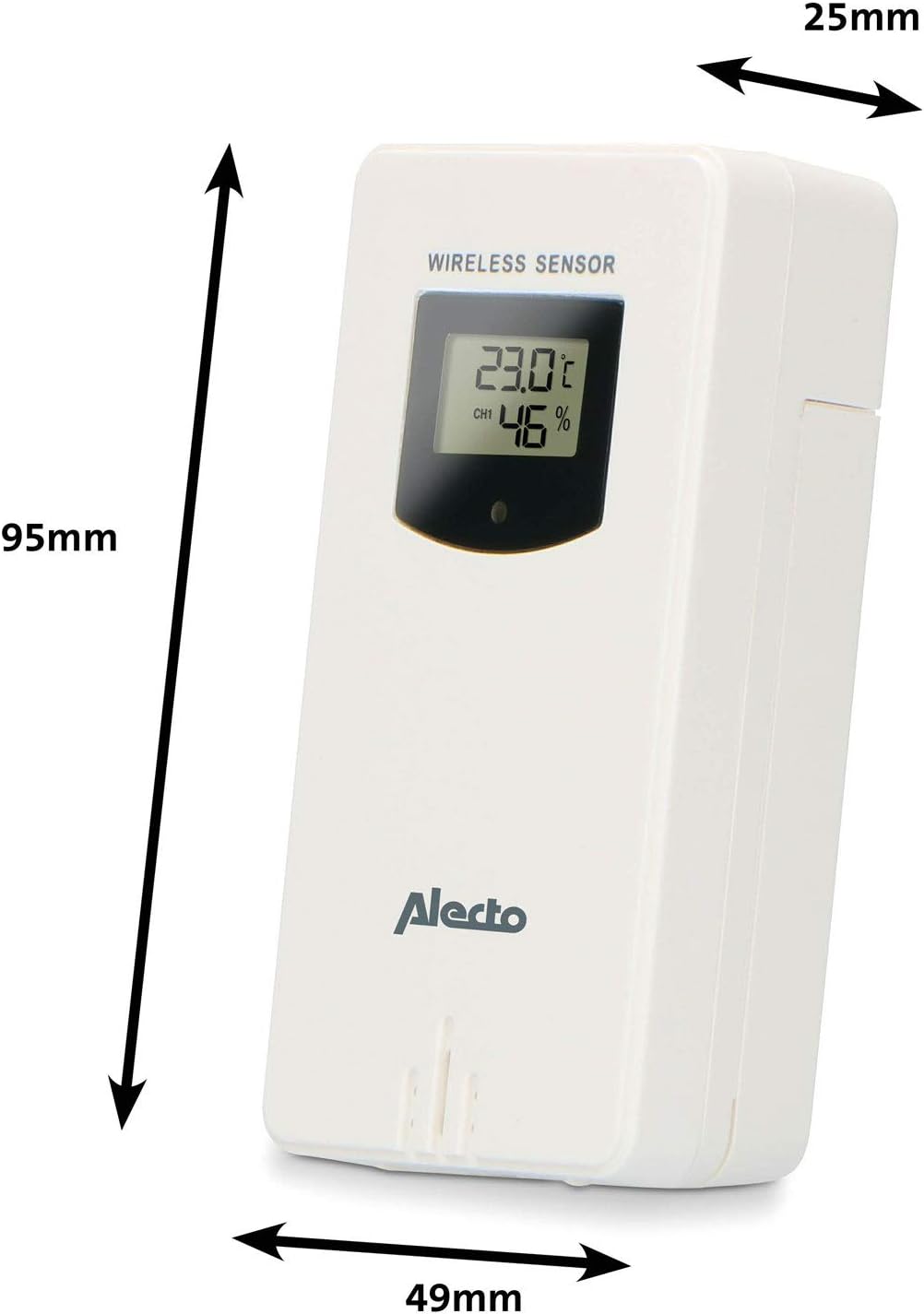
Figure 3.1: Wireless Outdoor Sensor dimensions and battery compartment location.
- Unité principale :
- Ouvrez le compartiment à piles situé à l'arrière de l'unité principale.
- Insert 2x AA batteries (not included) according to the polarity markings (+/-). These serve as backup batteries.
- Fermez soigneusement le compartiment à piles.
- Connect the main unit to a power outlet using the provided power adapter (if included).

Figure 3.2: Main Unit dimensions and power input.
3.2. Emplacement du capteur
For accurate outdoor readings, proper placement of the wireless sensor is crucial:
- Place the sensor in a shaded area, away from direct sunlight, to prevent inaccurate temperature readings.
- Assurez une bonne circulation d'air autour du capteur.
- Mount the sensor vertically, approximately 1.5 to 2.5 meters (5 to 8 feet) above the ground.
- Avoid placing the sensor near heat sources (e.g., vents, windows) or moisture sources.
- The maximum transmission range is 100 meters (328 feet) in open air. Walls and other obstacles will reduce this range.

Figure 3.3 : Example of outdoor sensor placement on a wall.
3.3. Appairage du capteur avec l'unité principale
The main unit and sensor should automatically pair once both are powered on. If pairing does not occur:
- Ensure both units have fresh batteries and are within range.
- Appuyez sur le bouton « TX » situé à l'intérieur du compartiment à piles du capteur extérieur pour envoyer manuellement un signal.
- On the main unit, you may need to initiate a search for the outdoor sensor (refer to the "Operation" section for specific button functions).
4. Fonctionnement
4.1. Disposition d'affichage
L'écran couleur de 5.7 pouces offre une vue claire surview of all measured data. Key areas include:
- Température et humidité extérieures : Displays current outdoor conditions.
- Température et humidité intérieures : Affiche les conditions intérieures actuelles.
- Prévisions météo animées : Icons predict upcoming weather (sunny, partly cloudy, cloudy, rainy, snowy).
- Heure Date: Heure, jour et date actuels.
- Pression barométrique: Pression atmosphérique actuelle.
- Phase de lune: Représentation graphique de la phase lunaire actuelle.
- Temperature/Ice Alarm Indicators: Alerts for specific temperature thresholds or potential ice conditions.

Figure 4.1 : Détaillé view of the main unit's color display.
4.2. Fonctions des boutons
The main unit features several buttons for setting and adjusting functions. Common buttons include:
- SET: Enters setup mode for time, date, and other settings.
- MODE: Permet de basculer entre les modes d'affichage ou de confirmer les paramètres.
- UP/DOWN (or +/-): Adjusts values during setup or cycles through channels.
- ALARME: Active ou règle la fonction d'alarme.
- MEM : Displays maximum/minimum temperature and humidity records. Long press to clear records.
- SNOOZE/LUMIÈRE : Activates snooze during an alarm or adjusts backlight brightness.
Video 4.2: Illustrative video demonstrating various features and settings of a weather station. (Note: This video is for a related product and may not show the exact Alecto WS-1560 model.)
4.3. Réglage de l'heure et de la date
- Press and hold the "SET" button until the time display starts flashing.
- Use the "UP" or "DOWN" buttons to adjust the hour, then press "SET" to confirm and move to minutes.
- Répétez l'opération pour les minutes, l'année, le mois et le jour.
- Press "SET" again to exit the setting mode.
4.4. Paramètres d'alarme
- Press the "ALARM" button once to view l'heure du réveil.
- Maintenez le bouton « ALARME » enfoncé jusqu'à ce que l'heure de l'alarme commence à clignoter.
- Use the "UP" or "DOWN" buttons to set the desired alarm hour and minute.
- Appuyez sur « ALARME » pour confirmer.
- To activate/deactivate the alarm, press the "ALARM" button briefly when the alarm time is displayed. An alarm icon will appear/disappear.
4.5. Enregistrements Max/Min
The weather station automatically records the maximum and minimum temperature and humidity values over a 24-hour period.
- Press the "MEM" button briefly to view les valeurs maximales enregistrées.
- Press "MEM" again to view les valeurs minimales enregistrées.
- Press "MEM" a third time to return to current readings.
- To clear the records, press and hold the "MEM" button for a few seconds.
5. Entretien
- Nettoyage: Essuyez l'écran et les surfaces de l'appareil avec un chiffon doux et sec.amp chiffon. N'utilisez pas de nettoyants abrasifs ou de solvants.
- Remplacement de la batterie : Remplacez les piles de l'unité principale et du capteur extérieur lorsque le témoin de batterie faible s'affiche. Remplacez toujours toutes les piles en même temps par des piles neuves du même type.
- Entretien du capteur : Periodically check the outdoor sensor for debris or obstructions that might affect its readings. Ensure it remains in a shaded, well-ventilated area.
6. Dépannage
| Problème | Cause possible | Solution |
|---|---|---|
| No outdoor temperature/humidity reading (or "---" displayed) |
|
|
| relevés de température/humidité inexacts |
|
|
| L’affichage est sombre ou vide |
|
|
7. Spécifications
| Numéro de modèle | WS-1560 |
| Marque | Alecto |
| Source d'alimentation (unité principale) | Power Adapter (if included) + 2x AA batteries (backup) |
| Source d'alimentation (capteur extérieur) | 2 piles AA |
| Dimensions du produit (unité principale) | 5.1 x 16.5 x 12.3 cm |
| Poids du produit | 440 g |
| Portée des capteurs sans fil | Jusqu'à 100 mètres (en plein air) |
| Taille de l'écran | 5.7 pouces / 14.5 cm |
| Origine | Chine |
8. Garantie et assistance
Pour toute information concernant la garantie, l'assistance technique ou le service après-vente, veuillez consulter la carte de garantie fournie avec votre produit ou visiter le site officiel d'Alecto. webConsultez le site. Conservez votre reçu d'achat comme preuve d'achat.
Alecto Website: www.alecto.nl (General Alecto website, specific support page may vary)