
Yealink 1302013
Yealink W80DM Cordless DECT Manager
Manuel d'utilisation
Introduction
The Yealink W80DM is a DECT Manager designed to provide high-quality Audio VoIP (wideband) and low bit-rate data applications, based on CAT-iq2.0 technology. This device serves as the central management unit for a multi-cell DECT system, enabling seamless roaming and handover for compatible Yealink DECT handsets.
It supports Opus codec for superior audio quality and utilizes Power over Ethernet (PoE) for simplified installation. The W80DM is specifically designed for use with compatible Yealink DECT devices and is not compatible with third-party DECT base stations or handsets.
Compatibilité: The W80DM is compatible with the following Yealink products (firmware versions specified):
- Yealink W56H/W53H (version x.83.0.90 or later)
- Yealink CP930W (version 87.83.0.60 or later)
- Yealink DD Phone (version 66.84.0.115 or later)
Note: The W80DM is shipped as a DECT Manager (DM), while the W80B is shipped as a base station. If you need to change the device role, contact your system administrator for firmware upgrade instructions.
Installation
1. Déballage et contenu de l'emballage
Carefully unpack the Yealink W80DM DECT Manager and verify that all components are present. Typical package contents include:
- Yealink W80DM DECT Manager Unit
- Câble Ethernet
- Guide de démarrage rapide (ou documentation similaire)
- Mounting Bracket (if applicable)
2. Installation physique
The W80DM can be mounted on a wall or placed on a flat surface. Ensure the installation location is within range of the DECT handsets and has access to a network connection.
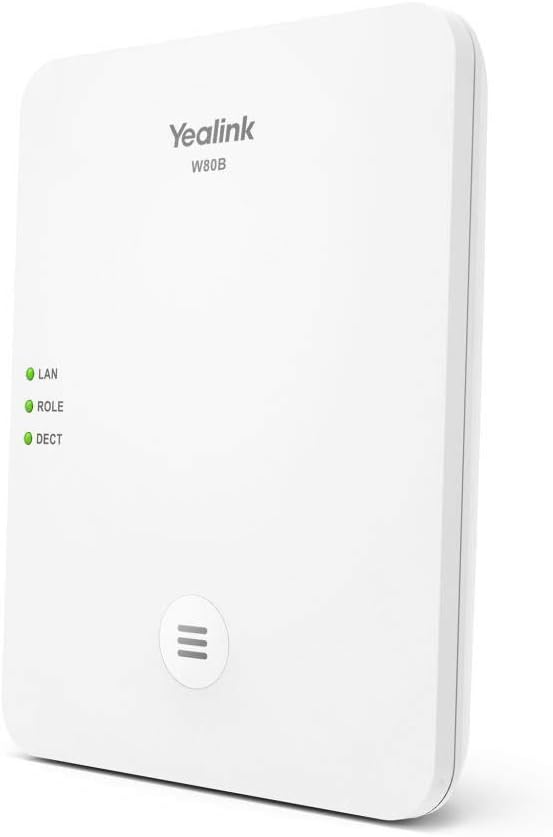
Figure 1: Yealink W80B DECT Base Station. This unit functions as a base station within the W80 multi-cell system, working in conjunction with the W80DM DECT Manager. It features LED indicators for LAN, ROLE, and DECT status, and a multi-function button.
Connexion réseau: Connect an Ethernet cable from your network switch (preferably one that supports Power over Ethernet, PoE) to the LAN port on the W80DM. The device will power on automatically if PoE is used. If PoE is not available, use a compatible power adapter (sold separately or included depending on package) to power the device.
Emplacement optimal : For best DECT signal coverage, place the W80DM in a central location, away from large metal objects, concrete walls, and other electronic devices that may cause interference.
3. Configuration initiale
Once powered on and connected to the network, the W80DM will obtain an IP address. You can access its webinterface de gestion basée sur web browser on a computer connected to the same network. Refer to the Quick Start Guide for default login credentials and initial setup steps.
It is recommended to change default passwords immediately after initial access for security purposes.
Opérationnel
DECT System Functionality
The W80DM acts as the DECT Manager, coordinating communication between multiple W80B base stations and registered DECT handsets. It manages handset registration, call routing, and ensures seamless handover as users move between base station coverage areas.
Enregistrement du combiné : To register a compatible Yealink DECT handset to the W80 multi-cell system, follow the registration procedure outlined in the handset's user manual. The W80DM's web interface will allow you to manage registered handsets and their settings.
Indicateurs LED
The W80DM (and W80B base stations) feature LED indicators to show the device's status:
- Voyant LAN : Indique l'état de la connexion réseau.
- Vert uni : Network connection is active.
- Vert clignotant : Data transmission is occurring.
- Désactivé: Aucune connexion réseau.
- ROLE LED: Indicates the device's role in the DECT system.
- Vert uni : Device is functioning as a DECT Manager (W80DM) or a registered base station (W80B).
- Vert clignotant : Device is in registration mode or experiencing a role conflict.
- LED DECT : Indicates the DECT signal status.
- Vert uni : DECT signal is active and stable.
- Vert clignotant : DECT signal activity (e.g., during a call or registration).
- Désactivé: No DECT signal or DECT function is disabled.
Entretien
Mises à jour du firmware
Consultez régulièrement le site officiel de Yealink. website for the latest firmware updates. Keeping your W80DM and associated base stations/handsets updated ensures optimal performance, security, and access to new features. Firmware updates are typically performed via the web interface de gestion.
Nettoyage
To clean the device, use a soft, dry cloth. Do not use liquid cleaners or aerosol sprays, as these can damage the unit. Ensure the device is powered off before cleaning.
Considérations environnementales
Operate the W80DM within its specified temperature and humidity ranges. Avoid exposing the device to direct sunlight, excessive heat, moisture, or dust. Ensure adequate ventilation around the unit.
Dépannage
This section provides solutions to common issues you might encounter with your Yealink W80DM.
| Problème | Cause possible | Solution |
|---|---|---|
| L'appareil ne s'allume pas. | Aucune alimentation provenant du commutateur PoE ou de l'adaptateur secteur. | Verify PoE switch is active or ensure power adapter is correctly connected and functional. |
| LAN LED is off. | Aucune connexion réseau. | Check Ethernet cable connection. Verify network switch port is active. |
| Handsets cannot register. | Incorrect registration procedure; DECT Manager not in registration mode; firmware incompatibility. | Ensure W80DM is in registration mode via its web interface. Follow handset's manual for registration. Verify firmware versions are compatible. |
| Mauvaise qualité des appels ou appels interrompus. | Weak DECT signal; network congestion; interference. | Relocate W80DM/W80B base stations for better coverage. Check network bandwidth. Identify and mitigate sources of interference. |
If the issue persists after attempting these solutions, please contact Yealink technical support or your system administrator for further assistance.
Caractéristiques
| Fonctionnalité | Détail |
|---|---|
| Numéro de modèle du produit | 1302013 |
| Fabricant | Yealink |
| Dimensions du produit | 3.94 x 3.94 x 3.94 pouces |
| Poids de l'article | 8.5 onces |
| Date de première disponibilité | 21er mars 2020 |
| Pays d'origine | USA |
| DECT Standard | CAT-iq2.0 |
| Alimentation électrique | Alimentation par Ethernet (PoE) |
| Prise en charge des codecs audio | Opus (for wideband audio) |
Garantie et assistance
Informations sur la garantie
Yealink products typically come with a limited manufacturer's warranty. Please refer to the warranty card included with your product or visit the official Yealink website for detailed warranty terms and conditions specific to the W80DM.
Assistance technique
For technical assistance, troubleshooting, or further inquiries regarding your Yealink W80DM, please contact Yealink technical support. You can find contact information, FAQs, and additional resources on the official Yealink support website:
When contacting support, please have your product model number (1302013) and any relevant error messages or symptoms ready.
Ask a question about this manual
Ask about setup, troubleshooting, compatibility, parts, safety, or missing instructions. Manuals+ will review the question and use this page’s manual context to help answer it.