
Nerf NER0205
NERF Bulls-Eye Digital Target (Model NER0205) Instruction Manual
Brand: Nerf | Model: NER0205
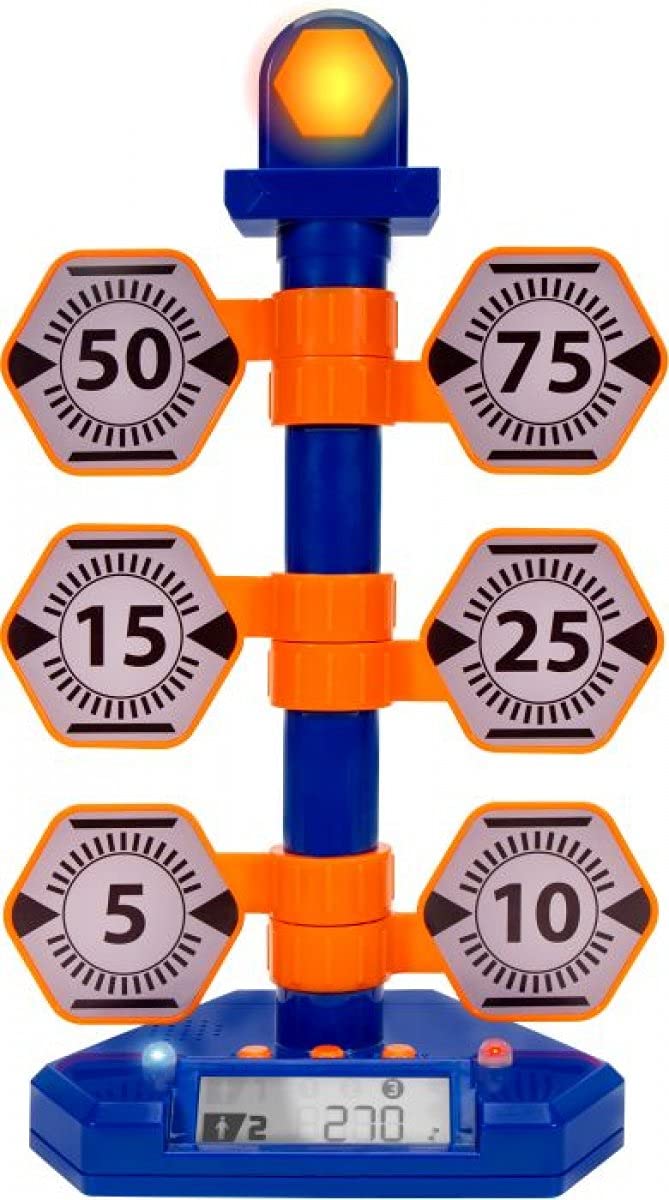
Image : Avant view of the NERF Bulls-Eye Digital Target, highlighting its design and target layout.
1. Plus deview
The Nerf Bulls-Eye Digital Target is designed to enhance dart-blasting accuracy and provide engaging gameplay. This free-standing target features six flip-back targets and a high-scoring bullseye, along with a score-tracking LCD screen. It supports both solo play and competitive multiplayer modes with three distinct game modes.
Caractéristiques principales :
- Six flip-back targets and a central bullseye for varied aiming practice.
- Score-tracking LCD screen to monitor performance.
- Three distinct game modes: Point Counter, Stack 'Em, and Accuracy Test.
- Supports single-player and multiplayer gameplay.
- Durable, free-standing design for indoor or outdoor use.
2. Installation
2.1. Déballage et composants
Retirez soigneusement tous les composants de l'emballage. Assurez-vous que tous les éléments listés sont présents :
- 1 Bulls-Eye Digital Target Unit
- 1 Base Attachment
- Manuel d'instructions (ce document)
2.2. Instructions de montage
Follow these steps to assemble your Digital Target:
- Attach the main target unit to the base attachment, ensuring it is securely fastened.
- Verify that all six flip-back targets are correctly aligned and can move freely.
2.3. Installation de la batterie
The Digital Target requires 3 AA batteries (not included).
- Locate the battery compartment on the underside of the main target unit.
- Using a small Phillips-head screwdriver, open the battery compartment cover.
- Insérez 3 piles AA en respectant la polarité (+/-).
- Replacez le couvercle du compartiment des piles et fixez-le avec la vis.
2.4. Visual Guide: Product Assembly and Features
Video: This video demonstrates the assembly process of a similar target system, including attaching the base and main unit, and shows the target in action with its rotating feature and different modes. It also illustrates battery installation.
3. Mode d'emploi
3.1. Mise sous/hors tension
To power on the target, locate the power button on the back or side of the main unit and press it. The LCD screen will illuminate. To power off, press the button again.
3.2. Modes de jeu
The Nerf Bulls-Eye Digital Target offers three engaging game modes:
- Point Counter: Each hit on a target adds to your score. The bullseye typically offers higher points.
- Stack 'Em: Targets must be hit in a specific sequence or within a time limit to maximize points.
- Accuracy Test: Focus on precision. This mode may involve hitting specific targets or achieving a certain score within a set number of shots.
Refer to the on-screen prompts or the included quick-start guide for detailed instructions on selecting and playing each game mode.
3.3. Notation
The integrated LCD screen automatically tracks your score. When a target is hit, it will flip back, and points will be added to the display. The screen also indicates which player is currently leading in multiplayer modes.
4. Entretien
4.1. Nettoyage
To clean the target, wipe it with a soft, dry cloth. Do not use abrasive cleaners or immerse the unit in water. Ensure the battery compartment is sealed before cleaning.
4.2. Stockage
When not in use, store the Digital Target in a cool, dry place away from direct sunlight. If storing for an extended period, remove the batteries to prevent leakage.
5. Dépannage
5.1. Target Not Powering On
- Vérifiez si les piles sont insérées correctement avec la bonne polarité.
- Remplacez les anciennes piles par des neuves.
- Assurez-vous que le bouton d’alimentation est complètement enfoncé.
5.2. Targets Not Registering Hits
- Ensure darts are hitting the targets directly and with sufficient force.
- Check for any obstructions preventing the targets from flipping back.
- Verify that the target unit is stable and not wobbling.
5.3. Inaccurate Scoring
- Reset the target unit by turning it off and on again.
- Ensure all targets are in their upright position before starting a new game.
6. Spécifications
| Fonctionnalité | Détail |
|---|---|
| Marque | Nerf |
| Numéro de modèle | NER0205 |
| Code UPC | 191726009795 |
| Dimensions de l'article | 8.46 x 4.49 x 13.98 pouces |
| Poids de l'article | 1.2 livres |
| Type de matériau | Plastique |
| Source d'énergie | Alimenté par batterie |
| Types de batteries pris en charge | AA (Quantity: 3) |
| Nombre de joueurs | 1-2 |
| Description de la tranche d'âge | Kid (Manufacturer Minimum Age: 60 months) |
7. Garantie et assistance
For warranty information, technical support, or to inquire about replacement parts, please refer to the official Nerf or Jazwares website, or contact their customer service directly. Specific warranty terms and conditions may vary by region and retailer.
Ask a question about this manual
Ask about setup, troubleshooting, compatibility, parts, safety, or missing instructions. Manuals+ will review the question and use this page’s manual context to help answer it.