
1. Introduction
Thank you for choosing the SUNSHINE P-1503T Analog Power Supply. This manual provides essential information for the safe and efficient operation, setup, maintenance, and troubleshooting of your device. Please read this manual thoroughly before using the product and keep it for future reference.
The SUNSHINE P-1503T is a versatile 15-volt, 3-amp analog power supply designed primarily for mobile phone maintenance. It features touch-sensitive controls and includes two USB ports for convenient mobile testing and charging.
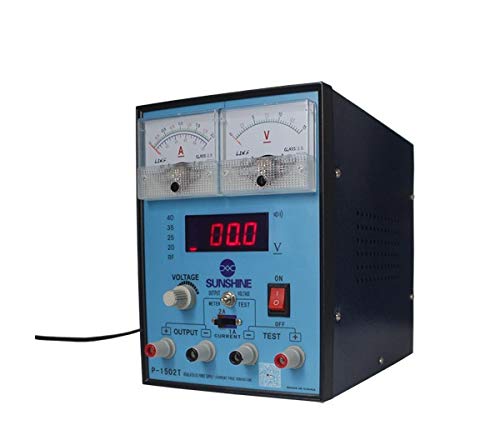
Figure 1 : Face avant view of the SUNSHINE P-1503T Analog Power Supply. This image shows the device's display, control knobs, and output terminals, including the two USB ports.
2. Consignes de sécurité
AVERTISSEMENT : Le non-respect de ces consignes de sécurité peut entraîner un choc électrique, un incendie ou des blessures graves.
- Branchez toujours l'alimentation électrique à une prise électrique mise à la terre.
- N'utilisez pas l'appareil dans des conditions humides ou damp conditions.
- Assurez une ventilation adéquate pour éviter toute surchauffe. Ne bloquez pas les ouvertures de ventilation.
- N'ouvrez pas le casing de l'alimentation. L'intérieur ne contient aucune pièce réparable par l'utilisateur. Confiez toute réparation à un personnel qualifié.
- Évitez de toucher les bornes de sortie lorsque l'appareil est sous tension.
- Disconnect the power cord from the outlet before cleaning or if the device will not be used for an extended period.
- Utilisez uniquement le volume d'entrée spécifiétage (15 Volts) as indicated on the device.
3. Installation
3.1 Déballage
- Retirez soigneusement le bloc d'alimentation de son emballage.
- Inspect the device for any signs of damage during transit. If damaged, do not use and contact your supplier.
- Ensure all accessories are present (e.g., power cord, test leads if included).
3.2 Connexion à l'alimentation
- Placez le bloc d'alimentation sur une surface stable et plane, bien ventilée.
- Connect the provided power cord to the power input socket on the rear of the device.
- Branchez l'autre extrémité du cordon d'alimentation dans une prise électrique mise à la terre appropriée.
4. Mode d'emploi
4.1 Mise sous/hors tension
- To power on the device, press the power switch located on the front panel. The display will illuminate.
- Pour éteindre l'appareil, appuyez de nouveau sur l'interrupteur d'alimentation.
4.2 Adjusting Output
The P-1503T is an analog power supply, typically meaning voltage and current are set via rotary knobs.
- Utilisez le Voltage Bouton de réglage pour régler le volume de sortie souhaitétage. Monitor the voltage affichage.
- Utilisez le Bouton de réglage du courant to set the desired current limit. Monitor the current display.
- The device emits a sound upon touch, indicating interaction with its controls.
4.3 Utilisation des ports USB
The power supply features two USB ports on the front panel:
- USB Port 1 (Mobile Testing): Connect a mobile device here for diagnostic purposes. This port is designed to provide stable power for testing mobile phone circuits.
- USB Port 2 (Mobile Charging): Connect a mobile device here for charging. This port delivers power suitable for recharging mobile phone batteries.
Note: Always ensure the output voltage and current settings are appropriate for the device being connected to prevent damage.
5. Entretien
5.1 Nettoyage
- Ensure the power supply is turned off and disconnected from the main power outlet before cleaning.
- Utilisez un chiffon doux et sec pour essuyer l’extérieur de l’appareil.
- Do not use liquid cleaners, aerosols, or solvents, as these may damage the casing ou composants internes.
- Veillez à ce que les ouvertures de ventilation soient dégagées de toute poussière et débris.
5.2 Stockage
Lorsqu'il n'est pas utilisé, rangez le bloc d'alimentation dans un endroit frais et sec, à l'abri de la lumière directe du soleil et des températures extrêmes.
6. Dépannage
| Problème | Cause possible | Solution |
|---|---|---|
| L'appareil ne s'allume pas. |
|
|
| Pas de volume de sortietage/courant. |
|
|
| Les ports USB ne fonctionnent pas. |
|
|
7. Spécifications
| Fonctionnalité | Détail |
|---|---|
| Marque | SOLEIL |
| Modèle | P-1503T |
| Appareils compatibles | Téléphone mobile |
| Type de connecteur | ATX |
| Facteur de forme | ATX |
| Méthode de refroidissement | Air |
| Vol d'entrée maximaltage | 15 volts |
| Vol d'entrée minimumtage | 15 volts |
| Fabricant | SOLEIL |
| System Bus Connector Type | Connecteur 2 |
| Source d'énergie | Externe |
| ASIN | B0847QS2FX |
8. Garantie et assistance
This product is covered by a standard manufacturer's warranty. Please refer to the warranty card included with your purchase for specific terms and conditions. For technical support, service, or warranty claims, please contact your retailer or the manufacturer directly.
For the latest information and support, please visit the official SUNSHINE website (si disponible).