1. Introduction
The FreedConn TCOM-SC is a Bluetooth communication system designed for motorcycle helmets. It allows for wireless communication, music streaming, FM radio, and GPS voice instructions, enhancing safety and convenience during rides. This manual provides detailed instructions for installation, operation, and maintenance of your TCOM-SC unit.
2. caractéristiques du produit
- Connectivité Bluetooth 3.0 : Pour des connexions sans fil stables.
- Fonction interphone : Supports pairing of up to 3 riders, with 2 riders communicating simultaneously over a range of up to 800 meters.
- Écran LCD : Provides clear visual information on status, battery, and FM radio frequency.
- Conception imperméable à l'eau: Garantit des performances fiables dans diverses conditions météorologiques.
- Radio FM: Radio FM intégrée pour le divertissement.
- Contrôle avancé du bruit : Reduces background noise for clear audio.
- Lecture de musique : Stereo music streaming with playback control.
- Batterie rechargeable : Long standby time and usage duration.
- Compatibilité universelle: Suitable for full-face and flip-up helmets.

Image : Terminéview of FreedConn TCOM-SC product features, including 3-rider connection, 800m duplex intercom, phone connectivity, last number redial, FM radio, advanced noise control, stereo music, playback control, individual volume control, rechargeable battery, waterproof, sunproof, dustproof, and hard & soft microphone options.
3. Contenu du colis
Veuillez vérifier le colis pour vous assurer que tous les articles sont présents :
- 1 x Intercom Host
- 1 x Headset (Soft Mic/Hard Mic options)
- 1 x câble USB
- 1 x 3M Clip
- 1 x clips
- 1 x tournevis
- 1 x Manuel d'utilisation
- 6 x Headset Velcro Pads

Image: Visual representation of the FreedConn TCOM-SC package contents, including the intercom host, headset with microphone, USB cable, mounting clips, screwdriver, user manual, and headset velcro pads.
4. Produit terminéview et composants
Familiarize yourself with the main components of the TCOM-SC unit:
- Écran d'affichage à cristaux liquides : Affiche l'état opérationnel.
- Jogging : Multi-function control for volume, track skipping, and menu navigation.
- Bouton multifonction : For power, intercom, and phone calls.
- Prise pour chargeur et casque : For connecting the charging cable and headset.
- Haut-parleurs stéréo pour les oreilles : Pour la sortie audio.
- Microphone antibruit : Available in hard cable (boom mic) and soft cable (flexible mic) versions.

Image: Diagram illustrating the components of the FreedConn TCOM-SC headset, including stereo ear speakers, power on/off and intercom button, LCD display screen, jog wheel, multi-function button, charger and headset socket, noise canceling microphone (hard and soft cable options), and slot cable.
5. Installation
Follow these steps to install the TCOM-SC unit on your helmet:
- Choisissez la méthode de montage : Choisissez entre les clamp mount (for helmets with an edge) or the adhesive mount (for helmets without a suitable edge).
- Fixez le support : Securely attach the chosen mount to the left side of your helmet.
- Insert Intercom Unit: Slide the TCOM-SC unit onto the mount until it clicks into place.
- Installer les haut-parleurs : Attach the Velcro pads to the inside of your helmet, then place the stereo speakers over the Velcro pads, aligning them with your ears.
- Installer le microphone : For full-face helmets, use the soft cable microphone and position it inside the chin bar. For open-face or flip-up helmets, use the hard cable boom microphone and position it in front of your mouth.
- Connecter le casque : Plug the headset cable into the headset socket on the TCOM-SC unit.
- Acheminer les câbles : Neatly tuck all cables under the helmet padding to avoid obstruction and ensure comfort.
6. Chargement de la batterie
The TCOM-SC unit is powered by a rechargeable battery. Ensure it is fully charged before first use.
- Connect the provided USB cable to the charging port on the TCOM-SC unit.
- Connectez l'autre extrémité du câble USB à un adaptateur secteur USB (non inclus) ou à un port USB d'ordinateur.
- The LCD display will indicate charging status.
- La charge prend généralement environ 2.5 heures.
- A full charge provides up to 10 hours of phone calling time, 8 hours of intercom time, and up to 300 hours of standby time.
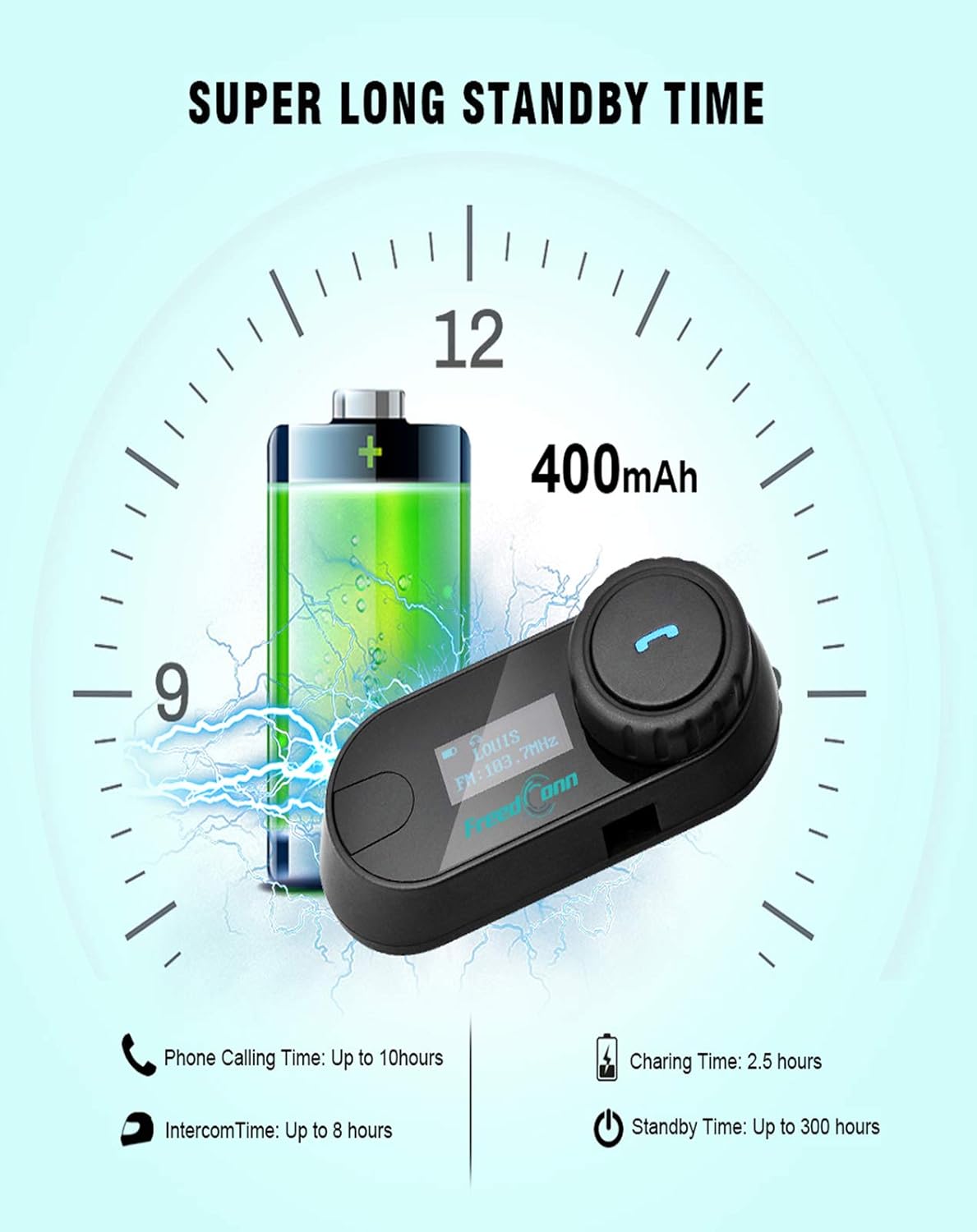
Image: Illustration of FreedConn TCOM-SC battery life and charging details, showing a 400mAh battery, 2.5 hours charging time, up to 10 hours phone calling time, up to 8 hours intercom time, and up to 300 hours standby time.
7. Opérations de base
7.1 Mise sous/hors tension
- Mise sous tension : Press and hold the Multi-function Button for approximately 3 seconds until you hear a voice prompt and the LCD screen illuminates.
- Éteindre: Press and hold the Multi-function Button for approximately 5 seconds until you hear a voice prompt and the LCD screen turns off.
7.2 Réglage du volume
- Rotate the Jog Wheel forward to increase volume.
- Rotate the Jog Wheel backward to decrease volume.
8. Couplage Bluetooth
8.1 Couplage avec un téléphone portable
- Assurez-vous que l'unité TCOM-SC est hors tension.
- Press and hold the Multi-function Button for approximately 5-7 seconds until the LCD screen shows "Pairing" and the indicator light flashes red and blue alternately.
- Sur votre téléphone mobile, activez Bluetooth et recherchez des appareils.
- Select "FreedConn TCOM-SC" from the list of available devices.
- If prompted, enter the PIN code "0000".
- Once paired, the LCD will show "Connected" and the indicator light will flash blue slowly.
8.2 Pairing with Another TCOM-SC Unit (Intercom)
To establish intercom communication between two TCOM-SC units:
- Assurez-vous que les deux unités TCOM-SC sont hors tension.
- On both units, press and hold the Multi-function Button for approximately 5-7 seconds until they enter pairing mode (red and blue indicator lights flashing alternately).
- Briefly press the Multi-function Button on un of the units. It will search for the other unit.
- Once connected, both units will show "Intercom" on their LCD screens and the indicator lights will flash blue slowly.
For multi-rider intercom (up to 3 units), repeat the pairing process with the third unit, ensuring only two units are actively communicating at any given time.
9. Fonctions opérationnelles
9.1 Appels téléphoniques
- Répondre à l'appel : Appuyez brièvement sur le bouton multifonction.
- Fin d'appel : Appuyez brièvement sur le bouton multifonction.
- Rejeter l'appel : Appuyez sur le bouton multifonction et maintenez-le enfoncé pendant 2 secondes.
- Recomposer le dernier numéro : Appuyez deux fois sur le bouton multifonction.
9.2 Lecture de musique
- Lecture/Pause : Appuyez brièvement sur le bouton multifonction.
- Piste suivante : Rotate the Jog Wheel forward and hold for 2 seconds.
- Piste précédente: Rotate the Jog Wheel backward and hold for 2 seconds.
9.3 Radio FM
- Activer/désactiver la FM : Double-press the Multi-function Button to switch between music/intercom and FM radio.
- Stations de numérisation : Tournez la molette de réglage vers l'avant ou vers l'arrière pour changer de station.
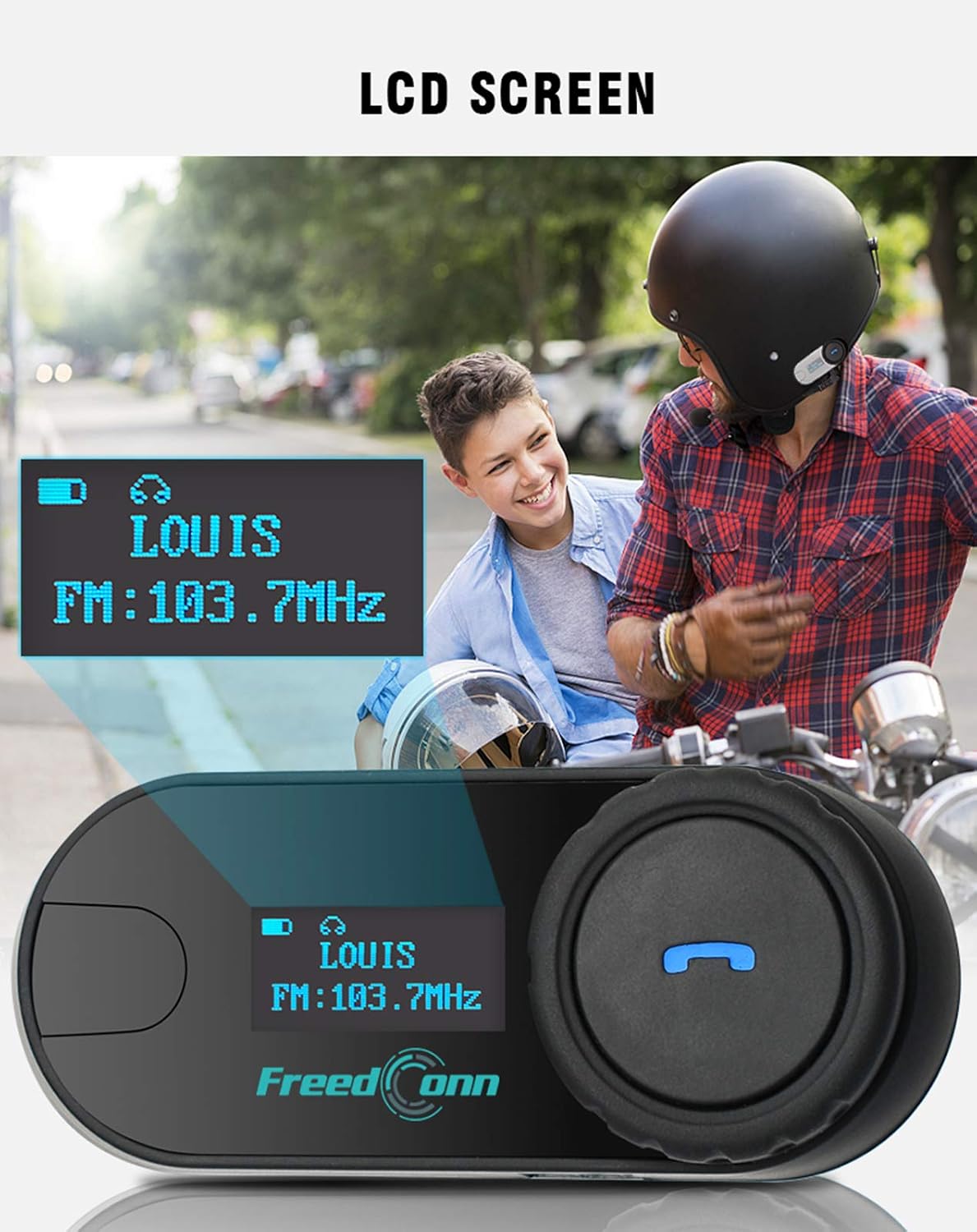
Image : Gros plan view of the FreedConn TCOM-SC LCD screen, displaying information such as connected device name (e.g., LOUIS) and FM radio frequency (e.g., FM: 103.7MHz).
10. Entretien
- Nettoyez l'appareil avec un chiffon doux, damp tissu. N'utilisez pas de produits chimiques ou de solvants agressifs.
- Pour préserver l'étanchéité, veillez à bien fermer le couvercle du port de chargement lorsqu'il n'est pas en charge.
- Rangez l'appareil dans un endroit frais et sec lorsqu'il n'est pas utilisé.
- Évitez d'exposer l'appareil à des températures extrêmes.

Image: The FreedConn TCOM-SC unit shown with water splashing around it, illustrating its waterproof, sun protection, and dust-proof capabilities, highlighting its durable and protective design.
11. Dépannage
- Pas d'alimentation : Assurez-vous que la batterie est chargée. Branchez-la à un chargeur et réessayez.
- Impossible d'appairer : Make sure both devices are in pairing mode. Turn off and restart both devices, then try pairing again. Ensure no other Bluetooth devices are interfering.
- Pas de son : Check volume levels on both the TCOM-SC and the connected device. Ensure the headset is properly plugged into the unit.
- Déconnexions de l'interphone : Ensure units are within the 800m range and there are no major obstructions. Re-establish the intercom connection.
- Mauvaise qualité audio : Check microphone placement. Ensure speakers are correctly positioned over your ears. Reduce background noise if possible.
12. Spécifications
| Numéro de modèle | TCOM-SC |
| Version Bluetooth | 3.0 |
| Portée de l'interphone | Jusqu'à 800 mètres (2 cavaliers) |
| Capacité de la batterie | 400mAh |
| Phone Calling Time | Jusqu'à 10 XNUMX heures |
| Heure de l'interphone | Jusqu'à 8 XNUMX heures |
| Temps de veille | Jusqu'à 300 XNUMX heures |
| Temps de charge | Environ 2.5 heures |
| Niveau de résistance à l'eau | Étanche |
| Dimensions du produit | 1.22 x 0.98 x 3.19 pouces |
| Poids de l'article | 10.2 onces |
13. Garantie et assistance
Pour obtenir des informations sur la garantie et une assistance technique, veuillez consulter le site officiel de FreedConn. webConsultez le site ou contactez votre détaillant. Conservez votre reçu d'achat comme preuve d'achat.