
1. Produit terminéview
The 1Mii Wireless Microphone Headset M4 is a 2.4G wireless audio system designed for clear voice transmission. It features a headset microphone and a compact receiver, offering flexibility for various applications such as teaching, public speaking, and fitness instruction.

Contenu du colis
- 2.4G Wireless Microphone Headset (1 unit)
- 2.4G Wireless Receiver (1 unit)
- 6.35mm Converter (1 unit)
- 2-in-1 USB Charging Cable (1 unit)
- Manuel d'utilisation (1 unité)
- Sponge Cover (2 units)

2. Instructions de configuration
Follow these steps to set up your 1Mii Wireless Microphone Headset M4.
2.1 Charge initiale
Before first use, ensure both the wireless headset microphone and the receiver are fully charged. Use the provided 2-in-1 USB charging cable. Turn off the devices while charging to optimize battery life.

2.2 Connexion du récepteur
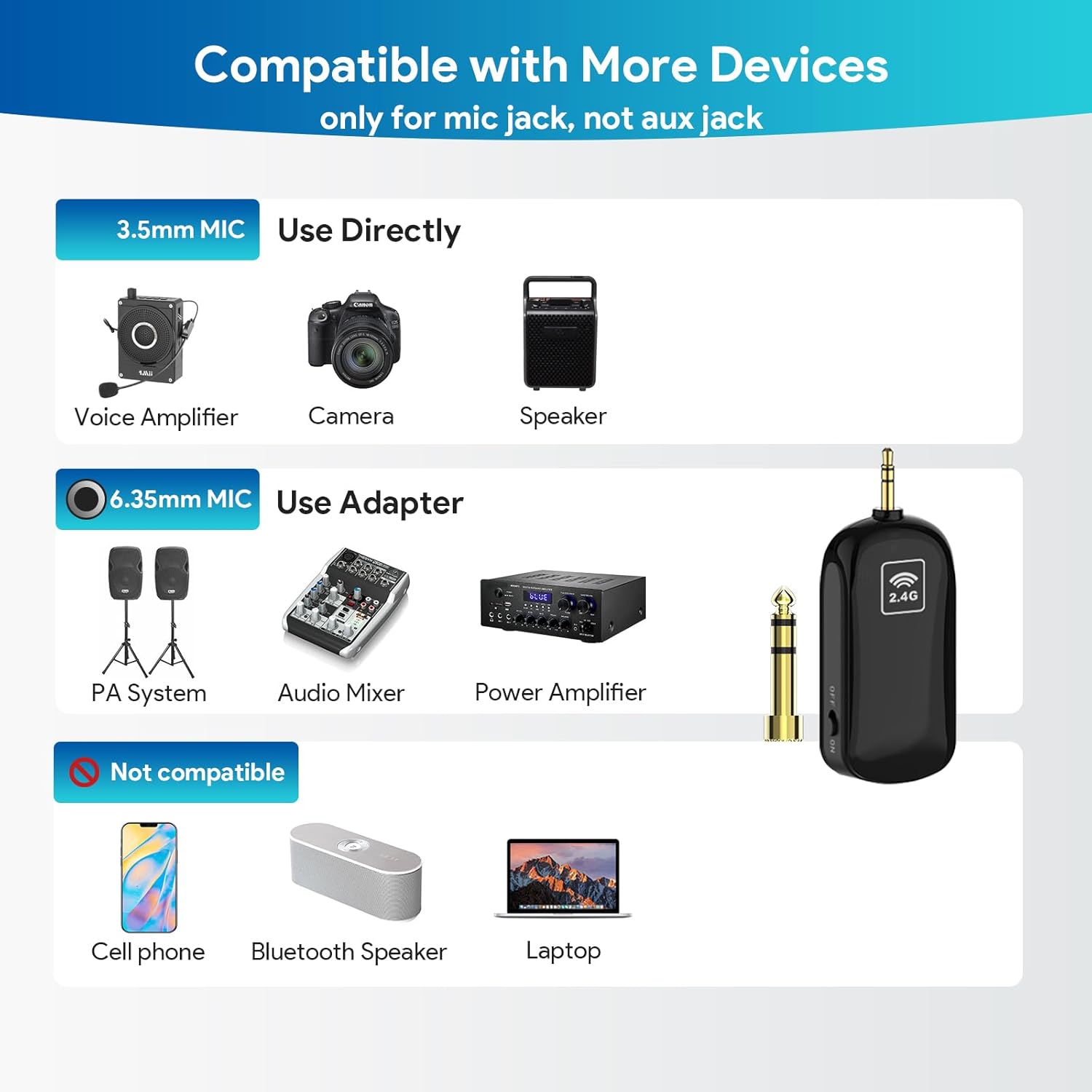
The receiver features a 3.5mm plug. It can be directly connected to devices with a 3.5mm microphone input jack. For devices with a 6.35mm microphone input jack, use the included 6.35mm converter.
- Identify the microphone input port on your speaker, voice amplifier, PA system, audio mixer, or camera.
- If the port is 3.5mm, plug the receiver directly into it.
- If the port is 6.35mm, attach the 6.35mm converter to the receiver, then plug the assembly into the port.
Remarque importante :
- This is a 2.4G wireless microphone system, not Bluetooth.
- It is not compatible with PCs, iPhones, iPads, Macs, or other smartphones.
- Ensure you are plugging into a microphone (MIC) jack, not an auxiliary (AUX) jack.
2.3 Port du casque
The headset microphone can be used as a traditional headset or converted into a handheld microphone.
- To use as a headset, pick up the handheld microphone unit.
- Plug the head bracket into the designated slot on the microphone unit.
- Push down the head bracket until you hear a "click" sound, indicating it is securely installed.

3. Mode d'emploi
3.1 Mise sous tension et connexion automatique
Once the receiver is connected to your audio system, power on both the wireless headset microphone and the receiver. The devices are engineered with advanced 2.4G wireless technology and will automatically connect upon power-up. A blue indicator light on both units typically signifies a successful connection.
3.2 Scénarios d'utilisation
The 1Mii Wireless Microphone Headset M4 is suitable for various applications:
- Class Teaching: Provides clear audio for students.
- Yoga Teaching: Allows instructors to move freely while speaking.
- Visites guidées : Ensures clear communication with groups.
- Lectures: Facilitates hands-free presentation.

3.3 Portée et performances sans fil
The system utilizes Class 1 2.4G technology, offering a reliable connection:
- Gamme extérieure : Jusqu'à 164 pieds (50 mètres) de visibilité directe en plein air.
- Gamme intérieure : Jusqu'à 50-70 pieds (20-30 mètres) à l'intérieur sans obstacles importants.
The microphone provides high signal stability, fast transmission, and short audio delay, ensuring loud, clear, and high-fidelity sound with low radiation and interference.

4. Entretien
4.1 Gestion de la batterie
The microphone headset and receiver are equipped with large capacity lithium-ion batteries, providing up to 6 hours of continuous use on a full charge. Charging typically takes 1.5 to 2 hours.
- Always fully charge both units before use.
- Turn off the transmitter and receiver after each use to conserve battery life.
- Use the provided 2-in-1 USB charging cable for optimal charging.
4.2 Nettoyage et stockage
- Essuyez les appareils avec un chiffon doux et sec. Évitez d'utiliser des produits chimiques agressifs ou des nettoyants abrasifs.
- Store the microphone and receiver in a cool, dry place away from direct sunlight and extreme temperatures.
- Replace the sponge cover on the microphone periodically for hygiene and optimal sound quality.
5. Dépannage
If you encounter issues with your 1Mii Wireless Microphone Headset M4, refer to the following common problems and solutions:
| Problème | Cause possible | Solution |
|---|---|---|
| Pas de son ou volume faible | Low battery on headset or receiver Connexion incorrecte au système audio Volume too low on audio system Receiver not paired with headset | Charge both units fully Ensure receiver is plugged into a MIC jack (not AUX) and connections are secure Increase volume on the connected speaker/amplifier Power cycle both units to re-establish automatic connection |
| Signal intermittent ou statique | Hors de portée Obstructions between headset and receiver Connexion de l'adaptateur desserrée | Rapprochez-vous du récepteur Ensure clear line-of-sight; avoid placing large objects between units Check that the 6.35mm adapter (if used) is securely fitted and not loose |
| Audio delay or echo | Le microphone est trop près du haut-parleur. Audio system settings | Adjust microphone position relative to the speaker Check audio system settings for any delay or echo effects |
| Picks up breathing or unwanted noise | Microphone positioned too close to mouth High gain/volume setting | Adjust microphone position slightly away from the mouth Reduce the volume or gain on the microphone or connected audio system |
| Not working with PC/Smartphone | Incompatible device type | The 1Mii M4 is a 2.4G wireless system, not designed for direct connection to computers, phones, or tablets. It requires a dedicated microphone input on compatible audio systems. |
6. Spécifications
| Fonctionnalité | Détail |
|---|---|
| Nom du modèle | M4 |
| Marque | 1Mii |
| Facteur de forme du microphone | Casque d'écoute |
| Technologie de connectivité | Sans fil 2.4G |
| Type de connecteur | Prise jack 3.5 mm, prise jack 6.35 mm (avec adaptateur) |
| Appareils compatibles | Amplifier, Audio Mixer, Camera, PA System, Speaker |
| Source d'énergie | Fonctionne sur batterie (2 batteries lithium-ion incluses) |
| Autonomie de la batterie | Up to 6-7 hours continuous use |
| Temps de charge | 1.5-2 heures |
| Portée sans fil | Up to 164 ft (50m) line-of-sight |
| Signal-to-Noise Ratio | 80 dB |
| Sensibilité Audio | 35 décibels |
| Diagramme polaire | Unidirectionnel |
| Dimensions de l'article (L x l x H) | 5.71 x 1.38 x 6.1 pouces |
| Poids de l'article | 5.6 onces |
| Matériel | Acrylonitrile butadiène styrène |
| Caractéristiques spéciales | Battery Indicator Light, Headset and Handheld 2-in-1, Volume Control |
7. Garantie et assistance
Warranty information for the 1Mii Wireless Microphone Headset M4 is not provided in the available product data. For specific warranty details or technical support, please refer to the official 1Mii webconsultez le site ou contactez directement leur service client.