
Introduction
The CHOUBENBEN Universal Remote Control utilizes advanced intelligent cooling transmission technology. It is designed to directly control the majority of LG brand air conditioner models without complex setup procedures. This remote offers functions such as original timing, electrical heating, swing, and fan control, serving as an effective replacement for your original A/C remote control.
Instructions d'installation
Installation de la batterie
The remote control requires two AAA 1.5V batteries (not included). To install:
- Ouvrez le couvercle du compartiment des piles au dos de la télécommande.
- Insérez deux piles AAA en veillant à respecter la polarité (+ et -) indiquée à l'intérieur du compartiment.
- Fermez soigneusement le couvercle du compartiment à piles.

Image : Arrière view of the remote control, highlighting the battery compartment. This is where you will insert the two AAA batteries.
One-Button Direct Search (Initial Pairing)
If the remote does not work immediately with your LG Air Conditioner, follow these steps to find the correct operating code:
- Ensure your A/C unit is powered on. Point the remote control directly at the A/C unit.
- Press and hold the "Power" button on the remote control continuously.
- Release the "Power" button immediately when you hear a "DI" sound from the A/C unit, indicating it has turned on or off automatically.
- Test other functions (e.g., temperature, mode) to confirm the setup is complete and working correctly.

Image : Avant view of the CHOUBENBEN Universal Remote Control, showing its buttons and display. This is the remote used for the one-button direct search.
Mode d'emploi
Fonctions de base
The remote control provides standard functions for your LG Air Conditioner:
- Marche/Arrêt : Appuyez sur le Pouvoir button to turn the A/C unit on or off.
- Réglage de la température : Utilisez le TEMPÉRATURE ▲ et TEMP ▼ buttons to increase or decrease the temperature. Note that the display is in Celsius only.
- Sélection du mode : Appuyez sur le Mode button to cycle through available modes (e.g., Cool, Heat, Fan, Dry, Auto).
- Vitesse du ventilateur : Adjust the fan speed using the dedicated Ventilateur bouton.
- Balançoire: Activate or deactivate the air swing function.
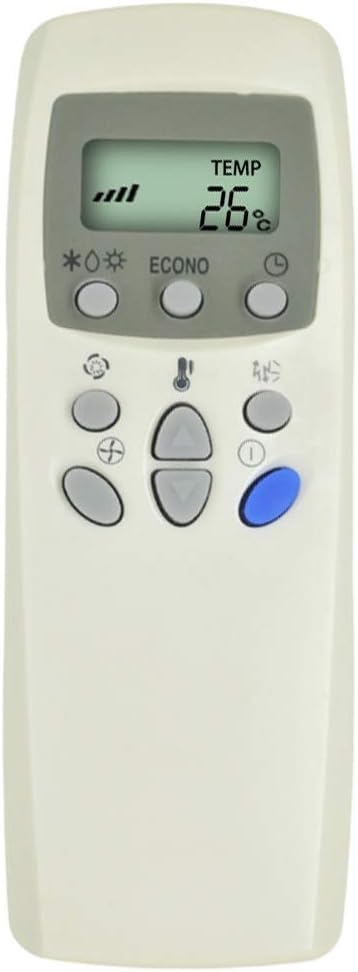
Image: Close-up of the remote control's front, showing the LCD display and various function buttons for temperature, mode, and fan speed.
Environmental Mode
This feature helps optimize energy consumption and environmental protection:
- Entering Environmental Mode: Press and hold the "Mode" button for 10 seconds. After releasing, the remote will operate only in cooling mode (adjustable temperature between 26-30 degrees Celsius) or heating mode (adjustable temperature between 18-22 degrees Celsius). This indicates entry into environmental mode.
- Exiting Environmental Mode: Press and hold the "Mode" button for 10 seconds again. After releasing, all functions will return to normal operation, indicating the withdrawal from environmental mode.
Opération de synchronisation
The remote supports original timing functions for both turning the A/C on and off:
- Timing - On: When the remote is off, press and hold the "Timing On" button for approximately 4 seconds. The LCD will display a flashing icon (e.g., "2" "1H"). Use the "TEMP ▲" or "TEMP ▼" buttons to adjust the desired timing duration. Press the "Timing On" button again to confirm and exit.
- Timing - Off: When the remote is on, press and hold the "Timing Off" button for approximately 4 seconds. The LCD will display a flashing icon (e.g., "2" "1H"). Use the "TEMP ▲" or "TEMP ▼" buttons to adjust the desired timing duration. Press the "Timing Off" button again to confirm and exit.
Remarques :
- This product utilizes the original timing function. To set the time, the remote must be in the "on" stage if the product cannot operate in the "off" stage.
- The calculation method for timing is consistent with the original remote control.
Entretien
Pour assurer la longévité et le bon fonctionnement de votre télécommande :
- Nettoyage: Essuyez la télécommande avec un chiffon doux et sec. N’utilisez pas de nettoyants liquides ni de produits abrasifs.
- Remplacement de la batterie : Replace batteries when the remote's range decreases or the display becomes dim. Always replace both batteries at the same time with new AAA 1.5V batteries.
- Stockage: Rangez la télécommande dans un endroit frais et sec, à l'abri de la lumière directe du soleil et des températures extrêmes.
- Évitez les chutes : Protégez la télécommande des chocs physiques, car cela pourrait endommager ses composants internes.
Dépannage
Si vous rencontrez des problèmes avec votre télécommande, tenez compte des points suivants :
- La télécommande ne répond pas :
- Vérifiez que les piles sont correctement installées et qu'elles ont une charge suffisante. Remplacez-les si nécessaire.
- Ensure there are no obstructions between the remote and the A/C unit's receiver.
- Confirm the remote is pointed directly at the A/C unit.
- Re-attempt the "One-button direct search" pairing process.
- Portée limitée :
- Remplacez les piles.
- Ensure the remote is within the operable distance of more than 8 meters.
- Problèmes d'affichage :
- If the screen is dim or blank, replace the batteries.
Resume Factory Settings
To restore the remote control to its factory default settings:
- Hold down the "Fan" button for approximately 10 seconds. Most air conditioner control states will be restored to factory settings, indicated by the screen displaying full brightness.
Caractéristiques
| Fonctionnalité | Description |
|---|---|
| Marque | CHOUBENBEN |
| Numéro de modèle | 2019101803 |
| Appareils compatibles | Climatiseur LG |
| Technologie de connectivité | Infrarouge |
| Portée maximale | 8 mètres |
| Type de batterie | 2 x AAA 1.5V (non inclus) |
| Afficher | Celsius uniquement |
Garantie et assistance
For warranty information or technical support regarding your CHOUBENBEN Universal Remote Control, please refer to the purchase documentation or contact the seller directly. Specific warranty terms may vary depending on the retailer and region of purchase.