
1. Introduction
The LAFVIN Mega 2560 R3 is a microcontroller board based on the ATmega2560-16AU. It is designed to be fully compatible with the Arduino IDE, offering an expanded set of features compared to standard boards. This manual provides essential information for setting up, operating, and maintaining your LAFVIN Mega 2560 R3 board.
Les principales caractéristiques comprennent :
- 100% compatibility with Arduino IDE.
- ATmega2560-16AU microcontroller for enhanced performance and memory.
- 256 KB of flash memory for program storage.
- 54 digital input/output pins, including 15 for PWM output.
- 16 analog input pins.
- 4 hardware serial ports (UARTs).
- Includes a USB cable for easy connectivity.
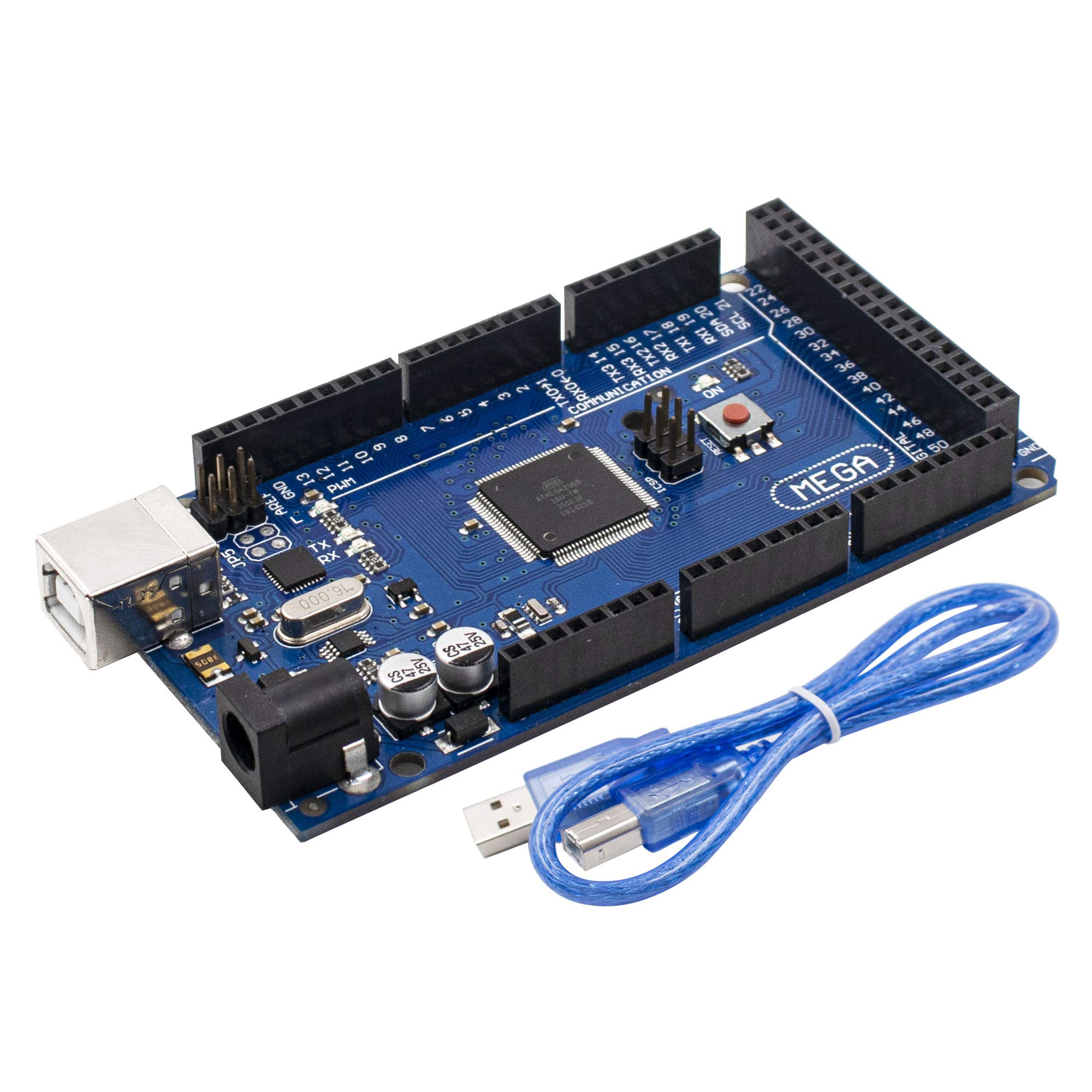
Figure 1: LAFVIN Mega 2560 R3 board and USB cable.
2. Produit terminéview et composants
The LAFVIN Mega 2560 R3 board features various components essential for its operation. Understanding these components is crucial for proper use and development.
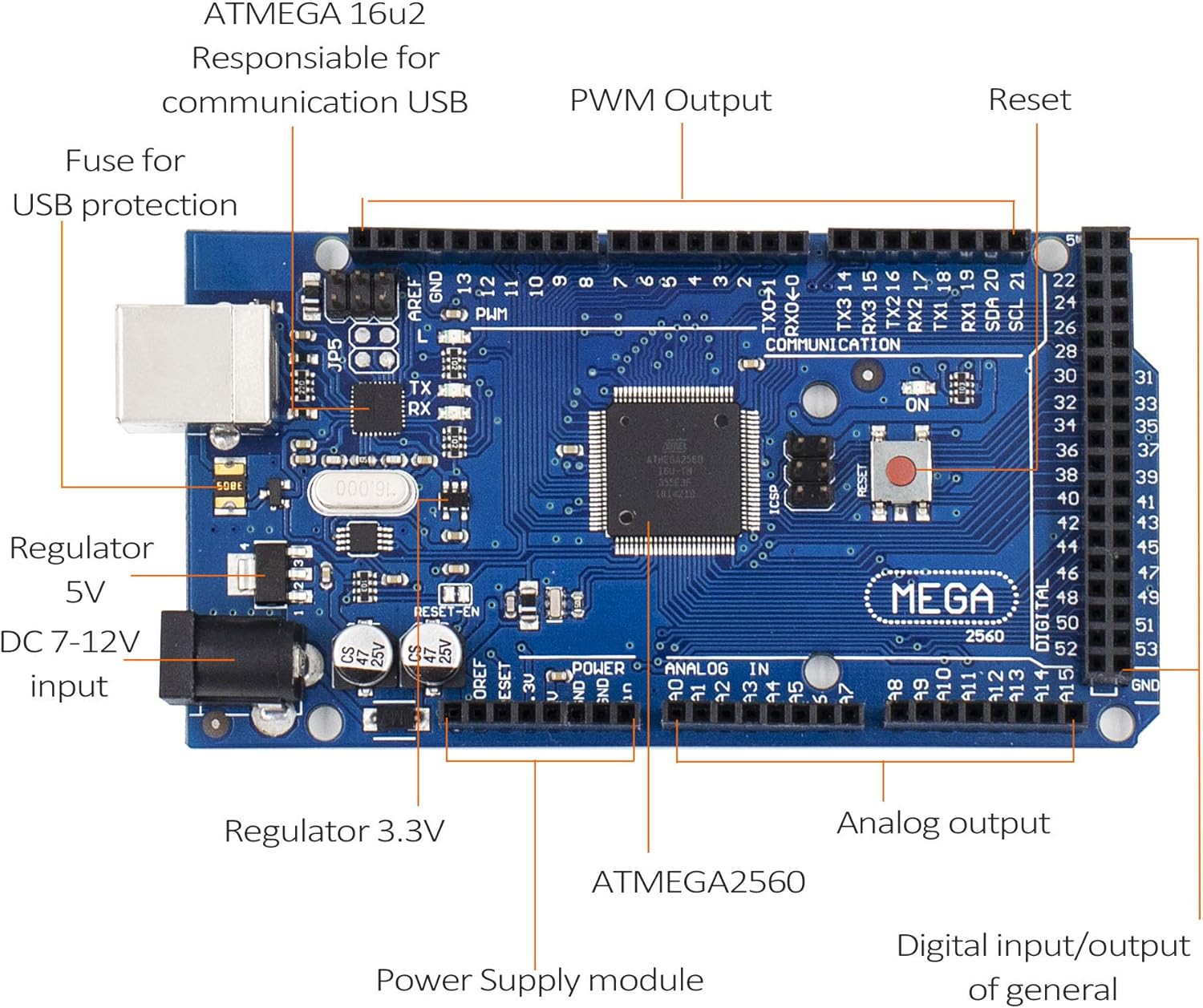
Figure 2: Key components of the LAFVIN Mega 2560 R3 board.
Les principaux composants comprennent :
- ATmega2560 Microcontroller: The main processor of the board.
- ATMEGA 16U2: Responsible for USB communication.
- Digital I/O Pins (0-53): Used for digital input and output, with pins 2-13 and 44-46 supporting PWM.
- Analog Input Pins (A0-A15): Used for reading analog sensor data.
- Port USB : For connecting to a computer for programming and power.
- DC Power Jack (7-12V input): Alimentation électrique alternative.
- Bouton de réinitialisation : Réinitialise le microcontrôleur.
- Power LED (ON): Indicates the board is powered.
- Voyants LED TX/RX : Indicate data transmission and reception over USB.
- Voltage Regulators (5V, 3.3V): Provide stable power to the board and connected components.
- ICSP Header: For In-Circuit Serial Programming.
3. Spécifications
The following table details the technical specifications of the LAFVIN Mega 2560 R3 board:
| Fonctionnalité | Spécification |
|---|---|
| Microcontrôleurs | ATmega2560-16AU |
| Vol d'exploitationtage | 5V |
| Vol d'entréetage (recommandé) | 7-12V |
| E / S numériques Pins | 54 (15 fournissent une sortie PWM) |
| Pins d'entrée analogique | 16 |
| DC Courant par I O Pin / | 20 mA |
| Courant continu pour pince 3.3V | 50 mA |
| Mémoire flash | 256 Ko (8 Ko utilisés par le chargeur de démarrage) |
| Mémoire SRAM | 8 Ko |
| Mémoire EEPROM | 4 Ko |
| Vitesse d'horloge | 16 MHz |
| Ports USB | 1 |
| Numéro de modèle | LA-024 |
| Code UPC | 763231735768 |
4. Installation
To begin using your LAFVIN Mega 2560 R3 board, follow these simple setup steps:
- Connectez-vous à l'ordinateur : Use the provided USB cable to connect the LAFVIN Mega 2560 R3 board to your computer. The USB port on the board is located near the DC power jack.
- Installez l'IDE Arduino : Si ce n'est pas déjà fait, téléchargez et installez l'IDE Arduino depuis le site officiel d'Arduino. website (www.arduino.cc/en/software).
- Sélectionner la carte et le port : Ouvrez l'IDE Arduino. Allez à Outils > Tableau et sélectionnez « Arduino Mega ou Mega 2560 ». Ensuite, allez à Outils > Port and select the serial port corresponding to your connected board. This is typically labeled with "(Arduino Mega 2560)" or similar.
- Options d'alimentation : The board can be powered via the USB connection or an external power supply (7-12V DC) connected to the DC power jack. Ensure the power supply polarity is correct if using an external adapter.

Figure 3: LAFVIN Mega 2560 R3 board connected via USB.
5. Mode d'emploi
Once the board is set up, you can begin programming and interacting with it using the Arduino IDE.
- Writing Code (Sketches): Use the Arduino IDE to write your programs (called sketches). The ATmega2560 microcontroller provides ample flash memory (256 KB) for complex projects.
- Uploading Sketches: After writing your code, click the "Upload" button in the Arduino IDE. The IDE will compile your sketch and upload it to the LAFVIN Mega 2560 R3 board. The TX/RX LEDs on the board will blink during the upload process.
- Using Digital I/O: The 54 digital pins can be configured as inputs or outputs using
pinMode(),digitalWrite(), etdigitalRead()functions. Pins marked with a tilde (~) support Pulse Width Modulation (PWM) for analog-like output. - Using Analog Inputs: The 16 analog input pins (A0-A15) can read varying voltage levels from sensors using the
analogRead()fonction. - Communication série : The board has four hardware serial ports (Serial, Serial1, Serial2, Serial3), allowing for communication with other devices or debugging via the Serial Monitor in the Arduino IDE.
6. Entretien
Proper care and maintenance will ensure the longevity and reliable operation of your LAFVIN Mega 2560 R3 board.
- À manipuler avec précaution : Avoid touching the electronic components directly, especially when the board is powered, to prevent electrostatic discharge (ESD) damage.
- Stockage: Store the board in an anti-static bag or a dry, non-conductive environment when not in use.
- Nettoyage: If necessary, gently clean the board with a soft, dry brush or compressed air to remove dust. Do not use liquids or abrasive cleaners.
- Alimentation: Always use a stable power supply within the recommended voltage range (7-12V for external power). Over-voltage peut endommager la carte.
- Évitez les courts-circuits : Ensure that no conductive materials accidentally bridge pins or components, which could cause short circuits.
7. Dépannage
If you encounter issues with your LAFVIN Mega 2560 R3 board, consider the following troubleshooting steps:
- Carte non détectée :
- Assurez-vous que le câble USB est correctement connecté à la fois à la carte et à votre ordinateur.
- Check if the power LED (ON) on the board is illuminated.
- Verify that the correct board type ("Arduino Mega or Mega 2560") and serial port are selected in the Arduino IDE.
- Essayez un autre port USB ou un autre câble USB.
- Sketch Upload Errors:
- Confirm the correct board and port are selected.
- Ensure no other software is using the serial port.
- Vérifiez votre code pour corriger les erreurs de syntaxe.
- Press the reset button on the board just before uploading.
- Comportement inattendu :
- Review Soyez attentif à la logique de votre code.
- Vérifiez tous les branchements électriques aux composants externes.
- Ensure external power supplies are providing the correct voltage et actuel.
- Problèmes d'alimentation :
- If using an external power supply, ensure it is within the 7-12V range and provides sufficient current for your project.
- Avoid drawing excessive current from the 5V or 3.3V pins, as this can damage the onboard regulators.
8. Garantie et assistance
For warranty information, technical support, or further assistance with your LAFVIN Mega 2560 R3 board, please refer to the official LAFVIN webVous pouvez consulter leur site web ou contacter directement leur service client. Les détails sont généralement fournis avec votre confirmation d'achat ou sur l'emballage du produit.